Gatemi Tax Reports for WooCommerce answers the question a shop has to answer every quarter: how much did I sell into each country, and how much tax did I charge there?
Every figure comes off the orders themselves. The tax lines an order carries record the label, the rate and the amounts as they were charged. Nothing here is worked out again from the store's current tax table — a country raises its VAT, a shop switches to OSS, a rate is corrected, and a plugin that recomputes quietly restates a return that has already been filed. This one cannot.
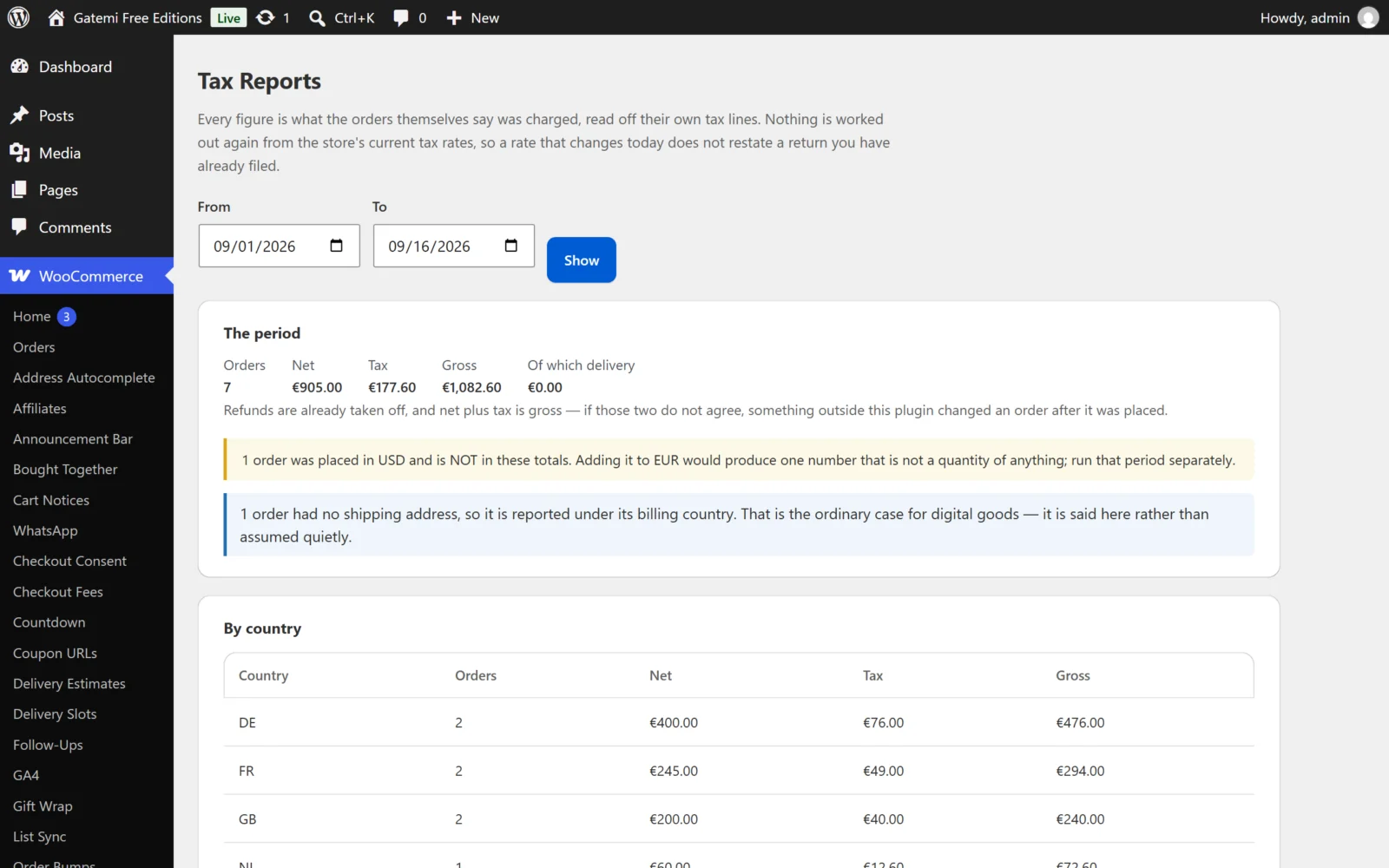
A sale is reported under where the goods went, falling back to the billing country when there is no shipping address — which is the ordinary case for digital goods. The fallback is counted and named on the report rather than assumed, because filing under the wrong member state is exactly what this category exists to prevent. Shops selling digital services can report on the billing address instead, and the setting says which rule is which.
Money in two currencies is not money. Orders placed in a currency other than the store's are left out of the totals, counted, and said out loud — adding them in would produce a single number that is not a quantity of anything.
Refunds come off. A return is not a sale, and the tax on it is not tax the shop owes.
Features
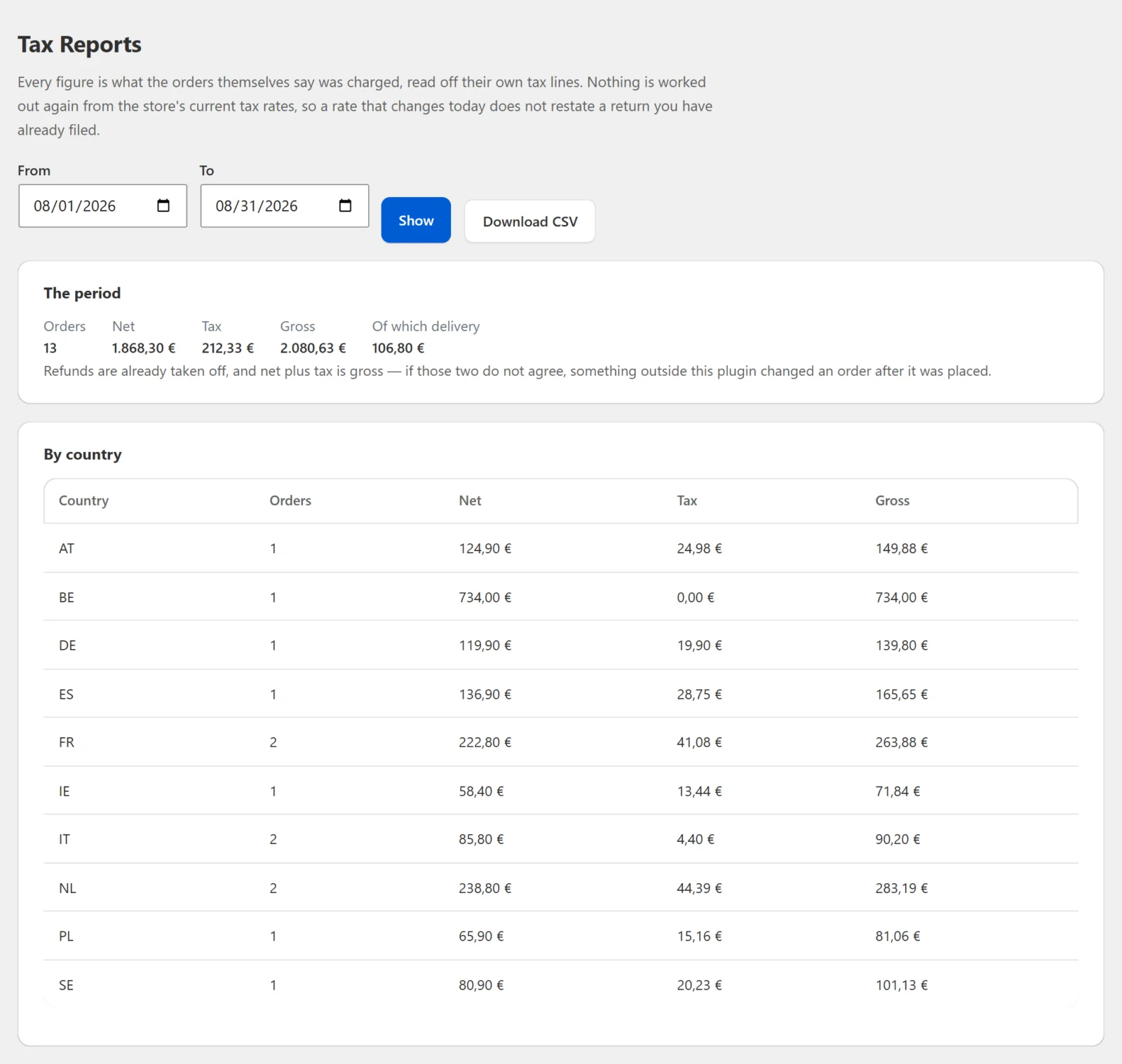
Net, tax and gross for any date range
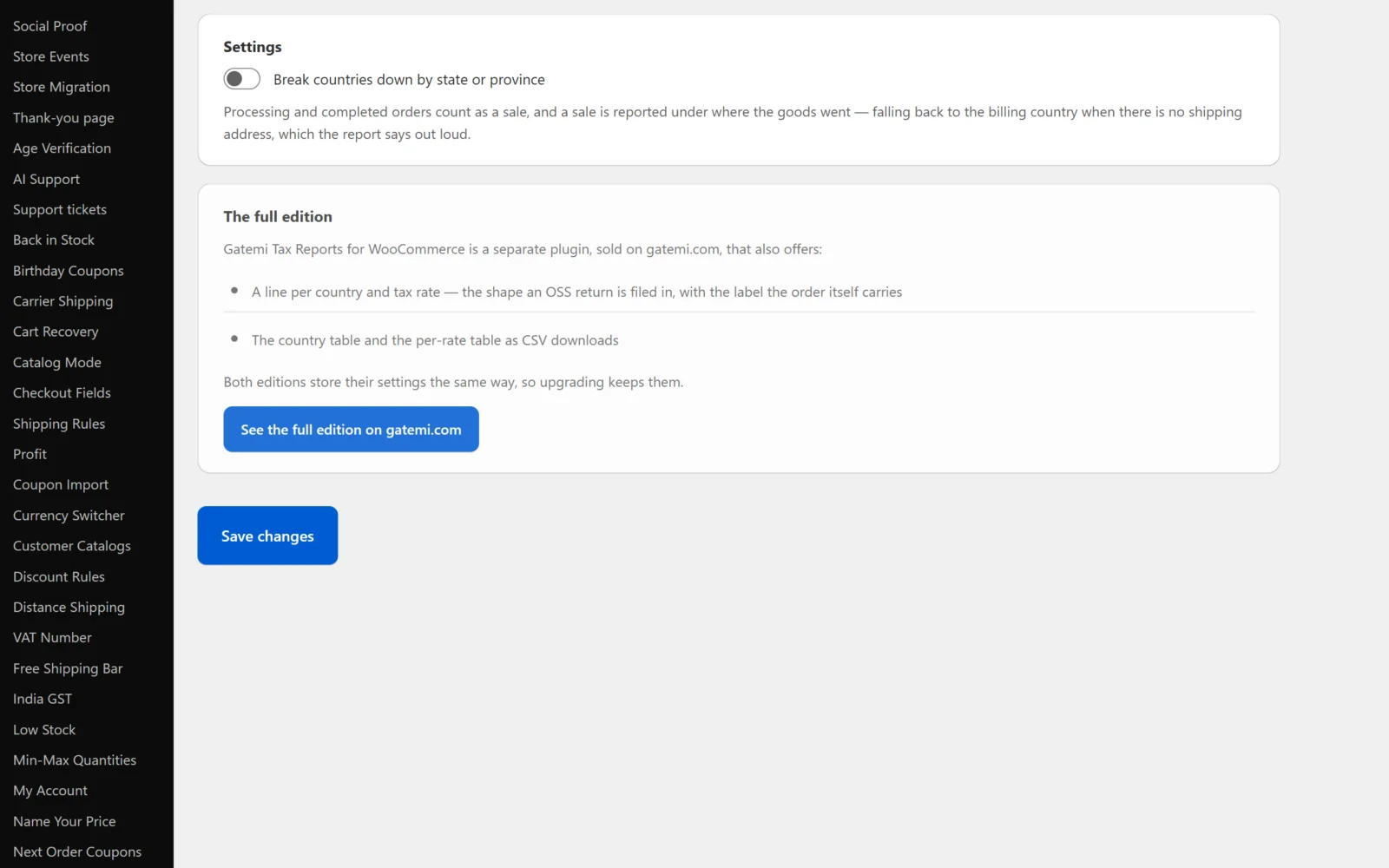
A row per country, optionally broken down by state or province
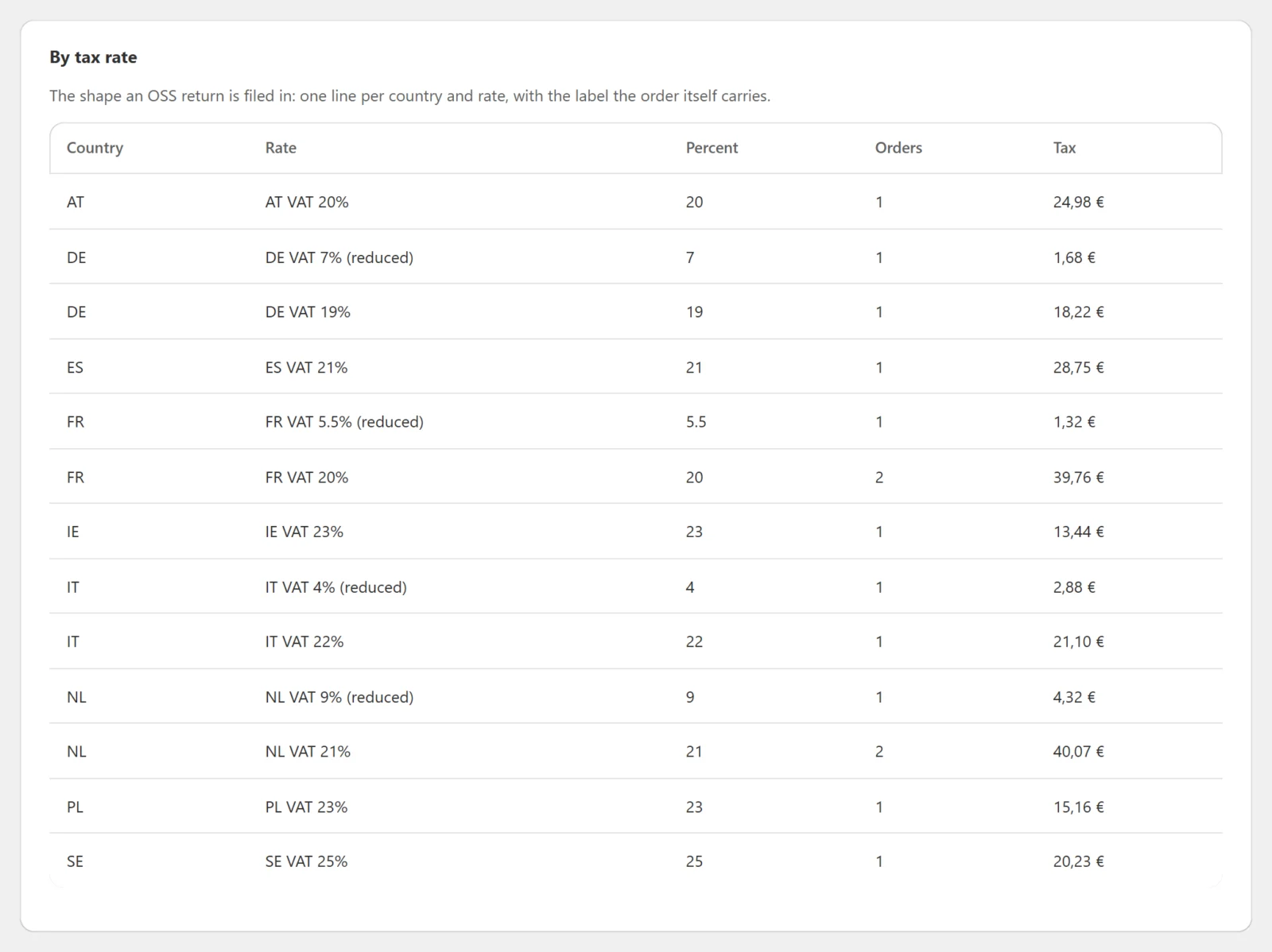
A row per country and tax rate, with the label the order itself carries — the shape an OSS return is filed in
Delivery shown separately, because it is taxed and reported differently in several places
Choose which order statuses count as a sale
CSV download of the country table
No database tables, no meta, nothing written to an order, and no storefront code at all
Every license includes
One year of updates and priority support, delivered straight to your WordPress dashboard.
Use on 1, 5 or 25 sites depending on your license — local, staging and development sites are always free.
30-day money-back guarantee — full refund, no questions asked.
Keeps working after expiry — if you choose not to renew, the plugin keeps running exactly as installed; it simply stops receiving updates and support until you do.
Requires WordPress 6.4+ · PHP 7.4+ · tested up to WordPress 7.0. Works with the classic and block checkout alike.
Free edition or full edition?
This plugin has a free edition. It is a complete plugin in its own right, and upgrading keeps every setting and every record, so you can start free and buy when you need more.
Report on the billing address, for digital services
—
✓
Included in both editions (8)
The order-is-the-record rule — figures read off the order's own tax lines
The place-of-supply rule — where the goods went, fallback counted and named
The one-currency rule — foreign-currency orders left out, counted, named
Refunds come off, and net plus tax is gross
Net, tax and gross for any date range
A row per country
A breakdown by state or province
Delivery shown separately
License
Single Site, Plus — 5 Sites, Agency — 25 Sites
Frequently asked questions
How does the license work?
Every license includes one year of updates and priority support, delivered straight to your WordPress dashboard. Choose the tier that matches how many production sites you run: 1, 5 or 25.
Which license do I need?
Count your live production sites — that's it. Local, staging and development sites (localhost, *.test, staging.*, dev.* and similar) are always free and never use up an activation.
What happens if I don't renew?
Nothing breaks. The plugin keeps working exactly as installed — it simply stops receiving updates and support until you renew. Renewing later reinstates both immediately.
Can I upgrade my license later?
Yes. Contact support any time and we'll move you to a higher tier — you only pay the difference, and your key and activations carry over.
Can I use it on client sites?
Absolutely. The Plus (5 sites) and Agency (25 sites) tiers are built for agencies — and if you run several Gatemi plugins across client stores, All Access usually works out cheaper.
What if it's not right for my store?
Tell us within 30 days and we refund the order in full — no questions asked. See the refund policy.
Changelog
Every release reaches your WordPress dashboard as an ordinary update while your licence is active.
Version 1.0.1Latest
Fixed: the per-rate table now takes refunds off, so it agrees with the country table; before, the tax on a refunded order was counted in full.
New: the per-rate table shows the net and gross amounts beside the tax for each country and rate.
New: a "Download rates CSV" button downloads the per-rate table.
Fixed: a state or county the customer typed in full, such as "West Yorkshire", is now shown in full instead of being cut to "WEST Y".
New: A Gatemi menu in the WordPress admin lists your Gatemi plugins with a link to each one's settings; this plugin's screen also stays under WooCommerce.
Improved: The settings screen has a refreshed design and fits a phone screen.
New: Translated into nine languages: Arabic, Chinese (Simplified), Dutch, French, German, Italian, Portuguese (Brazil), Russian and Spanish.
Improved: Tested with WordPress 7.1.
WordPress 6.4+ · PHP 7.4+
Version 1.0.0
First release.
WordPress 6.4+ · tested up to 7.0 · PHP 7.4+
5 reviews for Tax Reports for WooCommerce
Rated 4 out of 5
Ruth (verified owner)–
Not quite five stars, but close. The Tax Reports settings took me longer to work out than I expected. Perfectly happy.
Rated 4 out of 5
Craig C (verified owner)–
I like it. I don’t love the settings screen. Tax Reports does what I bought it for. I’m satisfied.
Rated 5 out of 5
Emma L. (verified owner)–
Vraiment du bon travail. Tax Reports a survécu à un changement d’hébergeur sans que j’y touche. Je renouvellerai.
Rated 5 out of 5
Mark L. (verified owner)–
Cheaper than the alternative and does more. Tax Reports did exactly what the demo suggested it would. Well made.
Rated 4 out of 5
Lukas S (verified owner)–
Macht, was es verspricht, die Doku könnte klarer sein. Tax Reports hat mir keinen Grund gegeben, weiterzusuchen. Würde ich wohl wieder kaufen.


Ruth (verified owner) –
Not quite five stars, but close. The Tax Reports settings took me longer to work out than I expected. Perfectly happy.
Craig C (verified owner) –
I like it. I don’t love the settings screen. Tax Reports does what I bought it for. I’m satisfied.
Emma L. (verified owner) –
Vraiment du bon travail. Tax Reports a survécu à un changement d’hébergeur sans que j’y touche. Je renouvellerai.
Mark L. (verified owner) –
Cheaper than the alternative and does more. Tax Reports did exactly what the demo suggested it would. Well made.
Lukas S (verified owner) –
Macht, was es verspricht, die Doku könnte klarer sein. Tax Reports hat mir keinen Grund gegeben, weiterzusuchen. Würde ich wohl wieder kaufen.