Gatemi Profit Reports for WooCommerce puts a cost on each product and then tells you what your shop is actually earning — by period, and product by product.
The cost is frozen onto the order when it is placed. This is the part the category gets wrong. A product's cost moves: a supplier raises a price, you re-price in January, a currency shifts. A plugin that works profit out at report time reads *today's* cost, so opening last March's report in August shows a margin March never had — and the number is always plausible, which is why nobody notices. Here the unit cost is copied onto the order line at the moment of sale, and the report reads only that.
A line with no cost is unknown, not free. Counting a missing cost as nought makes that line's margin 100% and the shop's total profit a number that is always too high and never obviously wrong. Lines with no cost are counted apart, the report says how many there are and what they were worth, and the margin is measured over the revenue that actually has a cost behind it.
Refunds are handled properly. A refunded unit takes its revenue *and* its cost back out, because the goods came back too. A partially refunded line reduces both.
Tax is never counted as revenue — it is the tax authority's money passing through the shop — and shipping is only counted if you say so.
Features
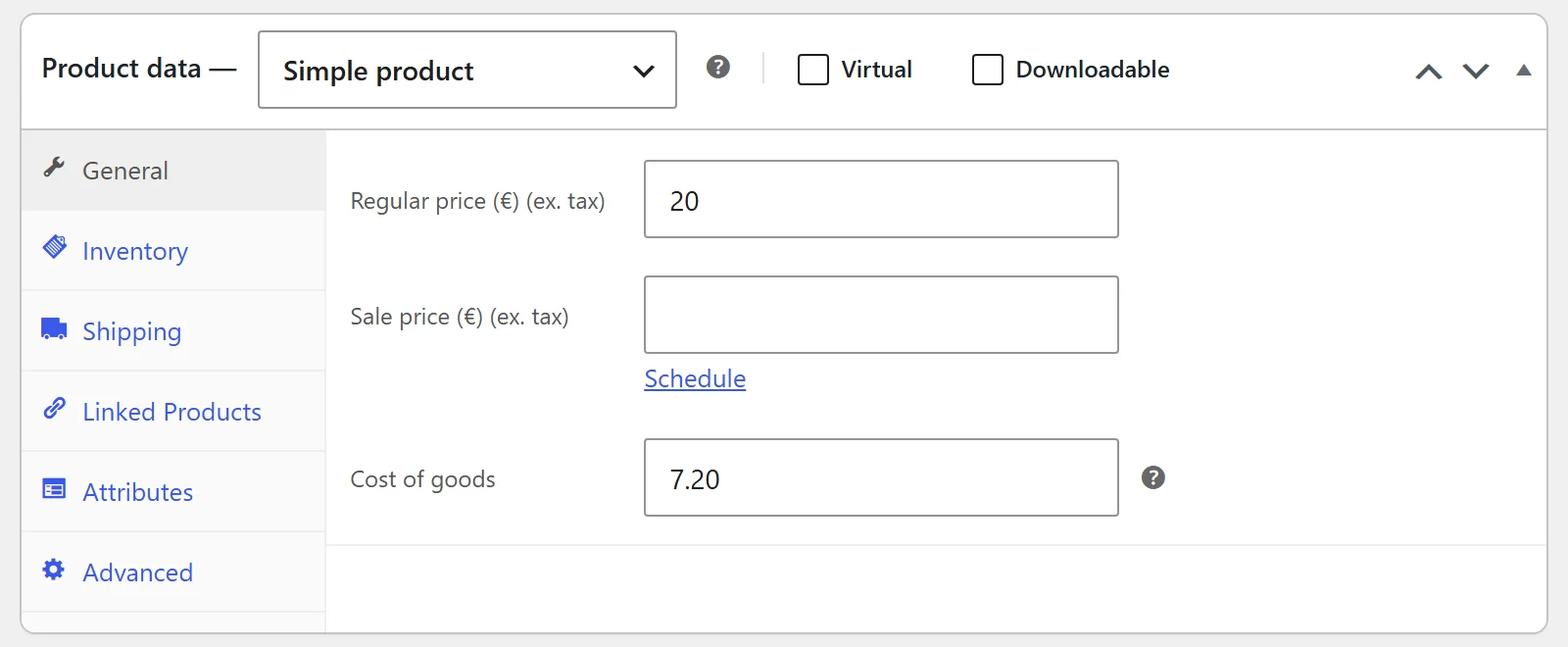
A cost of goods on every product and every variation, with variations inheriting the product's
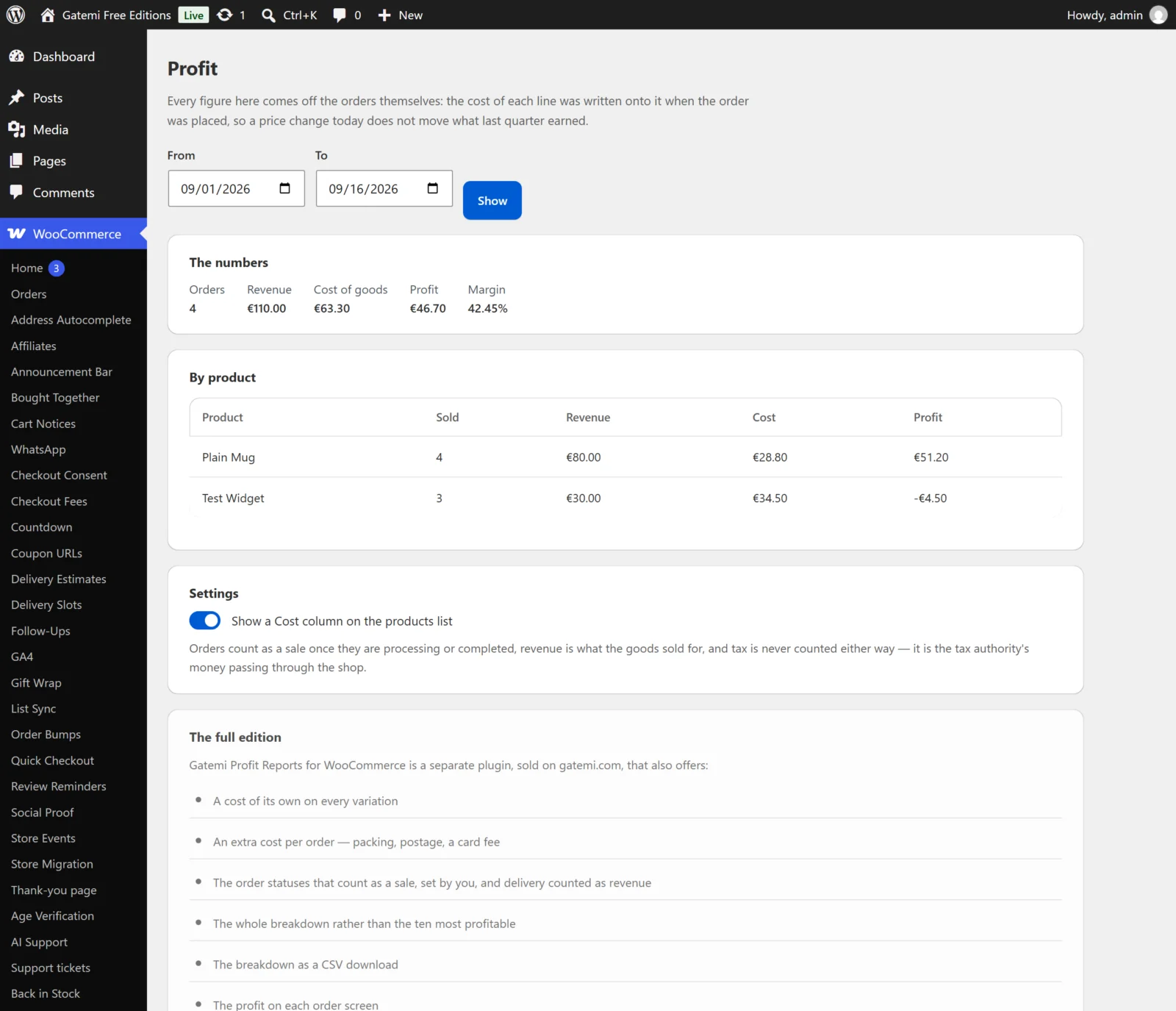
A Cost column on the products list, and the profit on each order screen
Profit, margin, cost and revenue for any date range
A breakdown by product, most profitable first, downloadable as CSV
An extra cost per order — packing, postage, a card fee — as a fixed amount or a percentage, frozen onto each order the same way
Choose which order statuses count as a sale
Nothing is held in memory: orders are read a page at a time, so a shop with fifty thousand of them gets a report rather than a fatal error
Every license includes
One year of updates and priority support, delivered straight to your WordPress dashboard.
Use on 1, 5 or 25 sites depending on your license — local, staging and development sites are always free.
30-day money-back guarantee — full refund, no questions asked.
Keeps working after expiry — if you choose not to renew, the plugin keeps running exactly as installed; it simply stops receiving updates and support until you do.
Requires WordPress 6.4+ · PHP 7.4+ · tested up to WordPress 7.0. Works with the classic and block checkout alike.
Free edition or full edition?
This plugin has a free edition. It is a complete plugin in its own right, and upgrading keeps every setting and every record, so you can start free and buy when you need more.
What the full edition adds
What the full edition adds
Free
Full
The product breakdown, most profitable first
ten rows
every row
A cost of its own on every variation
—
✓
An extra cost per order — packing, postage, a card fee
—
✓
Which order statuses count as a sale
—
✓
Whether delivery counts as revenue
—
✓
The breakdown as a CSV download
—
✓
The profit on each order screen
—
✓
Included in both editions (9)
The frozen-cost rule — the cost is written onto the order line at sale
Both freezes idempotent, whichever way a line is made
The honesty rule — a line with no cost is unknown, never free
The money rule — a refund takes back revenue and cost together
Tax is never revenue
Orders read a page at a time
A cost of goods on every product
A Cost column on the products list, saying "Not set" not "0"
Revenue, cost, profit and margin for any date range
License
Single Site, Plus — 5 Sites, Agency — 25 Sites
Frequently asked questions
How does the license work?
Every license includes one year of updates and priority support, delivered straight to your WordPress dashboard. Choose the tier that matches how many production sites you run: 1, 5 or 25.
Which license do I need?
Count your live production sites — that's it. Local, staging and development sites (localhost, *.test, staging.*, dev.* and similar) are always free and never use up an activation.
What happens if I don't renew?
Nothing breaks. The plugin keeps working exactly as installed — it simply stops receiving updates and support until you renew. Renewing later reinstates both immediately.
Can I upgrade my license later?
Yes. Contact support any time and we'll move you to a higher tier — you only pay the difference, and your key and activations carry over.
Can I use it on client sites?
Absolutely. The Plus (5 sites) and Agency (25 sites) tiers are built for agencies — and if you run several Gatemi plugins across client stores, All Access usually works out cheaper.
What if it's not right for my store?
Tell us within 30 days and we refund the order in full — no questions asked. See the refund policy.
Changelog
Every release reaches your WordPress dashboard as an ordinary update while your licence is active.
Version 1.0.1Latest
Fixed: In the per-product breakdown, revenue from order lines with no cost was counted as profit; profit is now measured only over revenue that has a cost behind it, and a product with no cost at all shows "Unknown — no cost set" and sorts last.
Fixed: The profit figure in the order screen's panel follows the same rule, so an order with uncosted lines no longer shows their revenue as profit.
Fixed: The CSV download now includes every product in the period, not only the rows shown on screen, and an unknown profit is an empty cell rather than 0.
Fixed: A cost or extra order cost typed as "1,250" is now read as 1250 rather than 1.25.
New: A Gatemi menu in the WordPress admin lists your Gatemi plugins with a link to each one's settings; this plugin's screen also stays under WooCommerce.
Improved: The settings screen has a refreshed design and fits a phone screen.
New: Translated into nine languages: Arabic, Chinese (Simplified), Dutch, French, German, Italian, Portuguese (Brazil), Russian and Spanish.
Improved: Tested with WordPress 7.1.
WordPress 6.4+ · PHP 7.4+
Version 1.0.0
First release.
WordPress 6.4+ · tested up to 7.0 · PHP 7.4+
5 reviews for Profit Reports for WooCommerce
Rated 5 out of 5
Simone M. (verified owner)–
Un quarto d’ora, non di più. Profit Reports non ha bisogno di sorveglianza. Resta installato.
Rated 5 out of 5
Jessica C. (verified owner)–
I expected to lose an evening to this and lost twenty minutes. The best sort of software: invisible.
Rated 4 out of 5
Adam G (verified owner)–
Does what it says, though the docs could be clearer. Profit Reports hasn’t broken anything, which is the first bar.
Rated 4 out of 5
Simon (verified owner)–
Reliable, if a bit plain. A refunded unit takes its cost back out as well as its revenue. Setting Profit Reports up was more involved than I expected. Keeping it installed.
Rated 4 out of 5
Neil W. (verified owner)–
Good, with one small reservation. Tax is never counted as revenue, and shipping only if I say so. Comfortable four stars.


Simone M. (verified owner) –
Un quarto d’ora, non di più. Profit Reports non ha bisogno di sorveglianza. Resta installato.
Jessica C. (verified owner) –
I expected to lose an evening to this and lost twenty minutes. The best sort of software: invisible.
Adam G (verified owner) –
Does what it says, though the docs could be clearer. Profit Reports hasn’t broken anything, which is the first bar.
Simon (verified owner) –
Reliable, if a bit plain. A refunded unit takes its cost back out as well as its revenue. Setting Profit Reports up was more involved than I expected. Keeping it installed.
Neil W. (verified owner) –
Good, with one small reservation. Tax is never counted as revenue, and shipping only if I say so. Comfortable four stars.