Gatemi Stock Valuation for WooCommerce answers the two questions a shop owner asks their accountant once a year and their spreadsheet every month: how much money is sitting in the stockroom, and how much of it is not moving.
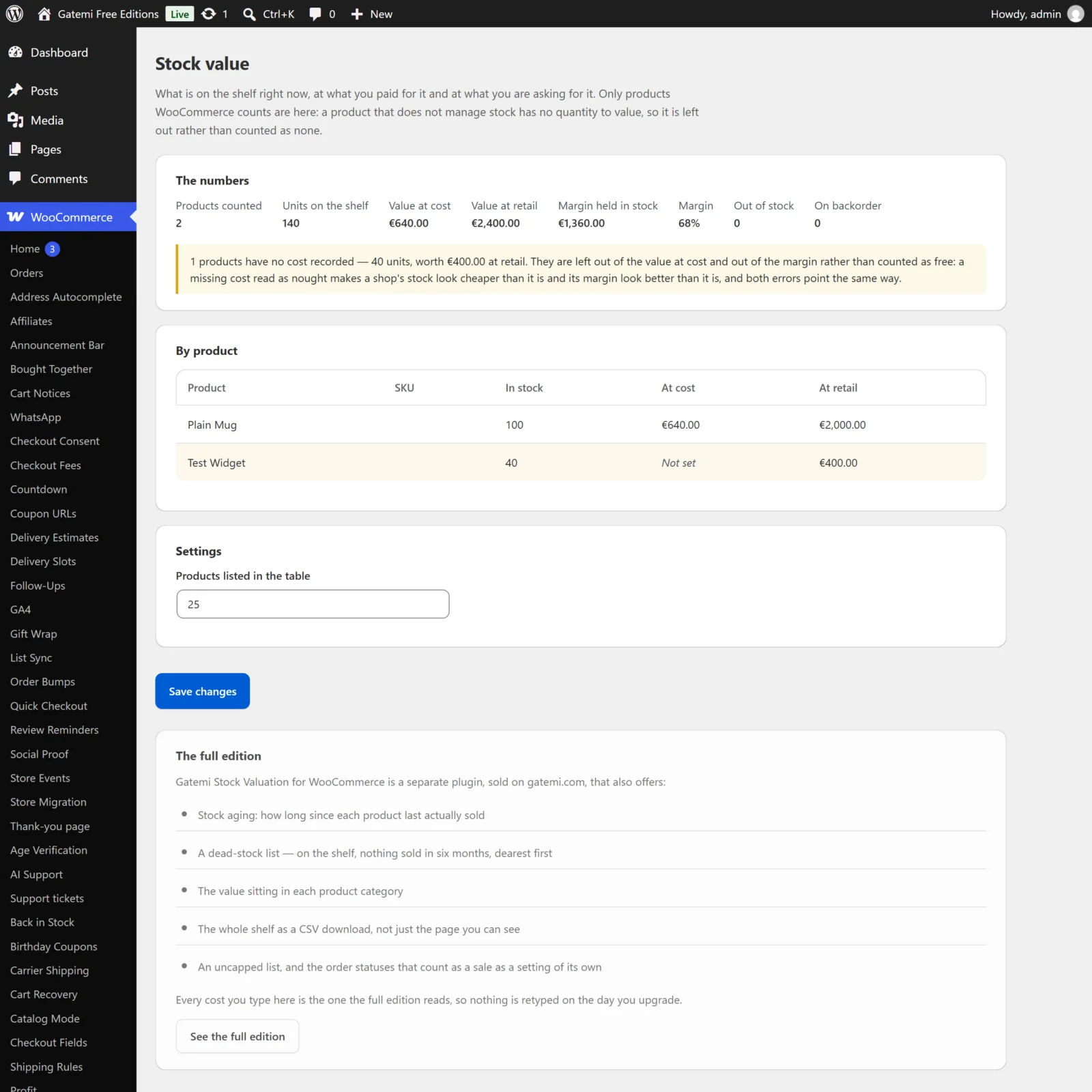
Only stock the store counts is stock. A product that does not manage stock has no quantity — not nought — so valuing it at nought understates the shelf and guessing one is worse. Those products are left out and the report says so. That is also what makes the report fast: it asks WooCommerce for the products that count their stock, so a shop with forty thousand products and four hundred counted ones reads four hundred.
A product with no cost is unknown, never free. This is the part the category gets wrong. Counting a missing cost as nought makes a shop's stock look cheaper than it is *and* its margin look better than it is — two errors that both point the same flattering way and neither of which looks wrong. Here uncosted products are counted apart, their units and retail value reported on their own, and the margin is measured only over the stock that actually has a cost behind it.
Aging is measured from the last sale, never from when the product was listed. A product listed three years ago that sells every week is not old stock, and a report that says it is produces a list of the shop's oldest *products* instead of its stuck *money*. A product that has never sold at all is aged from the day it was listed and is marked as such, because "never sold since March" and "last sold in March" are different facts.
The cost is the one you already typed. It is read from — and written to — the same key Gatemi Profit Reports uses, so a shop running both never has to keep two numbers in step, and neither plugin can disagree with the other about what a thing cost.
Features
The whole shelf valued at cost and at retail, with the margin you are holding in stock
Uncosted products counted, named and kept out of the cost figure
Out-of-stock and backordered counts, with negative quantities valued negatively rather than clamped
Stock aging in five bands, measured from the last real sale
A dead-stock list — on the shelf, nothing sold in six months — dearest first
A breakdown by product category
A per-product table, and a CSV of the whole shelf rather than the page you can see
A cost field beside WooCommerce's own price fields, on products and on variations, shared with Gatemi Profit Reports
Nothing is held in memory: products are read a page at a time, and the walk is capped with the cap said out loud
Every license includes
One year of updates and priority support, delivered straight to your WordPress dashboard.
Use on 1, 5 or 25 sites depending on your license — local, staging and development sites are always free.
30-day money-back guarantee — full refund, no questions asked.
Keeps working after expiry — if you choose not to renew, the plugin keeps running exactly as installed; it simply stops receiving updates and support until you do.
Requires WordPress 6.4+ · PHP 7.4+ · tested up to WordPress 7.0. Works with the classic and block checkout alike.
Free edition or full edition?
This plugin has a free edition. It is a complete plugin in its own right, and upgrading keeps every setting and every record, so you can start free and buy when you need more.
What the full edition adds
What the full edition adds
Free
Full
The age rule — aging from the last real sale
—
✓
A dead-stock list, dearest first
—
✓
The value sitting in each product category
—
✓
A CSV of the whole shelf
—
✓
Which order statuses count as a sale
—
✓
How far back the aging pass looks
—
✓
How many rows to show
25, this edition’s own number (a paid value is kept, never read)
✓
Included in both editions (8)
The cost rule — an uncosted product is unknown, never free
The count rule — only manage_stock products are stock
Negative quantities valued negatively rather than clamped
The shelf valued at cost and at retail, with the margin held
Uncosted products counted, with their units and retail value
Out-of-stock and backordered counts
A cost field on products and variations
A Cost column on the products list
License
Single Site, Plus — 5 Sites, Agency — 25 Sites
Frequently asked questions
How does the license work?
Every license includes one year of updates and priority support, delivered straight to your WordPress dashboard. Choose the tier that matches how many production sites you run: 1, 5 or 25.
Which license do I need?
Count your live production sites — that's it. Local, staging and development sites (localhost, *.test, staging.*, dev.* and similar) are always free and never use up an activation.
What happens if I don't renew?
Nothing breaks. The plugin keeps working exactly as installed — it simply stops receiving updates and support until you renew. Renewing later reinstates both immediately.
Can I upgrade my license later?
Yes. Contact support any time and we'll move you to a higher tier — you only pay the difference, and your key and activations carry over.
Can I use it on client sites?
Absolutely. The Plus (5 sites) and Agency (25 sites) tiers are built for agencies — and if you run several Gatemi plugins across client stores, All Access usually works out cheaper.
What if it's not right for my store?
Tell us within 30 days and we refund the order in full — no questions asked. See the refund policy.
Changelog
Every release reaches your WordPress dashboard as an ordinary update while your licence is active.
Version 1.0.1Latest
Fixed: a variation that keeps its own stock count was left out of the valuation entirely; it is now valued like any other product.
Fixed: a cost entered on a variation in Product data → Variations was not saved; it now is.
Fixed: in the stock aging report, a variable product whose stock is kept on the product itself is now dated by the sales of its variations, instead of reading as never sold.
New: A Gatemi menu in the WordPress admin lists your Gatemi plugins with a link to each one's settings; this plugin's screen also stays under WooCommerce.
Improved: The settings screen has a refreshed design and fits a phone screen.
New: Translated into nine languages: Arabic, Chinese (Simplified), Dutch, French, German, Italian, Portuguese (Brazil), Russian and Spanish.
Improved: Tested with WordPress 7.1.
WordPress 6.4+ · PHP 7.4+
Version 1.0.0
First release.
WordPress 6.4+ · tested up to 7.0 · PHP 7.4+
5 reviews for Stock Valuation for WooCommerce
Rated 4 out of 5
T. Palmer (verified owner)–
Four stars because there’s one thing missing for me. Worth considering if you’re looking at Reports & Analytics. Nothing to complain about, really.
Rated 5 out of 5
Martin D (verified owner)–
The docs are written by somebody who has used the thing. Two shops on Stock Valuation, both fine. Would buy from Gatemi again.
Rated 5 out of 5
Katie M. (verified owner)–
I’ve honestly forgotten it’s installed, and I mean that well. Stock Valuation doesn’t need babysitting. That’s a yes from me.
Rated 5 out of 5
Amy (verified owner)–
Trialled two, bought this. Sensible defaults meant I barely had to configure Stock Valuation.
Rated 5 out of 5
Olivier (verified owner)–
Étonnamment simple à configurer. Bon rapport qualité-prix face au reste de la gamme Reports & Analytics.


T. Palmer (verified owner) –
Four stars because there’s one thing missing for me. Worth considering if you’re looking at Reports & Analytics. Nothing to complain about, really.
Martin D (verified owner) –
The docs are written by somebody who has used the thing. Two shops on Stock Valuation, both fine. Would buy from Gatemi again.
Katie M. (verified owner) –
I’ve honestly forgotten it’s installed, and I mean that well. Stock Valuation doesn’t need babysitting. That’s a yes from me.
Amy (verified owner) –
Trialled two, bought this. Sensible defaults meant I barely had to configure Stock Valuation.
Olivier (verified owner) –
Étonnamment simple à configurer. Bon rapport qualité-prix face au reste de la gamme Reports & Analytics.