
The report is worked out fresh every time you press Show, straight from your orders. Nothing is stored in advance, nothing is cached, and nothing is written back. This page describes exactly what happens. Where the editions differ, it says so.
1. Which orders are read
The report asks WooCommerce, through wc_get_orders(), for:
- Orders only. Refunds are separate records in WooCommerce, carrying their own negative tax lines. Reading them as sales would take a refund off twice, so they are excluded and refunds are handled through the order they belong to (step 4).
- In the statuses that count as a sale. Processing and completed. In the full edition this list is a setting.
- Created within the date range. Both days are inclusive and compared in your site's time zone, by the date the order was created (not paid or completed).
Orders are read 100 at a time, oldest first, until there are none left, so a large shop's report is never held in memory all at once. (Full edition: the batch size can be changed with the gmtx_report_batch filter.)
2. The one-currency check
The report works in the store currency (WooCommerce → Settings → General). An order placed in any other currency — for example through a currency-switcher plugin — is not added to anything. It is counted, its currency is noted, and the screen says how many orders were left out and in which currencies.
3. The country an order belongs to
Free edition, and the full edition's default ("Where the goods went"):
- Take the order's shipping country and shipping state.
- If the shipping country is empty, take the billing country and billing state instead, and count this order as a fallback.
Full edition, "The billing address": take the billing country and state for every order. Nothing counts as a fallback.
The country is the order's two-letter code, upper-cased. The state is upper-cased, its spaces tidied, and kept up to 64 characters. An order with no country at all is shown as Not given.
Full edition: the result can be changed with the gmtx_place_of_supply filter — see the developer reference.
The country is read from the order's address when the report runs. If an order's address was edited after it was placed, the report uses the edited address.
4. The money
For each counted order:
| Figure | Worked out as |
|---|---|
| Tax | the order's total tax − the tax refunded on it |
| Gross | the order's total − the total refunded on it |
| Net | gross − tax |
| Delivery | the order's delivery total (before tax) − the delivery refunded |
These come from WooCommerce's own order methods (get_total_tax(), get_total_tax_refunded(), get_total(), get_total_refunded(), get_shipping_total(), get_total_shipping_refunded()), which read what the order recorded at checkout and what its refunds recorded since. WooCommerce's tax rate settings are never read. That is why a rate you change today does not alter a past period.
Two consequences:
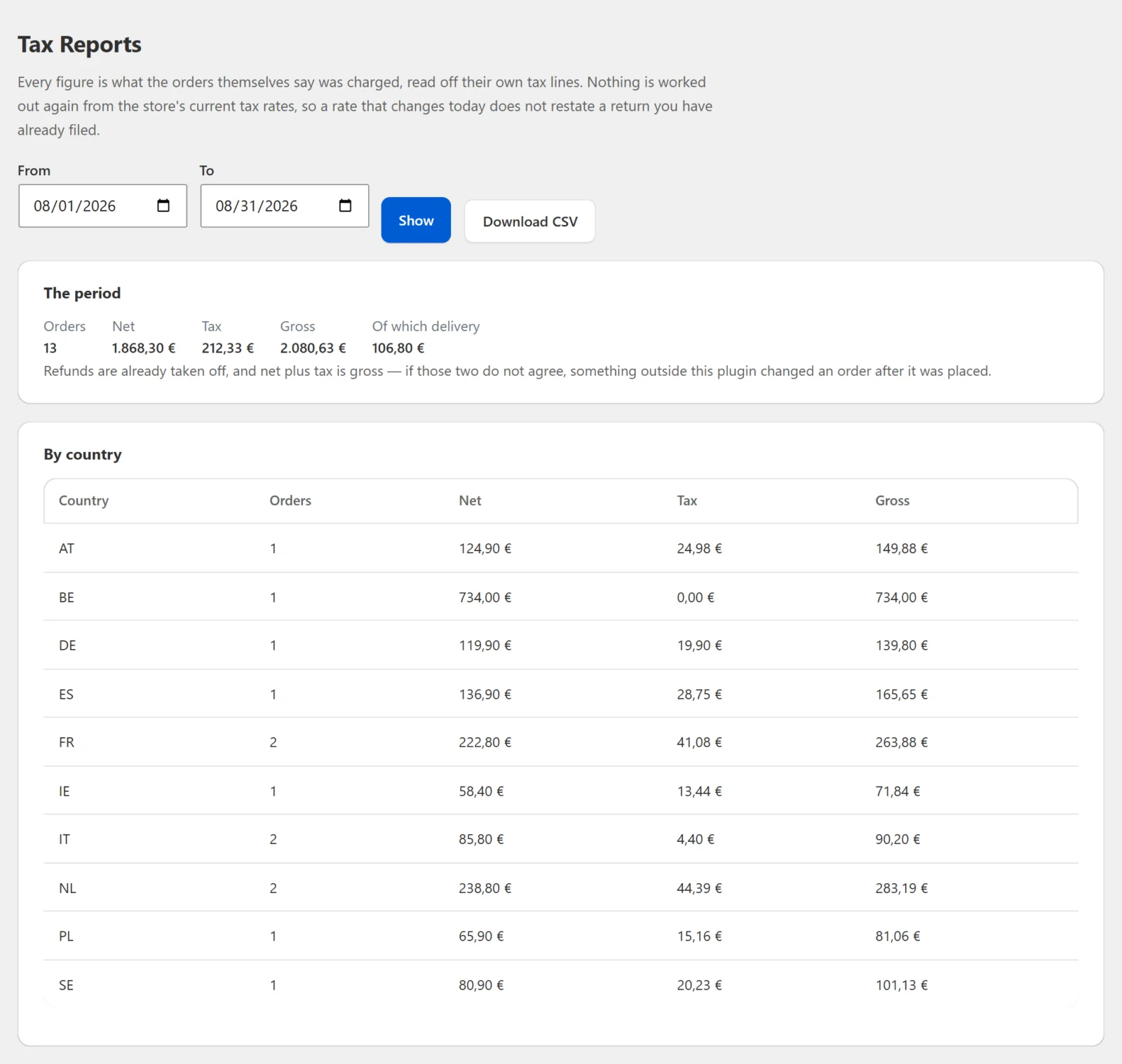
- Net plus tax always equals gross, in every row and in the totals, because net is defined that way.
- Net includes delivery and any untaxed lines. An order on which no tax was charged — a zero-rated product, or a business customer under the reverse charge — is added with tax 0.00. Delivery is part of net and is also shown on its own as "Of which delivery".
Refunds are whatever has been refunded by the time you run the report. A refund made next month on an order from this month changes this month's figures when you run it again. For a VAT return that is a correction to a period you have already filed, not an error — keep a copy of what you filed.
5. Totals and rows
Each order is added to the period totals and to its country's row (or country-and-state row, with the state breakdown on). At the end every figure is rounded to your store's number of decimals (WooCommerce → Settings → General → Number of decimals), and the rows are sorted alphabetically by country code, then state, so the same period always produces the same list in the same order.
6. The per-rate table — Full edition
With Show the breakdown by tax rate on, the full edition also reads each counted order's tax lines — one per tax rate applied to the order. For each line it takes:
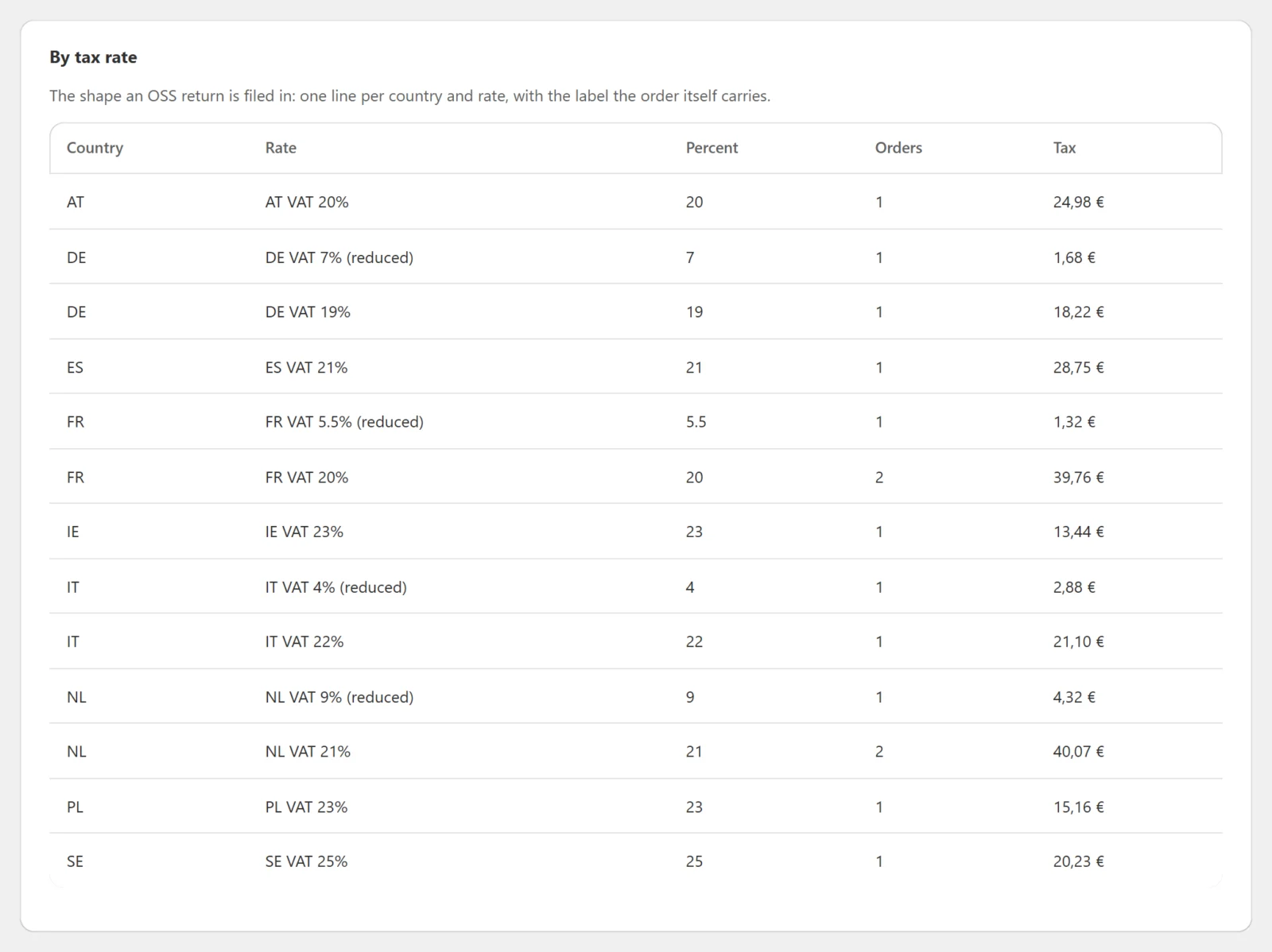
- the label the line carries (for example "VAT" or "TVA"),
- the rate percentage the line carries,
- the line's product tax plus its delivery tax, less the tax refunded under that rate (WooCommerce's own
get_total_tax_refunded_by_rate_id()), - the net that rate was charged on: the product, delivery and fee lines the order itself recorded under that rate, each less what was refunded on it. (An order whose lines carry no tax details — an imported one, for example — gets its net worked back from the tax and the percentage.)
It adds those to a row for the order's country and that tax rate, with gross as net plus tax, and counts the order in that row. An order charged under two rates appears in two rows; a line taxed under two rates (a compound rate) is in both rows' net, because it is each rate's base.
Because the label and percentage come from the order, a rate you have since renamed, changed or deleted still appears exactly as it was charged.
Refunds and the per-rate table. Refunds come off the per-rate rows rate by rate, as they come off the country figures (step 4), so a country's per-rate tax adds up to that country's tax. Net can differ: an order charged no tax at all (a reverse-charge sale, say) has no tax line, so it is in the country row but in no rate row.
The per-rate table has its own Download rates CSV button; see the developer reference.
7. What is never done
- No figure is recalculated from current tax rates.
- No order, order meta or product is written to.
- No database table or option is created beyond the settings (and, in the full edition, the licence option).
- Nothing runs on the storefront.
- No outside request is made — except, in the full edition, licence and update checks with gatemi.com once a licence key is entered.
Example
An order to Germany: one item €100.00 + €19.00 VAT, delivery €10.00 + €1.90 VAT, total €130.90. Later, the item is refunded: €119.00 (€100.00 + €19.00 tax). Delivery is not refunded.
| Value | |
|---|---|
| Tax | 20.90 − 19.00 = 1.90 |
| Gross | 130.90 − 119.00 = 11.90 |
| Net | 11.90 − 1.90 = 10.00 |
| Of which delivery | 10.00 − 0.00 = 10.00 |
In the full edition's per-rate table, the order's single 19% tax line adds the same figures to Germany's 19% row: tax €20.90 − €19.00 refunded under that rate = €1.90, net €10.00 (the item's €100.00 less its €100.00 refund, plus €10.00 delivery), gross €11.90.