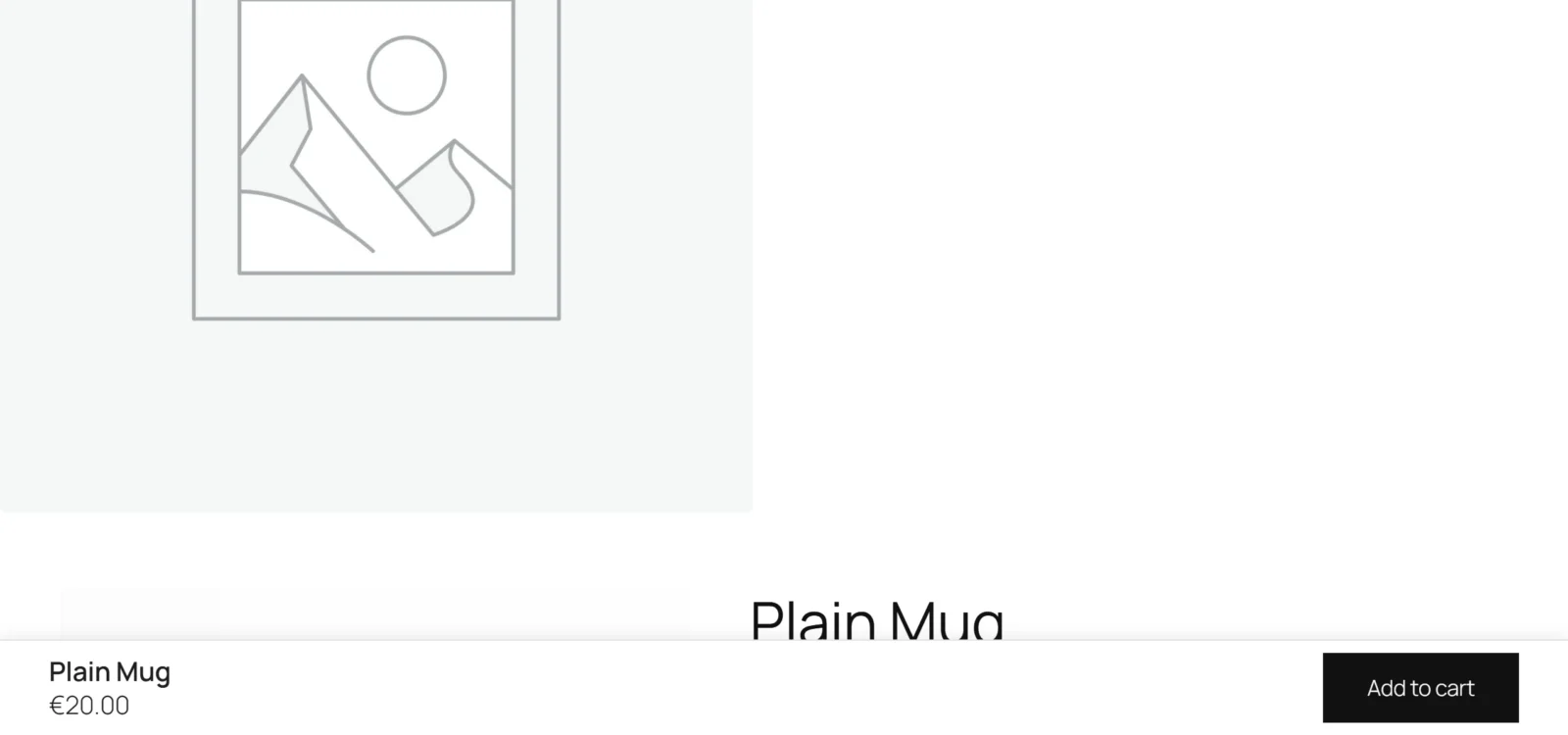
Gatemi Sticky Add to Cart for WooCommerce keeps buying one tap away. Once a shopper has scrolled past the add-to-cart button — into the description, the reviews, the size chart — a slim bar carries the product's image, its name, its price and the button.
It submits your product page's own form. The bar's button belongs to that form, so pressing it does exactly what pressing the real button does: variations are respected, add-on fields are validated, other plugins' checks run, Ajax add-to-cart behaves as your theme set it up. Plugins in this category that instead post ?add-to-cart= behind the shopper's back are the ones that add the wrong thing the moment a product has options.
It appears from where your form actually is. An IntersectionObserver watches the real add-to-cart form, so the bar shows up the moment that form leaves the screen — no scroll threshold in pixels, which is a guess about one theme and wrong on the next.
It knows when not to appear. Out-of-stock, non-purchasable, external and grouped products get no bar: its promise is one tap to buy, and a button that goes somewhere else is worse than no button. On a variable product the button waits until a variation is chosen — because the real form would refuse it anyway — and the price and image follow the choice.
Features
Sticky bar along the bottom or the top of the product page
The bar's quantity and the page's quantity are the same number
Price, image and availability follow the chosen variation
Show it to everyone, to small screens only, or to large screens only — decided in CSS, so page caches serve one page to everyone
Button text of your own, or whatever the product's own button says
Dark-mode aware, safe-area aware on phones, and a few KB of dependency-free CSS/JS
Every license includes
One year of updates and priority support, delivered straight to your WordPress dashboard.
Use on 1, 5 or 25 sites depending on your license — local, staging and development sites are always free.
30-day money-back guarantee — full refund, no questions asked.
Keeps working after expiry — if you choose not to renew, the plugin keeps running exactly as installed; it simply stops receiving updates and support until you do.
Requires WordPress 6.4+ · PHP 7.4+ · tested up to WordPress 7.0. Works with the classic and block checkout alike.
Free edition or full edition?
This plugin has a free edition. It is a complete plugin in its own right, and upgrading keeps every setting and every record, so you can start free and buy when you need more.
What the full edition adds
What the full edition adds
Free
Full
Position
bottom
bottom or top
Show to small screens only / large screens only
—
✓
The product's image in the bar
—
✓
Quantity field, tied to the one on the page
—
✓
Button text of your own
—
✓
Included in both editions (5)
Sticky bar with the product's name, price and add-to-cart button
The button submits the product page's own form (variations, add-ons, Ajax)
Appears from the real form's position (IntersectionObserver)
No bar for out-of-stock, non-purchasable, external or grouped products
Price and button availability follow the chosen variation
License
Single Site, Plus — 5 Sites, Agency — 25 Sites
Frequently asked questions
How does the license work?
Every license includes one year of updates and priority support, delivered straight to your WordPress dashboard. Choose the tier that matches how many production sites you run: 1, 5 or 25.
Which license do I need?
Count your live production sites — that's it. Local, staging and development sites (localhost, *.test, staging.*, dev.* and similar) are always free and never use up an activation.
What happens if I don't renew?
Nothing breaks. The plugin keeps working exactly as installed — it simply stops receiving updates and support until you renew. Renewing later reinstates both immediately.
Can I upgrade my license later?
Yes. Contact support any time and we'll move you to a higher tier — you only pay the difference, and your key and activations carry over.
Can I use it on client sites?
Absolutely. The Plus (5 sites) and Agency (25 sites) tiers are built for agencies — and if you run several Gatemi plugins across client stores, All Access usually works out cheaper.
What if it's not right for my store?
Tell us within 30 days and we refund the order in full — no questions asked. See the refund policy.
Changelog
Every release reaches your WordPress dashboard as an ordinary update while your licence is active.
Version 1.0.1Latest
Fixed: on a simple product, pressing the sticky bar's button reloaded the page without adding anything to the cart. It now adds the product exactly as the page's own button does.
New: translations into Arabic, Chinese (Simplified), Dutch, French, German, Italian, Portuguese (Brazil), Russian and Spanish.
New: A Gatemi menu in the WordPress admin lists your Gatemi plugins with a link to each one's settings; this plugin's screen also stays under WooCommerce.
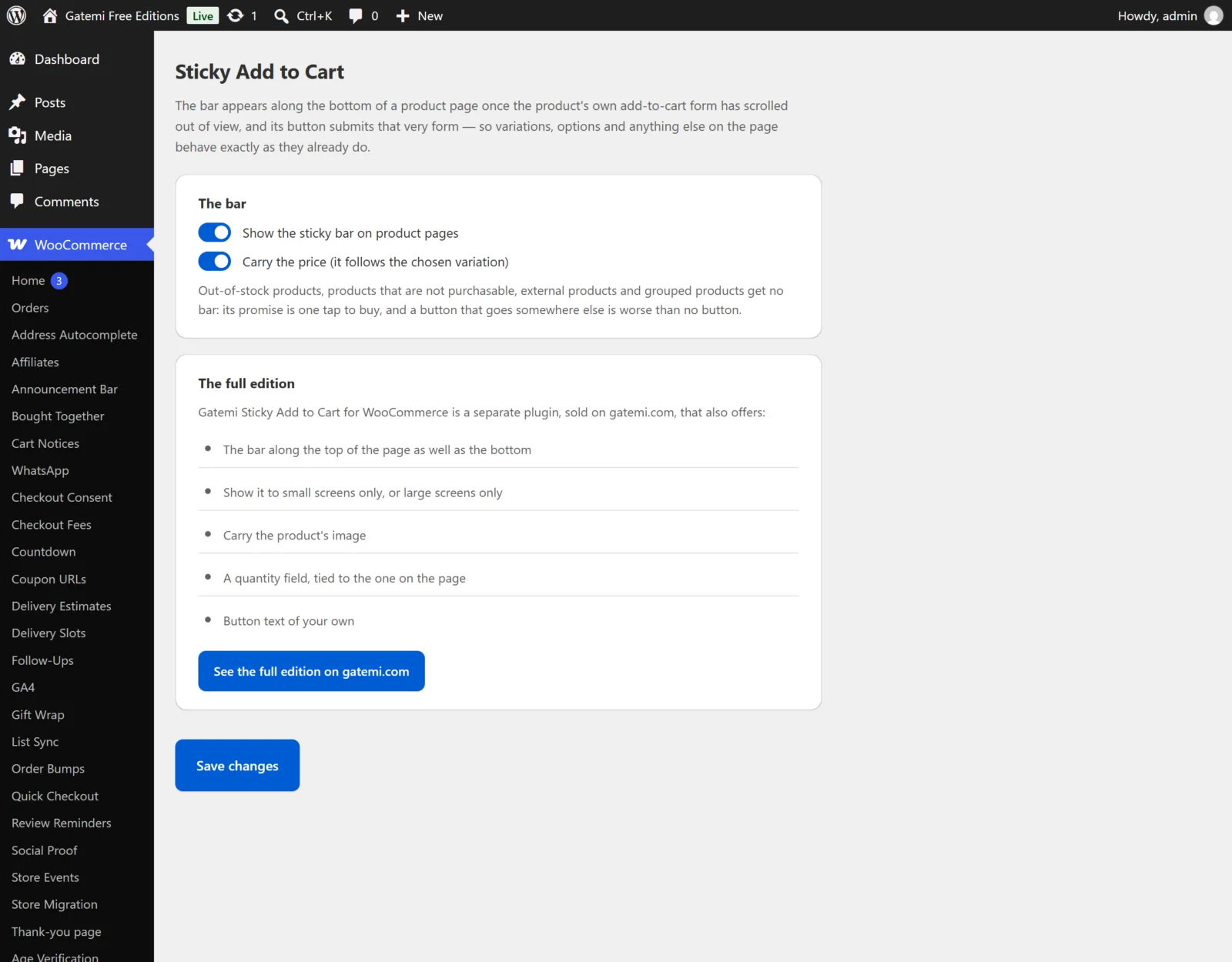
Improved: The settings screen has a refreshed design and fits a phone screen.
Improved: Tested with WordPress 7.1.
WordPress 6.4+ · PHP 7.4+
Version 1.0.0
First release.
WordPress 6.4+ · tested up to 7.0 · PHP 7.4+
5 reviews for Sticky Add to Cart for WooCommerce
Rated 4 out of 5
Nicolas (verified owner)–
Quatre étoiles parce qu’il me manque une chose. Il tient la route en Merchandising. Ça vaut son prix.
Rated 5 out of 5
Irene S. (verified owner)–
Ni un banner de publicidad en el escritorio, y eso se agradece. Le he exigido bastante a Sticky Add to Cart y ha aguantado. Cliente muy satisfecho.
Rated 5 out of 5
Craig M. (verified owner)–
The setup is about as painless as this sort of thing gets. Sticky Add to Cart is the first thing I install on a new build now. Very pleased with it.
Rated 5 out of 5
Sophie T. (verified owner)–
I’d tried two others before this one. Went with the Single Site licence and that covers what I need. Sticky Add to Cart is quietly doing the thing in the background right now. Keeping it.
Rated 5 out of 5
Paul B (verified owner)–
The settings screen explains itself, so I barely opened the docs.




Nicolas (verified owner) –
Quatre étoiles parce qu’il me manque une chose. Il tient la route en Merchandising. Ça vaut son prix.
Irene S. (verified owner) –
Ni un banner de publicidad en el escritorio, y eso se agradece. Le he exigido bastante a Sticky Add to Cart y ha aguantado. Cliente muy satisfecho.
Craig M. (verified owner) –
The setup is about as painless as this sort of thing gets. Sticky Add to Cart is the first thing I install on a new build now. Very pleased with it.
Sophie T. (verified owner) –
I’d tried two others before this one. Went with the Single Site licence and that covers what I need. Sticky Add to Cart is quietly doing the thing in the background right now. Keeping it.
Paul B (verified owner) –
The settings screen explains itself, so I barely opened the docs.