Add tracking numbers to orders and show them where customers look — their account page and their order emails — with a carrier list you can extend and bulk import for busy days.
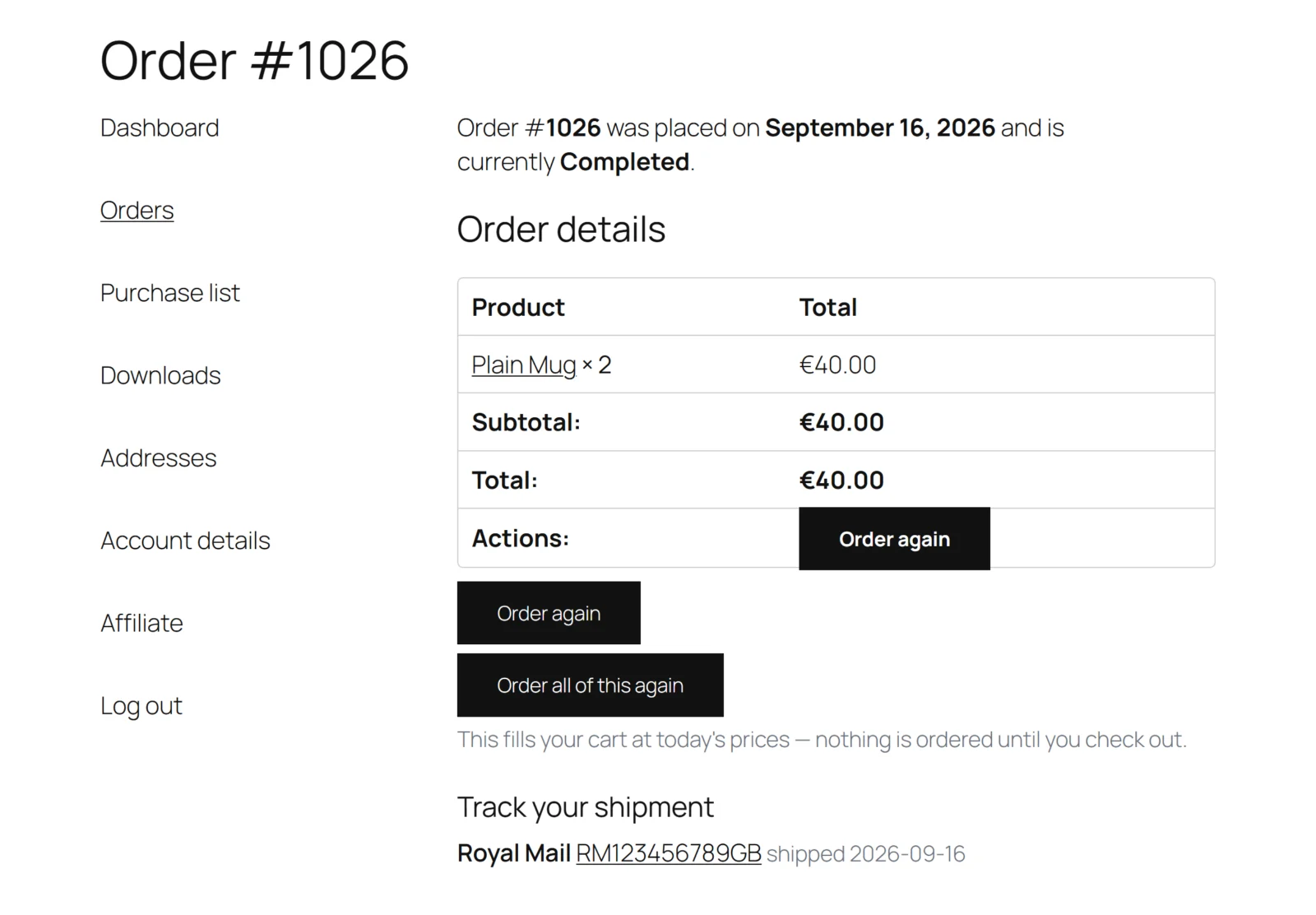
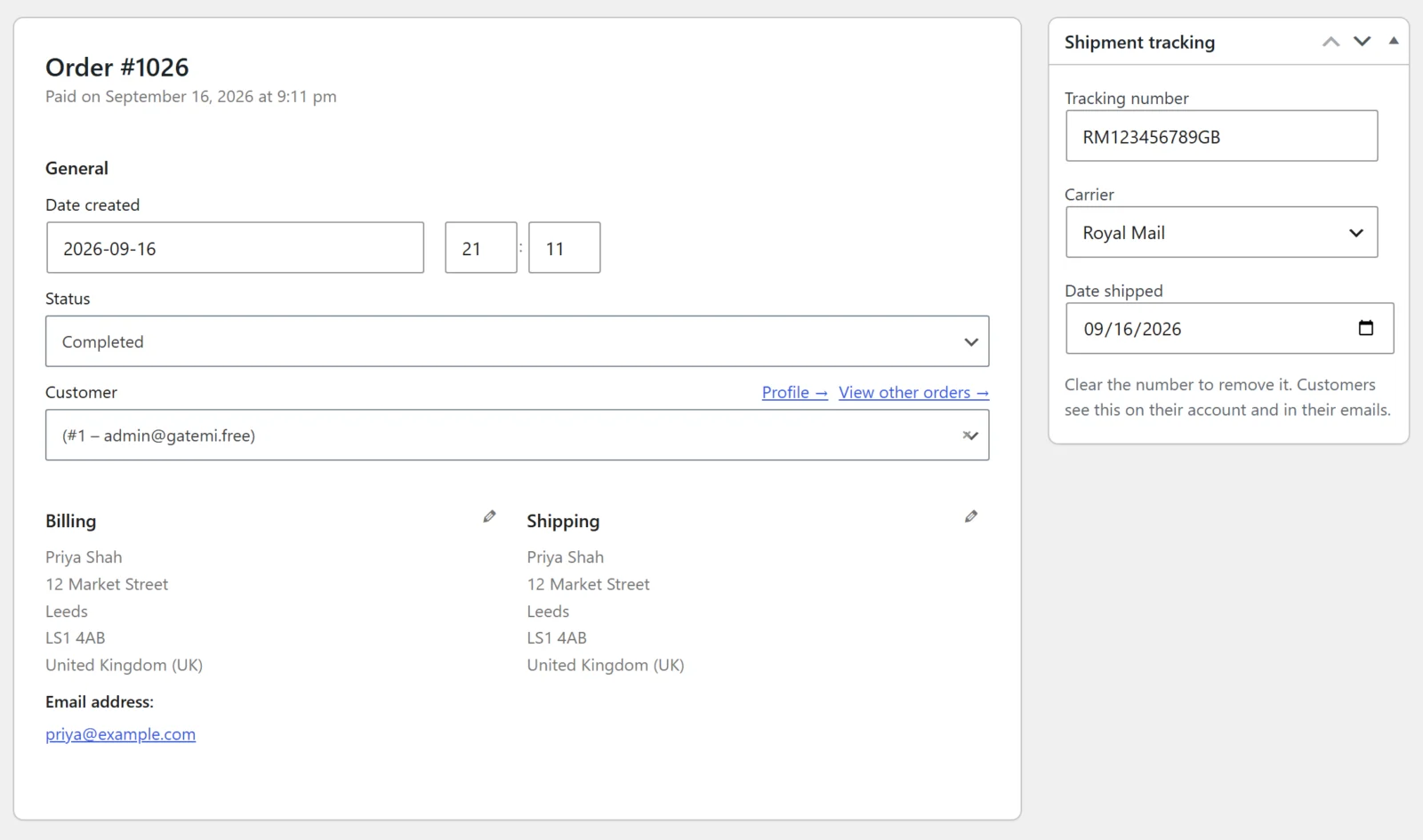
Gatemi Shipment Tracking for WooCommerce puts a tracking number on an order and gets it in front of the customer: on My Account, on the thank-you page, and inside every order email WooCommerce sends. No theme edits, no shortcode to place, nothing to configure before it works.
One order, several parcels. A split delivery is normal in any store that backorders, so an order carries as many shipments as it needs — each with its own carrier and shipped date.
Bulk import that you can run twice. A fulfilment house hands over a CSV; paste it in. A tracking number an order already carries is never added a second time, so re-running yesterday's file — which happens every time somebody is unsure whether it worked — changes nothing. Every row that could not be imported is reported with its line number, rather than dropped in silence.
Flat price, not per order. The SaaS alternatives charge by the shipment; this is a plugin you buy once a year however much you ship.
Features
Tracking numbers on the order screen, on both the classic and HPOS order pages
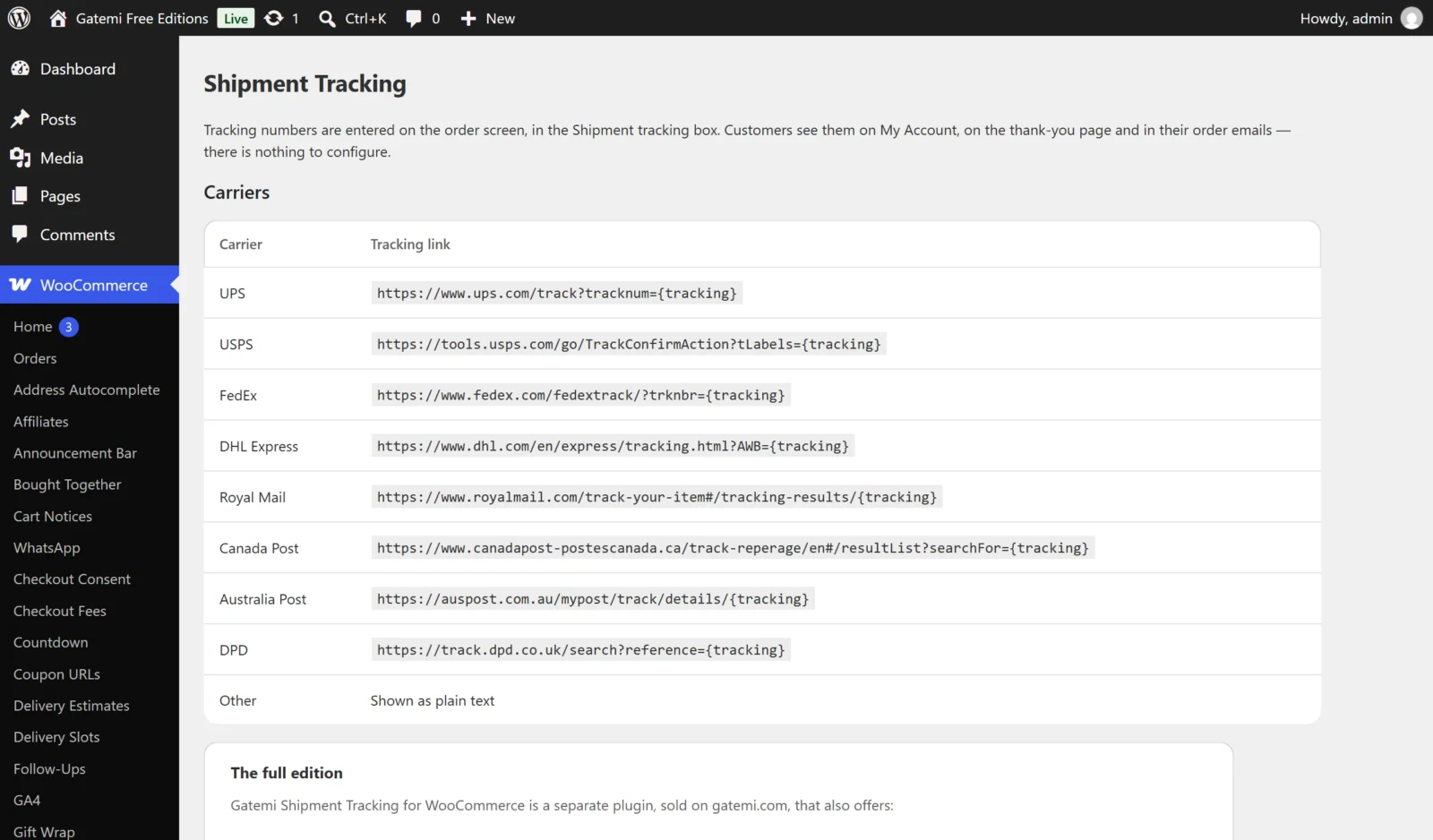
Carrier catalog covering UPS, USPS, FedEx, DHL Express, Royal Mail, Canada Post, Australia Post and DPD — plus your own, with a {tracking} URL template
Several shipments per order
Tracking on My Account, the thank-you page and every customer email (HTML and plain text)
[gatemi_tracking] shortcode for manual placement — and it shows nothing for an order the visitor does not own
Bulk CSV import, idempotent, with per-row problem reporting
Optionally move the order to another status when tracking is added
Uninstall keeps your shipments — they are your shipping record
Every license includes
One year of updates and priority support, delivered straight to your WordPress dashboard.
Use on 1, 5 or 25 sites depending on your license — local, staging and development sites are always free.
30-day money-back guarantee — full refund, no questions asked.
Keeps working after expiry — if you choose not to renew, the plugin keeps running exactly as installed; it simply stops receiving updates and support until you do.
Requires WordPress 6.4+ · PHP 7.4+ · tested up to WordPress 7.0. Works with the classic and block checkout alike.
Free edition or full edition?
This plugin has a free edition. It is a complete plugin in its own right, and upgrading keeps every setting and every record, so you can start free and buy when you need more.
What the full edition adds
What the full edition adds
Free
Full
Several shipments per order (split deliveries)
—
✓
Bulk CSV import, idempotent, per-row problem reporting
—
✓
Switch each surface off; word the heading; [gatemi_tracking] shortcode
—
✓
Included in both editions (1)
Shown on My Account, thank-you page and every customer email
License
Single Site, Plus — 5 Sites, Agency — 25 Sites
Frequently asked questions
How does the license work?
Every license includes one year of updates and priority support, delivered straight to your WordPress dashboard. Choose the tier that matches how many production sites you run: 1, 5 or 25.
Which license do I need?
Count your live production sites — that's it. Local, staging and development sites (localhost, *.test, staging.*, dev.* and similar) are always free and never use up an activation.
What happens if I don't renew?
Nothing breaks. The plugin keeps working exactly as installed — it simply stops receiving updates and support until you renew. Renewing later reinstates both immediately.
Can I upgrade my license later?
Yes. Contact support any time and we'll move you to a higher tier — you only pay the difference, and your key and activations carry over.
Can I use it on client sites?
Absolutely. The Plus (5 sites) and Agency (25 sites) tiers are built for agencies — and if you run several Gatemi plugins across client stores, All Access usually works out cheaper.
What if it's not right for my store?
Tell us within 30 days and we refund the order in full — no questions asked. See the refund policy.
Changelog
Every release reaches your WordPress dashboard as an ordinary update while your licence is active.
Version 1.0.1Latest
Fixed: a carrier you added yourself lost its {tracking} placeholder when the settings were saved, so its tracking links never carried the number. The placeholder is now kept.
Fixed: with "Move the order on to another status" switched on, adding the first shipment on the order screen moved the order on and then straight back when the order saved. The new status now sticks.
Fixed: in plain-text emails the tracking heading ran into the first carrier and the tracking link was lost. The heading now has its own line and each shipment's tracking address is written out.
New: translations into Arabic, Chinese (Simplified), Dutch, French, German, Italian, Portuguese (Brazil), Russian and Spanish.
New: A Gatemi menu in the WordPress admin lists your Gatemi plugins with a link to each one's settings; this plugin's screen also stays under WooCommerce.
Improved: The settings screen has a refreshed design and fits a phone screen.
Improved: Tested with WordPress 7.1.
WordPress 6.4+ · PHP 7.4+
Version 1.0.0
First release.
WordPress 6.4+ · tested up to 7.0 · PHP 7.4+
5 reviews for Shipment Tracking for WooCommerce
Rated 5 out of 5
J. Tate (verified owner)–
The price isn’t the point. The time is. Shipment Tracking handled Black Friday without a wobble.
Rated 5 out of 5
Megan K. (verified owner)–
It didn’t break when I changed themes. Shipment Tracking doesn’t phone home or nag me about anything. Doesn’t put a foot wrong.
Rated 5 out of 5
Maximilian (verified owner)–
Hat drei WooCommerce-Updates ohne Zucken überstanden.
Rated 5 out of 5
Hannah R. (verified owner)–
Somebody has actually thought about how a shop is run. The bit of Shipment Tracking I use most is exactly the bit I bought it for. It’s been worth every minute I didn’t spend on this.
Rated 4 out of 5
Rebecca C. (verified owner)–
Half a star off for the documentation. Nothing has gone wrong with Shipment Tracking yet. Yes, on balance.



J. Tate (verified owner) –
The price isn’t the point. The time is. Shipment Tracking handled Black Friday without a wobble.
Megan K. (verified owner) –
It didn’t break when I changed themes. Shipment Tracking doesn’t phone home or nag me about anything. Doesn’t put a foot wrong.
Maximilian (verified owner) –
Hat drei WooCommerce-Updates ohne Zucken überstanden.
Hannah R. (verified owner) –
Somebody has actually thought about how a shop is run. The bit of Shipment Tracking I use most is exactly the bit I bought it for. It’s been worth every minute I didn’t spend on this.
Rebecca C. (verified owner) –
Half a star off for the documentation. Nothing has gone wrong with Shipment Tracking yet. Yes, on balance.