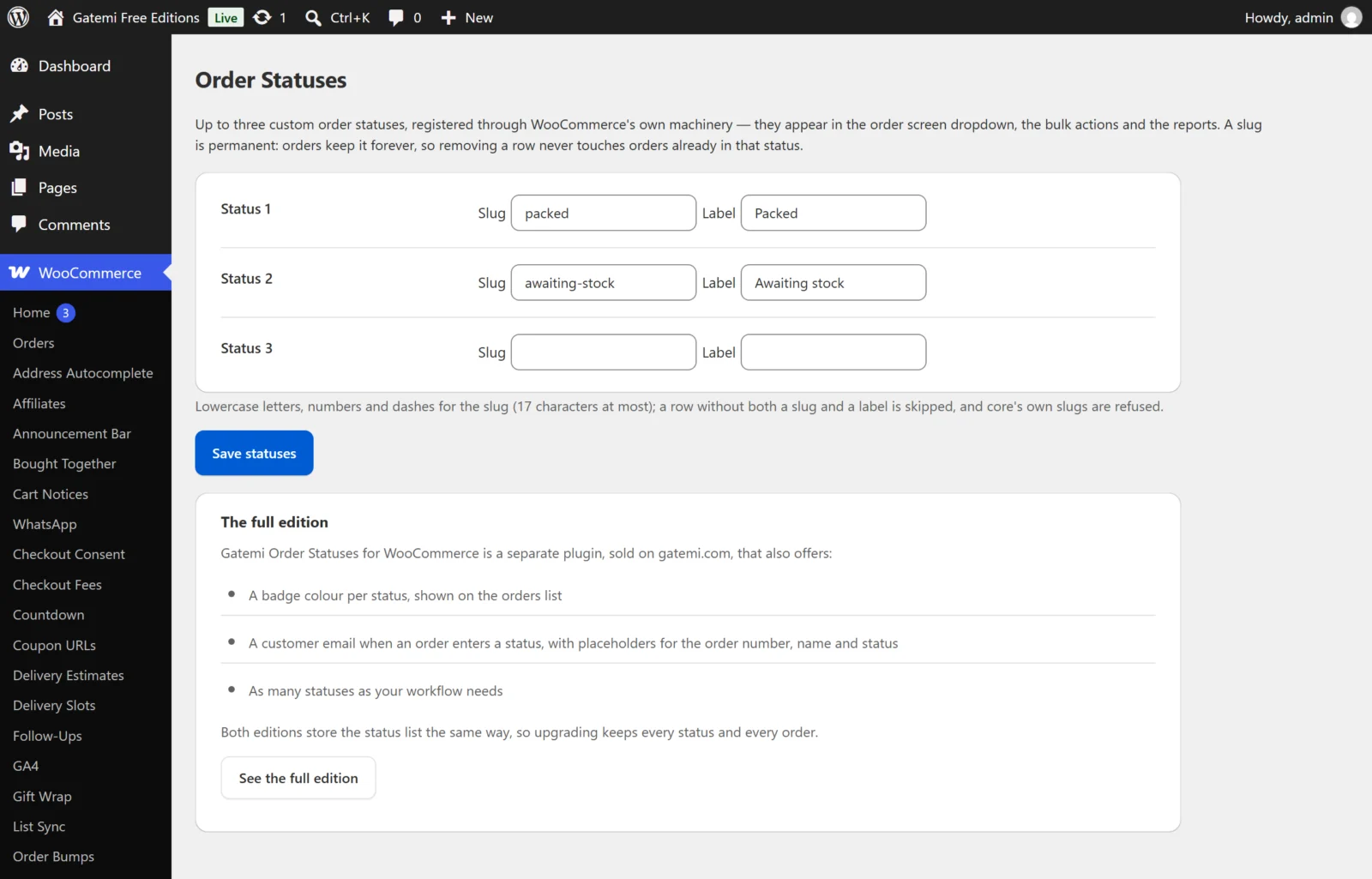
WooCommerce ships seven order statuses. Real stores run workflows: awaiting parts, in production, ready for pickup, shipped abroad, awaiting inspection. Gatemi Order Statuses lets you add your own statuses — each with a label, a badge color, a bulk action on the order screens, and an optional customer email sent the moment an order enters it.
Statuses register through WooCommerce's own machinery. They appear in the order dropdowns and reports like any core status, on both the classic orders screen and the HPOS one. Removing a status here never touches orders — orders already in that status keep it, because order history is not this plugin's to rewrite.
Features
Custom statuses with label, permanent slug and badge color (readable text color picked automatically)
"Change status to …" bulk actions on both order screens (classic and HPOS)
Optional customer email per status with {order_number}, {customer_name}, {status_label} and {site_title} placeholders
Core-slug protection: a custom status can never shadow pending, processing, completed and friends
HPOS and Cart/Checkout Blocks compatible
Every license includes
One year of updates and priority support, delivered straight to your WordPress dashboard.
Use on 1, 5 or 25 sites depending on your license — local, staging and development sites are always free.
30-day money-back guarantee — full refund, no questions asked.
Keeps working after expiry — if you choose not to renew, the plugin keeps running exactly as installed; it simply stops receiving updates and support until you do.
Requires WordPress 6.4+ · PHP 7.4+ · tested up to WordPress 7.0. Works with the classic and block checkout alike.
Free edition or full edition?
This plugin has a free edition. It is a complete plugin in its own right, and upgrading keeps every setting and every record, so you can start free and buy when you need more.
What the full edition adds
What the full edition adds
Free
Full
Custom statuses registered through core
✓ (up to 3)
✓ (unlimited)
Badge color per status on the orders list
—
✓
Status-triggered customer emails with placeholders
—
✓
Repeatable rows UI (add/remove) and the tunables list
—
✓
Included in both editions (2)
"Change status to …" bulk actions on both order screens (classic + HPOS)
Core slugs refused; removing a status never touches orders
License
Single Site, Plus — 5 Sites, Agency — 25 Sites
Frequently asked questions
How does the license work?
Every license includes one year of updates and priority support, delivered straight to your WordPress dashboard. Choose the tier that matches how many production sites you run: 1, 5 or 25.
Which license do I need?
Count your live production sites — that's it. Local, staging and development sites (localhost, *.test, staging.*, dev.* and similar) are always free and never use up an activation.
What happens if I don't renew?
Nothing breaks. The plugin keeps working exactly as installed — it simply stops receiving updates and support until you renew. Renewing later reinstates both immediately.
Can I upgrade my license later?
Yes. Contact support any time and we'll move you to a higher tier — you only pay the difference, and your key and activations carry over.
Can I use it on client sites?
Absolutely. The Plus (5 sites) and Agency (25 sites) tiers are built for agencies — and if you run several Gatemi plugins across client stores, All Access usually works out cheaper.
What if it's not right for my store?
Tell us within 30 days and we refund the order in full — no questions asked. See the refund policy.
Changelog
Every release reaches your WordPress dashboard as an ordinary update while your licence is active.
Version 1.0.1Latest
Fixed: A saved status's slug can no longer be changed by accident. It is now shown as text rather than an editable box, because renaming it left every order in that status on a status that no longer existed; add a new status for a new slug.
Fixed: Status emails are now sent as HTML, so a link or bold text in your message reaches the customer as formatting instead of as literal tags.
New: A Gatemi menu in the WordPress admin lists your Gatemi plugins with a link to each one's settings; this plugin's screen also stays under WooCommerce.
Improved: The settings screen has a refreshed design and fits a phone screen.
New: Translated into nine languages: Arabic, Chinese (Simplified), Dutch, French, German, Italian, Portuguese (Brazil), Russian and Spanish.
Improved: Tested with WordPress 7.1.
WordPress 6.4+ · PHP 7.4+
Version 1.0.0
First release.
WordPress 6.4+ · tested up to 7.0 · PHP 7.4+
5 reviews for Order Statuses for WooCommerce
Rated 5 out of 5
Claire R (verified owner)–
I expected to lose an evening to this and lost twenty minutes. Order Statuses replaced two plugins I have since uninstalled.
Rated 5 out of 5
Kevin W (verified owner)–
Was up and running the same afternoon. The Order Statuses update in the spring went through without any drama. Happy to have found it.
Rated 4 out of 5
natalie c (verified owner)–
Good value even with the niggle.
Rated 4 out of 5
Brian M. (verified owner)–
Good, and I suspect it will be very good in a version or two. Would be no hesitation at all if Order Statuses had one more setting. Fine as it is.
Rated 5 out of 5
Rebecca (verified owner)–
Doesn’t load a pile of scripts on every page, which was my worry. A colleague asked what I was using and I said Order Statuses. Can’t see myself switching.


Claire R (verified owner) –
I expected to lose an evening to this and lost twenty minutes. Order Statuses replaced two plugins I have since uninstalled.
Kevin W (verified owner) –
Was up and running the same afternoon. The Order Statuses update in the spring went through without any drama. Happy to have found it.
natalie c (verified owner) –
Good value even with the niggle.
Brian M. (verified owner) –
Good, and I suspect it will be very good in a version or two. Would be no hesitation at all if Order Statuses had one more setting. Fine as it is.
Rebecca (verified owner) –
Doesn’t load a pile of scripts on every page, which was my worry. A colleague asked what I was using and I said Order Statuses. Can’t see myself switching.