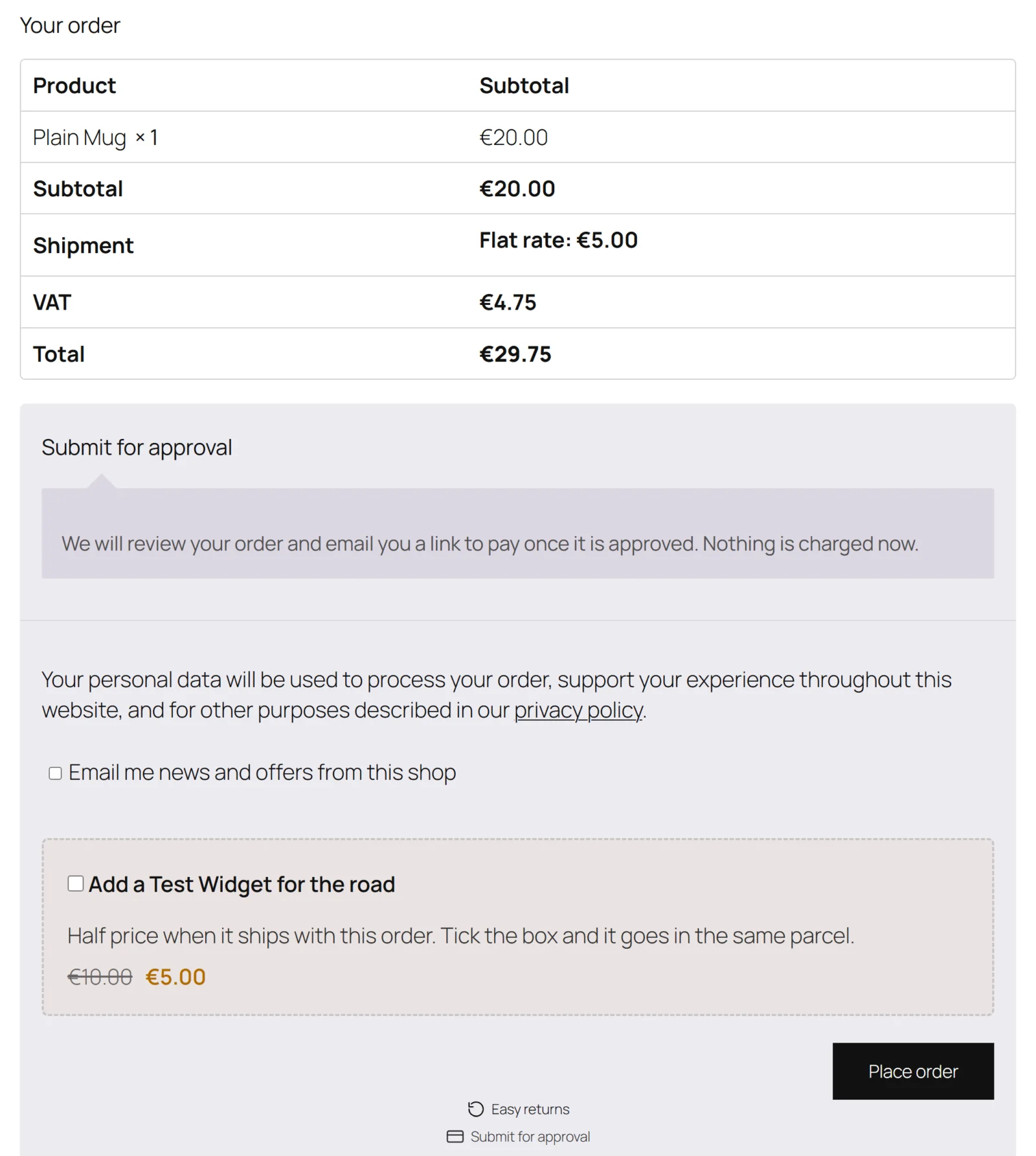
Pre-purchase order bumps at checkout — a one-tap offer that adds through WooCommerce’s own cart, so stock and every other plugin’s rules still apply, and never loses what the shopper has typed.
An order bump is one product offered on the page where somebody is already paying, taken with one tap. It is the cheapest revenue a shop has, and the easiest thing in the world to get wrong.
It adds through WooCommerce's own cart
Not by writing a line into cart_contents, which is the shortcut this category is full of and which skips stock, purchasability, sold-individually, the add-to-cart validation filter and every other plugin that has an opinion about what may be bought. A shop that takes that shortcut sells things it does not have, at the one moment it is least able to say so.
It never loses what the shopper has typed
On the checkout the tick box rides WooCommerce's own review request — the one the checkout already makes on every change — so the totals update and the address stays exactly where it was. A bump that reloads the page is a bump that gives a shopper a moment to reconsider the whole order. On the cart page, and for a visitor with no JavaScript, the same offer is an ordinary link.
It never offers what it cannot sell
Not something already in the cart. Not something out of stock or not purchasable. Not a product deleted since the offer was written. Each of those is a refusal landing on the page where somebody is handing over money.
The discount is a price, not a coupon
A coupon shows in the totals as something the shopper can remove, applies to whatever else it happens to match, and turns your offer into a code somebody posts on a forum. Here the accepted line simply is cheaper — measured from the price it came in at, on every recalculation, so it cannot drift downwards on repeated cart updates.
What you get
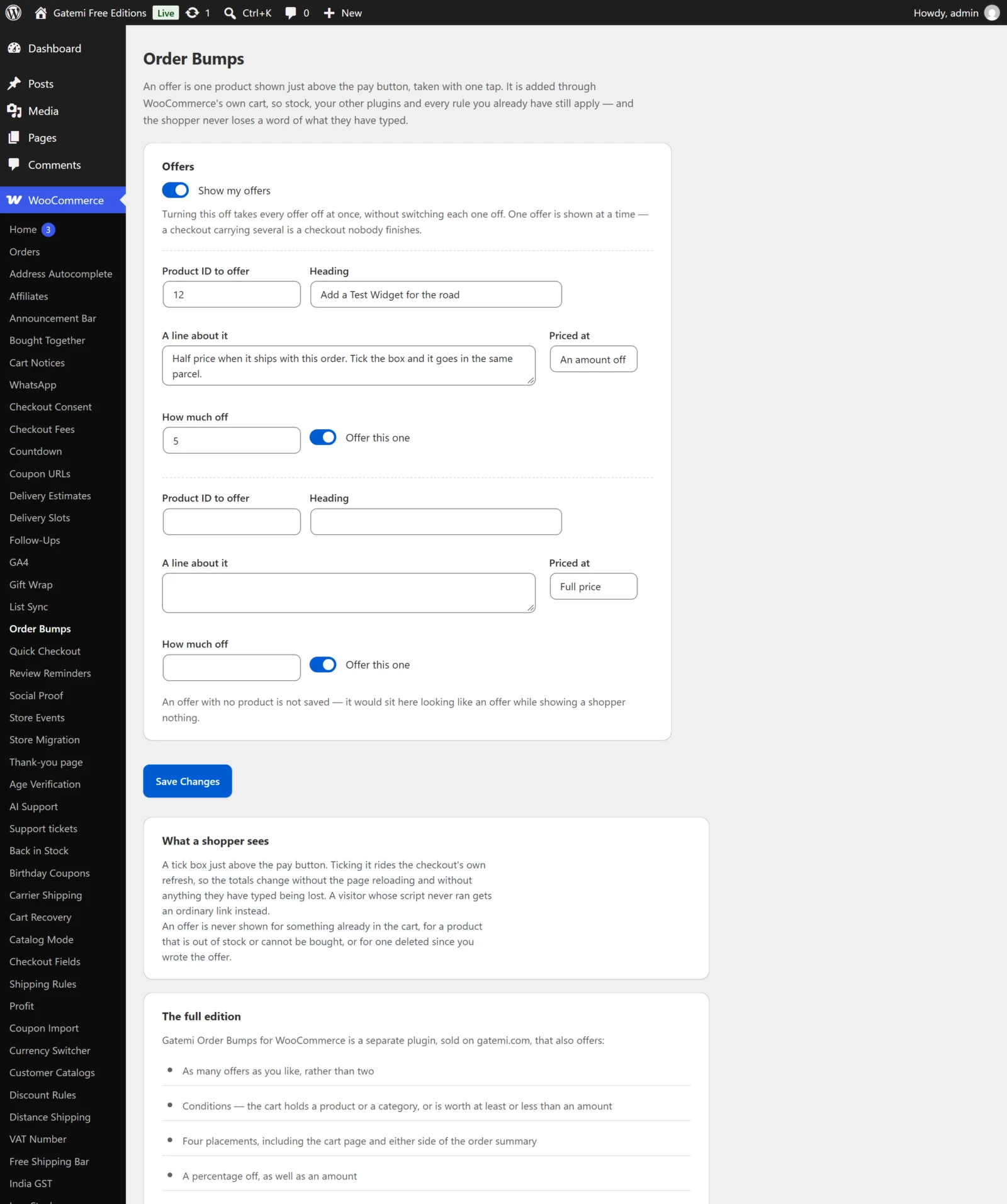
* As many offers as you like, each with its own product, words and price * Four placements: above or below the order summary, just above the pay button, or on the cart page * Six conditions — every checkout, the cart holds a product, the cart holds a category, the cart is worth at least or less than, or holds at least so many things — with every condition on an offer having to be satisfied, so adding one always narrows * Full price, a percentage off, or an amount off * A cap on how many offers one checkout may carry * The accepted offer named on the cart line and recorded on the order
Every license includes
One year of updates and priority support, delivered straight to your WordPress dashboard.
Use on 1, 5 or 25 sites depending on your license — local, staging and development sites are always free.
30-day money-back guarantee — full refund, no questions asked.
Keeps working after expiry — if you choose not to renew, the plugin keeps running exactly as installed; it simply stops receiving updates and support until you do.
Requires WordPress 6.4+ · PHP 7.4+ · tested up to WordPress 6.8. Works with the classic and block checkout alike.
Free edition or full edition?
This plugin has a free edition. It is a complete plugin in its own right, and upgrading keeps every setting and every record, so you can start free and buy when you need more.
What the full edition adds
What the full edition adds
Free
Full
Offers
2, one shown (a paid store's extras are kept)
unlimited
Placements
above the pay button
4, incl. the cart page and either side of the summary
Pricing
full price, an amount off
+ a percentage off
A percentage the paid edition set
kept, never charged — the line stays at the product’s own price
✓
Conditions: product, category, min/max total, min items
—
✓
Choose how many offers one checkout may carry
—
✓
Included in both editions (9)
A pre-purchase offer at the checkout
Added, so stock and every plugin's rules apply
The tick box rides the checkout's own refresh — nothing typed is lost
Never offered for something already in the cart (variations included)
Never offered for something out of stock, unpurchasable or deleted
The discount is a price on the line, not a coupon
Measured from the price the line came in at — it cannot drift
Unticking takes the line back out
The offer named on the cart line and recorded on the order
License
Single Site, Plus — 5 Sites, Agency — 25 Sites
Frequently asked questions
How does the license work?
Every license includes one year of updates and priority support, delivered straight to your WordPress dashboard. Choose the tier that matches how many production sites you run: 1, 5 or 25.
Which license do I need?
Count your live production sites — that's it. Local, staging and development sites (localhost, *.test, staging.*, dev.* and similar) are always free and never use up an activation.
What happens if I don't renew?
Nothing breaks. The plugin keeps working exactly as installed — it simply stops receiving updates and support until you renew. Renewing later reinstates both immediately.
Can I upgrade my license later?
Yes. Contact support any time and we'll move you to a higher tier — you only pay the difference, and your key and activations carry over.
Can I use it on client sites?
Absolutely. The Plus (5 sites) and Agency (25 sites) tiers are built for agencies — and if you run several Gatemi plugins across client stores, All Access usually works out cheaper.
What if it's not right for my store?
Tell us within 30 days and we refund the order in full — no questions asked. See the refund policy.
Changelog
Every release reaches your WordPress dashboard as an ordinary update while your licence is active.
Version 1.0.1Latest
New: Offers now appear on the Cart and Checkout blocks, above the block, as a "Yes, add this" link; accepting reloads the page with the offer in the cart.
Fixed: Ticking an offer on the classic checkout now updates the order total straight away.
Fixed: An offer the shopper accepted no longer falls out of the cart on the checkout's next refresh; it stays on the page, ticked.
Fixed: If a shopper ticks an offer and presses "Place order" before the total has refreshed, the order is held back with a notice to check the new total, rather than charged at a total they did not see.
Fixed: An offer limited by a condition that is no longer recognised (for example, because the plugin that added it was switched off) now stays hidden instead of being shown to everybody, and the offer editor marks that condition as not recognised.
New: A Gatemi menu in the WordPress admin lists your Gatemi plugins with a link to each one's settings; this plugin's screen also stays under WooCommerce.
Improved: The settings screen has a refreshed design and fits a phone screen.
New: Translated into nine languages: Arabic, Chinese (Simplified), Dutch, French, German, Italian, Portuguese (Brazil), Russian and Spanish.
Improved: Tested with WordPress 7.1.
WordPress 6.4+ · PHP 7.4+
Version 1.0.0
First release.
WordPress 6.4+ · tested up to 7.0 · PHP 7.4+
5 reviews for Order Bumps for WooCommerce
Rated 4 out of 5
Aurélie L. (verified owner)–
Quatre étoiles parce qu’il me manque une chose. Aucun conflit avec Order Bumps pour l’instant, c’est l’essentiel. Mieux que les gratuites.
Rated 5 out of 5
Ryan (verified owner)–
Live on the shop within the hour. No errors in the log since I installed Order Bumps. Absolutely worth it.
Rated 5 out of 5
Simon G. (verified owner)–
Refreshing to install something that just gets on with it. Everything in Order Bumps worked first time.
Rated 5 out of 5
Laurent P (verified owner)–
Aucun conflit avec le reste de mes extensions. Il reste installé.
Rated 5 out of 5
Alice Dunn (verified owner)–
No admin bloat, no dashboard widget I didn’t ask for. Even the Order Bumps settings descriptions are written properly.


Aurélie L. (verified owner) –
Quatre étoiles parce qu’il me manque une chose. Aucun conflit avec Order Bumps pour l’instant, c’est l’essentiel. Mieux que les gratuites.
Ryan (verified owner) –
Live on the shop within the hour. No errors in the log since I installed Order Bumps. Absolutely worth it.
Simon G. (verified owner) –
Refreshing to install something that just gets on with it. Everything in Order Bumps worked first time.
Laurent P (verified owner) –
Aucun conflit avec le reste de mes extensions. Il reste installé.
Alice Dunn (verified owner) –
No admin bloat, no dashboard widget I didn’t ask for. Even the Order Bumps settings descriptions are written properly.