Buy now buttons, skip-the-cart checkout and a one-page checkout — every route through WooCommerce’s own add-to-cart, so a refusal never lands on an empty checkout.
Fewer steps between wanting something and having bought it. Three routes, all of them going through WooCommerce's own add-to-cart.
Skipping the cart never skips the cart's rules
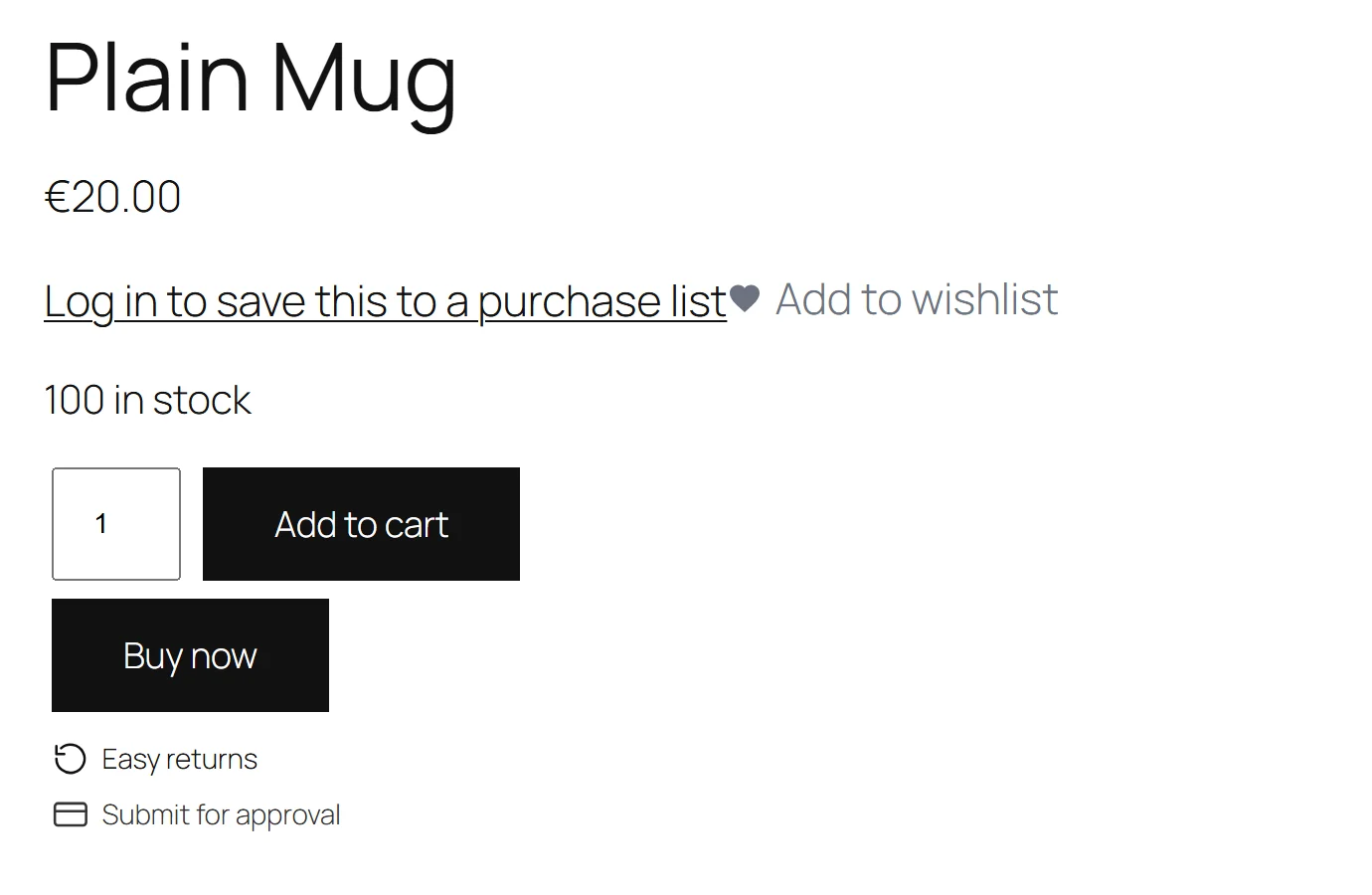
The Buy now button is a submit button printed inside your theme's own add-to-cart form, so pressing it submits that form: the chosen variation, the quantity, product add-ons, subscription terms, min/max quantity rules and every other plugin's validation all apply exactly as they did before this plugin existed. Every plugin in this category that instead posts ?add-to-cart=123 behind the shopper's back buys the wrong thing the moment a product has options — or buys one of something you sell in sixes.
A refusal never lands on the checkout
The redirect is hung on WooCommerce's own woocommerce_add_to_cart_redirect filter, which core applies only after an add has actually succeeded. So a shopper who did not choose a variation, or whose last unit went while they were reading, stays on the product page with WooCommerce's own message. Plugins that redirect from their own handler send that shopper to a checkout saying "your cart is currently empty" — the one sentence a shop cannot afford on the page after Buy now.
Nobody's cart is emptied
Buy now adds and goes. A store that silently discards the three things somebody was already buying has not made a sale faster; it has lost two.
The one-page checkout is WooCommerce's own
[gatemi_quick_checkout product="123"] puts one product and your checkout on a single page — and the checkout is rendered by WooCommerce itself, so every gateway and every field you have configured behave exactly as they do on the real one. A re-implemented checkout form is how this category comes to lose a payment method nobody noticed was missing. Opening the page does not put anything in anybody's cart: a page view is not a purchase.
What you get
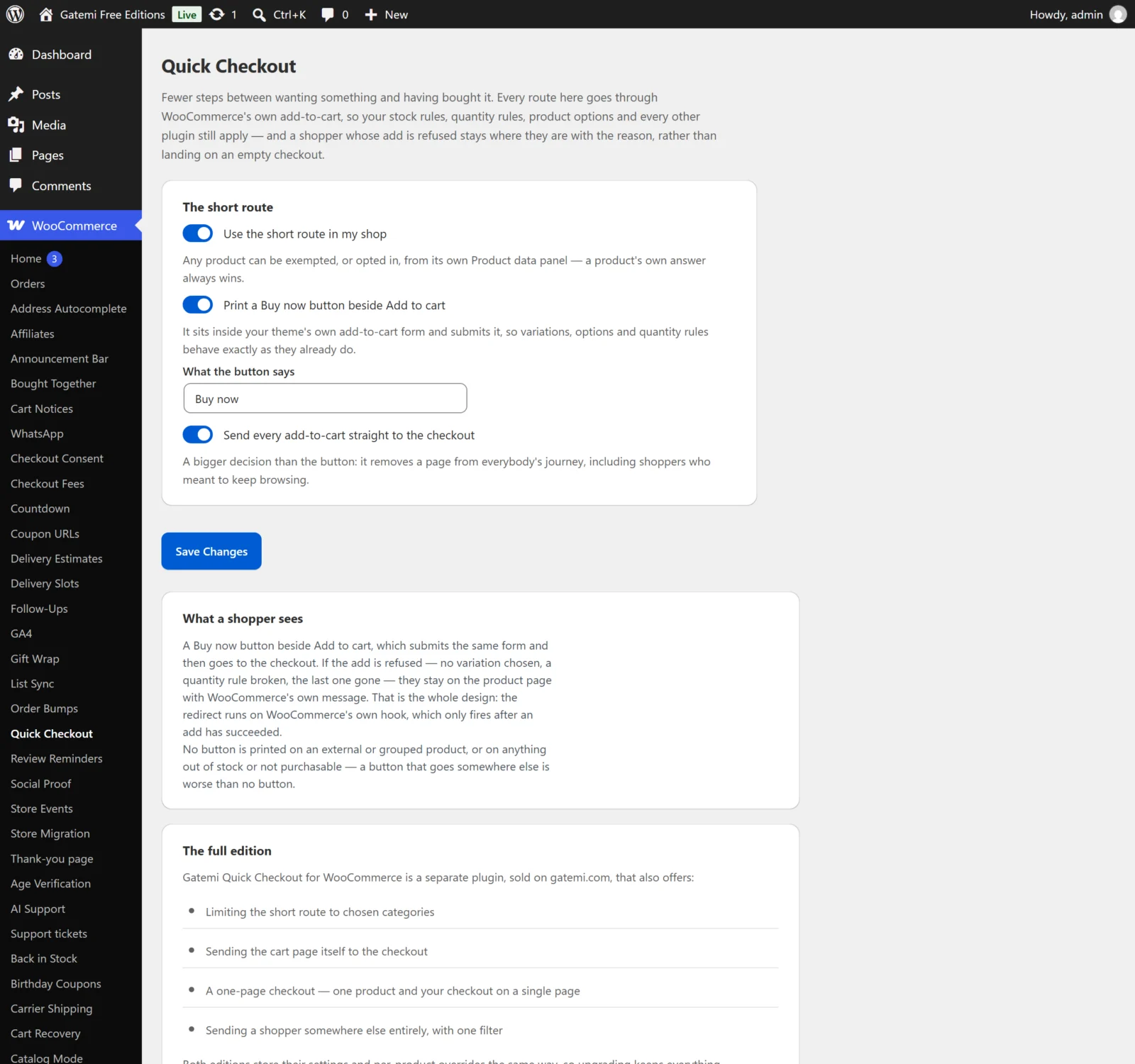
* A Buy now button with your own wording, beside Add to cart * Send every add-to-cart straight to the checkout * Send the cart page itself onward, leaving an empty cart alone * The [gatemi_quick_checkout] one-page checkout * One decider for where the short route applies: a product's own override first, then categories (sub-categories included), then the shop * Never on external or grouped products, or on anything out of stock or not purchasable
Every license includes
One year of updates and priority support, delivered straight to your WordPress dashboard.
Use on 1, 5 or 25 sites depending on your license — local, staging and development sites are always free.
30-day money-back guarantee — full refund, no questions asked.
Keeps working after expiry — if you choose not to renew, the plugin keeps running exactly as installed; it simply stops receiving updates and support until you do.
Requires WordPress 6.4+ · PHP 7.4+ · tested up to WordPress 6.8. Works with the classic and block checkout alike.
Free edition or full edition?
This plugin has a free edition. It is a complete plugin in its own right, and upgrading keeps every setting and every record, so you can start free and buy when you need more.
What the full edition adds
What the full edition adds
Free
Full
Limit the short route to chosen categories (sub-categories included)
—
✓
Send the cart page itself to the checkout, leaving an empty cart alone
—
✓
A one-page checkout — one product and core's own checkout on a page
—
✓
Included in both editions (8)
A Buy now button beside Add to cart
It submits the theme's own add-to-cart form — variations, options and quantity rules apply
Send every add-to-cart straight to the checkout
Never on external or grouped products, or anything out of stock or unpurchasable
Variable products included, because the button submits their own form
A per-product override — always, never, or follow the shop
A shopper's existing cart is never emptied
Your own wording on the Buy now button
License
Single Site, Plus — 5 Sites, Agency — 25 Sites
Frequently asked questions
How does the license work?
Every license includes one year of updates and priority support, delivered straight to your WordPress dashboard. Choose the tier that matches how many production sites you run: 1, 5 or 25.
Which license do I need?
Count your live production sites — that's it. Local, staging and development sites (localhost, *.test, staging.*, dev.* and similar) are always free and never use up an activation.
What happens if I don't renew?
Nothing breaks. The plugin keeps working exactly as installed — it simply stops receiving updates and support until you renew. Renewing later reinstates both immediately.
Can I upgrade my license later?
Yes. Contact support any time and we'll move you to a higher tier — you only pay the difference, and your key and activations carry over.
Can I use it on client sites?
Absolutely. The Plus (5 sites) and Agency (25 sites) tiers are built for agencies — and if you run several Gatemi plugins across client stores, All Access usually works out cheaper.
What if it's not right for my store?
Tell us within 30 days and we refund the order in full — no questions asked. See the refund policy.
Changelog
Every release reaches your WordPress dashboard as an ordinary update while your licence is active.
Version 1.0.1Latest
Fixed: The one-page checkout page was empty: adding the product took the shopper to the product page and the checkout below said the cart was empty; adding now returns to the same page with the checkout filled in, and a short line stands where the checkout will appear until then.
New: A Gatemi menu in the WordPress admin lists your Gatemi plugins with a link to each one's settings; this plugin's screen also stays under WooCommerce.
Improved: The settings screen has a refreshed design and fits a phone screen.
New: Translated into nine languages: Arabic, Chinese (Simplified), Dutch, French, German, Italian, Portuguese (Brazil), Russian and Spanish.
Improved: Tested with WordPress 7.1.
WordPress 6.4+ · PHP 7.4+
Version 1.0.0
First release.
WordPress 6.4+ · tested up to 7.0 · PHP 7.4+
5 reviews for Quick Checkout for WooCommerce
Rated 4 out of 5
Laura (verified owner)–
Happy enough with the purchase. I’ve only used about half of what Quick Checkout can do.
Rated 5 out of 5
Anna W. (verified owner)–
Die Doku deckt tatsächlich ab, was man braucht. Seit der Installation von Quick Checkout kein einziger Fehler im Log. Klare Empfehlung.
Rated 5 out of 5
Gary R (verified owner)–
Worth it for the time it’s saved me alone. I’ve had Quick Checkout on a busy shop for a full season.
Rated 5 out of 5
Helen Reeves (verified owner)–
One of my better purchases this year. Set Quick Checkout up once and it’s looked after itself. Nothing to fault.
Rated 4 out of 5
Chloe (verified owner)–
No real problems, but it took me a while to configure. Settled on Single Site in the end and it’s been fine. Job more or less done.


Laura (verified owner) –
Happy enough with the purchase. I’ve only used about half of what Quick Checkout can do.
Anna W. (verified owner) –
Die Doku deckt tatsächlich ab, was man braucht. Seit der Installation von Quick Checkout kein einziger Fehler im Log. Klare Empfehlung.
Gary R (verified owner) –
Worth it for the time it’s saved me alone. I’ve had Quick Checkout on a busy shop for a full season.
Helen Reeves (verified owner) –
One of my better purchases this year. Set Quick Checkout up once and it’s looked after itself. Nothing to fault.
Chloe (verified owner) –
No real problems, but it took me a while to configure. Settled on Single Site in the end and it’s been fine. Job more or less done.