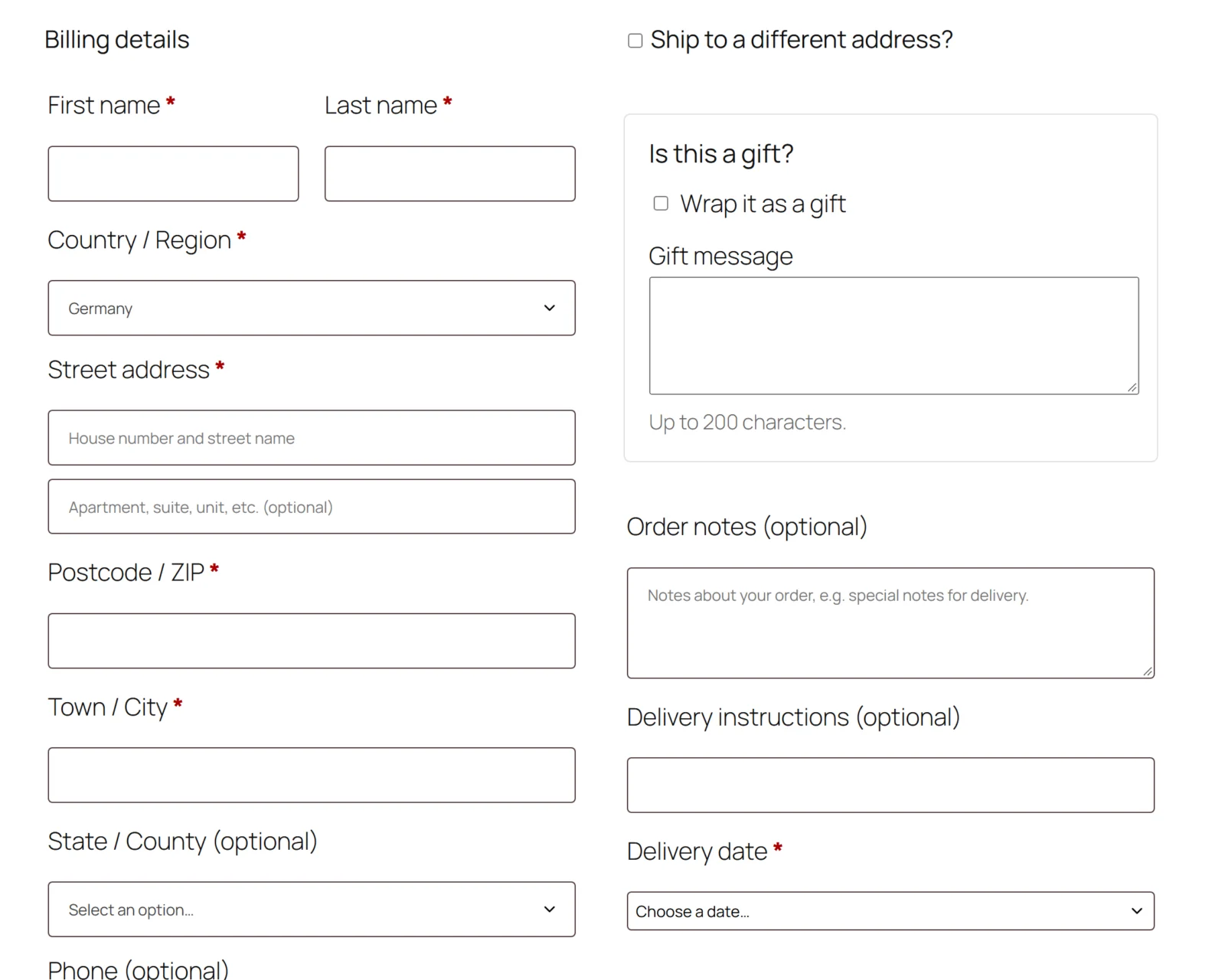
Add, rename, reorder, hide and require checkout fields — on the classic checkout and the block checkout alike — with the values shown on the order, in your emails and to the customer.
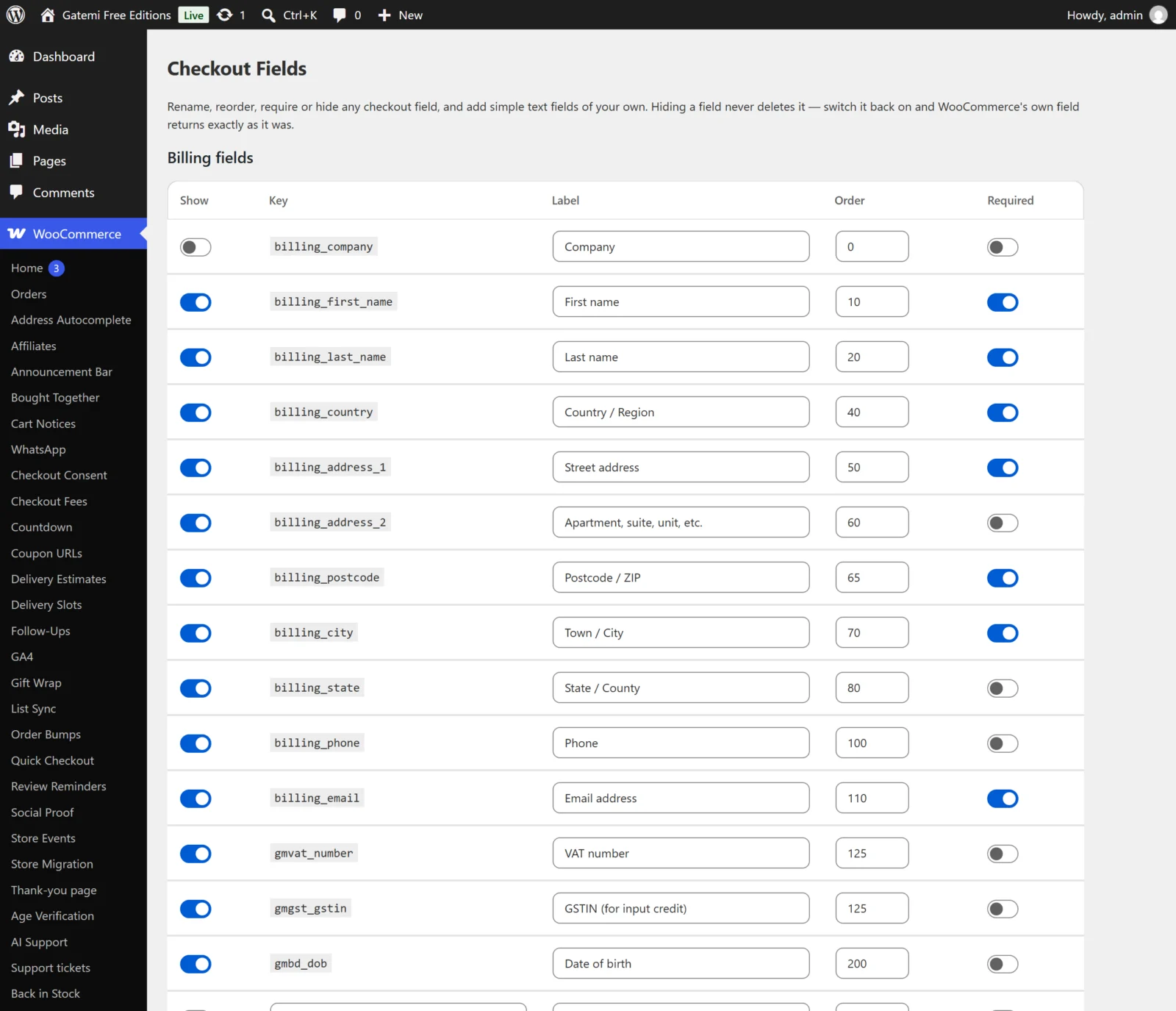
Gatemi Checkout Fields for WooCommerce lets you shape the checkout your customers actually see: rename a field, move it, make it optional or required, hide the ones your store does not need, and add your own.
Hiding a field never deletes it. Your changes are stored as a patch over WooCommerce's own field definitions, not as a replacement for them — so switching a field back on returns it exactly as WooCommerce defined it, with its validation and country-specific rules intact. Deactivating the plugin puts your checkout back as it was.
One configuration, both checkouts. Custom fields are registered with the block checkout through WooCommerce's own additional-fields API rather than a second engine bolted onto the Store API, so the classic checkout and the block checkout cannot drift apart.
The editor starts from your real checkout. Open it and you see the fields your store has right now — including the ones other plugins added — rather than a blank screen you have to rebuild from memory.
Features
Rename, reorder, require or hide any billing, shipping or additional field
Add your own fields: text, text area, dropdown, radio buttons, checkbox, email, phone, number, date
Every field type has its own sanitizer — a value is never stored untouched
Show a field's value on the order screen, in your order emails, and to the customer — each switchable per field
Block checkout support through WooCommerce's own API
Uninstall keeps what customers typed: those values are part of the order
Every license includes
One year of updates and priority support, delivered straight to your WordPress dashboard.
Use on 1, 5 or 25 sites depending on your license — local, staging and development sites are always free.
30-day money-back guarantee — full refund, no questions asked.
Keeps working after expiry — if you choose not to renew, the plugin keeps running exactly as installed; it simply stops receiving updates and support until you do.
Requires WordPress 6.4+ · PHP 7.4+ · tested up to WordPress 7.0. Works with the classic and block checkout alike.
Free edition or full edition?
This plugin has a free edition. It is a complete plugin in its own right, and upgrading keeps every setting and every record, so you can start free and buy when you need more.
What the full edition adds
What the full edition adds
Free
Full
Add your own fields
✓ (text)
✓
Block checkout, via WooCommerce's own additional-fields API
—
✓
Per-field display in order emails and the customer's order view
—
✓
Per-field placeholders and CSS classes
—
✓
Included in both editions (4)
Rename, reorder, require or hide any core checkout field
Hidden fields are unset, not styled away; restored exactly on re-enable
Custom values validated, saved on the order, shown on the order screen
Editor seeds itself from the store's real checkout
License
Single Site, Plus — 5 Sites, Agency — 25 Sites
Frequently asked questions
How does the license work?
Every license includes one year of updates and priority support, delivered straight to your WordPress dashboard. Choose the tier that matches how many production sites you run: 1, 5 or 25.
Which license do I need?
Count your live production sites — that's it. Local, staging and development sites (localhost, *.test, staging.*, dev.* and similar) are always free and never use up an activation.
What happens if I don't renew?
Nothing breaks. The plugin keeps working exactly as installed — it simply stops receiving updates and support until you renew. Renewing later reinstates both immediately.
Can I upgrade my license later?
Yes. Contact support any time and we'll move you to a higher tier — you only pay the difference, and your key and activations carry over.
Can I use it on client sites?
Absolutely. The Plus (5 sites) and Agency (25 sites) tiers are built for agencies — and if you run several Gatemi plugins across client stores, All Access usually works out cheaper.
What if it's not right for my store?
Tell us within 30 days and we refund the order in full — no questions asked. See the refund policy.
Changelog
Every release reaches your WordPress dashboard as an ordinary update while your licence is active.
Version 1.0.1Latest
Fixed: Unticking a field's box on the Checkout Fields screen now really switches it off; before, the field came back switched on after saving.
Fixed: Saving the screen no longer empties the choices of a dropdown or radio-button field: each of your own fields now has a Choices box (one choice per line, as key|Label), plus Placeholder and CSS classes boxes.
Fixed: Fields set to show on the order now appear to the customer on the order-received page and in My Account → Orders; before, they were not shown there.
New: Renaming, reordering, hiding or requiring WooCommerce's own billing and shipping fields now applies to the Checkout block as well as the classic checkout, and a value sent for a hidden field is not saved on the order. On the block, an edit applies when the billing and shipping versions of the field agree.
New: A Gatemi menu in the WordPress admin lists your Gatemi plugins with a link to each one's settings; this plugin's screen also stays under WooCommerce.
Improved: The settings screen has a refreshed design and fits a phone screen.
New: Translated into nine languages: Arabic, Chinese (Simplified), Dutch, French, German, Italian, Portuguese (Brazil), Russian and Spanish.
Improved: Tested with WordPress 7.1.
WordPress 6.4+ · PHP 7.4+
Version 1.0.0
First release.
WordPress 6.4+ · tested up to 7.0 · PHP 7.4+
5 reviews for Checkout Fields for WooCommerce
Rated 4 out of 5
D. Jackson (verified owner)–
Happy with it on the whole. Checkout Fields does the basics without complaint. Would buy it again, I think.
Rated 5 out of 5
K. Bennett (verified owner)–
This one is a keeper.
Rated 5 out of 5
Claire W. (verified owner)–
Bought it for one shop and ended up using it on all of them. Checkout Fields is the first thing I install on a new build now. It has been worth every minute I did not spend on this.
Rated 5 out of 5
Jessica H. (verified owner)–
It didn’t break when I changed themes.
Rated 4 out of 5
Brian (verified owner)–
Would be five stars with one more option. I’d one question about Checkout Fields and the docs didn’t cover it. Does its bit.




D. Jackson (verified owner) –
Happy with it on the whole. Checkout Fields does the basics without complaint. Would buy it again, I think.
K. Bennett (verified owner) –
This one is a keeper.
Claire W. (verified owner) –
Bought it for one shop and ended up using it on all of them. Checkout Fields is the first thing I install on a new build now. It has been worth every minute I did not spend on this.
Jessica H. (verified owner) –
It didn’t break when I changed themes.
Brian (verified owner) –
Would be five stars with one more option. I’d one question about Checkout Fields and the docs didn’t cover it. Does its bit.