Google Places address autocomplete at checkout, with your own API key — on the new PlaceAutocompleteElement, and never replacing the ordinary address fields.
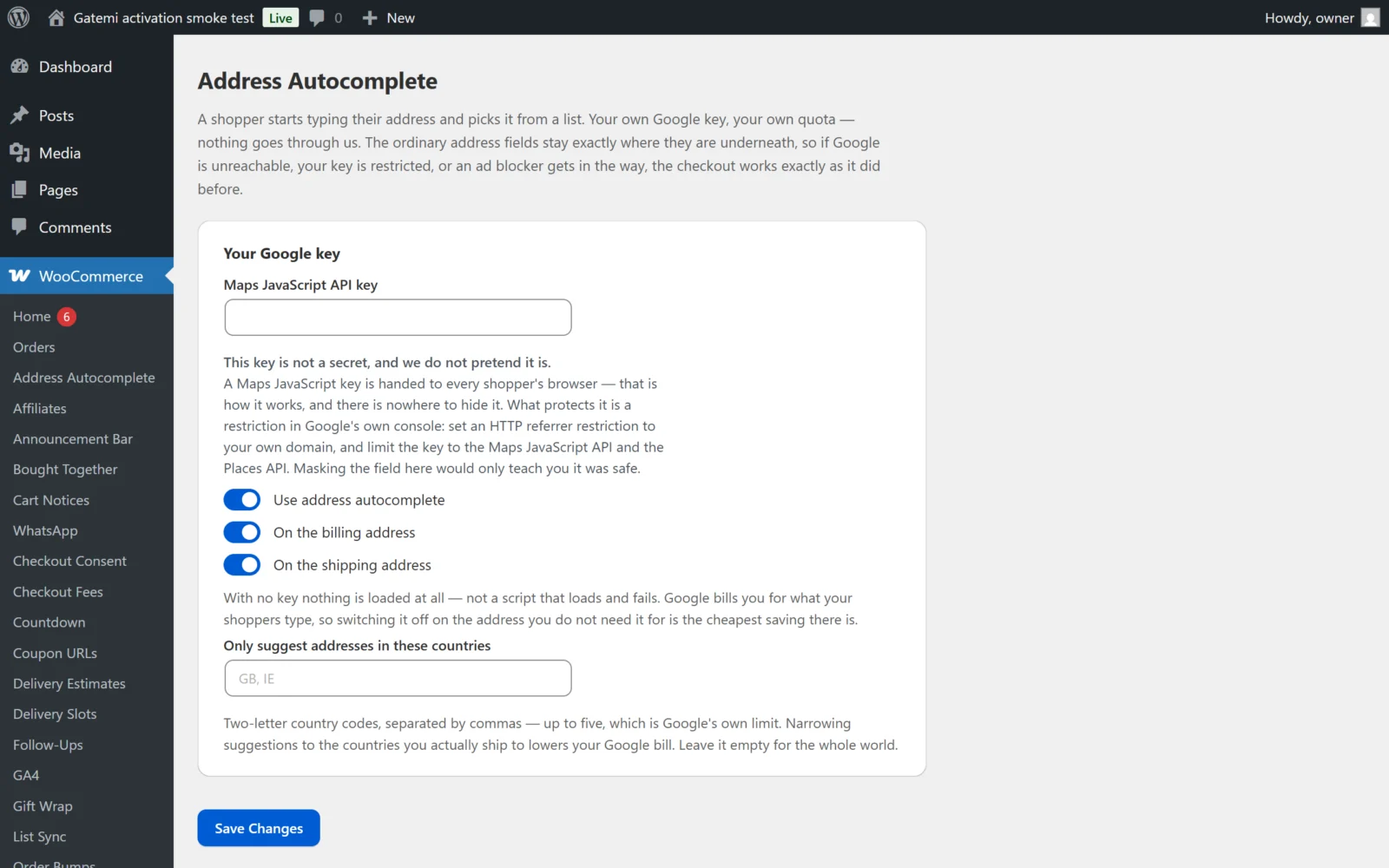
A shopper starts typing and picks their address from a list. Your own Google key, your own quota; nothing goes through us.
It never replaces a field
WooCommerce's own address inputs stay exactly where they are, underneath the search box. If your key is missing, your referrer restriction bites, your quota runs out, an ad blocker gets in the way, or Google has a bad afternoon, the checkout works precisely as it did before this plugin was installed. That is the one failure in this category that costs orders, and it is avoided by never replacing anything.
On the far side of Google's migration
Google has deprecated its old autocomplete widget in favour of PlaceAutocompleteElement. This plugin uses the new element — so it ships on the far side of that migration rather than needing a rewrite immediately. Where the new element is not available it stands down, rather than falling back to the thing Google is removing.
Your key is not a secret, and we do not pretend it is
A Maps JavaScript key is handed to every shopper's browser — that is how it works, and there is nowhere to hide it. So the field is not masked. What protects it is an HTTP-referrer restriction in Google's own console, and the settings screen says so right beside the field rather than in a document nobody reads.
What you get
* Autocomplete on the checkout and the My Account address editor * Billing and shipping, each switchable * Suggestions limited to the countries you choose (capped at Google's own limit of five before the request is made, not after) * A filterable map from Google's address components to WooCommerce's fields — the seam Google's renames land in * Nothing loaded at all on a store with no key * No data of yours or your shoppers' sent anywhere but Google
Every license includes
One year of updates and priority support, delivered straight to your WordPress dashboard.
Use on 1, 5 or 25 sites depending on your license — local, staging and development sites are always free.
30-day money-back guarantee — full refund, no questions asked.
Keeps working after expiry — if you choose not to renew, the plugin keeps running exactly as installed; it simply stops receiving updates and support until you do.
Requires WordPress 6.4+ · PHP 7.4+ · tested up to WordPress 6.8. Works with the classic and block checkout alike.
Free edition or full edition?
This plugin has a free edition. It is a complete plugin in its own right, and upgrading keeps every setting and every record, so you can start free and buy when you need more.
Limit suggestions to chosen countries (lowering the Google bill)
—
✓
Change how Google's components map onto checkout fields
—
✓
Included in both editions (9)
Google Places autocomplete at checkout, on the merchant's own key
On the My Account address editor too
Billing and shipping, each switchable
Built on PlaceAutocompleteElement, never the deprecated widget
Never replaces WooCommerce's own address fields
Nothing loaded on a store with no key
Nothing loaded on a page with no address on it
The key shown, not masked, with the referrer restriction explained
The country written first, so WooCommerce rebuilds the state field
License
Single Site, Plus — 5 Sites, Agency — 25 Sites
Frequently asked questions
How does the license work?
Every license includes one year of updates and priority support, delivered straight to your WordPress dashboard. Choose the tier that matches how many production sites you run: 1, 5 or 25.
Which license do I need?
Count your live production sites — that's it. Local, staging and development sites (localhost, *.test, staging.*, dev.* and similar) are always free and never use up an activation.
What happens if I don't renew?
Nothing breaks. The plugin keeps working exactly as installed — it simply stops receiving updates and support until you renew. Renewing later reinstates both immediately.
Can I upgrade my license later?
Yes. Contact support any time and we'll move you to a higher tier — you only pay the difference, and your key and activations carry over.
Can I use it on client sites?
Absolutely. The Plus (5 sites) and Agency (25 sites) tiers are built for agencies — and if you run several Gatemi plugins across client stores, All Access usually works out cheaper.
What if it's not right for my store?
Tell us within 30 days and we refund the order in full — no questions asked. See the refund policy.
Changelog
Every release reaches your WordPress dashboard as an ordinary update while your licence is active.
Version 1.0.1Latest
Fixed: on the Checkout block the address search now attaches to the block's own address fields and fills in the picked address, country and state together; before, it only worked on the classic checkout.
Improved: on My Account the Google script now loads only on the address editor, so the orders, downloads and dashboard pages no longer make a paid Google call for nothing.
New: A Gatemi menu in the WordPress admin lists your Gatemi plugins with a link to each one's settings; this plugin's screen also stays under WooCommerce.
Improved: The settings screen has a refreshed design and fits a phone screen.
New: Translated into nine languages: Arabic, Chinese (Simplified), Dutch, French, German, Italian, Portuguese (Brazil), Russian and Spanish.
Improved: Tested with WordPress 7.1.
WordPress 6.4+ · PHP 7.4+
Version 1.0.0
First release.
WordPress 6.4+ · tested up to 7.0 · PHP 7.4+
5 reviews for Address Autocomplete for WooCommerce
Rated 5 out of 5
Alan G. (verified owner)–
The other one I tried wanted a subscription for this. Address Autocomplete has never once needed me to clear a cache to fix it. It just works, and that’s all I ask.
Rated 4 out of 5
Alice G. (verified owner)–
I expected slightly more for the money, but only slightly. The Address Autocomplete settings took me longer to work out than I expected. Fine as it is.
Rated 4 out of 5
Carlos N (verified owner)–
Cumple, una vez das con los ajustes. Single Site me cubre por ahora. Me habría gustado una opción más en Address Autocomplete. Bastante bueno como para dejar de buscar.
Rated 5 out of 5
Thomas R. (verified owner)–
Read the docs, changed two settings, finished. Everything in Address Autocomplete worked first time. Everything I hoped and nothing I feared.
Rated 4 out of 5
Gary F. (verified owner)–
No complaints, just not quite a five. Address Autocomplete is fine on a small catalogue. Can’t speak for a big one.


Alan G. (verified owner) –
The other one I tried wanted a subscription for this. Address Autocomplete has never once needed me to clear a cache to fix it. It just works, and that’s all I ask.
Alice G. (verified owner) –
I expected slightly more for the money, but only slightly. The Address Autocomplete settings took me longer to work out than I expected. Fine as it is.
Carlos N (verified owner) –
Cumple, una vez das con los ajustes. Single Site me cubre por ahora. Me habría gustado una opción más en Address Autocomplete. Bastante bueno como para dejar de buscar.
Thomas R. (verified owner) –
Read the docs, changed two settings, finished. Everything in Address Autocomplete worked first time. Everything I hoped and nothing I feared.
Gary F. (verified owner) –
No complaints, just not quite a five. Address Autocomplete is fine on a small catalogue. Can’t speak for a big one.