Ask your own questions when somebody creates an account — every field type, conditional display, answers on the profile and in WordPress’ own personal-data export.
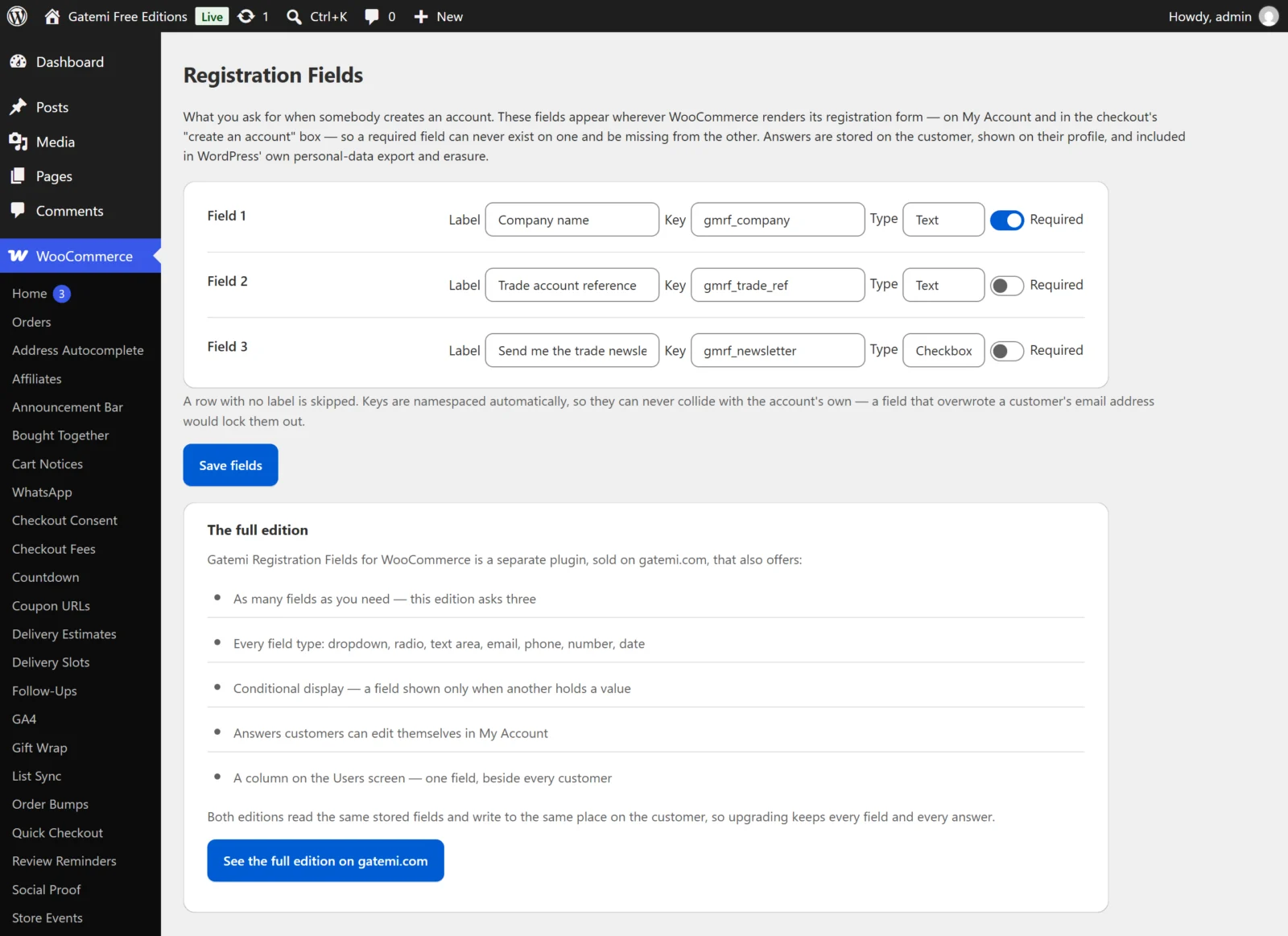
Gatemi Registration Fields adds your own questions to WooCommerce's registration form: a company name, a VAT number, how they heard about you, whether they are a trade account — with the answers stored on the customer, shown on their profile, and available to them in My Account when you say so.
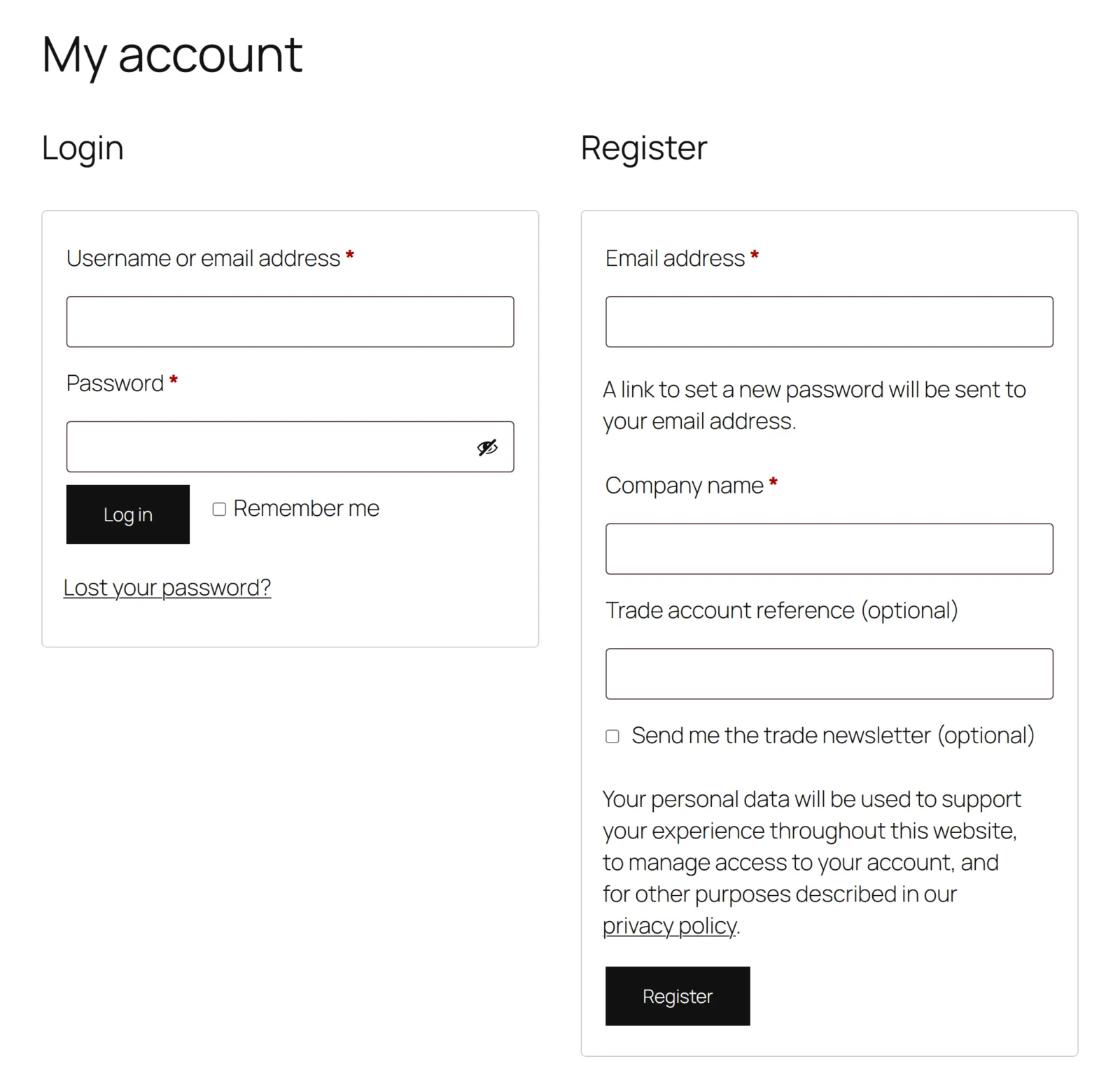
One form, everywhere WooCommerce renders it
Fields go on through woocommerce_register_form, which is the My Account page and the checkout's "create an account" box. A required field that one of those renders and the other does not is an account nobody can create, and the merchant hears about it from a customer who could not check out.
A rejected registration keeps what they typed
WooCommerce re-renders the form after an error. A plugin that renders its fields from the stored configuration alone hands the customer an empty box beside the one complaint, so they retype eight answers to fix one. This one reads the submission back. It is the most-reported complaint in this category and it is four lines.
Conditional fields are decided on the server
The script that shows and hides them is a convenience; the same rule is evaluated in PHP, and that is what validation and storage read. A field hidden by a rule is not validated and not stored — otherwise a required question the customer never saw refuses their registration.
It is personal data, and it is treated that way
Answers live in user meta under one namespace, and the plugin registers with WordPress' own personal-data exporter and eraser rather than adding a button of its own — because a customer asking a store for their data expects one export, and a plugin with its own screen is data the store forgets to include.
Features
Text, text area, dropdown, radio, checkbox, email, phone, number and date fields
Required fields, ordering, placeholders, and your own CSS classes
Conditional display: show a field only when another holds a value
Answers on the user's profile screen, editable by anyone who can edit users
Fields the customer can edit themselves in My Account — and ones they cannot
One field as a column on the Users screen
Keys namespaced automatically, so a field can never overwrite user_email
Every type names its own sanitizer, and an unknown type falls back to the strictest
Built for stores that mean it
Strict types throughout, PHPStan level 8 with no baseline, WordPress-Extra coding standards at zero errors and zero warnings, and a 208-check simulation suite that runs with no database and no network.
Every license includes
One year of updates and priority support, delivered straight to your WordPress dashboard.
Use on 1, 5 or 25 sites depending on your license — local, staging and development sites are always free.
30-day money-back guarantee — full refund, no questions asked.
Keeps working after expiry — if you choose not to renew, the plugin keeps running exactly as installed; it simply stops receiving updates and support until you do.
Requires WordPress 6.4+ · PHP 7.4+ · tested up to WordPress 7.0. Works with the classic and block checkout alike.
Free edition or full edition?
This plugin has a free edition. It is a complete plugin in its own right, and upgrading keeps every setting and every record, so you can start free and buy when you need more.
What the full edition adds
What the full edition adds
Free
Full
Your own fields on the registration form
up to 3
unlimited
Field types
text, checkbox
text, text area, dropdown, radio, checkbox, email, phone, number, date
Conditional display — show a field only when another holds a value
—
✓
Answers customers can edit themselves in My Account
—
✓
One field as a column on the Users screen
—
✓
Placeholders and per-field CSS classes
—
✓
Included in both editions (6)
A rejected registration comes back filled in
Required fields
Keys namespaced, so a field can never overwrite user_email
Every type names its own sanitizer; unknown falls back to the strictest
Answers on the profile screen, editable there
Registered with WordPress' own personal-data exporter and eraser
License
Single Site, Plus — 5 Sites, Agency — 25 Sites
Frequently asked questions
How does the license work?
Every license includes one year of updates and priority support, delivered straight to your WordPress dashboard. Choose the tier that matches how many production sites you run: 1, 5 or 25.
Which license do I need?
Count your live production sites — that's it. Local, staging and development sites (localhost, *.test, staging.*, dev.* and similar) are always free and never use up an activation.
What happens if I don't renew?
Nothing breaks. The plugin keeps working exactly as installed — it simply stops receiving updates and support until you renew. Renewing later reinstates both immediately.
Can I upgrade my license later?
Yes. Contact support any time and we'll move you to a higher tier — you only pay the difference, and your key and activations carry over.
Can I use it on client sites?
Absolutely. The Plus (5 sites) and Agency (25 sites) tiers are built for agencies — and if you run several Gatemi plugins across client stores, All Access usually works out cheaper.
What if it's not right for my store?
Tell us within 30 days and we refund the order in full — no questions asked. See the refund policy.
Changelog
Every release reaches your WordPress dashboard as an ordinary update while your licence is active.
Version 1.0.1Latest
Fixed: a required registration field could stop customers creating an account at the checkout, because the checkout never showed it. Your fields now appear in the classic checkout's "create an account" box as well as on My Account, and an account created through the Checkout block is never refused for a field it did not show.
Fixed: saving a profile as a user who can only view the answers, not edit them, no longer erases that customer's answers.
Fixed: a dropdown or radio field now only accepts one of its own options, and an answer its type cannot accept (such as an email address that is not one) is reported as "not a valid answer" rather than as a missing required field — on the registration form and in My Account → Account details.
New: translations into Arabic, Chinese (Simplified), Dutch, French, German, Italian, Portuguese (Brazil), Russian and Spanish.
New: A Gatemi menu in the WordPress admin lists your Gatemi plugins with a link to each one's settings; this plugin's screen also stays under WooCommerce.
Improved: The settings screen has a refreshed design and fits a phone screen.
Improved: Tested with WordPress 7.1.
WordPress 6.4+ · PHP 7.4+
Version 1.0.0
First release.
WordPress 6.4+ · tested up to 7.0 · PHP 7.4+
5 reviews for Registration Fields for WooCommerce
Rated 5 out of 5
Hannah R. (verified owner)–
Been running it on a live store for a couple of months now. Happy to have found it.
Rated 4 out of 5
Megan Fletcher (verified owner)–
Nothing wrong with it. Nothing that made me sit up either. I’d like one more option in Registration Fields, but it’s fine as it is. Decent bit of kit.
Rated 5 out of 5
Silvia P. (verified owner)–
Bastante más ligero que lo que tenía antes. Le he exigido bastante a Registration Fields y ha aguantado. No cambiaría nada.
Rated 4 out of 5
Ian (verified owner)–
Does the job, once you get the settings right. No conflicts with Registration Fields so far, and that’s the main thing. Happy enough.
Rated 4 out of 5
Brian H (verified owner)–
Doesn’t do quite everything, but what it does it does well. Been running Registration Fields a few weeks now with no trouble. A good four.



Hannah R. (verified owner) –
Been running it on a live store for a couple of months now. Happy to have found it.
Megan Fletcher (verified owner) –
Nothing wrong with it. Nothing that made me sit up either. I’d like one more option in Registration Fields, but it’s fine as it is. Decent bit of kit.
Silvia P. (verified owner) –
Bastante más ligero que lo que tenía antes. Le he exigido bastante a Registration Fields y ha aguantado. No cambiaría nada.
Ian (verified owner) –
Does the job, once you get the settings right. No conflicts with Registration Fields so far, and that’s the main thing. Happy enough.
Brian H (verified owner) –
Doesn’t do quite everything, but what it does it does well. Been running Registration Fields a few weeks now with no trouble. A good four.