
Both editions have one screen, WooCommerce → Social Proof (capability manage_woocommerce), and store their settings in the same option, gmsp_settings.
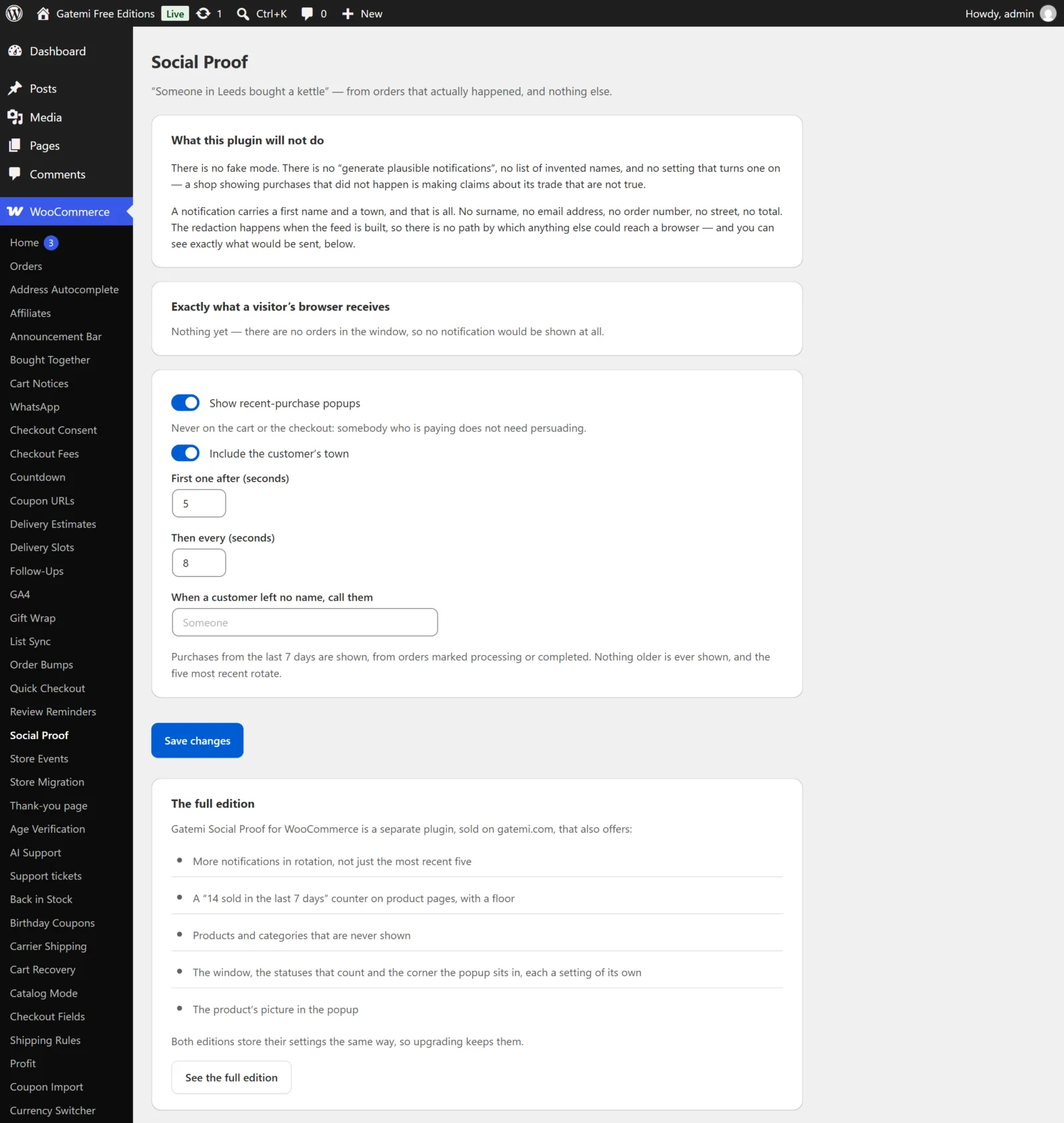
What a visitor's browser receives
Not a setting, but the most useful part of the screen. It lists the notifications in the current feed — Name, Town, Product — exactly as they would be sent. Change a setting, wait for the next rebuild, and this table shows the result.
Settings in both editions
Show recent-purchase popups
- Key:
popups· Default: on (yes) - Off: no popup anywhere, and the hourly rebuild is unscheduled (in the full edition it keeps running while the counter is on).
- Popups never appear on the cart or the checkout, whatever this says: somebody who is paying does not need persuading.
Include the customer's town
- Key:
show_city· Default: on - On: "Sarah in Leeds bought a kettle", from the billing city.
- Off: "Sarah bought a kettle". The town is left out of the feed itself, not just hidden.
First one after (seconds)
- Key:
delay· Default:5· Range: 1–120 - How long after the page loads the first popup appears.
Then every (seconds)
- Key:
interval· Default:8· Range: 3–300 - The gap between popups.
When a customer left no name, call them
- Key:
anonymous_name· Default: empty, shown as "Someone" - Used when an order has no billing first name, so a store selling to businesses still has a feed.
Fixed in the free edition
The free edition's screen says what it does with the rest:
| Free edition | |
|---|---|
| Notifications in rotation | The 5 most recent |
| Window | The last 7 days |
| Statuses that count | Processing, Completed |
| Corner | Bottom left |
| Product picture | Not shown |
| Sales counter | Not shown |
Full edition settings
The popups
Show the product's picture — Full edition
- Key:
show_image· Default: on - The product's featured image at WordPress' thumbnail size.
Where — Full edition
- Key:
position· Default:bottom-left - Bottom left, Bottom right, Top left or Top right.
How many to rotate — Full edition
- Key:
max_items· Default:12· Range: 1–30
Which orders count
Statuses — Full edition
- Key:
statuses· Default:processing,completed - Comma-separated order statuses, without
wc-. Pending is deliberately not in the default: an order nobody has paid for is not a purchase.
From the last (days) — Full edition
- Key:
window_days· Default:7· Range: 1–90 - Nothing older is ever shown, whatever is stored: the window is checked again every time the feed is read.
Never show these products (ids) — Full edition
- Key:
exclude_products· Default: empty - Comma- or space-separated product ids. An order whose first line is excluded is named by its next line instead.
Never show these categories (ids) — Full edition
- Key:
exclude_terms· Default: empty - Product category ids; sub-categories are covered too.
The free edition cannot edit these two lists, but it still obeys any it finds stored: a product a merchant decided never to name in public stays unnamed after a downgrade.
The product-page counter
Show "14 sold in the last 7 days" on product pages — Full edition
- Key:
counter· Default: off
Only when it is at least — Full edition
- Key:
counter_floor· Default:3· Minimum: 2 - "1 sold in the last week" is a shop telling its visitors nobody buys this, so lower counts are not shown. Refunded quantities are taken off.
License & updates — Full edition
Enter the GM-… key from your gatemi.com account and press Activate. The card shows the status, the renewal date and the sites in use. If gatemi.com cannot be reached, the licence is left unchanged and the check retries on its own.
For developers — Full edition
The screen ends with the filters the plugin applies, documented in the developer reference.