
Full edition only. Gatemi Product Compliance for WooCommerce can write the declaration fields of many products at once from a CSV file. It writes each product's own fields — the same ones as the product's Compliance tab — and does not create or change records.
You'll find it on WooCommerce → Product Compliance, in the Import declarations from a CSV file card.
Columns
The first row is the header row. Each data row is one product.
| Purpose | Header (canonical) | Also accepted |
|---|---|---|
| Find the product by SKU | sku |
— |
| Find the product by id | product_id |
id, product |
| Manufacturer | manufacturer |
— |
| Responsible person | responsible |
responsible_person, eu_responsible |
| Importer | importer |
— |
| Distributor | distributor |
— |
| Safety information | warnings |
safety, safety_information, safety_warnings |
| Conformity documents | documents |
— |
How headers are read: a UTF-8 byte-order mark at the start is removed; the header is trimmed and lower-cased; runs of spaces and hyphens become a single underscore. So Responsible Person, responsible-person and RESPONSIBLE_PERSON all mean responsible, and Product ID means product_id. Any other header is ignored. If two headers mean the same column, the first one is used.
The file must have a sku or a product_id column, or nothing is imported: "The file needs a sku or a product_id column to say which product each row is about."
Delimiter
The importer looks at the header line and uses whichever of comma, semicolon or tab appears most often (comma when tied). Files saved by spreadsheets in European locales, which use semicolons, work as they are.
Values
- Text fields keep line breaks; markup is stripped. Put a cell in double quotes if it contains a line break, a comma or the delimiter — spreadsheets do this when saving as CSV.
- Documents are media-library attachment ids separated by commas, e.g.
"412,418"(quoted, because of the comma). Non-numeric parts are ignored and duplicates removed.
Matching products
- If the file has a
skucolumn and the row's SKU is not empty, the product with that SKU is used. - Otherwise — or if the SKU matches nothing — if the file has a
product_idcolumn, the product with that id is used. - If neither finds a product, the row is skipped: "Line N: no product matches the sku or product_id given."
Variable products: a row may name the parent or a variation. A row whose SKU or id is a variation's is written to its parent product, because variations show their parent's declaration. Several rows for variations of one product therefore write the same parent — the last row wins — so give one row per product.
What a row writes
For each declaration column present in the file:
- a non-empty cell sets that field on the product;
- an empty cell removes that field from the product, so it falls back to the record that covers it.
A column absent from the file is not touched. A two-column file (sku,warnings) changes the warnings and nothing else.
A row whose file has no declaration column at all is skipped: "Line N: the file carries no declaration column, so there was nothing to write."
Blank rows are skipped silently. A row with fewer cells than the header is padded with empty cells — which, for a declaration column, means that field is cleared. Make sure your rows are complete.
Rehearse first
Tick Rehearse only — decide everything, write nothing before pressing Import. The importer reads the whole file, matches every row and reports the result exactly as a real run would, but writes nothing. Untick and import again to write.
The result
After a run the card shows:
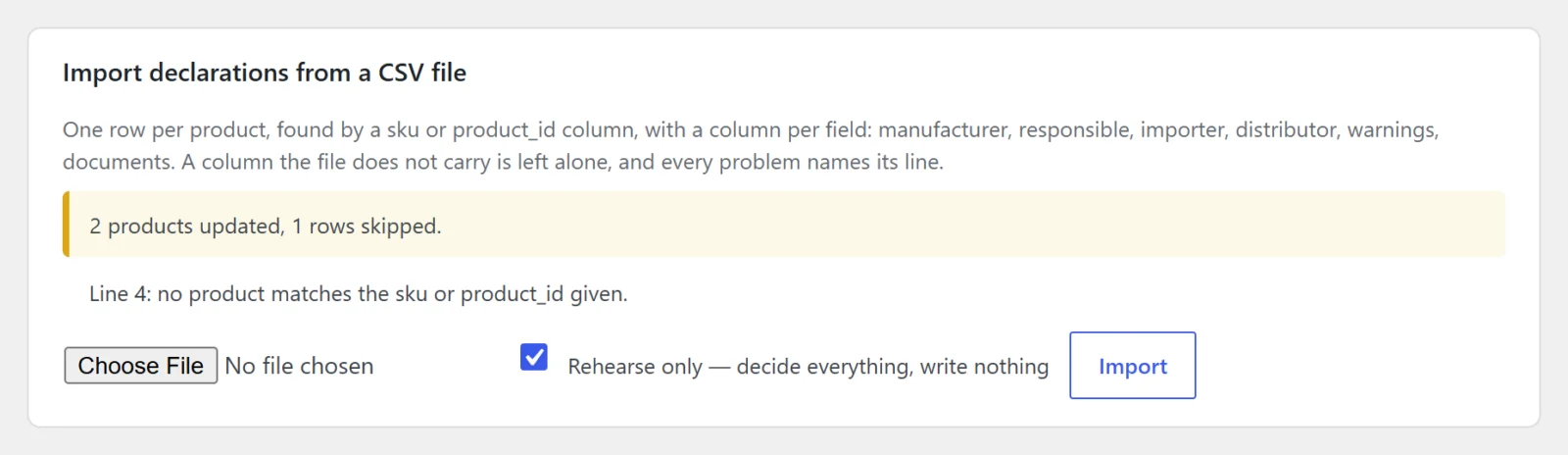
- "N products updated, M rows skipped." — "updated" counts rows that matched a product and had at least one declaration column (in a rehearsal, rows that would have been written);
- a list of problems, each naming its line number in the file (the header is line 1).
Limits
- 5,000 data rows per run. After that the importer stops with "Stopped after 5000 rows; run the rest as a second file." Split large files.
- The file is read from PHP's temporary upload location and is not stored in your uploads folder.
- Your server's upload size limit applies.
Example
sku;manufacturer;Responsible Person;safety_warnings;documents
FJ-PUZ-100;"Fjord Toys AS
Storgata 1, 0155 Oslo, Norway
support@fjordtoys.example";"Holzwerk Import GmbH
Speicherstraße 12, 20457 Hamburg, Germany
safety@holzwerk-import.example";"Not suitable for children under 36 months. Small parts.";"412,418"
FJ-PUZ-200;;;Keep away from fire.;
This semicolon-delimited file sets all four fields on FJ-PUZ-100. On FJ-PUZ-200 it sets the warnings and clears the manufacturer, responsible person and documents typed on that product, handing them back to its record.
After importing
Read the Products that need a responsible person report on the same screen — it is judged with records included — and open a few product pages to check the result.