
This page describes what both editions do, step by step. Differences in the full edition are marked Full edition.
1. The number is cleaned
Customers type VAT numbers in many ways: de 123 456 789, DE-123.456.789. Before anything else, the plugin removes every character that is not a letter or a digit and upper-cases the rest. de 123.456-789 becomes DE123456789.
2. The shape is checked
Before VIES is asked, the number must look like a VAT number:
- It starts with a prefix VIES answers for:
AT BE BG CY CZ DE DK EE EL ES FI FR HR HU IE IT LT LU LV MT NL PL PT RO SE SI SK XI. - After the prefix there are 2 to 14 characters, at least one of them a digit.
This is deliberately only a shape check. Per-country length rules change, and VIES is the authority on whether a number exists. A number that fails the shape check is malformed and VIES is not asked.
3. VIES is asked
The plugin posts to the Commission's VIES REST endpoint, https://ec.europa.eu/taxation_customs/vies/rest-api/check-vat-number, from your server — never from the shopper's browser.
- Free edition sends the country prefix and the rest of the number, nothing else.
- Full edition also sends your own VAT number as the requester, when you have set one, so VIES returns a consultation number.
The answer becomes one of four verdicts:
| Verdict | When |
|---|---|
valid |
VIES answered and said the number is valid |
invalid |
VIES answered and said it is not |
unavailable |
Network error or timeout, a reply other than HTTP 200, a reply that is not JSON, or VIES reporting its own error (for example MS_UNAVAILABLE) |
malformed |
Failed the shape check; VIES was not asked |
With a valid answer, the name, the address and (if returned) the consultation number are kept.
VIES writes --- for a name or address a member state does not disclose (Germany and Spain, for example); the plugin reads that as empty, so the evidence shows nothing rather than a line of dashes.
The result is remembered in the shopper's WooCommerce session, keyed on the cleaned number. Changing the postcode or the shipping method does not ask VIES again; changing the number does. The remembered result is cleared when the cart is emptied. An unavailable result is remembered for one minute at most, so once VIES is back the next checkout refresh asks again and the tax can come off. (Full edition: a valid or invalid answer is remembered for an hour by default, adjustable with the gmvat_cache_ttl filter; the free edition keeps it for the session.)
4. The four conditions
The VAT comes off only when all four are true:
- The verdict is
valid.unavailablenever counts — the plugin fails closed. (Full edition: with Accept a number when VIES cannot be reached on, anunavailablenumber that passed the shape check counts as valid.) - The number's prefix matches the billing country. Greece is matched as billing
GR↔ prefixEL; Northern Ireland is matched as described below; every other country's prefix is its own code. - The billing country is not your own country. Your country is the Your country setting, or your WooCommerce store address country. (Full edition: Also exempt customers in my own country removes this condition.)
- The field is switched on (Ask for a VAT number at the checkout).
The result then passes through the gmvat_exempt filter, so site code can change it. See the developer reference.
A note on Northern Ireland (XI)
XI numbers are checked against VIES. WooCommerce has no separate country for Northern Ireland — its addresses have the country GB — so condition 2 matches an XI number to a billing country of GB with a Northern Ireland delivery postcode (every one begins BT). The postcode is the shipping postcode, or the billing one when the order ships to the billing address.
The XI prefix covers goods moving between Northern Ireland and the EU, not services, so the postcode is only taken into account when the cart needs shipping. A cart with nothing to deliver — a download, a service — does not match, and the VAT stays on. A GB address outside Northern Ireland does not match either. In both cases the checkout explains: "An XI VAT number covers goods delivered to a Northern Ireland address, so the tax cannot be removed from this order."
5. The exemption is applied
When the conditions pass, the plugin calls WooCommerce's own WC()->customer->set_is_vat_exempt( true ); otherwise it sets it to false. WooCommerce then calculates the cart without tax. Because the classic cart, the Cart and Checkout blocks and the Store API all read their totals through this flag, the totals shown are the totals charged. The plugin does not change any tax rate.
6. On the classic checkout
The classic (shortcode) checkout:
-
The field is added to the billing section through the
woocommerce_checkout_fieldsfilter, asgmvat_number, with the placeholderDE123456789. -
As the shopper types, WooCommerce refreshes the order review (
woocommerce_checkout_update_order_review); the plugin reads the number and billing country from that request, checks the number (or uses the remembered result), and sets the exemption. The totals update. -
On "Place order" (
woocommerce_checkout_process) the check runs again from the posted form. A malformed or invalid number stops the order with a message:- "That does not look like a VAT number. It should start with your country code, for example DE123456789."
- "VIES does not recognise that VAT number. Please check it and try again."
An empty field, an unavailable VIES, a country mismatch or a home-country customer does not stop the order; the VAT simply stays on.
-
When VIES cannot be reached, the refresh that got that answer adds a notice (not an error) with the VIES cannot be reached sentence from the settings, or the built-in one. It is a notice so nothing stands between the shopper and the pay button.
-
When the order is created (
woocommerce_checkout_create_order) the evidence is written onto it (step 8).
7. On the Checkout block
The Checkout block does not run the classic hooks. On WooCommerce 8.9 or later the plugin uses WooCommerce's Additional Checkout Fields API:
- The field is registered on
woocommerce_initwith the idgatemi-vat/number, in theaddresslocation. WooCommerce draws it in the billing address form, sanitises it, saves it and shows it on the order. Because it is an address field, WooCommerce also shows it on the shipping address form; the plugin reads only the billing value. - Required is enforced by WooCommerce itself when the setting is on.
- Validation: a malformed or invalid number is refused with the same messages as the classic checkout.
- The exemption is applied when the Store API updates the customer — when the cart's address changes (
woocommerce_store_api_cart_update_customer_from_request), so totals update as the shopper types, and again at checkout (woocommerce_store_api_checkout_update_customer_from_request), before the order takes its totals. - The evidence is written when the Store API fills the order (
woocommerce_store_api_checkout_update_order_from_request).
On WooCommerce older than 8.9 the API does not exist and the block checkout has no VAT field.
8. The evidence on the order
When a VAT number was given, six facts are written to the order meta:
| Meta key | What it holds |
|---|---|
_gmvat_number |
The number as checked (cleaned) |
_gmvat_status |
valid, invalid, unavailable or malformed |
_gmvat_checked_at |
When the check was made, UTC, Y-m-d H:i:s |
_gmvat_exempt |
yes if the VAT came off, otherwise no |
_gmvat_name |
The name and address VIES returned, joined by a space (only if a name was returned) |
_gmvat_consultation |
The VIES consultation number (only if one was returned) |
The free edition does not send a requester number, so on new orders it writes _gmvat_consultation only if VIES returned one anyway. Full edition: with your own VAT number set, every successful check stores one.
On the block checkout WooCommerce also stores the value as typed under _wc_billing/gatemi-vat/number.
9. The order screen
A VAT number box sits in the sidebar of the order screen (both the classic orders screen and the HPOS orders screen). It shows:
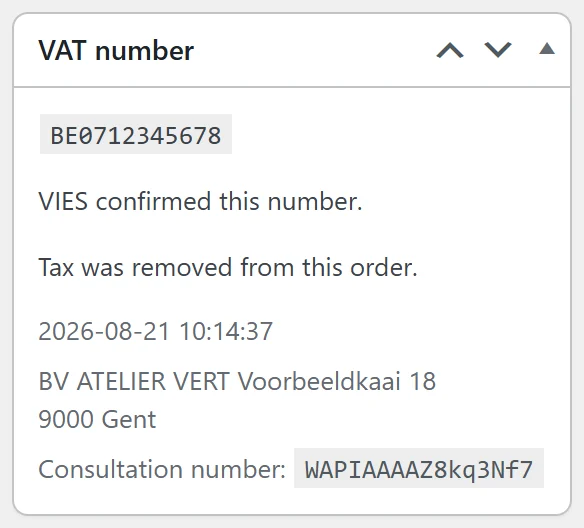
- the number;
- what VIES said — "VIES confirmed this number.", "VIES did not recognise this number.", "VIES could not be reached, so the number was not confirmed." or "This is not shaped like a VAT number, so VIES was not asked.";
- "Tax was removed from this order." or "Tax was charged on this order.";
- the time of the check, the name and address, and the consultation number, when present.
Orders without a number show "No VAT number was given for this order."
10. The order-received page
When an order was recorded as unavailable and the VAT was not removed, the order-received page shows the VIES cannot be reached sentence above the order details. This works on the classic page and on the block Order Confirmation template (both run woocommerce_thankyou). It is how a block-checkout shopper sees the sentence: the Store API passes on only error notices, and an error would refuse the order.
What the plugin does not do
So you know where its job ends:
- It does not add the "Reverse charge" wording or the customer's VAT number to invoices — use your invoicing plugin or accounting system.
- It does not file the recapitulative statement (EC Sales List).
- It does not use the shipping country for the decision; the billing country is what is compared. The one use of the delivery address is the postcode that tells a Northern Ireland (
XI) sale apart. - It does not re-check numbers on existing orders.
- It does not handle UK (
GB) VAT numbers, which VIES no longer checks.