
What the EU One-Stop Shop return asks for, why WooCommerce's own reports do not give it, and how to get the figures off your orders.
If you sell to consumers in other EU countries, four times a year somebody has to answer one question: how much did we sell into each member state, at which VAT rate, and how much VAT did we charge there? That is what the EU One-Stop Shop (OSS) return asks. This guide explains what OSS is, who has to use it, what the return needs, why WooCommerce's built-in reports stop short of it, and how to get the numbers straight off your orders.
Not legal or tax advice. This article describes the rules as the European Commission publishes them and what our plugins do. Whether you must register, which rate applies to a product, and what you file are questions for your accountant or tax adviser.
What the One-Stop Shop is
Since 1 July 2021 the EU's VAT e-commerce rules have taxed most cross-border sales to consumers where the customer is, not where the seller is. Without help, that would mean registering for VAT in every country you ship to. The One-Stop Shop is the help: you register once, in your own member state, file one return that lists the VAT due in each other country, and pay it in one payment. Your own tax authority passes the money on.
The Commission describes three schemes inside the OSS (source):
- The Union scheme — for EU businesses making intra-Community distance sales of goods, or supplying services to consumers in a member state where they have no establishment. This is the one most WooCommerce shops mean when they say "OSS".
- The non-Union scheme — for businesses established outside the EU that supply services to EU consumers.
- The import scheme (IOSS) — for goods imported from outside the EU in consignments worth no more than €150.
The Commission is explicit that "the schemes are optional": you can instead register in each country. But for a small shop, OSS is almost always the simpler route.
The legal basis is the VAT Directive (Council Directive 2006/112/EC) as amended by Council Directive (EU) 2017/2455 and Council Directive (EU) 2019/1995; the Commission keeps the full list of acts on its EU legislation page.
Who must account for VAT in the customer's country: the €10,000 threshold
Two kinds of cross-border consumer sale are covered by an EU-wide threshold of €10,000 a year:
- intra-Community distance sales of goods — goods you dispatch from one member state to a consumer in another; and
- telecommunications, broadcasting and electronic (TBE) services — downloads, online courses, software licences, streaming and the like — supplied to consumers in other member states.
The two are added together. If their total, excluding VAT, is no more than €10,000 in the current calendar year and in the preceding one, you may keep charging your own country's VAT on them, and the OSS is not relevant to you. Above it, the VAT of the customer's country applies (European Commission, OSS; European Commission, where to tax).
Three details matter:
- It only helps businesses established in one member state. A business established outside the EU — even with an EU fixed establishment — cannot use it (Commission; Revenue, Ireland).
- You can opt in below it. A seller under the threshold can choose the destination rules anyway — and is then bound to that choice for two calendar years.
- It is EU-wide, not per country. €6,000 to France plus €5,000 to Germany is €11,000: over.
We cover the threshold in more depth in The OSS €10,000 threshold, explained.
Quarterly returns: when and in what form
Under the Union and non-Union schemes the return is quarterly; the import scheme is monthly. Per the Commission's declare and pay page:
- Each return is due by the end of the month after the quarter: 31 July for April–June, 31 October for July–September, 31 January for October–December, 30 April for January–March. A weekend or public holiday does not move the date.
- A return is due even if you sold nothing across borders that quarter — a nil return.
- Payment is due by the same date, and has to quote the return's reference.
- The return is in one currency, generally the euro. Sales made in another currency are converted at the European Central Bank rate published on the last day of the quarter.
- After a return is submitted, mistakes and later credit notes are corrected in a later return, in a section for corrections, within three years.
Records behind the return have to be kept for 10 years from the end of the year of the sale, and include the member state of consumption, the type and date of supply, the VAT payable and the information used to decide where the customer is (Commission, record keeping).
What the return actually asks for
Strip away the form and an OSS return is a table. For each member state of consumption it needs the taxable amount (net) and the VAT amount, for each rate — standard and reduced — that you charged there. The Union scheme return also separates services from goods and goods by where they were dispatched from. Then come corrections to earlier quarters, and the total due.
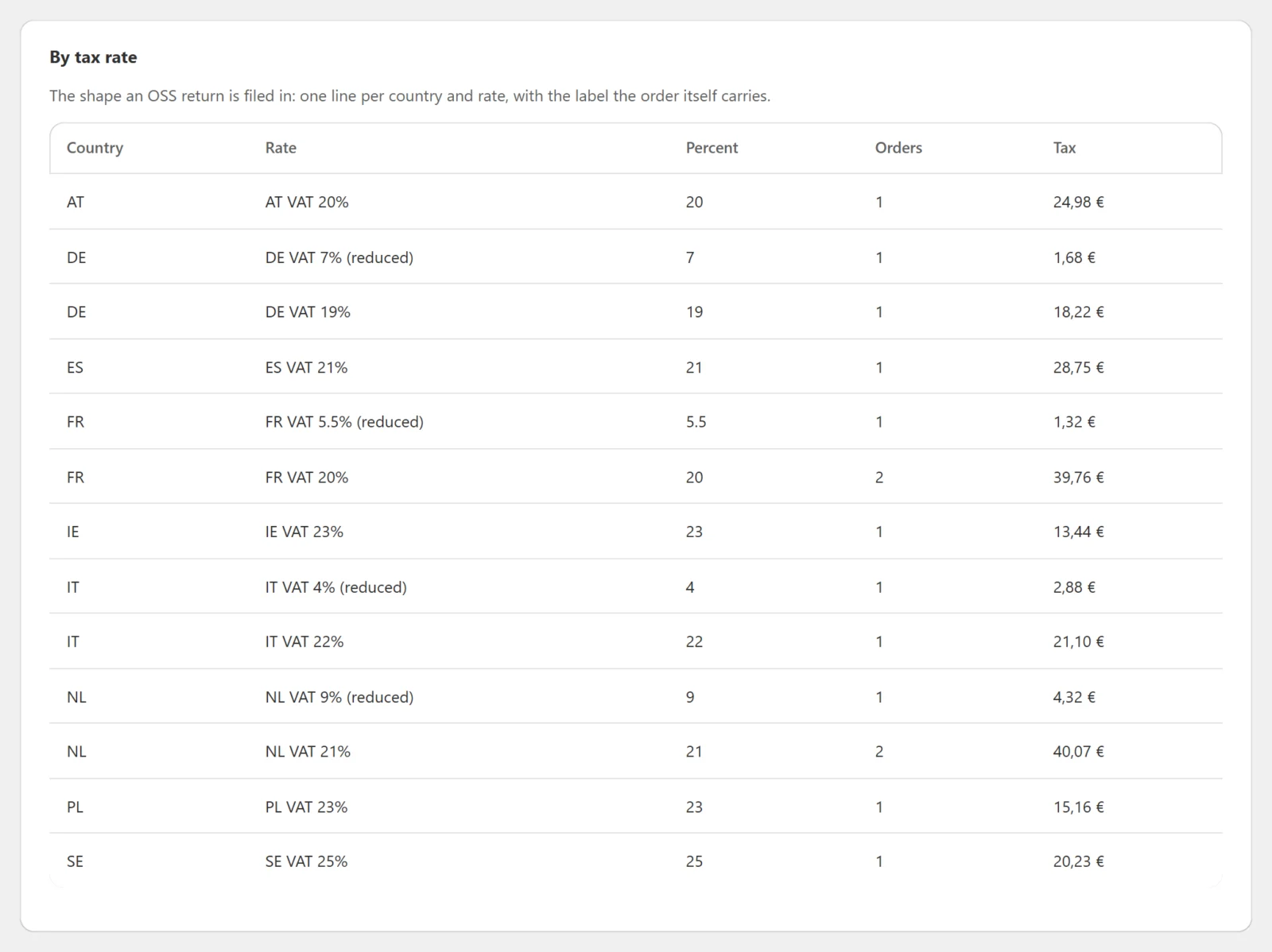
So, for a quarter, you need something that looks like this:
| Member state | Rate | Net (taxable amount) | VAT |
|---|---|---|---|
| France | 20% | … | … |
| Germany | 19% | … | … |
| Germany | 7% | … | … |
Two things are left out on purpose: your own country, which goes on your ordinary domestic VAT return, and business customers who gave you a valid VAT number, whose sales are reverse-charged and reported elsewhere (in most countries on the EC Sales List). Neither belongs on the OSS return.
Why WooCommerce's built-in reports don't give you this
WooCommerce has a Taxes report under Analytics. It is useful, and fair to say clearly what it does: it lists the tax collected per tax rate — the rate's code, its percentage, the tax on products, the tax on shipping, the total and the number of orders — and it reads those amounts from the orders' own tax lines. The country column it shows is taken from the tax rate's code, that is, the rate you configured.
What it does not give you is the net amount per country. The OSS return asks for the taxable amount beside the VAT, and the Taxes report has no net column. Its revenue reports, meanwhile, give net sales but not by destination country. Shops end up exporting orders to a spreadsheet and pivoting them by hand every quarter — which works until a refund, a digital order with no shipping address, or an order in another currency lands in the file.
The figures must come from the tax you charged, not today's rates
This is the single most important rule in any VAT report, and the easiest to get wrong.
A report that takes each order's net amount and multiplies it by the rate in your tax table today gives you a number that is always plausible and sometimes false. Rates change. A country raises its standard rate in January; you correct a mis-configured reduced rate in March; you add a rate for a product category you had been charging at standard. Run last year's report after any of those and a recomputing report quietly restates a return you have already filed.
What you owe is the VAT you actually charged your customers — and WooCommerce records exactly that. Every order carries its own tax lines: the rate's label, its percentage, and the amounts as they were charged at checkout. A report built from those lines cannot be moved by a later change to your tax settings.
Both Gatemi editions follow this rule: every figure comes off the order's own totals and tax lines, and nothing is worked out again from the store's tax table. More on why in Why recomputed tax reports are wrong.
Place of supply: shipping or billing address?
The return is organised by member state of consumption, so a report has to decide, for every order, which country it belongs to.
- Goods. The place of supply of an intra-Community distance sale is where the goods are when dispatch or transport to the customer ends (VAT Directive Article 33(a); Commission). In WooCommerce terms: the shipping country.
- Digital (TBE) services. These are taxed where the customer is established, has their permanent address or usually resides (Article 58; Revenue). A download has no shipping address, so the closest thing an order holds is the billing country — which is also one of the pieces of evidence the EU rules accept for where a customer is. Keep whatever else you collect (a payment country, an IP country) too: the Commission's record-keeping page asks you to keep "information used to determine the place where the customer is established".
A WooCommerce order with no shipping address is the ordinary case for a digital product. What a report must not do is drop it, or file it under your own country by default. Gatemi's rule is: report under the shipping country, fall back to the billing country when there is none, and count and name every order that fell back, so you can see how many of your figures rest on the billing address.
The full edition also offers a setting to report every order under the billing address, for shops whose sales are services rather than goods.
Refunds and corrections
A refund is not a sale, and the VAT on it is not VAT you owe. Gatemi's reports subtract an order's refunded total and refunded tax from the order before adding it to its country.
That has a consequence worth knowing. The report selects orders by the date they were placed, and subtracts whatever has been refunded by the time you run it. So if you filed July–September in October, and a September order is refunded in November, running July–September again in December gives a smaller figure than the one you filed. That is correct, and it is useful: the difference is your correction. Under OSS, the Commission says a credit note corrects the return for the period the supply was declared in, and after submission that correction goes into a later return (source). Keep a copy of the figures you filed — the full edition's CSV download is the easiest way — so you can compare.
The same goes for an order whose status changes later — say it is cancelled. Only orders in the statuses that count as a sale are read (processing and completed, by default), so it drops out of a re-run.
Multiple currencies
If your shop takes payment in more than one currency, adding the amounts together produces a number that is not a quantity of anything — €100 plus £100 is not 200 of either.
Both Gatemi editions report in the store's own currency and leave any order placed in a different currency out of the totals — and say so, with the number of orders and the currencies they were in, so nothing disappears silently. Report those periods separately and convert them yourself, at the ECB rate on the last day of the quarter that the OSS rules ask for.
A worked example
Take Noorderlicht Ceramics, a shop established in the Netherlands. It sells handmade tableware, shipped across the EU, and an online glazing course delivered as a download. Its cross-border consumer sales were well over €10,000 last year, so it is registered for the OSS Union scheme in the Netherlands. Its store currency is the euro.
In the quarter 1 July – 30 September 2026 (return due 31 October 2026) it had, in processing or completed status:
- France, goods: 10 orders, €2,000.00 net including delivery, VAT at 20% €400.00, gross €2,400.00.
- France, the course: 2 orders, €50.00 net each, VAT at 20% €10.00 each. The course asks for no shipping address.
- Germany, goods: 8 orders, €1,500.00 net, VAT at 19% €285.00, gross €1,785.00. In September one German customer returned a mug and was refunded €119.00 (€100.00 net plus €19.00 VAT).
- Netherlands, goods: 20 orders, €3,000.00 net, VAT €630.00, gross €3,630.00.
- One order paid in pounds sterling, from a customer who switched the currency in the shop.
Running the report for 2026-07-01 to 2026-09-30 gives:
The period: 40 orders · Net €6,500.00 · Tax €1,316.00 · Gross €7,816.00
| Country | Orders | Net | Tax | Gross |
|---|---|---|---|---|
| DE | 8 | 1,400.00 | 266.00 | 1,666.00 |
| FR | 12 | 2,100.00 | 420.00 | 2,520.00 |
| NL | 20 | 3,000.00 | 630.00 | 3,630.00 |
Check the arithmetic. Germany: €1,500.00 − €100.00 = €1,400.00 net, and €285.00 − €19.00 = €266.00 tax, which is 19% of €1,400.00. France: €2,000.00 + €100.00 = €2,100.00 net, and €400.00 + €20.00 = €420.00, 20% of it. Net plus tax is gross in every row: 1,400 + 266 = 1,666; 2,100 + 420 = 2,520; 3,000 + 630 = 3,630; 6,500 + 1,316 = 7,816.
Underneath, the report says two things out loud:
- 2 orders had no shipping address, so they are reported under their billing country — the two course sales, filed under France.
- 1 order was placed in GBP and is not in these totals.
From that, Noorderlicht's OSS lines for the quarter are:
| Member state | Rate | Taxable amount | VAT |
|---|---|---|---|
| France (goods) | 20% | €2,000.00 | €400.00 |
| France (services) | 20% | €100.00 | €20.00 |
| Germany (goods) | 19% | €1,400.00 | €266.00 |
The Netherlands row goes on its ordinary Dutch VAT return, not on the OSS return. The pound-sterling order is converted separately at the ECB rate for 30 September and added by hand. And the split between goods and the course is Noorderlicht's own to make — the report groups by country and rate, not by type of supply, so a shop selling both needs to know which orders were which (here, simply the two course orders).
If one of those German customers had been a business with a valid VAT number, charged no VAT under the reverse charge, that order would sit in the DE row with €0.00 tax: the country row adds up every counted order. Take such orders out before filing — they belong on your EC Sales List, not OSS.
How the free and full editions produce it
Gatemi Sales by Country (free)
Gatemi Sales by Country is on wordpress.org. It adds WooCommerce → Sales by Country: pick a date range and you get exactly the period card and country table above — net, tax and gross for the period, the delivery included in it, a row per country, and the two honest notes about orders that fell back to the billing country and orders in another currency. One setting breaks each country down by state or province.
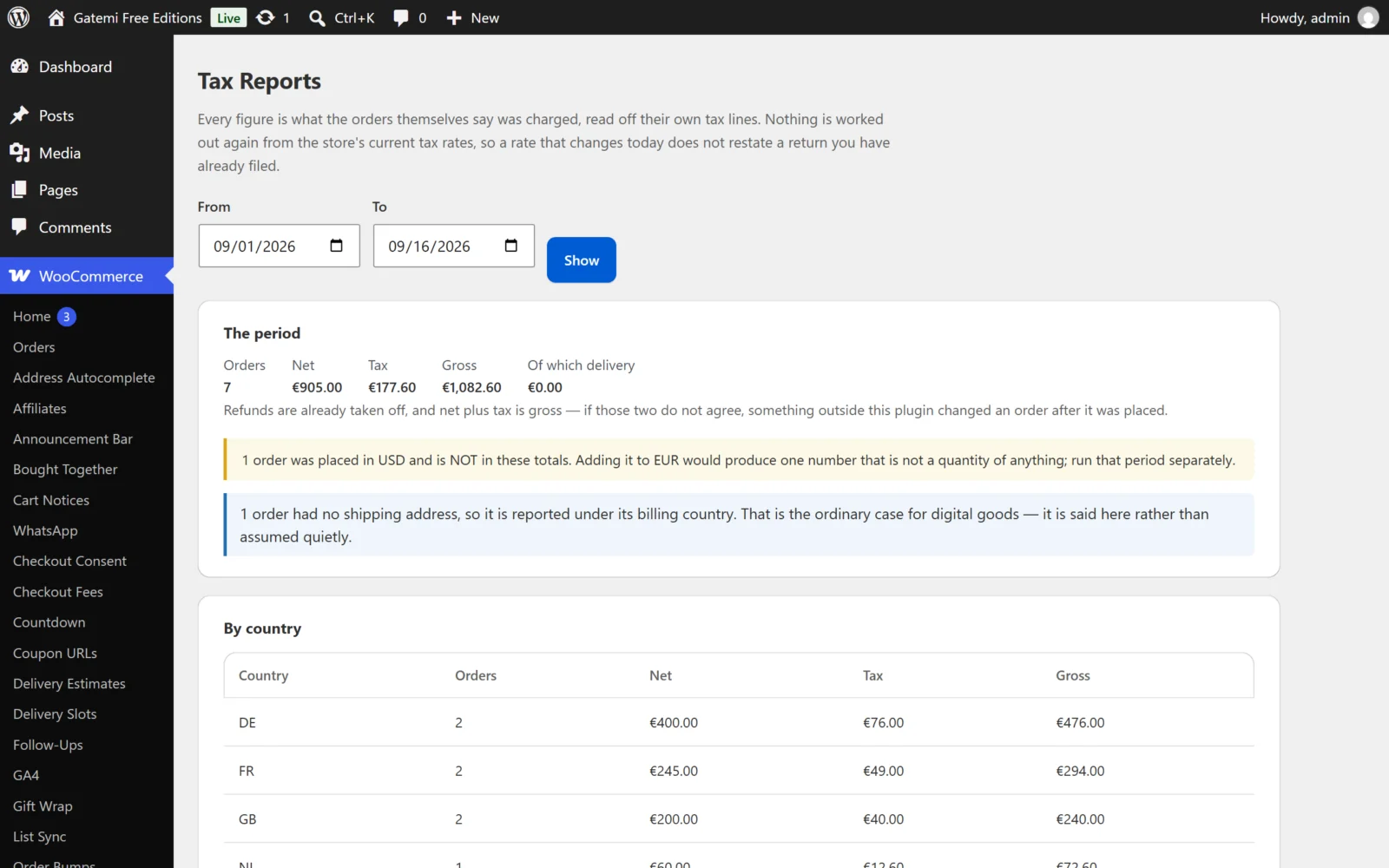
It counts processing and completed orders, and it reports a sale where the goods went, falling back to billing. It creates no tables, writes nothing to your orders, runs nothing on your storefront and makes no external request.
For a shop that charges one VAT rate per country — the common case for a shop selling standard-rated goods — the country table already gives the taxable amount and the VAT for each OSS line.
Gatemi Tax Reports for WooCommerce (full edition)
Gatemi Tax Reports for WooCommerce is a separate plugin, sold on gatemi.com. It produces the same country table with the same rules, and adds:
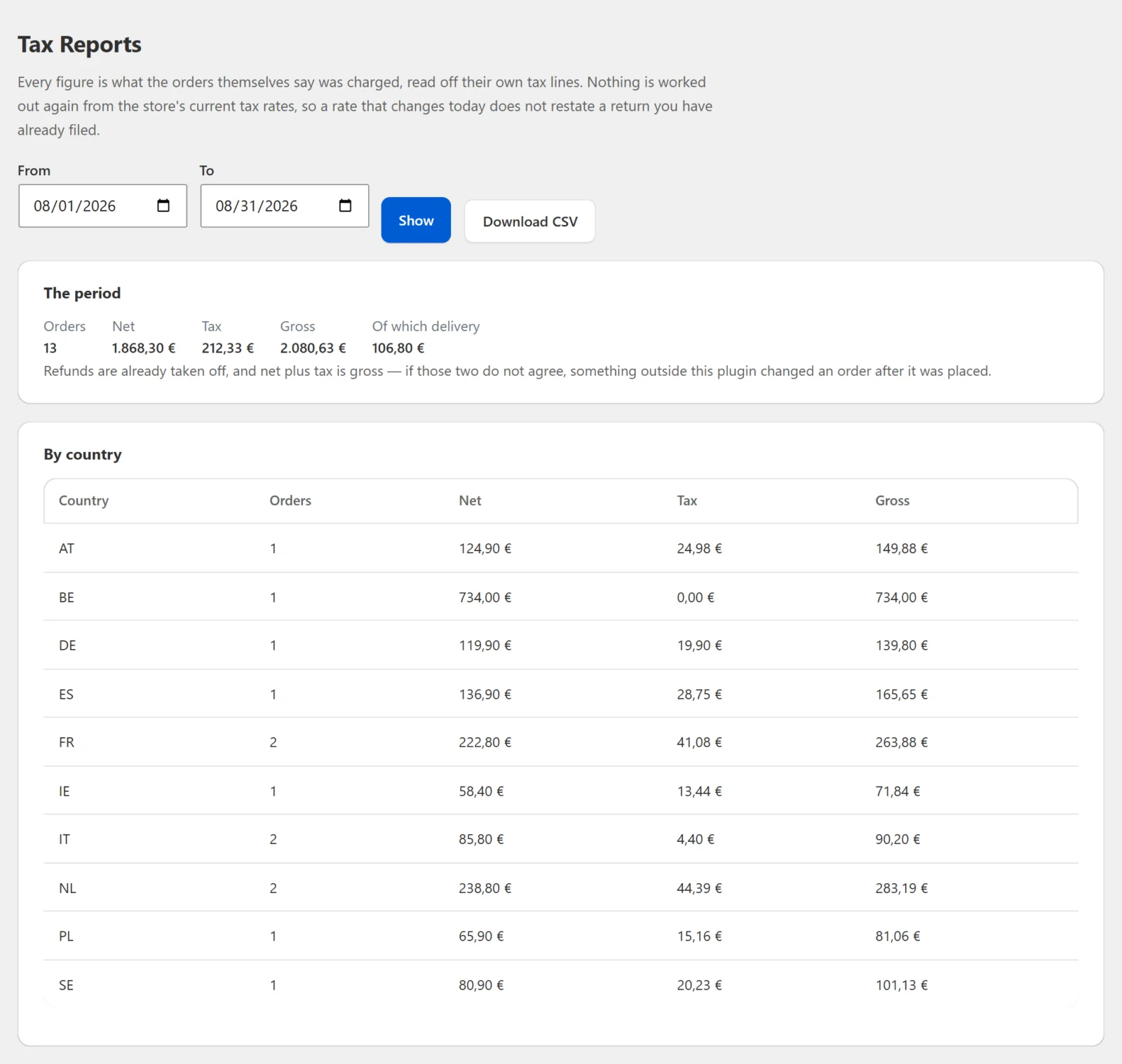
- A "By tax rate" table — one line per country and tax rate, showing the rate's label and percentage as the order itself carries them, the number of orders, and the net, tax and gross under it. This is how you see, at a glance, that Germany had both 19% and 7% sales in a quarter. The per-rate lines are built from the orders' own tax lines and the lines each rate taxed, with refunds taken off rate by rate — in the example above, Germany's 19% line shows €1,400.00 net and €266.00 tax, the same as its country row.
- A choice of which order statuses count as a sale.
- A choice to report under the billing address for every order, for shops selling services.
- CSV downloads of the country table — country, state, orders, net, tax, gross and currency — and of the rate table — country, rate, percent, orders, net, tax, gross and currency — to keep with your records or hand to your accountant.
Both editions store their settings in the same place, so moving from one to the other keeps them. The documentation covers each setting: Getting started, Settings and How it works.
A quarterly routine
- On the first working day after the quarter, open the report and set the range to the whole quarter.
- Read the two notes. If orders fell back to billing, confirm they really are digital or address-less. If orders were in another currency, run them separately.
- Take out your own country and any reverse-charged business sales.
- Where a country had more than one rate, split its line by rate.
- Separate goods from services if you sell both.
- Keep the figures you filed. Next quarter, re-run the previous one and compare: any difference is a correction.
- Give the lot to your accountant before the end of the month.
Next step
Install Gatemi Sales by Country from wordpress.org and run it for last quarter. It reads only what your orders already say, so it is safe to try on a live shop.