
How to declare the GPSR manufacturer, responsible person and warnings for a large WooCommerce catalogue with records and a CSV import, rehearsed first.
Article 19 of the General Product Safety Regulation (Regulation (EU) 2023/988) asks every online offer to show the manufacturer, the EU responsible person where the manufacturer is outside the EU, the product's identifiers and its warnings. On a shop with twenty products, typing that into each one is an afternoon. On a shop with two thousand it is a month — and a second month every time a supplier moves.
This post shows how to do it at scale with Gatemi Product Compliance for WooCommerce (the full edition): records first, a CSV for the exceptions, and a rehearsal before anything is written.
Not legal advice. The plugin shows and stores what you declare; whether the information is correct is for you and your adviser.
Start with records, not rows
Most catalogues have far fewer manufacturers than products. Before you build a spreadsheet, count them. If 1,800 of your 2,000 products come from six makers, the fastest route is six compliance records, not 1,800 rows.
A record (WooCommerce → Product Compliance → Compliance records) holds the same six fields as a product — manufacturer, responsible person, importer, distributor, safety information, conformity documents — plus:
- Market: every market, the EU, or the UK;
- Applies to: every product, these categories (and their sub-categories), or these products — by category or product id;
- Enabled.
The first enabled record that covers a product, in the order the records appear on the screen, fills every field the product leaves empty. Put specific records above general ones.
One detail worth knowing before you plan: only one record applies to a product — the first match. A second record further down never fills a gap the first one left. If a product needs the manufacturer from one record and the warnings from another, put the warnings on the product itself.
Use the CSV for what records cannot express
Records are for what products share. The CSV import is for what is particular to each product: warnings that differ by model, a one-off maker, a product that needs a different importer from the rest of its category. Anything typed on the product — by hand or by import — wins over the record, field by field.
The file
One row per product. The importer needs a way to find the product and at least one declaration column.
| Column | Accepted header names | What goes in it |
|---|---|---|
| Product | sku, or product_id (also id, product) |
The product's SKU, or its WordPress post id |
| Manufacturer | manufacturer |
Name, postal address, email — line breaks kept |
| Responsible person | responsible (also responsible_person, eu_responsible) |
Name, postal address, email |
| Importer | importer |
Name and address |
| Distributor | distributor |
Name and address |
| Safety information | warnings (also safety, safety_information, safety_warnings) |
The warnings, word for word |
| Conformity documents | documents |
Media-library attachment ids, separated by commas |
Headers are matched without regard to case, spaces or hyphens: Responsible Person, responsible-person and responsible_person are the same column. A UTF-8 byte-order mark on the first header — which Excel adds — is ignored. The delimiter is read from the header line: comma, semicolon or tab, whichever it contains most, so a file saved by a European-locale spreadsheet works as it is.
A small example:
sku,responsible,warnings
FJ-PUZ-100,"Holzwerk Import GmbH
Speicherstraße 12, 20457 Hamburg, Germany
safety@holzwerk-import.example","Not suitable for children under 36 months. Small parts. Choking hazard."
FJ-PUZ-200,,"Keep away from fire."
Cells with line breaks or commas must be in quotes — your spreadsheet does that when it saves as CSV.
Three rules that make it safe to run
A column the file does not carry is left alone. The file above has no manufacturer column, so nothing it does touches a manufacturer. That means you can fix one field across a thousand products with a two-column file and know the other five are untouched.
An empty cell in a column the file does carry clears that field. Look at FJ-PUZ-200 above: its responsible cell is empty, so any responsible person typed on that product is removed — and the product falls back to whatever its record says. This is how you hand a product back to its record. It is also how you blank a field by accident, which is what the rehearsal is for.
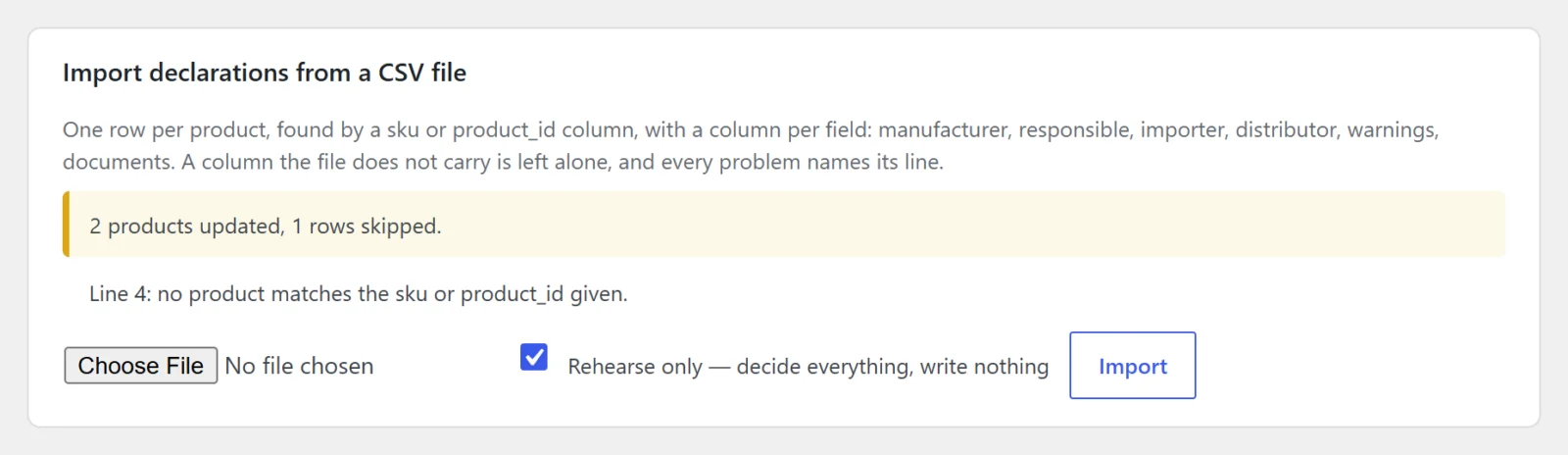
Rehearse first. Tick "Rehearse only — decide everything, write nothing" and import. The importer reads every row, finds every product and reports exactly what it would have done — "N products updated, M rows skipped" and a list of problems, each naming its line — without writing a thing. Fix the file, rehearse again, then import for real.
Matching products: SKU first, and use the parent
If a row has a sku, the importer looks the product up by SKU; if the SKU is empty or matches nothing and there is a product_id, it tries the id. A row that matches no product is skipped and reported: "Line 14: no product matches the sku or product_id given."
Variable products: one row per product. Variations show their parent's declaration, so a row naming a variation's SKU or id is written to its parent. Several rows for variations of one product all write the same parent, and the last one wins.
Limits
- 5,000 rows per run. Beyond that the importer stops and says so; split the file and run the rest as a second file.
- Blank lines are skipped.
- The uploaded file is read from PHP's temporary upload location and is not copied into your uploads folder.
- The import writes product fields only; it does not create records.
A worked example
A homewares shop has 2,140 products: 1,650 from four EU manufacturers, 410 from two Chinese factories imported through a Rotterdam importer, and 80 from small makers.
- Four records for the EU manufacturers, each scoped to its brand category; manufacturer and responsible person both the manufacturer.
- Two records for the two factories — they are different manufacturers — each scoped to its factory's category, each with its own manufacturer and the same Rotterdam importer as responsible person and importer.
- A CSV of 80 rows for the small makers:
sku, manufacturer, responsible, warnings. - A second CSV of the 120 products whose warnings differ from their record's:
sku, warnings.
Rehearsal of the first CSV reports three problems: two SKUs with a trailing space in the shop (fixed in WooCommerce), and one product that had been deleted. The real run updates 79 products. The report on the same screen goes from 2,140 products missing a responsible person to zero.
Check the result
- The "Products that need a responsible person" list on the same screen is judged with records included, so it tells you what is still uncovered after both records and imports. A product whose manufacturer's address ends in an EU member state is not listed. It checks up to 500 published products and says so if there are more.
- Open a few product pages and read the "Product safety and compliance" block above the add-to-cart button.
- Place a test order and look under the line on the order screen: the declaration copied onto the order is the one that will stand for that sale.
Next step
Records and CSV import are in the full edition. See Gatemi Product Compliance for WooCommerce, and keep the CSV import reference open while you build your file.