
A step-by-step GPSR checklist for WooCommerce: scope, responsible person, product page information, warnings, order records and the guarantee notice.
The General Product Safety Regulation (Regulation (EU) 2023/988) has applied since 13 December 2024. This is the list we would work through on a WooCommerce shop that sells to EU consumers, in the order that saves the most time. Each step says what the rule is, where it comes from, and what to do in WooCommerce.
Not legal advice. This list covers the parts of the GPSR that land on an online shop's product pages. It does not cover product testing, technical documentation, labelling or recall procedures in full. Check your obligations with your adviser.
1. Decide whether you are in scope
- Do you target EU consumers? An online offer counts as made available in the EU if you direct your activities to one or more Member States (Article 4). Shipping countries, site languages, currency and domain are the factors the Regulation's recitals mention. Look at your WooCommerce → Settings → General "Selling location(s)" and "Shipping location(s)": if they include EU countries, assume you are.
- Are your products consumer products in scope? Food, medicines, feed, live plants and animals, plant protection products and antiques are excluded (Article 2(2)). Products with their own EU safety law — toys, electrical goods, cosmetics — are still subject to the distance-sales information rule.
- Do you sell in Great Britain too? The UK government says the GPSR applies in Northern Ireland, and the General Product Safety Regulations 2005 continue to apply in Great Britain.
In WooCommerce: export your products (Products → Export) to get a spreadsheet of every SKU, category and name. It is the working list for every step below.
2. Group products by manufacturer
Add two columns to that spreadsheet: manufacturer and manufacturer country. Most shops find they have a handful of manufacturers covering most of the catalogue. That grouping decides how much typing the rest of this list needs.
3. Find the responsible person for each group
For every product placed on the EU market there must be an economic operator established in the EU responsible for it (Article 16(1)). It is the EU manufacturer, or the importer, or an authorised representative with a written mandate, or — only if none of those is in the EU — a fulfilment service provider (Regulation (EU) 2019/1020, Article 4(2)).
- For each manufacturer outside the EU, name the EU responsible person.
- If you import directly into the EU, recognise that it is probably you.
- Get each one's postal address and an electronic address that reaches a person — the Commission's guidelines say a website alone is not enough if it does not allow direct contact.
More on this in Who is the GPSR responsible person for a WooCommerce shop?.
4. Collect warnings and safety information
Article 19(d) asks for any warning or safety information that has to be on the product, its packaging or an accompanying document, in a language consumers easily understand as determined by the Member State where it is sold.
- Copy the warnings from the packaging or the manufacturer's leaflet, word for word.
- Note which languages each country you sell to requires.
- Mark products that genuinely have no warnings, so a blank is a decision rather than a gap.
5. Check product identification
Article 19(c): information allowing the product to be identified, including a picture, its type and any other product identifier.
- Every product has a main image of the product itself.
- The product name says what type of product it is.
- SKUs are filled in, and shown: WooCommerce prints the SKU in the classic product meta block when SKUs are enabled. WooCommerce's "GTIN, UPC, EAN, or ISBN" field is stored but not printed by the classic product template — check whether your theme shows it if you rely on it.
- For variable products, each variation that is a different model has its own SKU.
6. Put the information on the product page
Article 19 says the offer must show the manufacturer, the responsible person (where the manufacturer is outside the EU), the identifiers and the warnings clearly and visibly. The Commission's guidelines give "a product offer on your e-shop" as the example.
- Show the manufacturer's name, postal and electronic address on the product page.
- Show the responsible person's name, postal and electronic address.
- Show the warnings.
- Put them where a shopper sees them before buying — near the price and the add-to-cart button, not only in a tab or a footer link.
In WooCommerce: there are no fields for any of this. Gatemi Product Compliance adds a Compliance tab to each product (Manufacturer, Responsible person, Safety information; the full edition adds Importer, Distributor and Conformity documents) and prints the filled-in fields in the product summary, above the add-to-cart button.
7. Clear the gaps
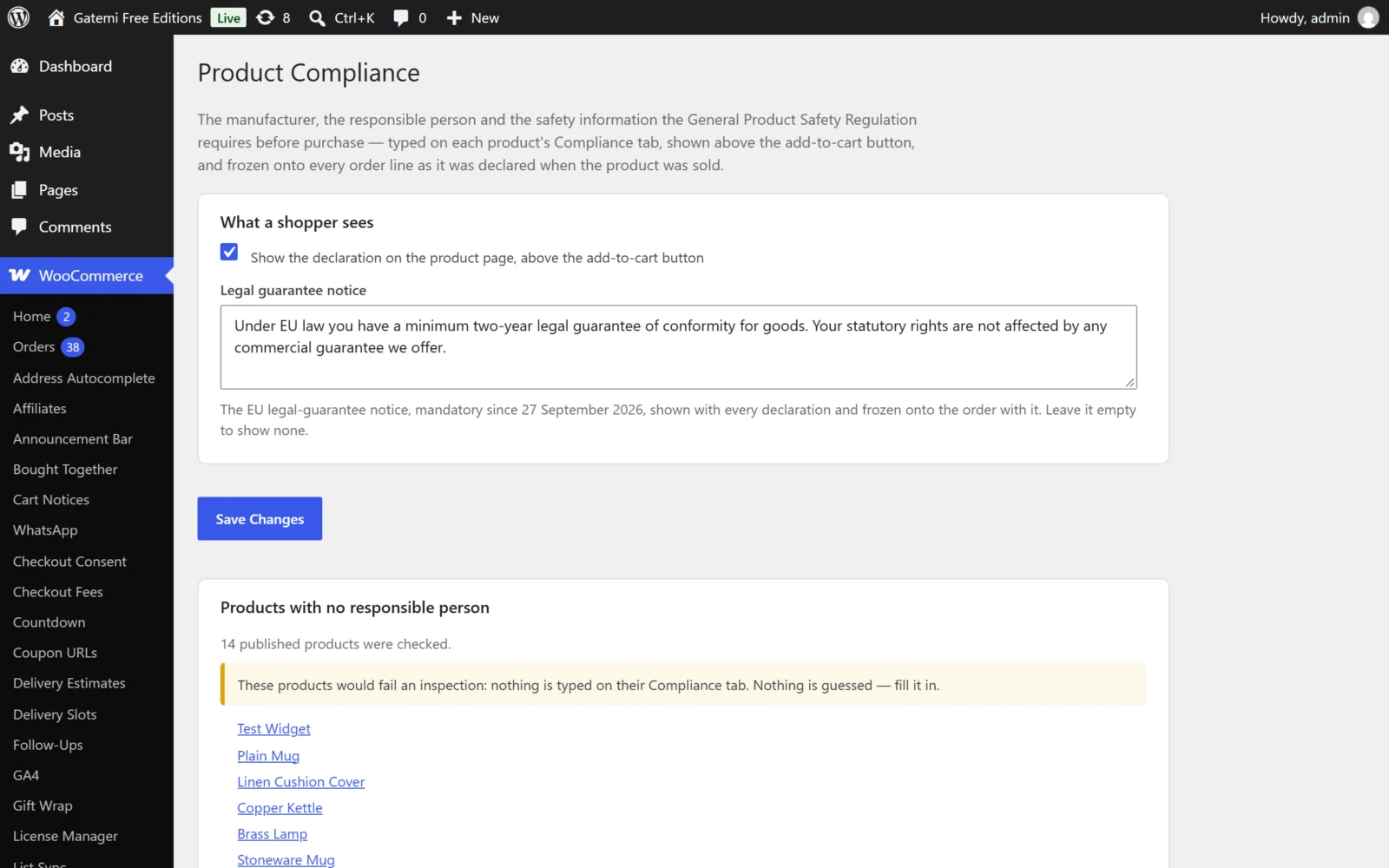
- Go to WooCommerce → Product Compliance and read the "Products that need a responsible person" list. Every published simple and variable product with no responsible person is on it, linked to its editor — except products whose manufacturer's address ends in an EU member state.
- Work down it until it says "Every published product declares a responsible person."
- For a large catalogue, use the full edition's records (one record covers a whole category) or its CSV import. See Getting hundreds of products GPSR-ready with a CSV import.
8. Keep a record of what each buyer was shown
The GPSR expects you to answer authorities' questions about products for years after a sale (Article 15 mentions ten-year periods). Your product pages will have changed by then.
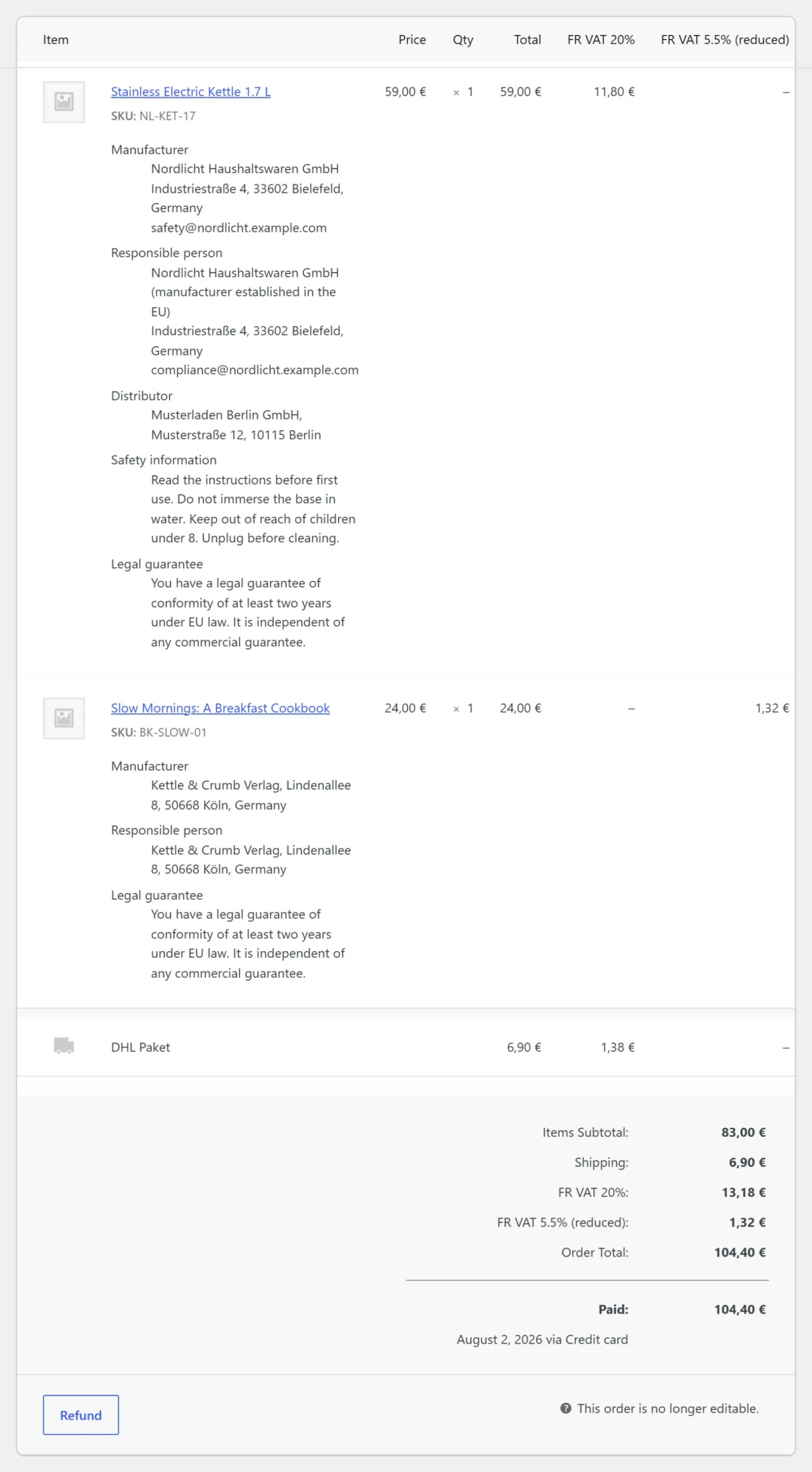
- Make sure the declaration is kept with each order. Gatemi Product Compliance copies it onto every order line when the order is placed, at the classic or block checkout, and shows it on the admin order screen, the order-received page, My Account and order emails.
- Note that orders you create by hand in wp-admin are not checkout orders, and do not get a copy.
9. Check UK and EU separately, if you sell to both
- Decide whether Great Britain buyers need different contact details from EU buyers.
- With the full edition, write records for the EU, the UK, or every market. A shopper whose shipping or billing country is GB sees UK records; everybody else EU records. Set the fallback market in the settings for visitors who have not entered an address yet.
10. The legal-guarantee notice (from 27 September 2026)
Separate from the GPSR, Directive (EU) 2024/825 requires a reminder of the two-year legal guarantee of conformity before purchase, using the harmonised notice whose design is fixed by Implementing Regulation (EU) 2025/1960. Member States apply it from 27 September 2026.
- Download the official notice from the Commission's page. Its elements cannot be edited, and online it must be in colour.
- Ask your adviser where your national rules want it shown.
- Gatemi Product Compliance's Guarantee text box is a text of your own shown with every declaration and copied onto orders. It is not the harmonised notice and does not meet this obligation: place the official graphic itself through your theme.
11. Make it a process, not a project
- Add "Compliance tab filled in" to the steps for adding a new product.
- When a supplier changes address, update it once (a record, in the full edition) rather than per product.
- Re-read the report after every import of new stock.
Next step
Steps 6, 7 and 8 are where WooCommerce needs help. See Gatemi Product Compliance for WooCommerce, and read the full GPSR for WooCommerce guide for the reasoning behind each step.