Gatemi Countdown for WooCommerce puts a clock on the offers you want shoppers to act on. Write a campaign, say when it ends and where it appears, and it runs.
The deadline is decided on the server. A countdown whose end time is worked out in the browser says something different on a laptop with the wrong date, and can be extended by changing it. Here a fixed-date campaign resolves to one absolute moment and the script only renders the difference — which also makes it right in every timezone without the plugin knowing any of them.
A sale countdown reads WooCommerce's own sale dates. Rather than asking you to type the same date into two places and hope, a sale campaign takes its deadline from the product's own Sale price dates. A timer showing three hours left on a sale that ended yesterday is the failure this whole category is judged on, and this is what makes it impossible.
Evergreen campaigns keep nothing on your server. Each visitor's start is written into their own browser, so the HTML is identical for everybody served it — a full-page cache stays safe, and nothing about who saw what is ever stored.
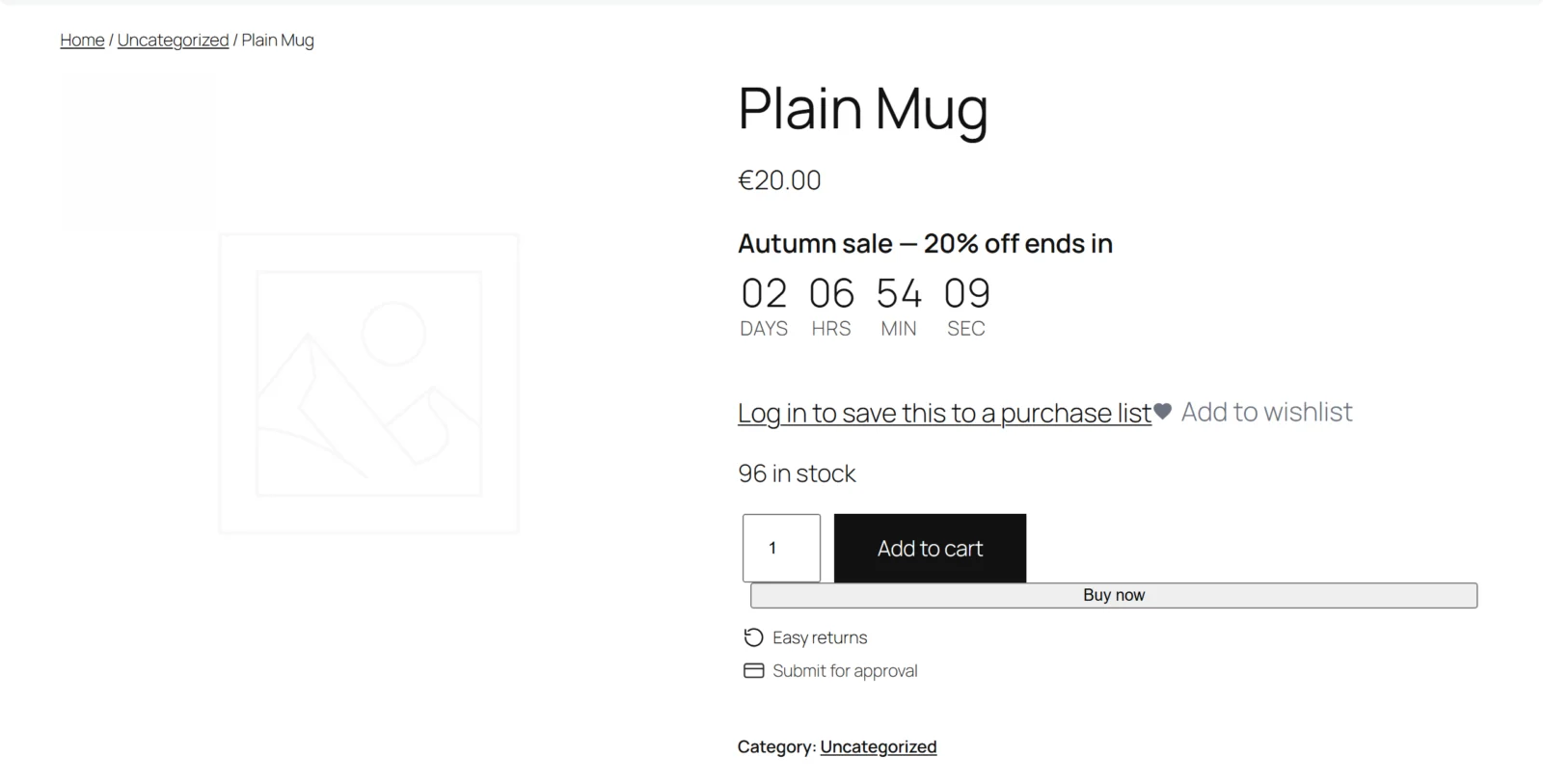
It works before the script does. The digits are server-rendered at the value they hold when the page is built, so a visitor whose JavaScript has not run sees a real remaining time rather than an empty box or a row of dashes.
Features
Three kinds of campaign: a fixed date, the product's own sale end, or an evergreen per-visitor timer
Scope a campaign to every product, chosen categories (sub-categories included), or chosen products
Show it on the product page, on shop and category listings, on the cart, or anywhere with [gatemi_countdown]
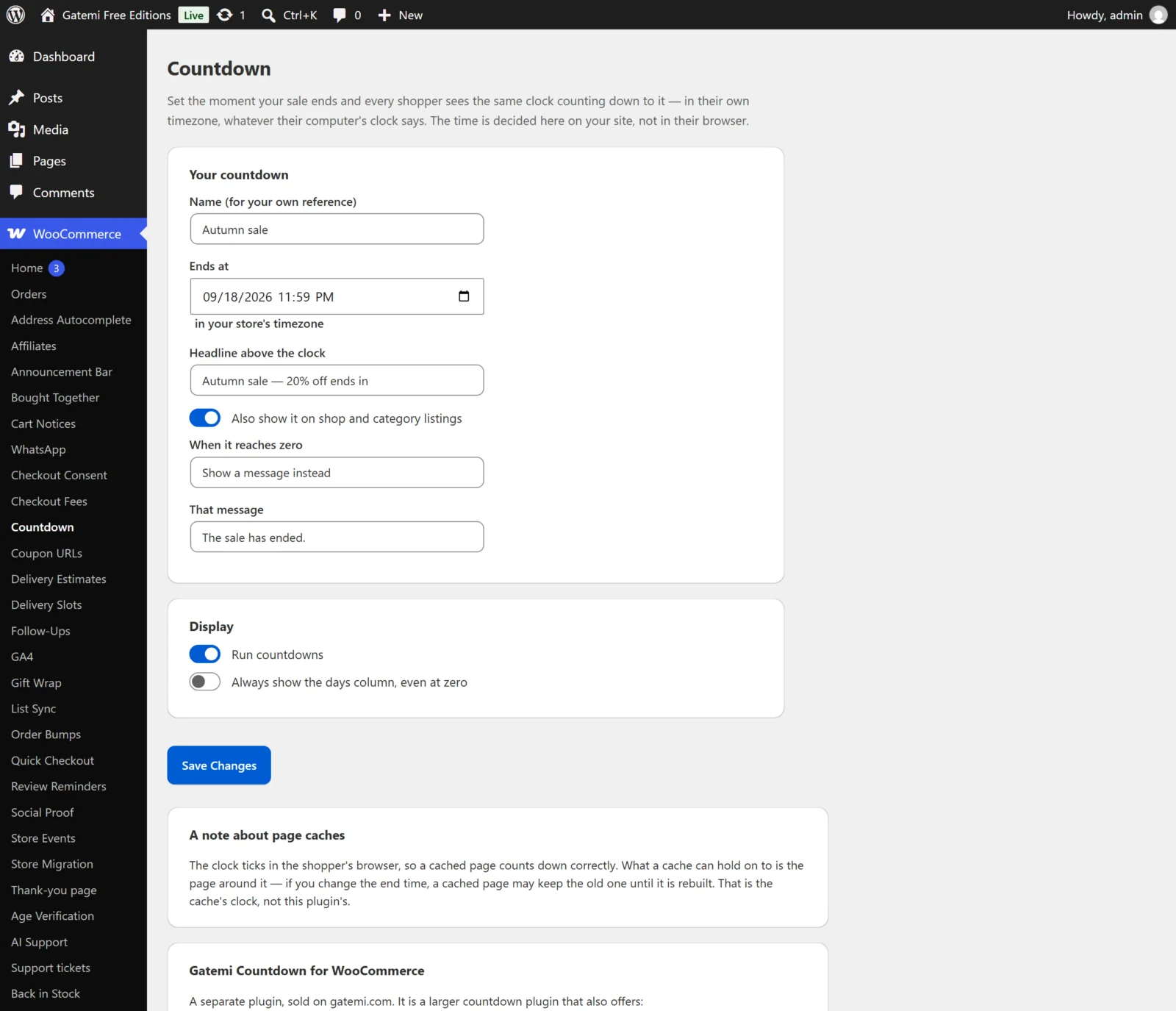
Say what happens at zero: take it off the page, leave it at zero, or replace it with your message
A headline and an accent colour per campaign
Assets load only on pages where a countdown was actually rendered
Every license includes
One year of updates and priority support, delivered straight to your WordPress dashboard.
Use on 1, 5 or 25 sites depending on your license — local, staging and development sites are always free.
30-day money-back guarantee — full refund, no questions asked.
Keeps working after expiry — if you choose not to renew, the plugin keeps running exactly as installed; it simply stops receiving updates and support until you do.
Requires WordPress 6.4+ · PHP 7.4+ · tested up to WordPress 7.0. Works with the classic and block checkout alike.
Free edition or full edition?
This plugin has a free edition. It is a complete plugin in its own right, and upgrading keeps every setting and every record, so you can start free and buy when you need more.
What the full edition adds
What the full edition adds
Free
Full
More than one countdown at a time
—
✓
Evergreen timers — a fresh countdown per visitor
—
✓
Timers that read WooCommerce's own sale end dates
—
✓
Targeting by category or by product
—
✓
A countdown on the cart page
—
✓
An accent colour per countdown
—
✓
Included in both editions (10)
A countdown ending at a fixed date and time
The deadline decided on the server, as one absolute moment
Right in every timezone, whatever the visitor's clock says
The digits rendered before any script runs
Your own headline above the clock
On the product page
In shop and category listings
At zero: take it off the page, or show your own message
The days column dropped once there are none
Neither file loaded on a page with no countdown
License
Single Site, Plus — 5 Sites, Agency — 25 Sites
Frequently asked questions
How does the license work?
Every license includes one year of updates and priority support, delivered straight to your WordPress dashboard. Choose the tier that matches how many production sites you run: 1, 5 or 25.
Which license do I need?
Count your live production sites — that's it. Local, staging and development sites (localhost, *.test, staging.*, dev.* and similar) are always free and never use up an activation.
What happens if I don't renew?
Nothing breaks. The plugin keeps working exactly as installed — it simply stops receiving updates and support until you renew. Renewing later reinstates both immediately.
Can I upgrade my license later?
Yes. Contact support any time and we'll move you to a higher tier — you only pay the difference, and your key and activations carry over.
Can I use it on client sites?
Absolutely. The Plus (5 sites) and Agency (25 sites) tiers are built for agencies — and if you run several Gatemi plugins across client stores, All Access usually works out cheaper.
What if it's not right for my store?
Tell us within 30 days and we refund the order in full — no questions asked. See the refund policy.
Changelog
Every release reaches your WordPress dashboard as an ordinary update while your licence is active.
Version 1.0.1Latest
Fixed: A campaign's end date and time is now read in your store's own timezone, including daylight saving on the day you typed; before, it was read as UTC, so on most stores the countdown ended hours early or late.
Fixed: A sale-linked campaign on a variable product now counts down to the soonest sale end among its variations; before, those products showed no countdown.
Improved: The countdown now runs on your site's clock, so a shopper whose computer clock is wrong still sees the right time left.
New: A Gatemi menu in the WordPress admin lists your Gatemi plugins with a link to each one's settings; this plugin's screen also stays under WooCommerce.
Improved: The settings screen has a refreshed design and fits a phone screen.
New: Translated into nine languages: Arabic, Chinese (Simplified), Dutch, French, German, Italian, Portuguese (Brazil), Russian and Spanish.
Improved: Tested with WordPress 7.1.
WordPress 6.4+ · PHP 7.4+
Version 1.0.0
First release.
WordPress 6.4+ · tested up to 7.0 · PHP 7.4+
5 reviews for Countdown for WooCommerce
Rated 5 out of 5
Brian G. (verified owner)–
Genuinely impressed. Sorted.
Rated 5 out of 5
Kevin Jordan (verified owner)–
Plays nicely with my other extensions. I’ve had Countdown on a busy shop for a full season. Worth every penny.
Rated 4 out of 5
Gemma M. (verified owner)–
Sound plugin. Minor gripes only. The Countdown settings took me longer to work out than I expected. Close to a five.
Rated 5 out of 5
Neil (verified owner)–
This fixed something that had been quietly costing me orders.
Rated 4 out of 5
David (verified owner)–
Not quite five stars, but close. Countdown works, once you get past the setup. Does the job.






Brian G. (verified owner) –
Genuinely impressed. Sorted.
Kevin Jordan (verified owner) –
Plays nicely with my other extensions. I’ve had Countdown on a busy shop for a full season. Worth every penny.
Gemma M. (verified owner) –
Sound plugin. Minor gripes only. The Countdown settings took me longer to work out than I expected. Close to a five.
Neil (verified owner) –
This fixed something that had been quietly costing me orders.
David (verified owner) –
Not quite five stars, but close. Countdown works, once you get past the setup. Does the job.