
Both editions keep their settings on WooCommerce → Purchase Lists (capability manage_woocommerce), in one shared option, gmpl_settings. Switches are stored as yes or no.
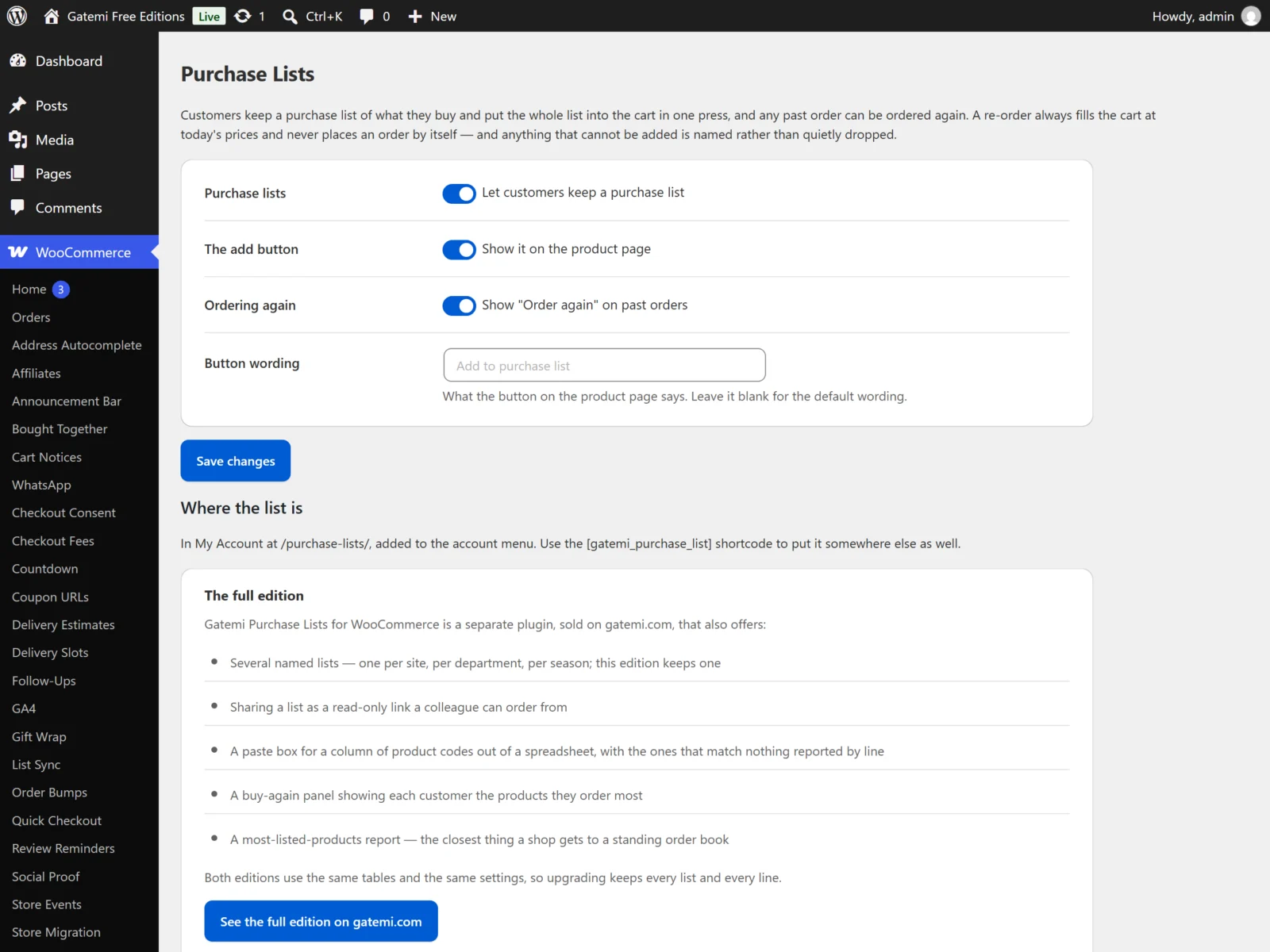
Settings in both editions
Purchase lists
- Free label: "Let customers keep a purchase list" · Full label: "Let customers keep purchase lists"
- Key:
enabled· Default: on - Off: the plugin does nothing to any page. The Purchase list menu item, the page, the add button and Order again all disappear — a menu item leading to an empty page is worse than none. Lists already kept are not deleted.
The add button
- Free label: "Show it on the product page" · Full label: "Show the add button on the product page"
- Key:
on_product· Default: on - Shows the add button on the single product page, below the add-to-cart button (WooCommerce's
woocommerce_single_product_summaryhook, priority 35).
Button wording
- Free label: "Button wording" · Full label: "Button label"
- Key:
button_label· Default: empty, shown as "Add to purchase list" - What the add button says. Once a product is on the customer's list the button reads "On your purchase list — add again" whatever this says.
Ordering again
- Label: Show "Order again" on past orders
- Key:
reorder_orders· Default: on - Adds an Order again action to each order under My Account → Orders (it opens the order), and an Order all of this again button below the order details.
Full edition settings
Let a customer keep more than one named list — Full edition
- Key:
multiple_lists· Default: on - Lets a customer create, rename and delete lists — one per site, per department, per season. Up to 20 per customer (filter
gmpl_max_lists). The first list a customer makes is their default and cannot be deleted.
Let a customer share a list by link — Full edition
- Key:
sharing· Default: on - Shows each list's share link. Switching this off closes every link already handed out, because the check is made when the link is opened.
Let customers paste a list of product codes — Full edition
- Key:
bulk_add· Default: on - Shows a paste box on the purchase list page. Up to 500 lines per paste. See How it works.
Show each customer the products they order most — Full edition
- Key:
buy_again· Default: on - A buy-again panel built from the customer's own most recent processing and completed orders, showing up to 8 products (filter
gmpl_buy_again_limit).
Most listed products — Full edition
Not a setting: a table on the same screen listing products by how many purchase lists they are on.
License & updates — Full edition
Enter the key from your gatemi.com account and press Activate. The card shows the status (Active, Expired, Revoked), how many of your sites are in use, and a Deactivate on this site button. Stored in gmpl_license. Without a key the plugin makes no external requests.
What the free edition does with the full edition's settings
The four full-edition keys above live in the same option. The free edition keeps them as they are when you save its screen, so nothing the full edition set is blanked, and it does not read them: it always shows one list per customer and no sharing, paste box or buy-again panel.
Where the list is
The page is in My Account at /purchase-lists/, added to the account menu before Downloads. The [gatemi_purchase_list] shortcode puts the same page anywhere else as well.