
All settings are on WooCommerce → Next Order Coupons. Only users who can manage WooCommerce (manage_woocommerce) can open the screen or save it.
Both editions store their settings in one WordPress option, gmnc_settings. The free edition offers four of them; the full edition offers all fourteen. When the free edition saves, it rewrites only its own four keys and leaves the other ten exactly as they were, so nothing the full edition wrote is lost. The free edition never reads those ten keys either — what you see on its screen is everything that governs it.
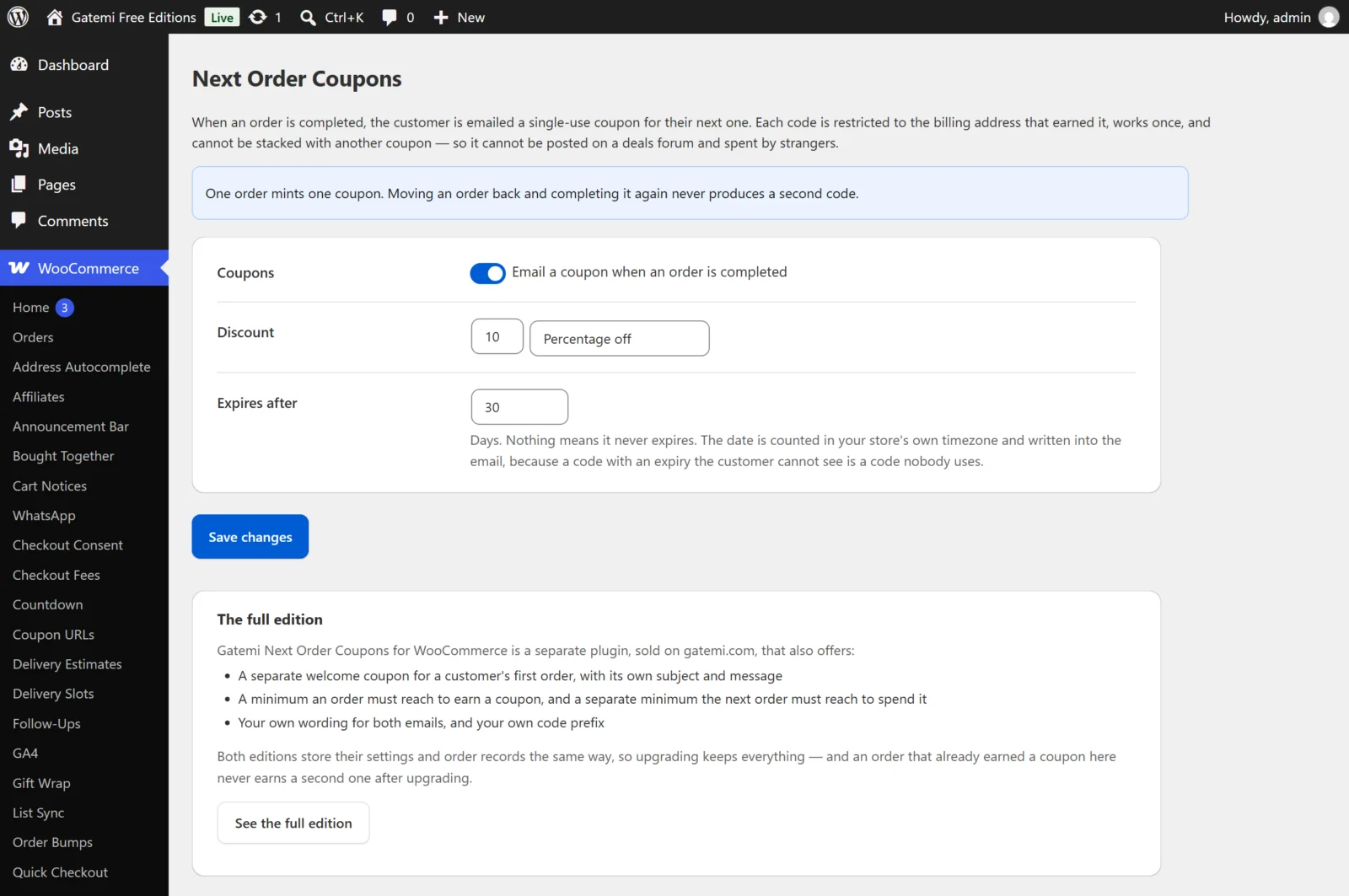
Settings in both editions
Send coupons
- Label: "Email a coupon when an order is completed" (free) / "Send coupons" (full edition)
- Key:
enabled· Default: on (yes) - When off, no order earns a coupon and no email is sent. Orders that already earned a coupon keep it.
Discount
- Label: "Discount" — a number box and a choice
- Keys:
amount(default10) anddiscount_type(defaultpercent) discount_typeispercent(Percentage off) orfixed_cart(Fixed amount off the cart). Anything else is saved aspercent.- The amount is read the way people type it:
12,50means 12.50, not 12. A negative amount is saved as 0. - A percentage is capped at 100, because more than 100% off would make an order pay the customer.
- A fixed amount is in your store currency and is shown in the email with WooCommerce's own price formatting.
Expires after
- Label: "Expires after" — days
- Key:
expiry_days· Default:30 - The coupon stops working this many days after it is minted. The date is counted in your store's timezone (Settings → General) and written into the email in your store's date format.
- Empty or
0means the coupon never expires. - Saved between 0 and 3650 days (ten years).
Settings in the full edition only
The full edition's screen groups its settings into cards. The labels below are the ones on that screen.
When a coupon is earned — Full edition
On a customer's first order
- Key:
first_order· Default: on (yes) - A customer's first order earns the welcome coupon and the welcome email.
- First orders are counted by billing email address, not by account. A guest who has bought before is not new, and someone who made an account after three orders does not become new again. Previous orders count when they are Processing, Completed or On hold.
- When off, a first order is treated like any other order and earns the thank-you coupon — if On every order after that is on.
On every order after that
- Key:
next_order· Default: on (yes) - Every order that is not treated as a first order earns the thank-you coupon.
- Turn this off and leave On a customer's first order on to reward first orders only.
Earned when the order reaches
- Key:
status· Default:completed - Completed or Processing. Anything else is saved as
completed. - Completed is the default because an order in Processing may still be cancelled; choose Processing only if you are happy to reward an order before you ship it. The free edition always uses Completed.
Only for orders worth at least
- Key:
min_spend· Default:0(every order earns) - An order whose total is below this earns no coupon and gets no email. The total is the order total WooCommerce records — including tax and shipping.
What the coupon is worth — Full edition
Besides Discount and Expires after (above), this card has:
Spendable on orders worth at least
- Key:
coupon_min_spend· Default:0(no minimum) - Written onto the coupon as WooCommerce's Minimum spend, so the next order must reach this to use it. It is a different number from Only for orders worth at least: one is what earns the coupon, the other is what spends it.
Codes start with
- Key:
prefix· Default:THANKS - Letters, numbers and dashes only; everything else is removed, the rest is upper-cased and cut to 12 characters. Empty means
THANKS. - A dash and eight random letters and digits follow, for example
SPRING-7KQ2M9XA. The free edition always usesTHANKS-.
The welcome email — Full edition
Sent for a first order (when On a customer's first order is on).
- Subject — key
first_subject, default empty. Empty uses "Welcome — here is {amount} off your next order". - Message — key
first_body, default empty. Empty uses the built-in message (the same text as the thank-you email below).
The thank-you email — Full edition
Sent for every other order that earns a coupon.
- Subject — key
next_subject, default empty. Empty uses "Thank you — here is {amount} off your next order" (the free edition's only subject). - Message — key
next_body, default empty. Empty uses:
Hello {first_name},

Thank you for your order. Here is {amount} off your next one at {site_title}.

Your code: {code}
Use it by: {expiry}

Enter it at the checkout.
The free edition always sends this subject and message.
Placeholders you can use in any subject or message:
| Placeholder | Becomes |
|---|---|
{code} |
The coupon code |
{amount} |
What it is worth, e.g. 10% or €5.00 |
{expiry} |
The last day it works, in your date format (empty if it never expires) |
{first_name} |
The customer's billing first name |
{site_title} |
Your site title |
Emails are sent as plain text, so markup in a message is not rendered. Subjects are saved through sanitize_text_field() and messages through sanitize_textarea_field().
How the codes are protected — Full edition
Not a setting, but a card stating the rule: every coupon is restricted to the billing email that earned it, can be used once in total and once per customer, and cannot be combined with other coupons. Both editions do this.
License & updates — Full edition
Enter your gatemi.com licence key and click Activate for one-click updates. Deactivate on this site frees the key for another site. The key is stored in its own option, gmnc_license, not in gmnc_settings. If a check cannot reach gatemi.com, your licence state is left unchanged.
For developers — Full edition
A table of the filters the plugin offers. See the developer reference.