
All settings are on WooCommerce → Low Stock and need the manage_woocommerce capability (shop managers and administrators). Both editions store them in one WordPress option, gmls_settings, in the same shape, so moving from one edition to the other keeps every value.
The free edition shows four settings. The full edition shows those four plus four more, marked Full edition, and a threshold field on each product category. Values the full edition saved are kept untouched by the free edition when it saves — it writes only its own four.
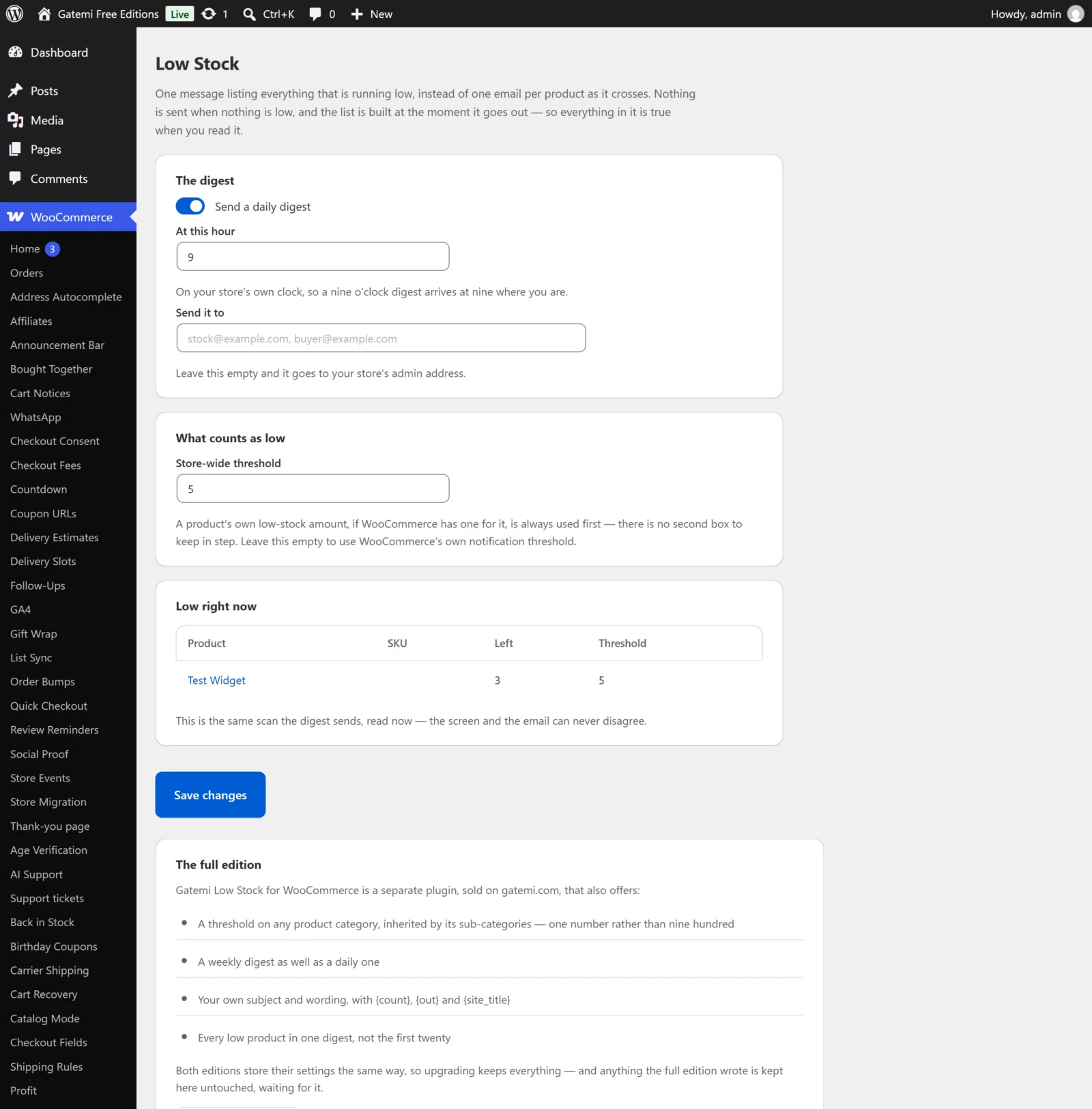
The digest
Send a daily digest
- Key:
digest· Default: on (yes) - Full edition label: Email a digest.
- Ticked, the plugin keeps one scheduled task that builds and sends the digest. Unticked, the task is removed and nothing is sent.
- The task also exists only while there is somebody to send to (see Send it to).
How often — Full edition
- Key:
schedule· Default:daily - Every day (
daily) or Every week (weekly). Any other stored value is read as daily. - A weekly digest goes out on the weekday of its first run: the first time the chosen hour comes round after you save.
- The free edition always sends daily and does not read this key.
At this hour
- Key:
hour· Default:9 - Full edition label: At what hour.
- A whole number from 0 to 23; anything outside is clamped into that range.
- Read in your store's timezone (Settings → General → Timezone), so a 9 o'clock digest arrives at nine where the shop is, whatever the server's clock says.
Send it to
- Key:
recipients· Default: empty - One or more addresses separated by commas, spaces or semicolons. Anything that is not a valid email address is dropped, and duplicates are removed (case-insensitively).
- Empty means the site's admin email (
admin_emailin Settings → General). - If no valid address is left at all, no digest is scheduled.
Send it even when nothing is low — Full edition
- Key:
send_empty· Default: off (no) - Off: when nothing is at or below its threshold, nothing is sent.
- On: the digest goes out on schedule regardless, saying "Nothing is below its threshold."
- The free edition never sends an empty digest and does not read this key.
What counts as low
Store-wide threshold
- Key:
threshold· Default: empty - A whole number, 0 or more. Products at or below it are reported.
- Empty is different from 0. Empty means "use WooCommerce's own value" — the Low stock threshold in WooCommerce → Settings → Products → Inventory (option
woocommerce_notify_low_stock_amount, which WooCommerce defaults to 2). Zero is a real answer: report a product only once it has run out. - This is the fallback. A product's own Low stock threshold (the field on its Inventory tab) always wins over it, and in the full edition so does a category threshold. The full order is on How it works.
Low-stock threshold on a product category — Full edition
- Found on Products → Categories, when adding or editing a category.
- Stored as: term meta
_gmls_thresholdon theproduct_catterm. Default: empty. - Products in the category, and in every sub-category below it, are reported at or below this number unless they have their own threshold.
- If a product is in several categories with thresholds, the highest one is used.
- Emptying the box removes the threshold (the product falls back to the store-wide one); 0 means "tell me only once it has gone".
- Saving it requires the
manage_product_termscapability.
Wording — Full edition
Subject — Full edition
- Key:
digest_subject· Default: empty - Empty uses the built-in subject:
{count} products are low at {site_title}.
Message — Full edition
- Key:
digest_body· Default: empty - Empty uses the built-in opening:
These products are at or below their threshold right now. {out} of them have run out. - The list of products is always added under your message; you do not need a placeholder for it.
Both fields understand three placeholders:
| Placeholder | Replaced with |
|---|---|
{count} |
How many products are low |
{out} |
How many of those have run out |
{site_title} |
Your store's name |
The free edition always uses the built-in subject and opening and does not read these two keys.
The live report
The Low right now card (full edition: What is low right now) is not a setting. It runs the same scan the digest sends, at the moment you open the screen, and shows each product's name (linked to its edit screen), SKU, how many are left and the threshold that applied. The free edition shows up to twenty products and says how many more there are; the full edition shows them all (see gmls_report_limit in the developer reference).
License & updates — Full edition
A card for the gatemi.com licence key: paste the key and click Activate, or Deactivate on this site to free the key for another site. The plugin works without a key; the key enables one-click updates. Without a key the plugin makes no requests to gatemi.com.
For developers — Full edition
The full edition's screen ends with a table of every filter it applies. They are all listed in the developer reference.