
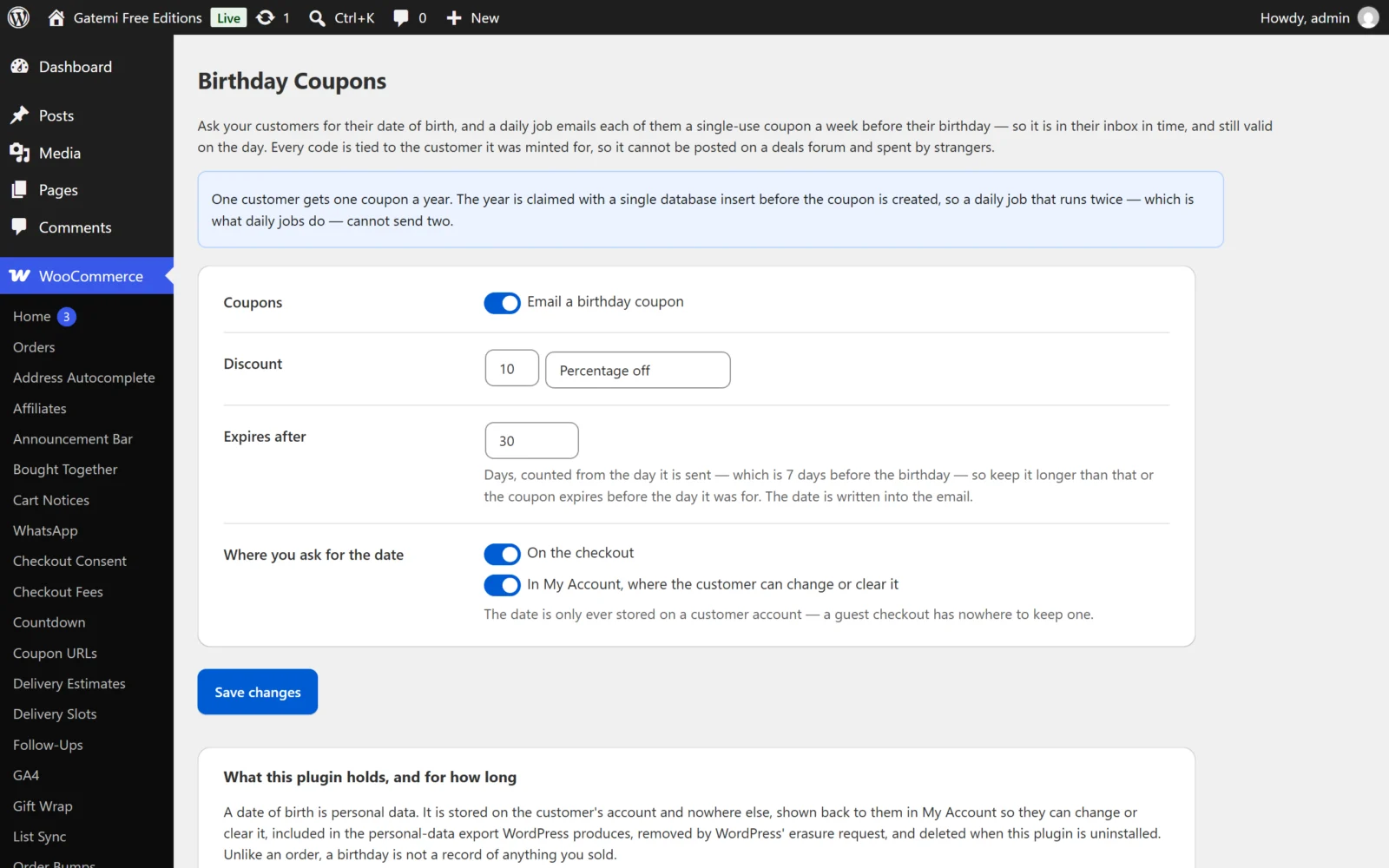
All settings are on WooCommerce → Birthday Coupons. Both editions store them in one WordPress option, gmbd_settings, so moving from the free edition to the full edition keeps everything you set.
The free edition has six settings on one table. The full edition has sixteen, in six cards. Settings only the full edition has are marked Full edition. The free edition never reads them, even if they are stored.
Which days earn a coupon
Send coupons / Email a birthday coupon
- Key:
enabled· Default: on (yes) - The master switch. Labelled Email a birthday coupon in the free edition (row "Coupons") and Send coupons in the full edition.
- Off: no coupons are minted or sent, the date field is not shown on the checkout or in My Account, and the daily cron event is removed.
On a customer's birthday — Full edition
- Key:
birthday· Default: on (yes) - Whether birthdays earn a coupon. The free edition always sends birthday coupons and writes
yeshere when you save.
On the anniversary of the day they joined — Full edition
- Key:
anniversary· Default: off (no) - Sends a second, separate coupon on the anniversary of the day the customer account was created. It needs nothing from the customer: the date comes from the account's registration date. Guests have no account, so they get none.
Send it this many days early — Full edition
- Key:
days_before· Default:7· Range: 0–60 - How many days before the day the coupon is sent.
0sends it on the day. - The free edition always uses 7 and never reads this key.
What the coupon is worth
Discount
- Keys:
amount(default10) anddiscount_type(defaultpercent) - The number and its type: Percentage off (
percent) or Fixed amount off the cart (fixed_cart). - Typed amounts are read the way people type them:
12,50is 12.50. Negative amounts become 0, and a percentage is capped at 100.
Spendable on orders worth at least — Full edition
- Key:
coupon_min_spend· Default:0 - Sets the coupon's WooCommerce minimum spend.
0means the coupon can be spent on any order.
Expires after
- Key:
expiry_days· Default:30· Range: 1–365 - Days, counted from the day the email is sent, in your store's timezone. The last day is written into the email.
- Keep it longer than the head start (7 days in the free edition), or the coupon expires before the birthday it was for.
Codes start with — Full edition
- Key:
prefix· Default:BDAY - The start of every code. Letters, numbers and dashes only, upper-cased, up to 12 characters. An empty box goes back to
BDAY. - The rest of the code is a dash and eight random characters, for example
BDAY-7KQ2MX9P. The free edition always usesBDAY.
Where you ask for the date
On the checkout
- Key:
ask_at_checkout· Default: on (yes) - Adds a Date of birth field (a date picker) to the billing section of the classic checkout. It is saved only when the customer has an account. The field is added through
woocommerce_checkout_fields, so it does not appear on the Checkout block.
In My Account, where the customer can change or clear it
- Key:
ask_in_account· Default: on (yes) - Adds the field to My Account → Account details. A customer who clears it there has their date deleted.
Make it required at the checkout — Full edition
- Key:
require_date· Default: off (no) - Makes the checkout field required. It is off by default because a required date of birth costs orders. In the free edition the field is never required.
The emails — Full edition
| Label | Key | Default |
|---|---|---|
| The birthday email → Subject | birthday_subject |
empty |
| The birthday email → Message | birthday_body |
empty |
| The anniversary email → Subject | anniversary_subject |
empty |
| The anniversary email → Message | anniversary_body |
empty |
An empty box uses the wording the plugin ships with. The free edition always uses that wording:
Subject: Happy birthday — here is {amount} off from {site_title}
Hello {first_name}, Happy birthday from all of us at {site_title}. Here is {amount} off, with our compliments. Your code: {code} Use it by: {expiry} Enter it at the checkout.
The emails are plain text. These placeholders work in subjects and messages:
| Placeholder | Becomes |
|---|---|
{code} |
The coupon code |
{amount} |
What it is worth, e.g. 10% or €5.00 |
{expiry} |
The last day it works, in your WordPress date format |
{first_name} |
The customer's first name (their display name if none) |
{site_title} |
Your site title |
License & updates — Full edition
The License & updates card takes your gatemi.com licence key (GM-XXXXX-XXXXX-XXXXX-XXXXX-XXXXX) and shows its status. It is stored in its own option, gmbd_license. A network failure during a licence check never changes the stored status.
Users list — Full edition
The full edition adds a Birthday column to Users, showing the day and month only (for example 14 Mar). The year is deliberately not shown. A customer with no date shows a dash. The column appears while On a customer's birthday is on.
Customer profile — Full edition
Editing another user under Users → (edit) shows a Birthday Coupons section with an Anniversary date box (user meta _gmbd_since), visible to users who can manage WooCommerce. The anniversary coupon is counted from that date; left empty, from the day the customer registered.