
The settings are at WooCommerce → Settings → Payments → Authorize.Net, in four tabs: Connection, Credit card, eCheck (ACH) and Google Pay. Each payment method is its own WooCommerce gateway with its own option:
| Gateway | Id | Option |
|---|---|---|
| Credit / Debit Card (also holds the connection) | gatemi_authnet |
woocommerce_gatemi_authnet_settings |
| eCheck (ACH) | gatemi_authnet_echeck |
woocommerce_gatemi_authnet_echeck_settings |
| Google Pay | gatemi_authnet_googlepay |
woocommerce_gatemi_authnet_googlepay_settings |
eCheck and Google Pay use the API keys saved on the Connection tab and its Environment.
Connection
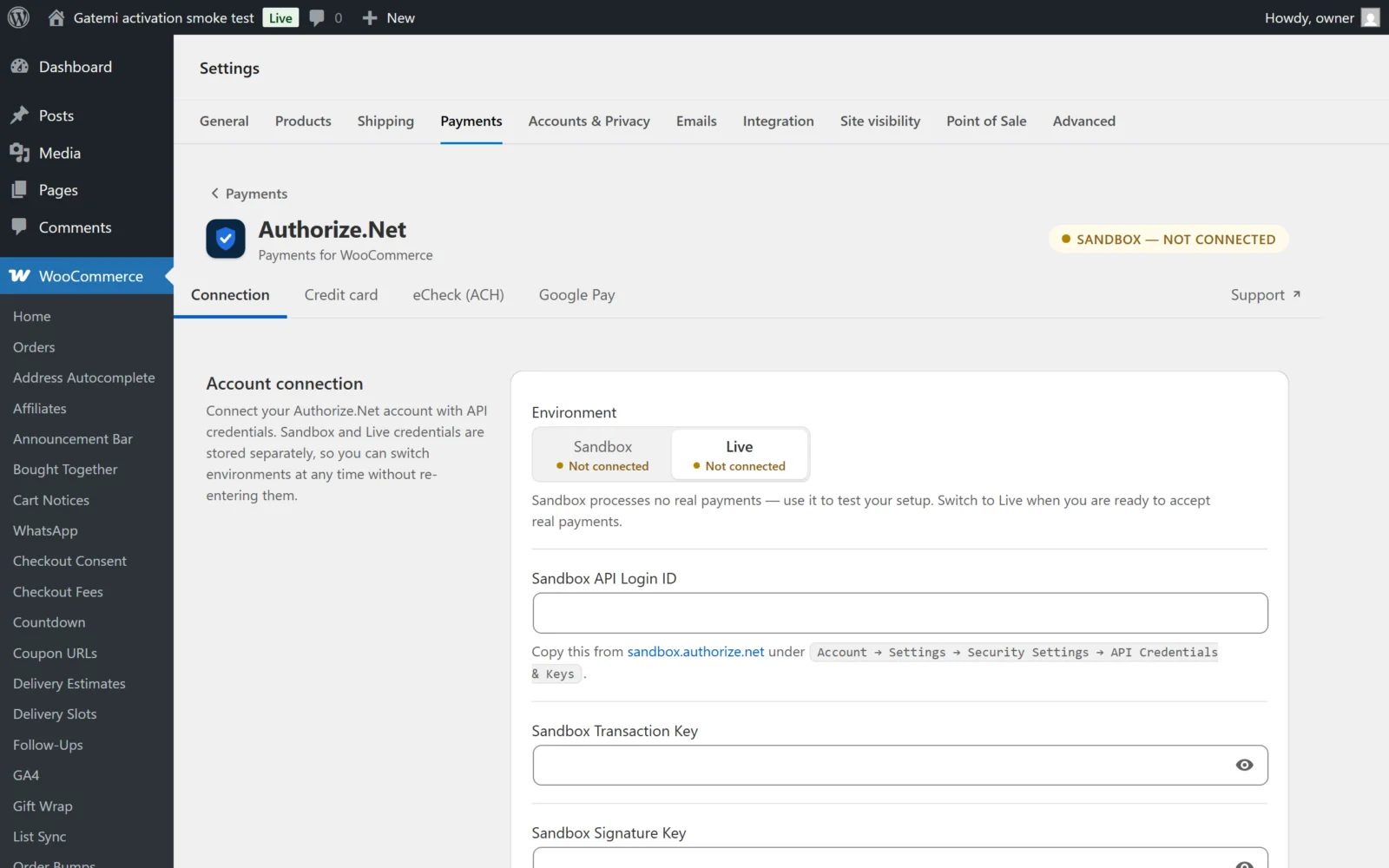
| Label | Key | Default |
|---|---|---|
| Environment | environment — Sandbox or Live |
sandbox (a store that saved the screen before keeps its stored choice) |
| Sandbox API Login ID | sandbox_api_login_id |
empty |
| Sandbox Transaction Key | sandbox_transaction_key |
empty |
| Sandbox Signature Key | sandbox_signature_key |
empty |
| Live API Login ID | live_api_login_id |
empty |
| Live Transaction Key | live_transaction_key |
empty |
| Live Signature Key | live_signature_key |
empty |
The badge at the top of the screen shows the active environment and whether it is connected.
- Saving requires all three values for the environment you are editing; a partial set is refused rather than saved.
- The API Login ID and Transaction Key are checked with Authorize.Net before they are saved. Invalid ones are refused with Authorize.Net credentials are invalid for the selected environment.
- After a save, the plugin stores the Public Client Key for Accept.js (option
gatemi_authnet_public_client_key, one per environment), fills in the Google Pay Gateway ID, and registers or updates the webhook. - The Signature Key is required, together with the API Login ID and Transaction Key, and is what verifies webhooks. Without it every webhook is refused.
Credit card
Payment method
| Label | Key | Default |
|---|---|---|
| Enable Credit / Debit Card | enabled |
on |
| Title | title |
Credit / Debit Card |
| Description | description |
Pay securely using your credit or debit card. |
Payment preferences
| Label | Key | Default |
|---|---|---|
| Saved cards | tokenization |
off |
| Transaction type | transaction_type — Authorize only (auth_only) or Authorize and capture (auth_capture) |
auth_capture |
| Card logos | accepted_card_logos — Visa, MasterCard, American Express, Discover, JCB, Diners Club |
all six |
| Debug logging | debug |
off |
| Remove data on uninstall | remove_data_on_uninstall |
off |
- Remove data on uninstall — when ticked, deleting the plugin also deletes its settings and API keys. Off by default, so they survive deleting and reinstalling. Orders, saved cards and customer profiles are never removed.
- Saved cards stores the card as a customer payment profile in Authorize.Net's Customer Information Manager. Your site keeps only a token. It is needed for WooCommerce Subscriptions renewals.
- Authorize only reserves the amount; the order waits On hold and is captured from Order actions → Capture Authorized Payment.
- Card logos are display only. The card brands you can accept are set by your merchant account.
- The card method is offered only when the store currency is one Authorize.Net processes: AUD, CAD, DKK, EUR, GBP, NOK, NZD, PLN, SEK or USD.
eCheck (ACH)
Payment method
| Label | Key | Default |
|---|---|---|
| Enable eCheck (ACH) | enabled |
off |
| Title | title |
eCheck (ACH) |
| Description | description |
Pay securely using your bank account. |
Enable eCheck on your Authorize.Net account first.
Payment preferences
| Label | Key | Default |
|---|---|---|
| Transaction type | echeck_transaction_type — Authorize only, Authorize and capture |
auth_capture |
| Order status after checkout | echeck_order_status |
on-hold |
| Order status when payment clears | echeck_webhook_success_status |
processing |
| Accepted bank account types | echeck_account_types — Checking, Savings, Business checking |
Checking, Savings |
| Account holder name | echeck_name_source — Billing first and last name, Billing company name |
billing name |
| Statement descriptor | statement_descriptor |
your site name |
| Debug logging | debug |
off |
A bank payment takes days to clear. The order stays in Order status after checkout until Authorize.Net's webhook reports the capture, then moves to Order status when payment clears. eCheck is offered only in USD.
Google Pay
Payment method
| Label | Key | Default |
|---|---|---|
| Enable Google Pay | enabled |
off |
| Title | title |
Google Pay |
| Description | description |
Pay securely using Google Pay. |
Enable Google Pay in Authorize.Net under Account → Digital Payment Solutions first.
Google Pay configuration
| Label | Key | Default |
|---|---|---|
| Gateway ID | googlepay_gateway_id |
filled in when the API keys are saved |
| Google Pay merchant ID | google_merchant_id |
empty |
| Show Google Pay button on | express_locations — Cart page, Top of checkout |
both |
The Gateway ID is your Authorize.Net gateway id; you can also find it under your profile icon in the Authorize.Net dashboard. The Google Pay merchant ID comes from the Google Pay & Wallet Console, is only needed for live payments, and is not the same as the Gateway ID. In sandbox the button runs in Google's TEST environment.
Button & payment preferences
| Label | Key | Default |
|---|---|---|
| Merchant name | googlepay_merchant_name |
your site name |
| Transaction type | transaction_type — Authorize only, Authorize and capture |
auth_capture |
| Button label | express_button_label — Plain, Buy, Checkout, Donate, Book, Order, Pay, Subscribe |
pay |
| Button color | express_button_color — Black, White |
black |
| Button shape | express_button_shape — Rectangle, Pill |
rect |
| Button width | express_button_width — Full width, Auto |
full |
| Button height (px) | express_button_height, 32–64 |
48 |
| Debug logging | debug |
off |
Google Pay is offered only in USD by default.
Logs
With Debug logging on, payment activity is written to WooCommerce → Status → Logs. Card numbers are never in the log; the browser sends only an Accept.js token.