
Settings are on WooCommerce → AI Support (capability manage_woocommerce). Both editions store them in one option, gmai_settings, so upgrading keeps them. The free edition shows them on one Settings tab beside Conversations; the full edition splits them into Assistant, Knowledge, Orders, Tickets, Cost & privacy, Conversations and License tabs.
A save only changes the fields that form sent, so saving one tab never blanks another.
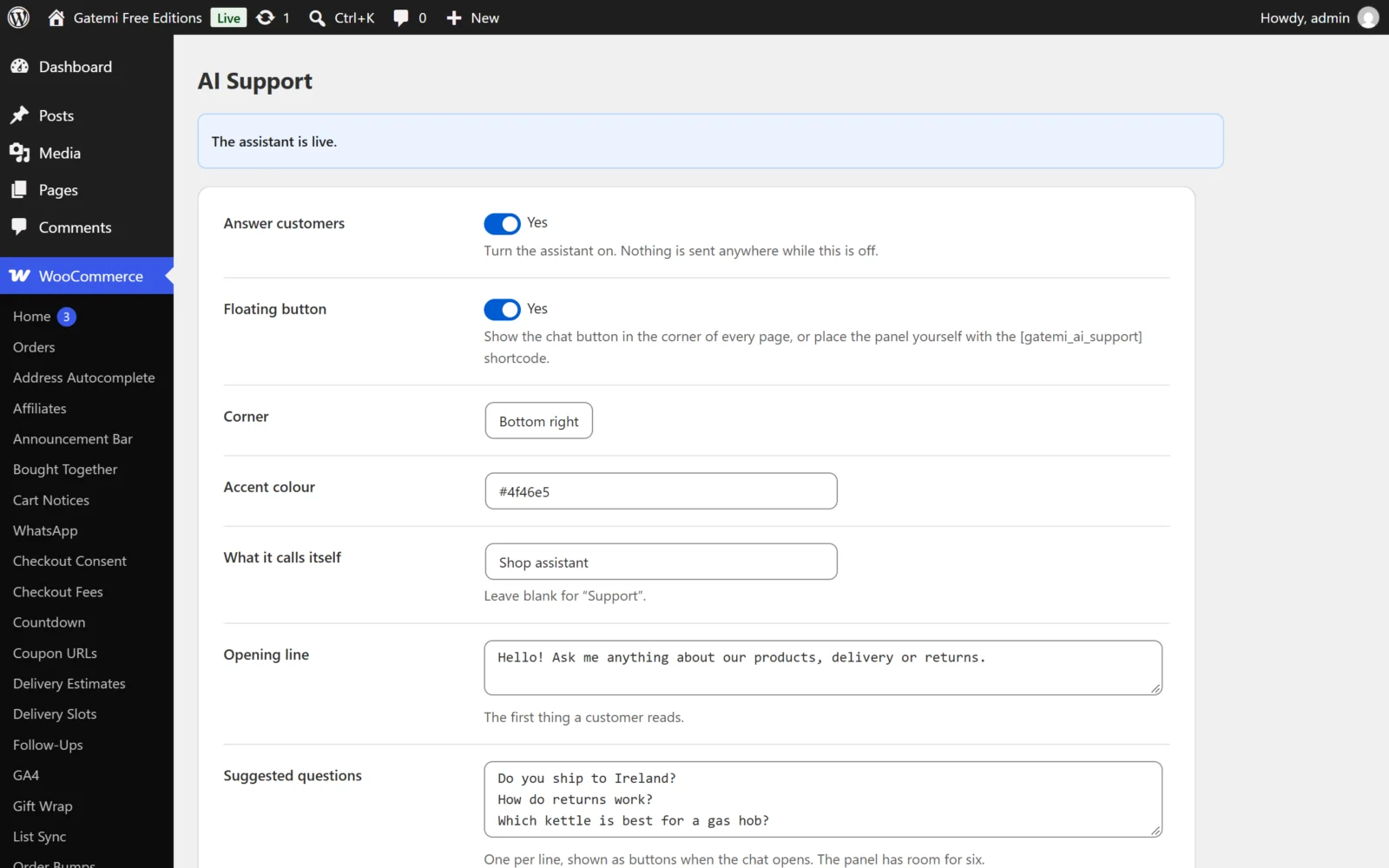
The assistant
| Label | Key | Default | What it does |
|---|---|---|---|
| Answer customers | enabled |
off | The master switch. Off, the widget is not shown and nothing is sent to OpenAI. |
| Floating button | launcher |
on | Shows the chat button on every front-end page. Off, place the panel with [gatemi_ai_support]. |
| Corner | position |
Bottom right | bottom-right or bottom-left. |
| Accent colour | accent |
#4f46e5 |
A hex colour for the button and the panel. |
| What it calls itself | assistant_name |
empty → "Support" | Shown on the button and the panel. |
| Opening line | greeting |
empty → "Hi! Ask me anything about our products or our policies." | The first message in the panel. |
| Suggested questions | starters |
Free edition: "Do you ship to my country?", "Which plan is right for me?", "How do refunds work?". Full edition: "Where is my order?", "Which plan is right for me?", "How do refunds work?" | One per line; up to six are shown as buttons. |
The free edition's defaults ask nothing about orders, because it cannot look one up and would only be able to answer with a ticket. The full edition's defaults open with "Where is my order?", which it can answer. Edit the list to suit your shop.
The model
| Label | Key | Default | What it does |
|---|---|---|---|
| OpenAI API key | api_key |
empty | Your key. Never shown again once saved. The constant GMAI_OPENAI_KEY in wp-config.php takes precedence and hides the field. |
| Model | model |
gpt-4o-mini |
Any chat model your key can use. |
| House style — Full edition | persona |
empty | How you talk to customers, or a policy to repeat. It cannot override the safety rules. |
Full edition: Test the connection sends a test call with your key.
Knowledge
| Label | Key | Default | What it does |
|---|---|---|---|
| Index products | index_products |
on | Names, descriptions, categories and options. Never prices or stock. |
| Also index | index_post_types |
page |
Other post types, comma-separated. Only published, public content. |
| Anything else it should know | knowledge_extra |
empty | Free text indexed as one more source. |
| Semantic search — Full edition | embeddings |
off | Adds OpenAI embeddings so meaning matches as well as words. Costs extra; needs a rebuild after big changes. |
| Embedding model — Full edition | embedding_model |
text-embedding-3-small |
The embedding model. |
Rebuild the index now re-reads everything. The screen shows how many passages are indexed and, in the full edition, when it was last rebuilt and whether the database accepted a full-text index.
Orders — Full edition
The free edition has no order settings: it never looks up an order, and the screen says so.
| Label | Key | Default | What it does |
|---|---|---|---|
| Look up orders | orders_enabled |
on | Lets customers ask about orders in chat. |
| Identify by email alone | email_lookup |
on | The customer gives an email, receives a six-digit code, and can then see every order on that address — no order number needed. |
| Licence keys and downloads: Email a six-digit code first | require_code |
on | Keys and download links need a code sent to the address on the order. Signed-in customers who own the order skip it. Turning it off lets anyone who guesses an order number and email read that order's keys. |
| Code lasts for | code_ttl |
15 |
Minutes, 5–60. |
| Lookups per visitor | lookup_attempts |
5 |
Failed lookups allowed per hour from one address. |
Tickets
| Label | Key | Default | What it does |
|---|---|---|---|
| Let customers open tickets | tickets_enabled |
on | The assistant can open a ticket and look one up. |
| Send tickets to | ticket_email |
empty → site admin email | Where new tickets are emailed. |
| Acknowledge to the customer | ticket_ack |
on | Emails the customer their reference straight away. |
See Tickets.
Cost and privacy
| Label | Key | Default | What it does |
|---|---|---|---|
| Stop spending after | daily_budget |
5.00 |
Per day, in your OpenAI account's currency. When reached, the assistant stops answering and offers a ticket. 0 is no ceiling. |
| Model calls per day | daily_requests |
500 |
A second ceiling, counted rather than costed. 0 is no limit. |
| Messages per chat | session_requests |
30 |
Per hour, per conversation (1–500). |
| Length of one chat | max_turns |
20 |
Messages before the customer is asked to start again or open a ticket (2–100). |
| What customers are told | consent_notice |
empty → the default notice | Shown in the panel before anybody types. |
| Keep transcripts — Full edition | store_transcripts |
on | Needed to attach a chat to a ticket and to review conversations. |
| Record visitor IP address and location — Full edition | store_ip |
off | Off, only a one-way hash of the address is kept, for rate limiting. On, the IP and an approximate location are shown on the Conversations tab; the address is sent to ipinfo.io to resolve it. |
| ipinfo.io token — Full edition | ipinfo_token |
empty | Optional token for ipinfo.io. |
| Delete transcripts after | retention_days |
90 |
Days, 0 keeps forever. Conversations that became a ticket are always kept. |
| Delete everything at uninstall | delete_data |
off | See FAQ. |
The full edition shows the last 14 days' spend and the price per million tokens it is using for your model. A model not in its price table is counted in tokens but not costed (fix it with gmai_model_prices).
Conversations
The Conversations tab (both editions) lists every chat with its last message time, message count, tokens, estimated cost, the customer's helpful/unhelpful rating and the ticket it led to. Filter by Marked unhelpful, Marked helpful or Became a ticket, and open one to read it. Full edition: the transcript shows which tool the assistant called — never what the tool returned — and, with Record visitor IP address and location on, the visitor's IP and location.