
What the EU's VIES service actually returns, what a consultation number is, and why your own VAT number in the request matters.
Most shops that sell to EU businesses check VAT numbers against VIES, the European Commission's VAT Information Exchange System. Fewer know exactly what a VIES answer means, or how to keep one so it is still useful in three years. This post covers both.
Not legal or tax advice. This explains how VIES works and how our plugins use it. Ask your accountant what evidence your tax authority expects.
What VIES is
VIES is not a central list of EU businesses. The Commission's VIES site says so directly: there is no VAT database at Community level. When you check a number, your request goes to the national database of the member state that issued it, over a secure network between tax administrations, and the reply comes back in a few seconds. The VIES FAQ calls the data "real-time" for that reason.
Its legal basis is Article 31 of Council Regulation (EU) No 904/2010, and the VIES disclaimer limits its use to people involved in intra-Community supplies who need to confirm a VAT number — drawing up their own invoices is the example it gives.
What a check returns
The VIES help lists the possible answers:
- Yes, valid VAT number.
- No, invalid VAT number — meaning the number is not valid, at least on the date of the check.
- Service unavailable — a problem with the network or the Commission's application.
- Member State service unavailable — the issuing country's database is not answering.
- Incomplete or corrupted input, and request time-out.
With a valid answer, VIES may also return the name and address of the business. Not every country allows this. The FAQ says that if no name or address is shown, the member state does not permit it, and the help adds that such fields appear as ---.
So "unavailable" is not "invalid". It means nobody could answer. Treating the two as the same is how a shop ends up refusing good customers on a busy afternoon — or, the other way round, waving through numbers nobody checked.
What a check does not prove
A "valid" answer tells you the number exists in that country's register on that day. It does not tell you:
- that the person at your checkout is the business that owns it;
- that the goods will actually leave your country;
- that the sale is in fact a business purchase.
The VIES help is explicit: confirming that a VAT number is valid and belongs to a given taxable person is only one of the elements of evidence supporting the VAT exemption of intra-Community supplies of goods (Article 138(1) of the VAT Directive), or the non-application of VAT on services supplied to another member state.
That is why the other two checks matter: the number's country prefix should match the customer's country, and the customer should not be in your own country. A valid number fails both of those just as easily as an invalid one.
The consultation number
Here is the part most shops miss. The VIES help says:
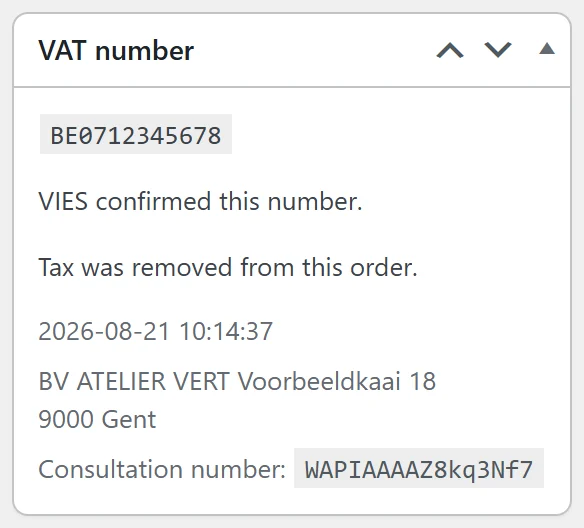
- If you put your own VAT number in the "requester" field, the reply contains a unique consultation number.
- If you want to be able to prove to a tax administration that you checked a given VAT number at a given time and got a given reply, you should keep that consultation number in your archives.
Without a requester number, VIES still answers valid or invalid, but you have nothing issued by VIES to show for it. Your own log says you checked; the consultation number is the Commission's system saying you checked.
The requester number has to be a valid VAT number itself. VIES has a specific error for this — "Invalid requester VAT number" — so a typo in your own number shows up quickly.
What to store for each check
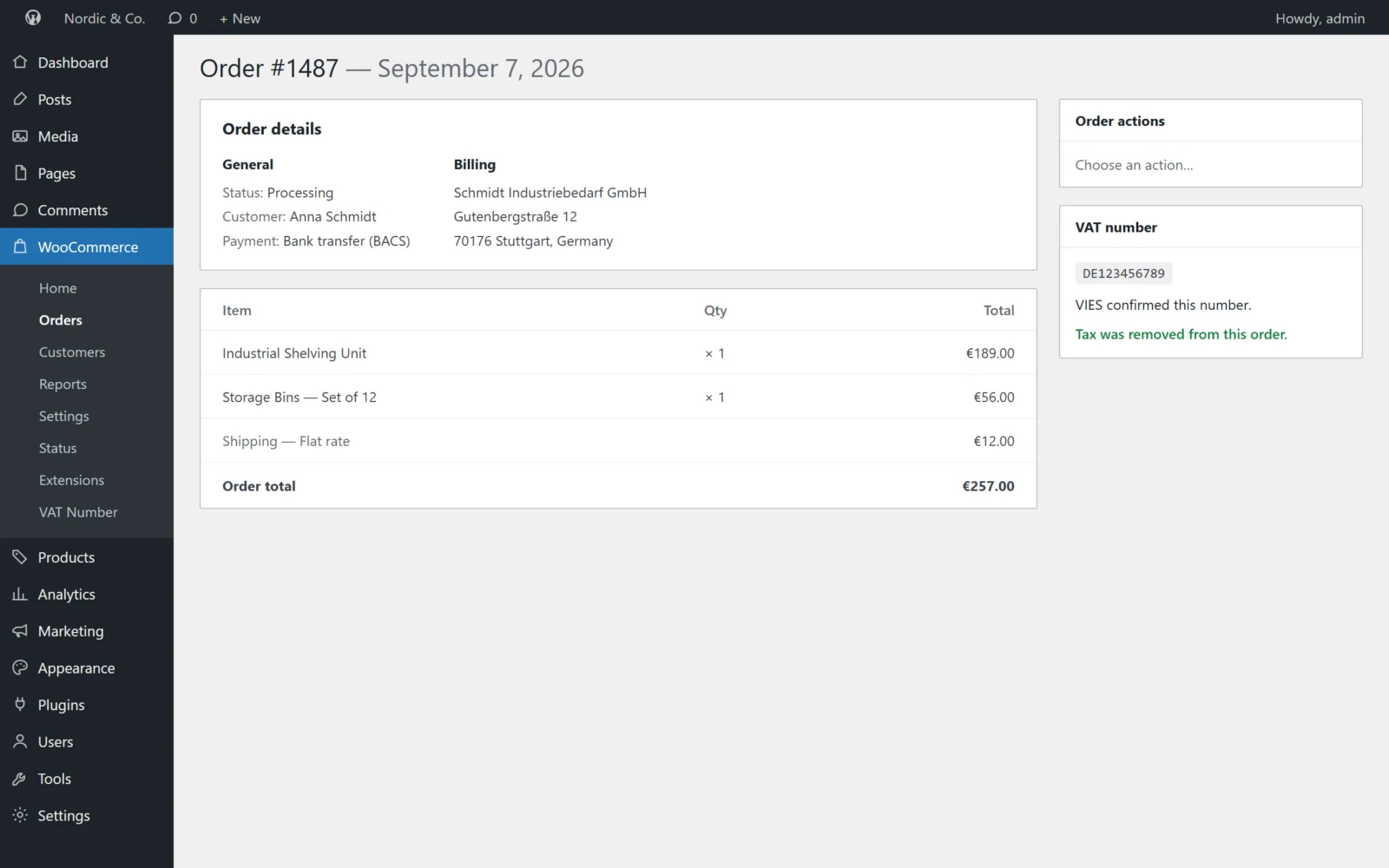
Whatever tool you use, keep these on the order, not in a log file that gets rotated away:
- The number as checked (cleaned up — VIES wants it upper case, with no spaces or dots).
- The answer: valid, invalid or unavailable.
- The date and time of the check.
- The name and address returned, if any.
- Whether the VAT actually came off the order.
- The consultation number, if you have one.
How the Gatemi plugins use VIES
Both editions call the VIES REST service from your server — never from the customer's browser — when a customer types a VAT number at the checkout, and remember the answer for that customer's session — an "unavailable" answer for one minute at most, so the check runs again once VIES is back. Both keep "unavailable" separate from "invalid", read VIES's --- placeholder as no name or address rather than recording the dashes, and write all six facts above to the order and show them in a "VAT number" box on the order screen.
The difference is the requester:
- Gatemi EU VAT Number (free) sends only the customer's number and its country prefix. VIES does not return a consultation number for these checks, so the field stays empty on new orders. It still shows one on an order that carries it — for example an order taken while the full edition was active.
- Gatemi VAT Number for WooCommerce (full edition) has a setting for your own VAT number. When it is filled in, every check is sent as a requester and the consultation number VIES returns is stored on the order. Its settings screen also has a test lookup, so you can try a number — your own included — and see the consultation number before a customer does.
For how this fits into the whole reverse-charge picture, see the guide WooCommerce EU VAT numbers and reverse charge, explained.
Next step
If you want a consultation number on every exempted order, see Gatemi VAT Number for WooCommerce.