
See net, tax and gross sales per country and state in WooCommerce — for EU VAT, US sales tax, UK VAT or plain where-do-my-customers-live analytics.
"How much did we sell in each country?" sounds like the simplest question a shop owner could ask. WooCommerce does not answer it directly. Its Analytics section groups revenue by date, product, category, coupon and customer, and its Taxes report groups tax by the rates you configured — but there is no screen that says France: 12 orders, €2,100 net, €420 tax. This post covers why that table is worth having, the different reasons shops need it, and how to get it.
Not legal or tax advice. Where this post touches on tax, ask your accountant how the rules apply to you.
Four reasons shops need sales by country
1. EU VAT and the One-Stop Shop
The best-known reason. An EU shop selling to consumers across borders above €10,000 a year charges VAT at the customer's rate and files a quarterly One-Stop Shop return listing, for each member state, the taxable amount and the VAT (European Commission). The country table is the starting point for that return. Our WooCommerce OSS VAT report guide walks through it in full, and the €10,000 threshold post covers when it starts to apply.
2. US sales tax by state
US sales tax is set state by state, and an online seller's obligation to collect in a state generally depends on its sales into that state. Each state publishes its own rules and thresholds, so the figure your adviser will ask for is sales per state, over whatever period that state measures.
Switch on the state breakdown and the report gives one row per state — US / CA, US / NY, US / TX and so on — each with orders, net, tax and gross. WooCommerce stores US states as two-letter codes, so each state is one clean row.
What the report does not do is decide what counts toward any particular state's rule — some states count gross sales, some exclude certain sales, and the periods differ. Treat the figures as the raw material and check the rules with the state or your adviser.
3. The UK, and other countries with their own VAT or GST
A UK shop exporting to the EU, an EU shop selling to the UK, an Australian or Swiss store watching how close it is to registering abroad — they all start from the same table. Turn on the state breakdown and UK orders split by the county the customer typed. (Version 1.0.1 fixed a bug where a county typed in full, such as "West Yorkshire", was cut to six characters; it is now kept whole and upper-cased, so two spellings of the same county land in one row.)
4. Plain business analytics
Even with no tax question at all, knowing where the money comes from changes decisions: which country to translate the shop into, where a shipping promotion would pay for itself, which markets are growing quarter on quarter. The country table gives order counts and revenue per country for any date range you pick.
What a useful sales-by-country report has to get right
A country table is only as good as three decisions behind it.
Which country an order belongs to. Goods are best reported where they were delivered, so the shipping country comes first. But a digital download has no shipping address. A report that drops those orders, or files them under the shop's own country, gets the table wrong for exactly the shops that sell digital products. The sensible rule is shipping country, then billing country — and the report should say how many orders used the fallback.
What "net" means. Net should be what you actually kept: the order total, minus the tax, minus refunds. A report that shows the original amount of an order that was half refunded overstates the market.
One currency. If your shop sells in several currencies, €1,000 and $1,000 cannot be added into one number. The report should total the store's own currency and tell you what it left out.
How Gatemi Sales by Country does it
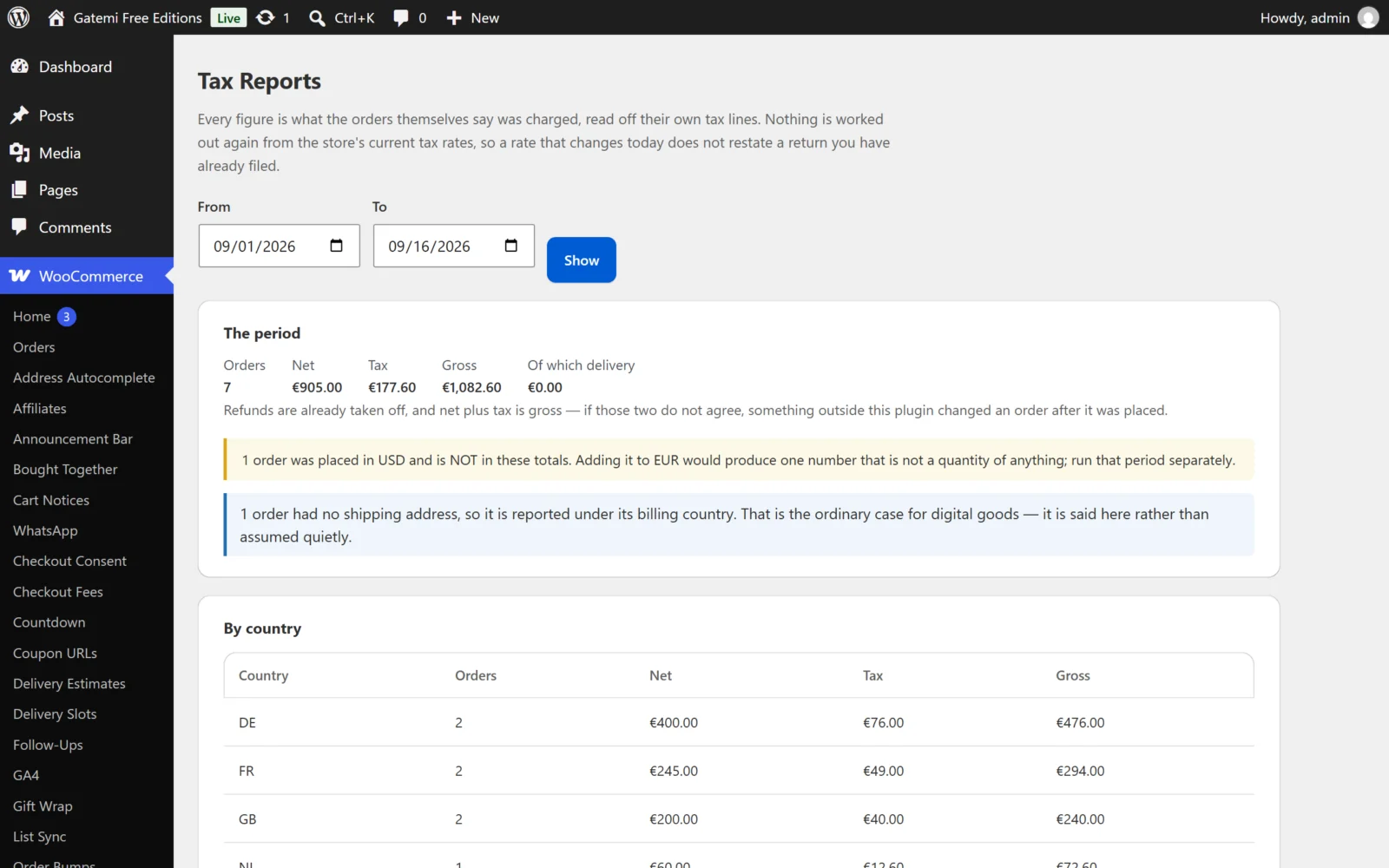
Gatemi Sales by Country is a free plugin on wordpress.org. After activating it, open WooCommerce → Sales by Country, choose a date range and press Show.
You get:
- The period: orders, net, tax, gross, and how much of it was delivery.
- By country: a row per country, in alphabetical order, with orders, net, tax and gross. Optionally, a row per country and state.
- Two notes when they apply: how many orders had no shipping address and were reported under their billing country, and how many were placed in another currency (and which) and left out of the totals.
Behind it:
- Processing and completed orders count as sales.
- Refunds are taken off — refunded total, refunded tax and refunded delivery.
- Every figure comes from the order itself. Nothing is recomputed from your tax settings, so changing a rate today does not rewrite last year (we explain why that matters in Why recomputed tax reports are wrong).
- It adds no tables, writes nothing to your orders, adds nothing to your storefront and makes no outside requests.
A quick example
A shop in the UK, selling in pounds, runs the report for October with the state breakdown on:
| Country | State | Orders | Net | Tax | Gross |
|---|---|---|---|---|---|
| GB | GREATER LONDON | 14 | £1,120.00 | £224.00 | £1,344.00 |
| GB | WEST YORKSHIRE | 6 | £480.00 | £96.00 | £576.00 |
| IE | D | 3 | £300.00 | £0.00 | £300.00 |
| US | CA | 4 | £520.00 | £0.00 | £520.00 |
Net plus tax equals gross on every row. The Irish and Californian rows show no tax, because the shop did not charge any on those orders — the report shows what the orders say, which is exactly what you want to check before deciding whether that is right.
When you need the full edition
Gatemi Tax Reports for WooCommerce is a separate plugin, sold on gatemi.com, that produces the same table and adds:
- a table by country and tax rate, with each rate's label and percentage as the order carries them, and net, tax and gross for each — useful when a country has more than one rate;
- a choice of which order statuses count as a sale;
- the option to report every order under its billing address, for shops that sell services;
- CSV downloads of the country table and the rate table for your accountant or spreadsheet.
Settings carry over between the two, so you can start free and move later.
Next step
Install Gatemi Sales by Country and run it for last month — it only reads your orders, so there is nothing to set up first.