
Both editions put one screen under WooCommerce → Zapier, which needs the manage_woocommerce capability.
Free edition
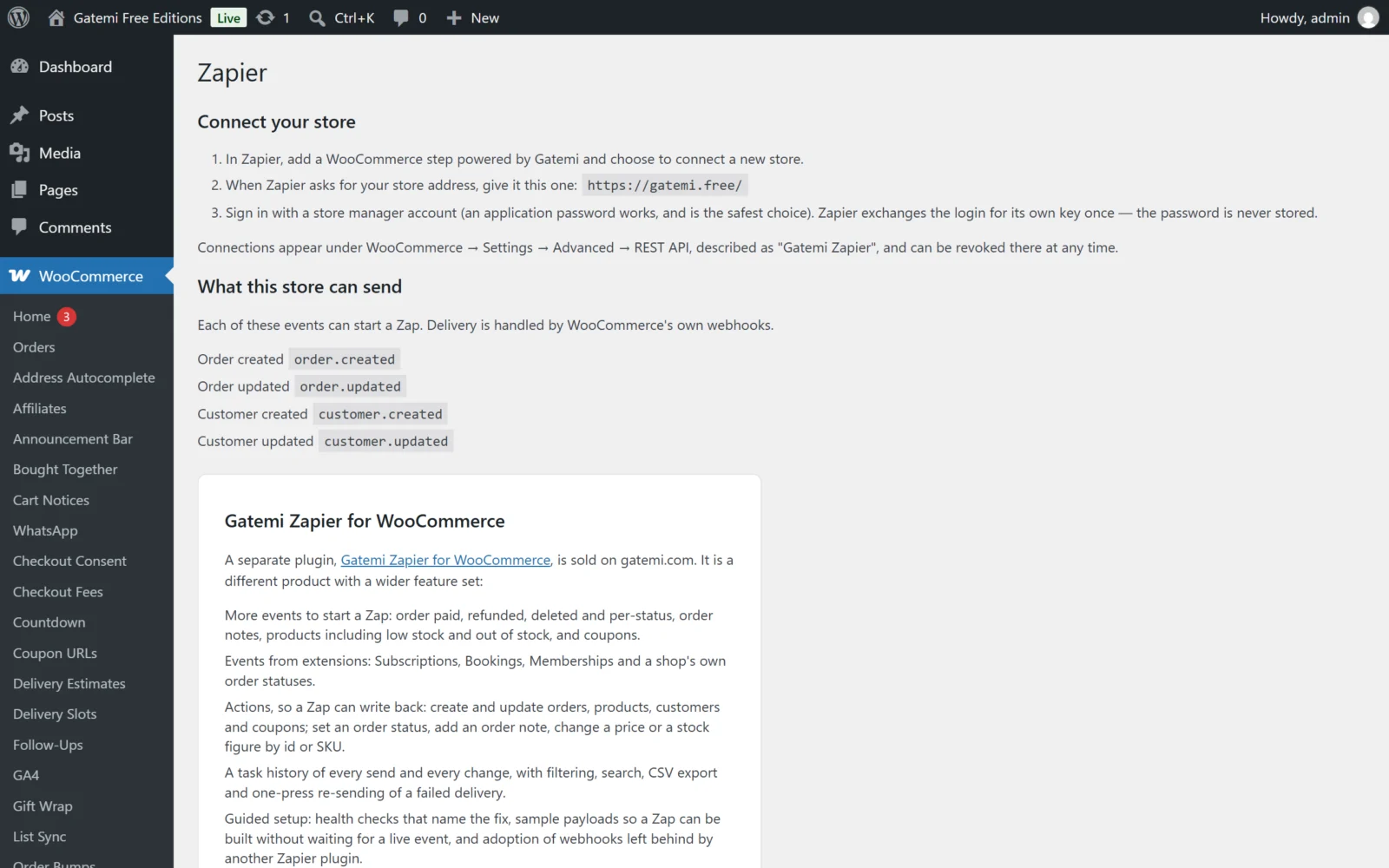
The free edition has no settings at all and stores no options. Its screen shows:
- Connect your store — three steps, the store address to give Zapier (your home address), and a warning when the store is not served over HTTPS.
- What this store can send — the four events it serves, with their topic names:
| Event | Topic |
|---|---|
| Order created | order.created |
| Order updated | order.updated |
| Customer created | customer.created |
| Customer updated | customer.updated |
- A description of the full edition, with a link.
Connections and subscriptions are managed in WooCommerce itself:
- WooCommerce → Settings → Advanced → REST API — the key pair each connection created, described as Gatemi Zapier. Revoke it to disconnect.
- WooCommerce → Settings → Advanced → Webhooks — one webhook per published Zap, named
Gatemi Zapier: <topic>.
Full edition
The screen has three tabs. A store that has never connected opens on Setup; one that has opens on Activity.
Setup
- Check this store is ready. The readiness checks, each with a status, what was found and — when something is wrong — the fix:
| Check | Looks at |
|---|---|
| WooCommerce | WooCommerce is active and recent enough |
| HTTPS | The store is served over HTTPS |
| Permalinks | Pretty permalinks are on, so /wp-json/ works |
| Storage | The task history table exists |
| Scheduled tasks | The plugin's housekeeping events are scheduled |
| Other Zapier plugins | Whether another Zapier plugin is active |
| Connection | Whether Zapier has connected and used its key |
| Webhook owners | Whether webhooks for Zapier belong to this plugin |
| Recent failures | Failed deliveries in the task history |
Check again reruns them. The heading reads This store is not ready yet, Ready to connect or Connected to Zapier.
- Add this store in Zapier — the connection address with a Copy button, and the sign-in steps.
- Build your first Zap — suggestions, and two lists generated from what this store can do: What this store can tell Zapier about (every event, including those from Subscriptions, Bookings and Memberships when installed) and What Zapier can change here.
Activity
The task history: every delivery to Zapier (Trigger) and every change Zapier made in the store (Action).
| Column | Shows |
|---|---|
| Date | When it happened |
| Status | Succeeded or Failed |
| Type | Trigger or Action |
| What happened | A sentence naming the record, with View to open it, and the error code on a failure |
| Took | How long it took, in seconds |
Filter by All, Succeeded or Failed, search with Search activity, export the current view as CSV, and clear the history (asks to confirm — it cannot be undone). A failed delivery has Send again: the record is rebuilt as it stands now and sent to the same Zap.
Settings
All optional; the plugin works without changing anything.
| Label | Option | Default | What it does |
|---|---|---|---|
| Detailed logging | gatemi_zapier_logging |
off | Also log successful deliveries and incoming requests, under WooCommerce → Status → Logs. Errors are always logged. |
| Keep task history for … days | gatemi_zapier_retention_days |
30 |
Older Activity records are deleted daily. 0 keeps them forever. |
| Collapse duplicate sends | gatemi_zapier_dedupe |
on | Sends a record to Zapier at most once per event per request, where WooCommerce's own duplicate check would let the same record out twice. |
| Remove data on uninstall | gatemi_zapier_delete_data |
off | When the plugin is deleted, also remove the task history, settings, connection keys and the webhooks it created. Deactivating never deletes anything. |
Press Save settings to keep changes.
The tab also holds the License & updates card (licence key, status, sites in use, Deactivate on this site).
Events — Full edition
Every topic below can start a Zap. WooCommerce core topics are served as they are; the rest are the plugin's own.
| Record | Topics |
|---|---|
| Order | order.created, order.updated, order.deleted, order.restored, order.paid, order.refunded (fully or partially), order.status_changed, and order.status_changed_to_<status> for every registered order status, your own included |
| Order note | order_note.created, order_note.deleted |
| Product | product.created, product.updated, product.deleted, product.restored, product.stock_low, product.out_of_stock, product.stock_status_changed, product.stock_status_changed_to_<status> |
| Customer | customer.created, customer.updated, customer.deleted |
| Coupon | coupon.created, coupon.updated, coupon.deleted, coupon.restored (when coupons are enabled) |
| Subscription | subscription.created, subscription.status_changed, subscription.status_changed_to_<status>, subscription.renewed, subscription.renewal_failed; notes: subscription_note.created, subscription_note.deleted — with WooCommerce Subscriptions |
| Booking | booking.created, booking.ordered, booking.status_changed, booking.status_changed_to_<status>, booking.cancelled, booking.updated, booking.deleted, booking.restored — with WooCommerce Bookings |
| Membership | user_membership.created, user_membership.status_changed, user_membership.status_changed_to_<status> — with WooCommerce Memberships |
A variation's stock events are reported against its parent product.
Actions — Full edition
What a Zap can do in the store, as served under gatemi-zapier/v1:
- Create, read and update orders, products, customers and coupons (WooCommerce's own REST controllers, served under this plugin's namespace and recorded in Activity).
- Update order status, with an optional note.
- Add an order note, by order id.
- Change a product's price — raise or lower by an amount or a percentage, put on sale or end a sale — by id or SKU.
- Change stock — set, add or remove — by id or SKU.
- With the extensions installed: subscriptions, subscription notes, bookings, memberships and membership plans.
Delete actions are not offered by the Zapier app.