
Everything is on one screen, WooCommerce → Order Alerts. Only users who can manage WooCommerce (manage_woocommerce) can open or save it.
Both editions store two options:
gmal_settings— the switches and the wording;gmal_rules— the routing table, one entry per rule.
Upgrading from the free edition to the full edition therefore keeps everything. The free edition shows and edits only the rules it can use (rules covering every order, up to three). Any targeted rule the full edition wrote is left in gmal_rules exactly as it is. A save in the free edition writes the full edition's defaults for the settings it does not show (Also tell them when a product is low stays on), and keeps each rule's Tell them about low stock too as it was stored, so upgrading later finds the full edition's low-stock alerts as you left them.
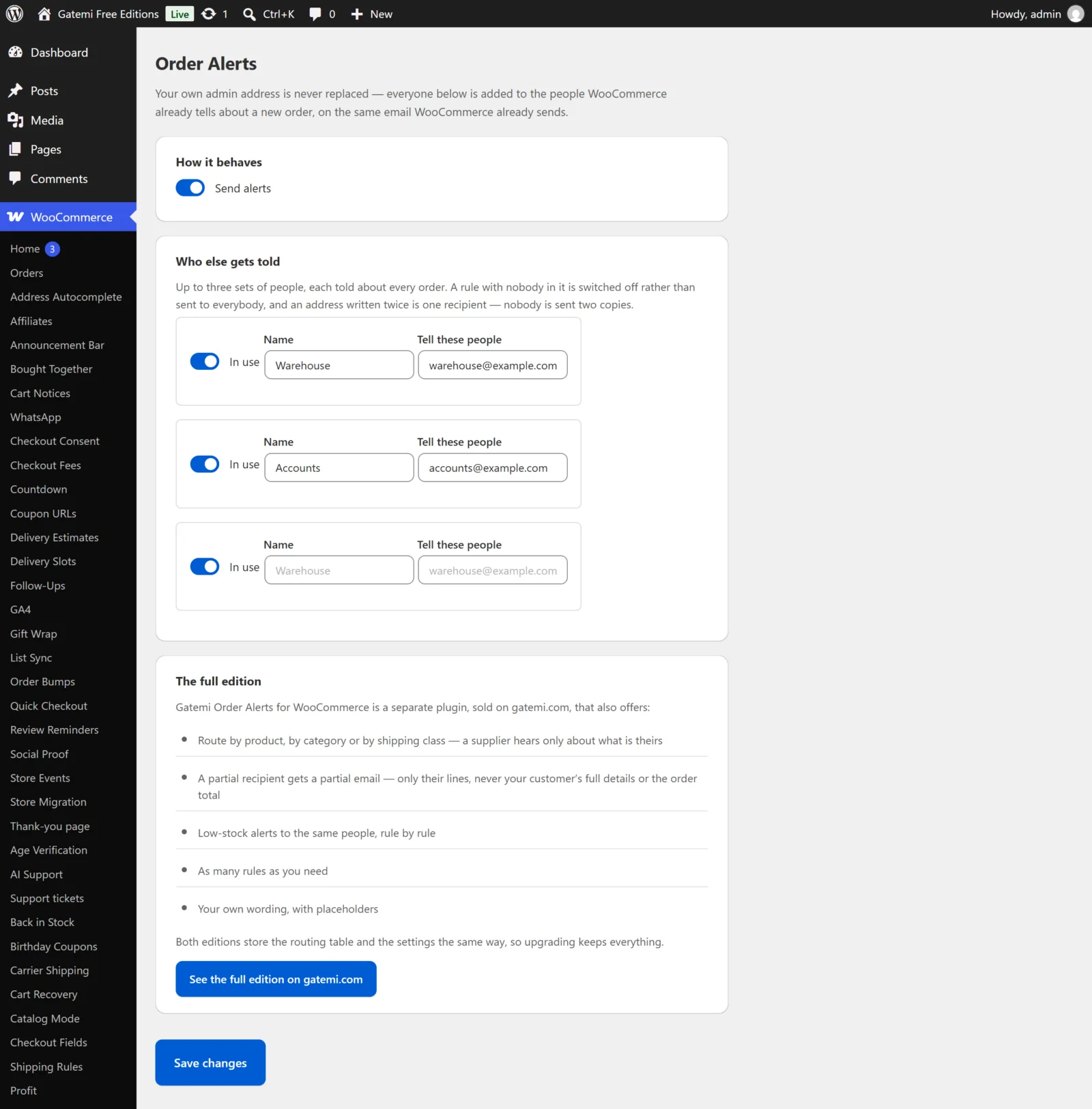
How it behaves
Send alerts
- Key:
enabled· Default: on (yes) - Free edition: when off, nobody is added to the new-order email.
- Full edition: when off, nothing is sent at all — no whole-order recipients are added to the new-order email, no supplier's own message goes out, and no low-stock alert is sent.
Send them when an order reaches — Full edition
- Key:
status· Default:processing - Processing (paid) or Completed. Anything else is saved as
processing. - This decides when a supplier's own message (a rule set to Only their own lines) is sent. Processing is the default because an order nobody has paid for is not one a supplier should start picking.
- It does not move WooCommerce's own new-order email, which WooCommerce sends at its usual moment.
Include the shipping address in a supplier's message — Full edition
- Key:
include_address· Default: on (yes) - Adds a "Ship to:" block to a supplier's own message: the order's shipping address, or the billing address when there is no shipping address.
- A drop-shipper cannot ship without it. The order total and the payment method are never in the message either way.
Also tell them when a product they cover is running low — Full edition
- Key:
stock_alerts· Default: on (yes) - The store-wide switch for low-stock alerts. A rule still has to tick Tell them about low stock too for its people to hear about stock.
Who gets told
Each row is one rule. The free edition shows three rows; the full edition starts with the rules you have and an Add a rule button. A rule is stored in gmal_rules with these fields.
In use
- Field:
enabled· Default: on - Untick to keep a rule without using it.
Name
- Field:
label· Default: empty - For you. In the full edition it fills the
{rule}placeholder in a supplier's message.
Tell these people
- Field:
recipients· Default: none - One or more email addresses, separated by commas, semicolons or spaces.
- Anything that is not a valid address is dropped when you save. One typo would otherwise make WordPress fail the send for everyone on the list.
- An address written twice is kept once (case is ignored). The first spelling you typed is the one kept.
- A rule with nobody in it is switched off, not sent to everybody.
About — Full edition
- Field:
scope· Default:all - Every order (
all), These products (products), These categories (categories) or These shipping classes (classes). - The free edition only offers rules about every order.
Which ones — Full edition
- Field:
targets - For products and categories: ids, separated by commas or spaces. Naming a variable product covers all its variations; naming a variation covers only that variation. A category covers its sub-categories.
- For shipping classes: the class slugs, separated by commas or new lines (not spaces — a class can be called "Chilled goods"). A variation with no class of its own uses its parent's.
Send them — Full edition
- Field:
send - Only their own lines (
lines) — a separate message listing only the lines this rule covers. This is the default for a rule about products, categories or shipping classes. - The whole order email (
order) — the recipients are added to WooCommerce's own new-order email, which carries every line and the customer's details. A rule about Every order can only be this.
Tell them about low stock too — Full edition
- Field:
low_stock· Default: off - When WooCommerce reports a product this rule covers as low in stock, its people get a low-stock message. Off by default: somebody who asked to hear about orders has not asked to hear about stock.
Wording — Full edition
Leave a box empty to use the text shown in it as a placeholder.
| Label | Key | Default |
|---|---|---|
| Order alert: subject | order_subject |
Order #{order_number} — items to pick ({site_title}) |
| Order alert: message | order_body |
A new order needs these items. They are the only items on this order that are yours to send. |
| Low stock: subject | stock_subject |
Running low: {product} |
| Low stock: message | stock_body |
{product} ({sku}) is down to {stock} at {site_title}. Please let us know your lead time for a restock. |
The items are always listed under your order message — you do not need a placeholder for them.
| Placeholder | Becomes |
|---|---|
{order_number} |
The order's number |
{rule} |
The name(s) of the rule(s) that matched |
{product} |
The product running low |
{sku} |
Its SKU |
{stock} |
How many are left |
{site_title} |
Your store's name |
Subjects are saved through sanitize_text_field() and messages through sanitize_textarea_field(). All messages are plain text.
License & updates — Full edition
Enter your gatemi.com licence key and click Activate to switch on one-click updates; Deactivate on this site frees it. The licence is kept in its own option, gmal_license. A failed check never changes your licence state.
For developers — Full edition
A table of the plugin's filters. See the developer reference.