
A countdown is a campaign, stored as a private gmcd_campaign post with its settings in post meta. Store-wide switches are in the option gmcd_settings. Both editions use the same post type, meta keys and option.
Free edition: WooCommerce → Countdown
The free edition edits one campaign — the first published one that is a fixed-date, store-wide countdown (it creates one if there is none).
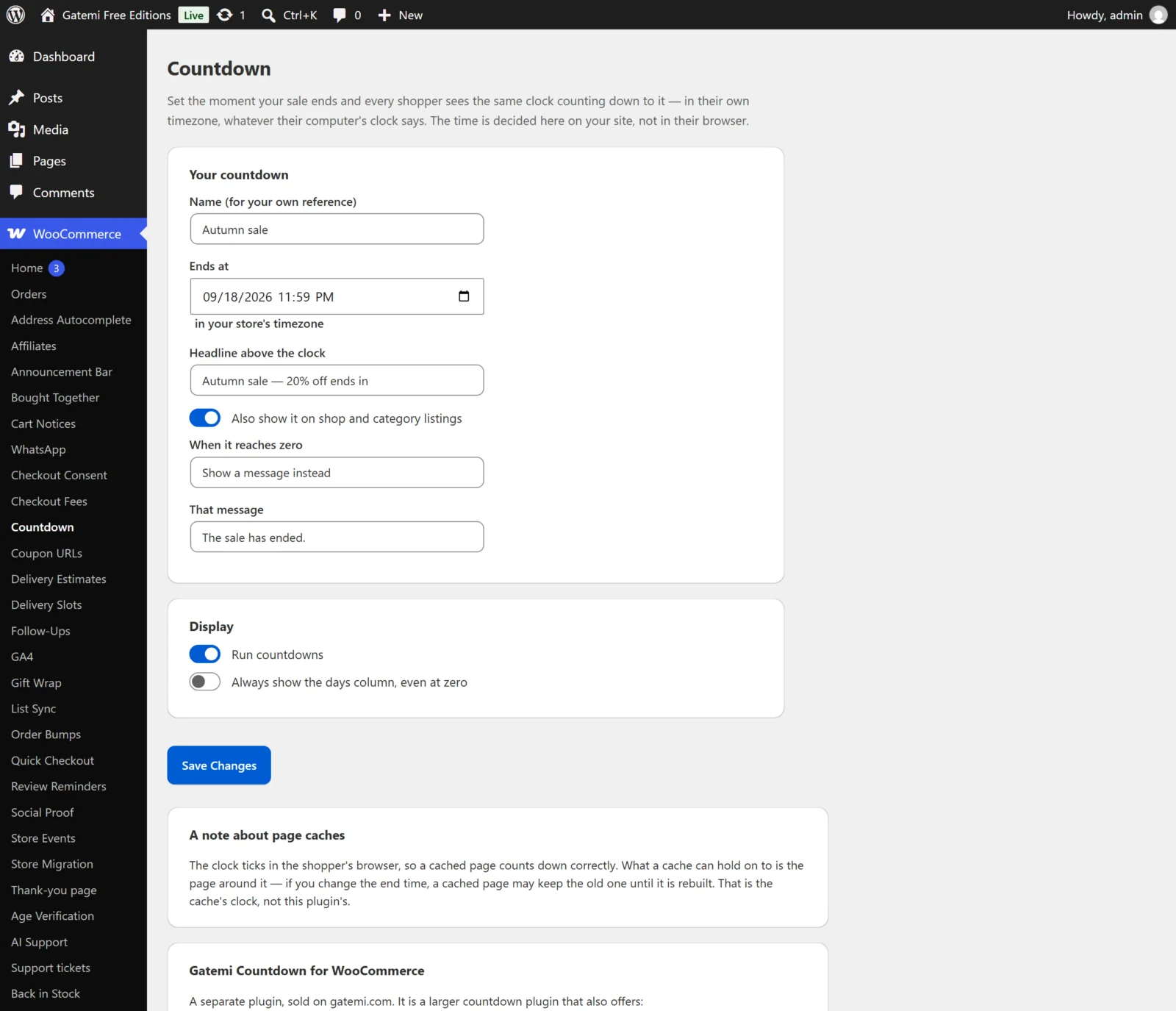
Your countdown
| Label | Stored as | Default | What it does |
|---|---|---|---|
| Name (for your own reference) | post title | "Sale countdown" | Never shown to shoppers |
| Ends at | _gmcd_ends_at |
empty | The end, in your store's timezone; stored as a UTC timestamp. Empty, no countdown shows |
| Headline above the clock | _gmcd_headline |
empty | A line above the digits, e.g. "Sale ends in" |
| Also show it on shop and category listings | _gmcd_placements |
off | Adds loop to the placements; product is always on |
| When it reaches zero | _gmcd_expiry |
hide |
Take it off the page (hide) or Show a message instead (message) |
| That message | _gmcd_expired_text |
empty | The message at zero. With Show a message instead and no message, the countdown is taken off |
Saving also writes _gmcd_kind = scheduled and _gmcd_scope = all: the free edition's countdown always runs to a fixed end time and covers every product.
Display
| Label | Key in gmcd_settings |
Default | |
|---|---|---|---|
| Run countdowns | enabled |
yes |
Off, no countdown shows anywhere; the campaign is kept |
| Always show the days column, even at zero | always_days |
no |
Off, a countdown under a day shows hours, minutes and seconds only |
A campaign the free edition does not show
A campaign the full edition wrote as sale-linked or evergreen, or aimed at categories or products, is not shown by the free edition and is never rewritten by it: the free form edits its own fixed-date, store-wide campaign, and pressing Save Changes creates one beside the others if there is none.
Full edition: a campaign (WooCommerce → Countdowns)
Each campaign is edited in the Countdown box on its own screen. Campaigns are read in menu order, then by id, and the first that covers a product and has a deadline is the one shown.
| Label | Meta key | Default | What it does |
|---|---|---|---|
| What ends it | _gmcd_kind |
scheduled |
See below |
| Ends at | _gmcd_ends_at |
empty | For a fixed-date countdown; your store's time, stored as a UTC timestamp |
| Runs for | _gmcd_minutes |
60 |
Minutes, for an evergreen countdown; capped at 525,600 (a year) |
| Start again for a visitor whose evergreen countdown has run out | _gmcd_restart |
off | Evergreen only |
| Covers | _gmcd_scope |
all |
Every product (all), These categories (categories), These products (products) |
| Category ids | _gmcd_terms |
empty | For These categories; sub-categories are covered too |
| Product ids | _gmcd_products |
empty | For These products; a variation is matched by its parent |
| Shown | _gmcd_placements |
product |
On the product page, On shop and category listings, On the cart — at least one; none ticked means the product page |
| Headline | _gmcd_headline |
empty | |
| At zero | _gmcd_expiry |
hide |
Take the countdown off the page (hide), Leave it sitting at zero (zero), Replace it with a message (message) |
| The message | _gmcd_expired_text |
empty | |
| Accent colour | _gmcd_accent |
empty | A hex colour for the clock; empty uses your theme's colour |
What ends it
| Choice | Key | Deadline |
|---|---|---|
| Ends at a fixed date and time — everybody sees the same clock | scheduled |
Ends at |
| Ends when the product's own sale ends — the timer and the price cannot disagree | sale |
The product's Sale price dates → To, only while it is on sale |
| Starts when each visitor first sees it, and runs for a set time | evergreen |
Runs for minutes from that visitor's first sight |
A sale-linked campaign shows nothing on a product whose sale has no end date, and nothing on the cart (the cart has no single product).
Full edition: WooCommerce → Countdown settings
| Label | Key in gmcd_settings |
Default |
|---|---|---|
| Run the published campaigns | enabled |
yes |
| Always show a days column, even at zero | always_days |
no |
Turning Run the published campaigns off stops every countdown without unpublishing anything.
The screen also carries About page caches, For developers (the filter list) and License & updates (key stored in gmcd_license; an expired licence stops updates, the plugin keeps working).