
When a customer needs a person, the assistant opens a ticket. A ticket is a real email thread: it reaches you as an email you answer from your normal inbox, and it is kept in wp-admin with the chat that led to it. Tickets are in both editions — a support assistant that cannot reach a person would be a trap.
When a ticket is offered
The assistant offers a ticket when the customer asks for a human, is annoyed, raises an order, a refund, a complaint, a legal or safety matter, or when it has failed to answer twice. It also offers one when a spend ceiling or a chat limit is reached.
What a ticket needs
A name, an email, a subject and a description. The assistant asks for whatever is missing and never invents a value. It may also record an order number the customer gives and a category (order, product, technical, billing or other).
- Free edition: an order number is stored as the customer gave it, marked "Not verified" — the free edition never looks an order up.
- Full edition: a conversation that has proved the customer's email fills the address in itself. A technical ticket is not opened without diagnostics — the assistant first asks for the exact error, versions, what changed and what was tried, and whether there is a screenshot or log — but a customer who cannot supply them is never held at the door. One conversation opens one ticket; asking again adds to it.
What happens when it is opened
- A ticket is saved as a private
gmai_ticketpost with a reference such asGM-7KD2XQ(six characters from an alphabet without look-alike letters). - You get an email at Send tickets to, subject
[GM-7KD2XQ] Subject, with the customer's address as its Reply-To. Press Reply in your mail program and you are writing to the customer. - The customer gets an acknowledgement with their reference (if Acknowledge to the customer is on), with your ticket address as its Reply-To.
- The assistant tells the customer the reference, exactly as returned.
No mailbox credentials are stored anywhere; nothing reads your inbox.
Working tickets in wp-admin
WooCommerce → Support tickets lists tickets with Reference, Subject, From, Status and Opened. Opening a ticket shows:
- Customer — reference, name, email, category, any order number, and the status.
- Chat before the ticket — the customer's and the assistant's turns from the conversation that led to it.
- Reply by email — a link to answer the customer.
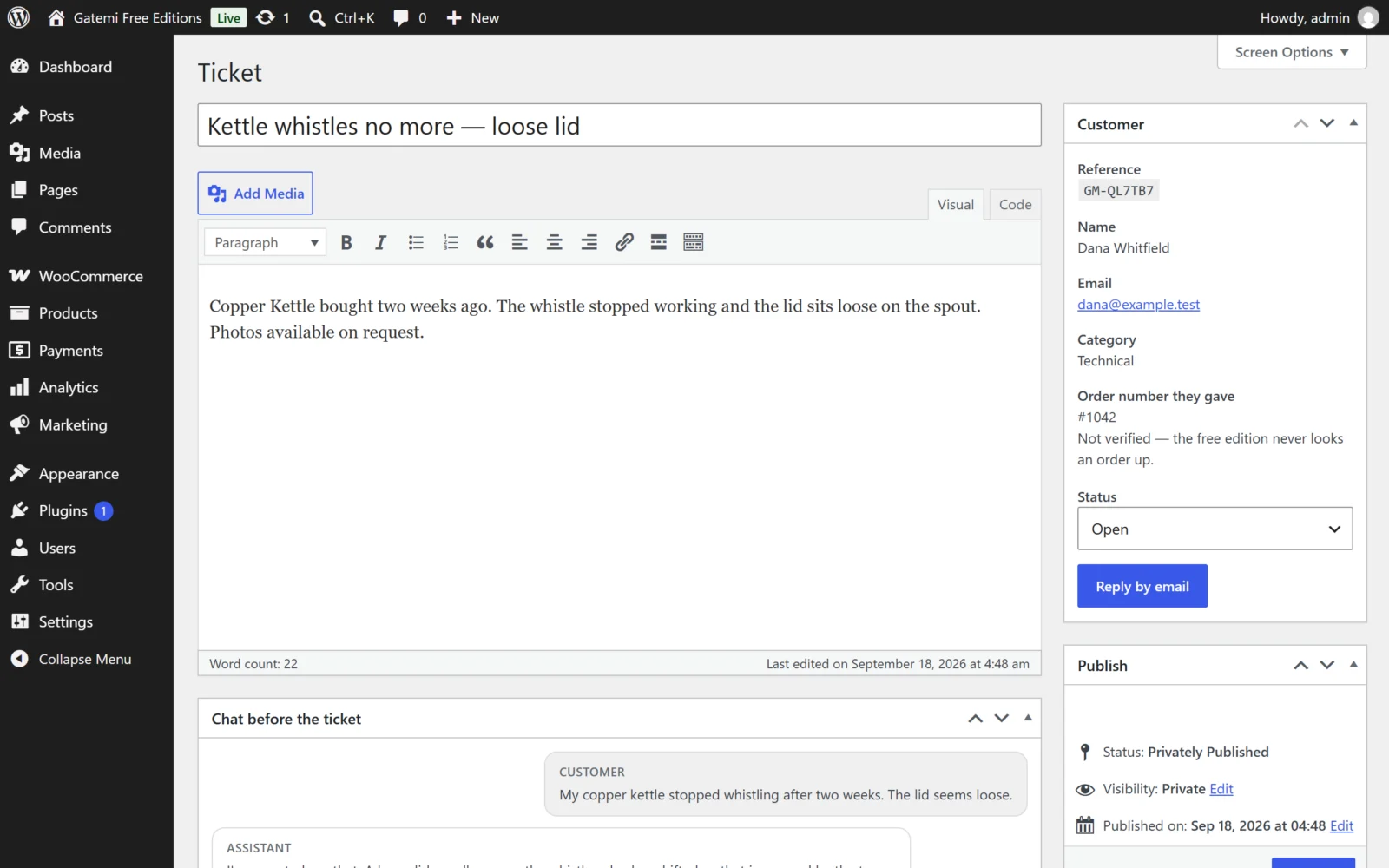
Statuses: Open, Waiting on customer, Resolved, Closed.
A customer can ask the assistant about an existing ticket. It needs both the reference and the email it was opened with, because a reference travels in subject lines and is not a secret.
Retention
A conversation that became a ticket is never deleted by the retention sweep. Tickets themselves are only removed if you tick Delete everything at uninstall and delete the plugin.
Changing the emails
The gmai_ticket_email filter receives each email (to, subject, body, headers), the ticket and which email it is (shop or customer). See the developer reference.