
The settings are on WooCommerce → Address Autocomplete (capability manage_woocommerce). Both editions store them in the same option, gmaa_settings, in the same shape, so upgrading from the free edition to the full edition keeps the key, the switches and the country list.
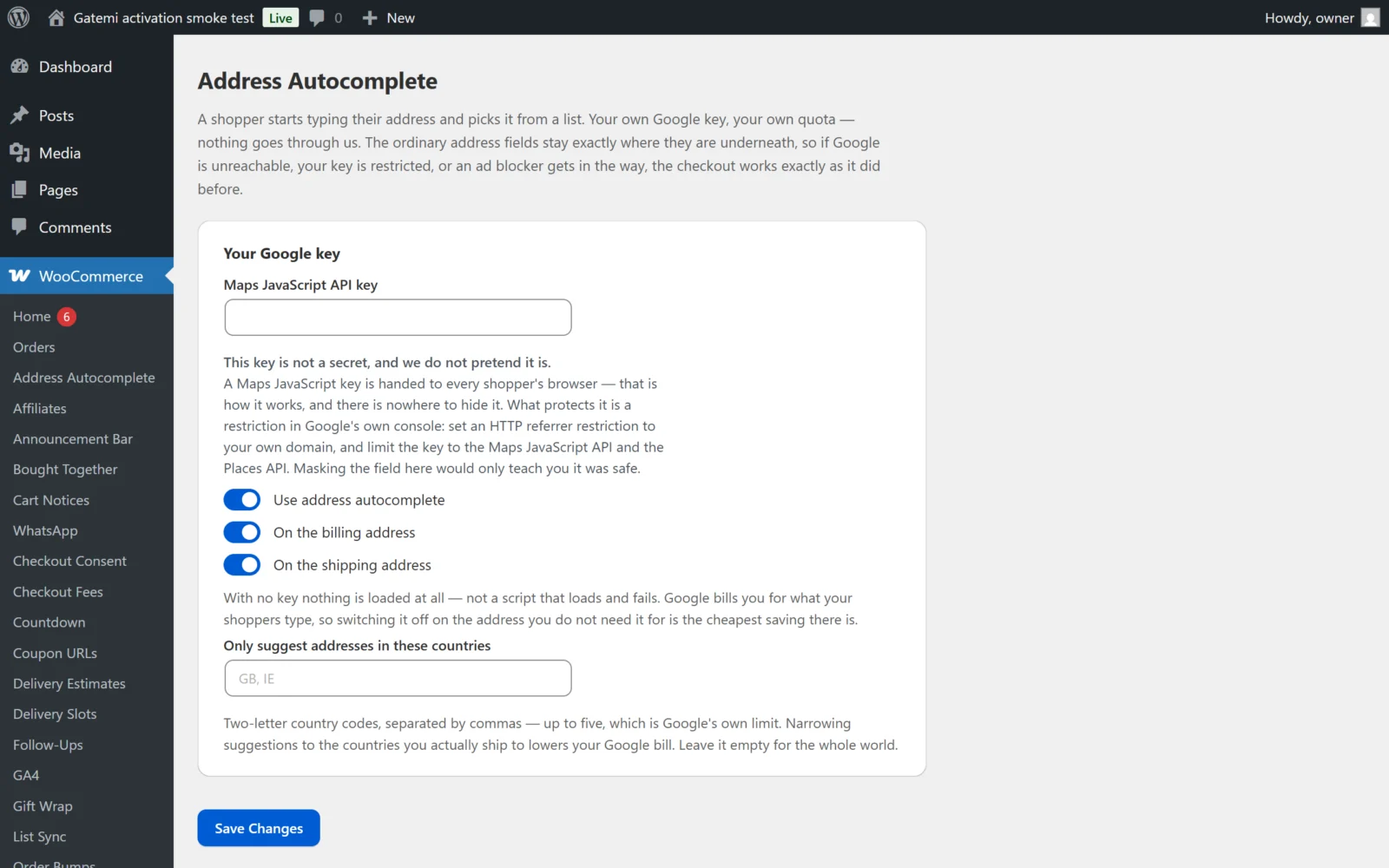
The full edition groups them into two cards — Your Google key and Where it applies — and has the same five settings.
Your Google key
Maps JavaScript API key
- Key:
api_key· Default: empty - Your Google Maps Platform key. Stored as typed, with surrounding spaces removed.
- Empty means nothing is loaded at all — no Google script, no plugin script, no stylesheet. The plugin does not load a script that would only fail.
- The field is a plain text box, deliberately not masked. The key is sent to every shopper's browser by Google's own loader, so it is not a secret. What protects it is an HTTP-referrer restriction in Google's console, limited to the Maps JavaScript API and the Places API.
- If the value does not look like a Google key (at least 20 characters of letters, digits,
_and-), a note appears under the field. It is saved anyway.
Use address autocomplete
- Key:
enabled· Default: on (yes) - The master switch. Off, nothing loads, whatever the other settings say.
Where it applies
On the billing address
- Key:
billing· Default: on (yes) - Adds the search box above the billing address's first line.
On the shipping address
- Key:
shipping· Default: on (yes) - Adds the search box above the shipping address's first line.
With both addresses off, the plugin treats itself as not configured and loads nothing. Google bills for what shoppers type, so switching off the address you do not need is the simplest saving there is.
Only suggest addresses in these countries
- Key:
countries· Default: empty (the whole world) - Two-letter country codes, separated by commas or spaces, for example
GB, IE. Stored upper case, duplicates removed, asGB,IE. - At most five. That is Google's own limit: given more, Google refuses the whole request and the shopper simply gets no suggestions. So anything past the fifth code is dropped when you save, where you can see it, rather than at Google's end.
- Anything that is not two letters is ignored.
- Passed to Google as the element's
includedRegionCodes, so only addresses in those countries are suggested. Narrowing it to where you ship also lowers your bill.
License & updates — Full edition
Enter the GM-XXXXX-… key from your gatemi.com account and press Activate. The card then shows the licence status ("Active — updates until …", "Expired — renew for updates", "Revoked"). If a check cannot reach gatemi.com, the licence state is left unchanged and the screen says so. Deactivate on this site frees the activation for another site.
Without a licence key the full edition makes no request to gatemi.com.
For developers — Full edition
The full edition's screen ends with a table of the filters it applies: gmaa_settings, gmaa_modules, gmaa_enabled, gmaa_field_map, gmaa_script_url, gmaa_license_api_url and gmaa_update_cache_ttl. They are documented in the developer reference.