
Settings live in two places, on purpose:
- WooCommerce → Distance Shipping holds the facts about your shop — the key, where deliveries leave from, the unit. They are entered once and every zone uses them. Both editions store them in the option
gmdrs_settings. - The Distance rate method inside each shipping zone holds the prices. What twelve kilometres costs is a decision about a zone, so it is made there.
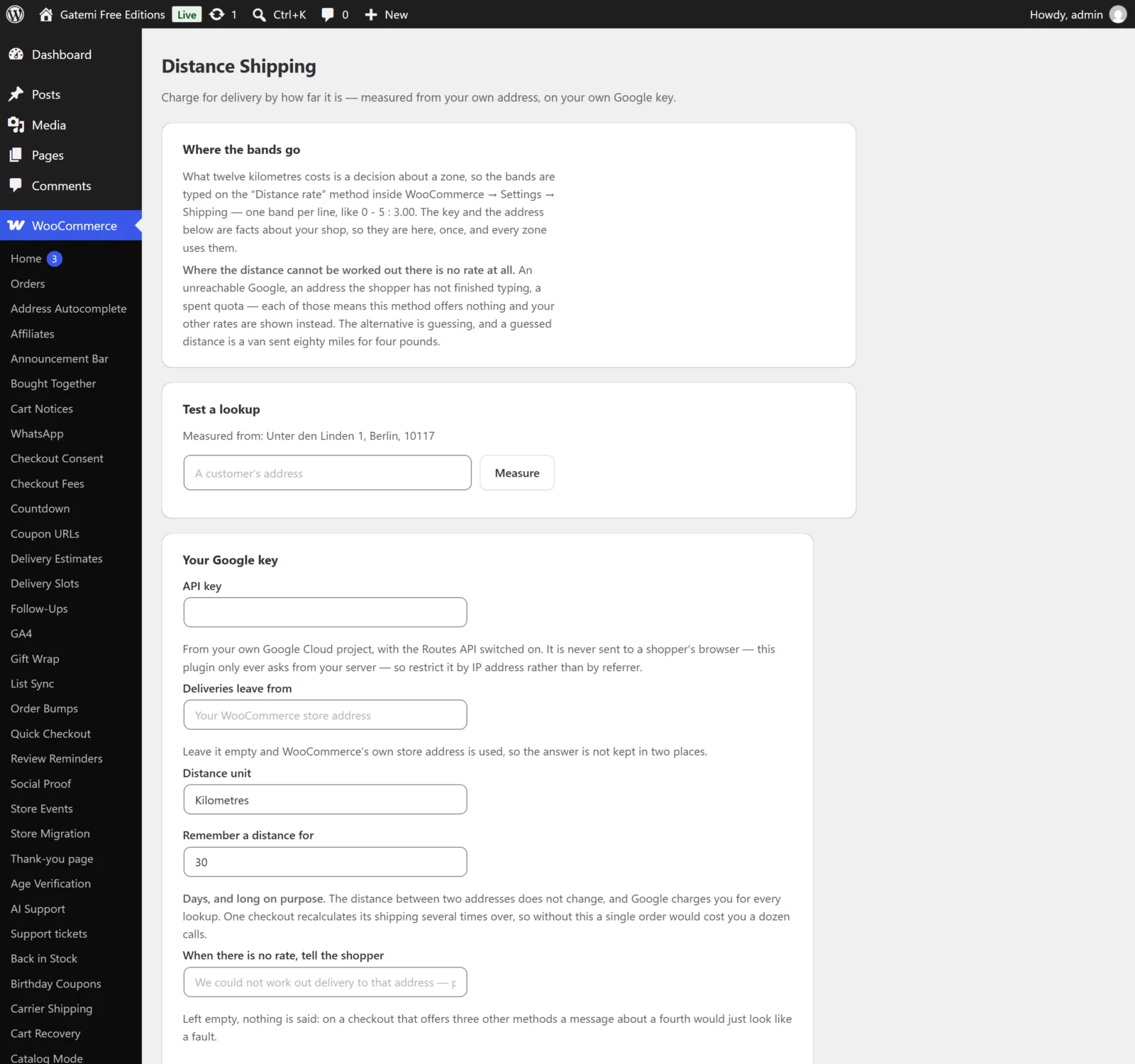
WooCommerce → Distance Shipping
API key
- Key:
api_key· Default: empty - Your Google Cloud key with the Routes API enabled. Sent to Google in the
X-Goog-Api-Keyheader from your server, never placed in a URL and never sent to a browser. With no key, nothing is looked up and the method offers no rate.
Deliveries leave from
- Key:
origin· Default: empty - The address distances are measured from. Empty uses WooCommerce's store address (address lines, city and postcode from WooCommerce → Settings → General).
Distance unit
- Key:
unit· Default:km(Kilometres); ormi(Miles) - The unit your bands are written in. Distances are remembered in metres, so changing the unit re-reads every remembered distance correctly rather than mixing miles and kilometres.
Travelling by — Full edition
- Key:
mode· Default:DRIVE - Van or car (
DRIVE), Motorbike (TWO_WHEELER), Bicycle (BICYCLE) or On foot (WALK). The free edition always asks for a driving route.
Remember a distance for
- Key:
cache_days· Default:30 - How many days a looked-up distance is kept, from 1 to 365. Zero or empty is saved as 30. The distance between two addresses does not change, and one checkout recalculates its shipping several times, so a long value saves real money.
When there is no rate, tell the shopper (free) / Tell the shopper (full)
- Key:
no_rate· Default: empty - A sentence shown as a notice when the method can offer no rate. Empty says nothing — on a checkout with three other methods, a message about a fourth looks like a fault. Fill it in if Distance rate is your only delivery method.
- It is shown at most once per page however many times shipping is recalculated.
Write failed lookups to WooCommerce → Status → Logs — Full edition
- Key:
log· Default: off (no) - Writes each failed lookup, with Google's reason, to the WooCommerce log under the source
gmdrs-distance-shipping. Off by default: an expired key would otherwise add a line per checkout.
Test a lookup
Not a setting. Type an address and click Measure to make one real lookup — it uses your key and counts on your Google bill — and see the distance and the driving minutes, or the likely reason it failed.
License & updates — Full edition
Your licence key, stored in gmdrs_license. A check that cannot reach gatemi.com leaves the licence unchanged.
The Distance rate method (in each zone)
WooCommerce → Settings → Shipping → (zone) → Distance rate → Edit. These are stored by WooCommerce with the zone's method instance.
Name
- Key:
title· Default: "Delivery" - The name shoppers see at the checkout.
Tax status
- Key:
tax_status· Default: Taxable - Whether the rate is taxed. Tax is calculated on the rate as one line.
Bands
- Key:
rows - One band per line. The default for a new method is three example lines; replace them.
| Part | Example | Meaning |
|---|---|---|
from - to |
5 - 15 |
From 5 up to, but not including, 15 units |
* as the end |
15 - * |
15 and everything beyond |
: cost |
: 4.00 |
A flat cost |
+ per unit |
: 4.00 + 0.80 |
A flat cost plus 0.80 per kilometre or mile of the whole journey |
# at the start |
# summer prices |
A comment line, ignored |
time prefix — Full edition |
time 0 - 20 : 4.00 |
The band is in driving minutes |
x refusal — Full edition |
30 - * : x We do not deliver this far. |
No rate, and this sentence is shown |
| label — Full edition |
0 - 5 : 3.00 | Local delivery |
The rate's name for this band |
; item — Full edition |
: 4.00 ; item 0.50 |
Plus 0.50 per item in the cart (items and per item also work) |
; % — Full edition |
: 4.00 ; 2% |
Plus 2% of the goods (percent 2 also works) |
; min — Full edition |
: 4.00 ; min 5 |
The band never charges less than 5 (minimum also works) |
; max — Full edition |
: 4.00 + 0.80 ; max 20 |
The band never charges more than 20 (maximum also works) |
; free — Full edition |
: 4.00 ; free 80 |
Free when the goods are worth at least 80 (free over also works) |
The extras go after the cost, each after its own semicolon, and before a | label if the band has one. One extra that cannot be read drops the whole line, because a band quietly missing its ceiling would charge more than you wrote.
Example (full edition):
time 0 - 20 : 4.00 | City delivery
0 - 15 : 5.00 + 0.40 ; free 80
15 - 40 : 12.00 ; item 0.50 ; max 20
40 - * : x Sorry, we only deliver within 40 km.
- Bands are read top to bottom; the first one that covers the journey wins.
- A line that cannot be read is dropped, not guessed at.
- Write decimals with a point (
2.5,0.80) or a comma (2,5,0,80). A lone comma is a decimal point unless exactly three digits follow it, which is a thousands separator:1,250is 1250. Several commas are always thousands separators. - In the free edition, a
timeband is never priced: when it is reached, the method offers no rate. A refusal line is honoured in both editions — it offers no rate — but the free edition shows your no rate sentence rather than the band's own. A band label is ignored in the free edition.