
Carrier Shipping keeps two kinds of setting apart on purpose:
- Store-wide, under WooCommerce → Carrier Shipping: credentials, where parcels ship from, packing. Entered once, used by every zone.
- Per zone, in the shipping method you add to a zone under WooCommerce → Settings → Shipping: what the shopper sees.
The free edition stores its settings in gmcsf_settings; the full edition in gmcs_settings. They are separate options.
Free edition
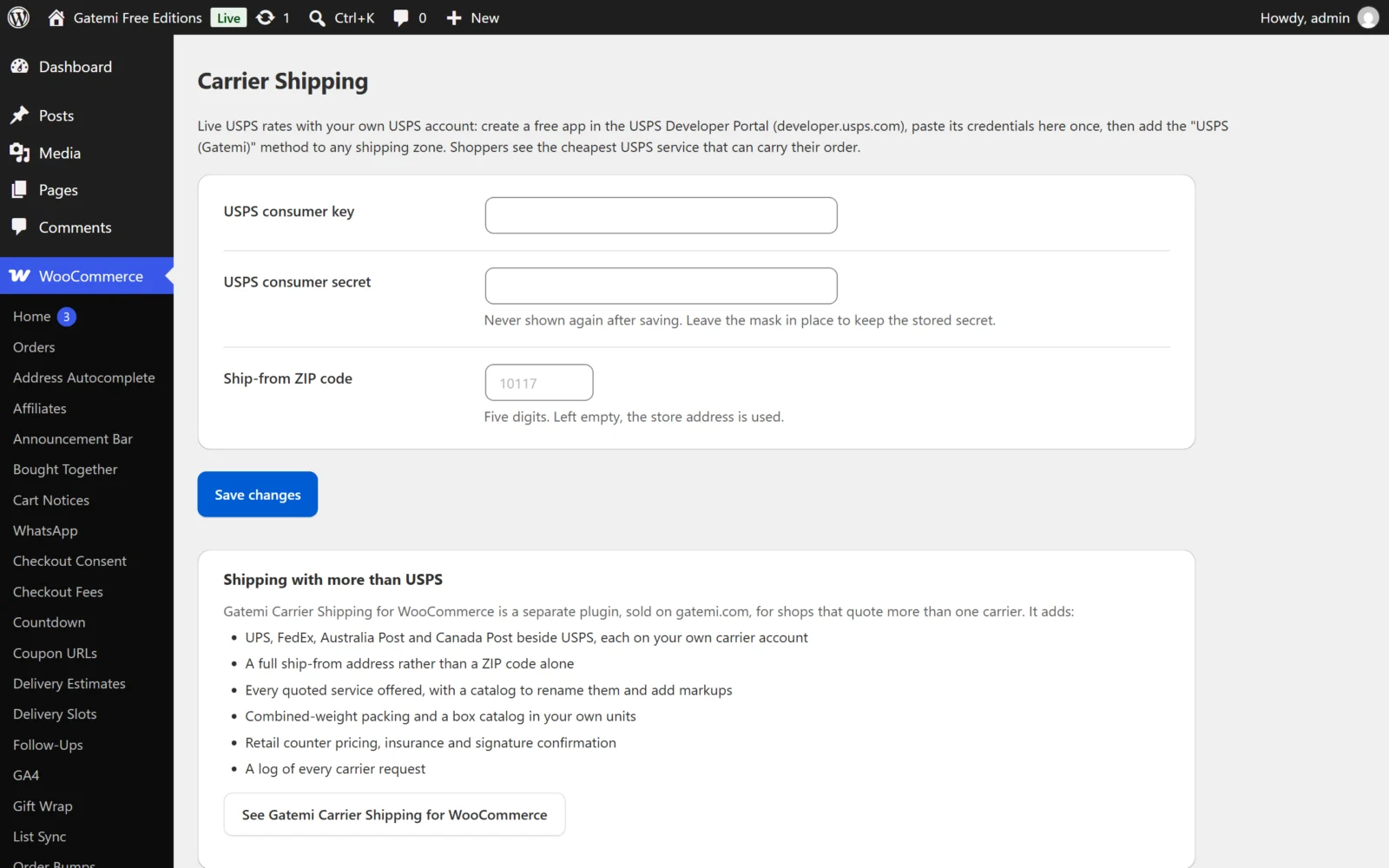
WooCommerce → Carrier Shipping
| Label | Key | Default | What it does |
|---|---|---|---|
| USPS consumer key | client_id |
empty | The consumer key of your app in the USPS Developer Portal. |
| USPS consumer secret | client_secret |
empty | The app's consumer secret. Shown as a mask after saving and never printed again. Leave the mask (or empty the box) to keep the stored secret. |
| Ship-from ZIP code | origin_zip |
empty | Five digits; anything else is stripped. Empty uses the postcode of your WooCommerce store address. |
No rate is quoted until all three — key, secret and a ZIP — are known.
The zone method: USPS (Gatemi)
Method id gmcsf_usps. One setting:
| Label | Default | What it does |
|---|---|---|
| Method title | USPS |
Shown before the service name, e.g. "USPS — USPS Priority Mail". Empty shows the service name alone. |
What the free edition does without asking: each unit is its own parcel, USPS commercial pricing is used, and the one cheapest service priced for every parcel is offered.
Full edition
General tab
Ship from
| Label | Key | Default |
|---|---|---|
| Country code | origin_country |
empty — the store address |
| State or province code | origin_state |
empty — the store address |
| City | origin_city |
empty — the store address |
| Postcode | origin_postcode |
empty — the store address |
If Country code is empty, every blank field is taken from WooCommerce's store address. Every carrier needs a postcode; the screen warns if there is none.
Packing
| Label | Key | Default | What it does |
|---|---|---|---|
| Packing method | packing_method |
weight_based |
One parcel, combined weight (weight_based), One parcel per item (per_item), or Pack into my boxes (box_packing). Box packing with no boxes defined falls back to combined weight. |
| Maximum parcel weight | max_package_weight |
empty — no limit | Splits a combined parcel once it reaches this weight, in your store's weight unit. |
Your boxes (boxes) — a table of Name, Length, Width, Height, Empty weight and Max weight, in your store's units. Use Add a box for more rows. A box needs all three dimensions and a max weight to be used. Only the Pack into my boxes method uses them.
Troubleshooting
| Label | Key | Default | What it does |
|---|---|---|---|
| Log carrier requests and responses | debug |
off | Writes every request and response to WooCommerce → Status → Logs, source gatemi-carrier-shipping, with credentials redacted. Errors are always logged. Requests contain shopper addresses, so leave it off normally. |
One tab per carrier
Each carrier tab has Quote carrier rates (enabled, default off), its credentials, its options, and a Services table. Test connection checks the credentials against the carrier; Get carrier API credentials links to its developer portal. Secrets are masked after saving, and a submitted mask means "unchanged".
UPS, FedEx and Canada Post also have an Environment: Production — real rates or Test — the carrier's sandbox. Sandbox credentials differ from production ones.
| Carrier | Credentials | Options (default) | Ships from |
|---|---|---|---|
| USPS | Consumer key, Consumer secret | Price type: Commercial (online) or Retail (counter) — Commercial; Request insurance — off; Request signature confirmation (domestic only) — off | US |
| UPS | Client ID, Client secret, UPS account number (optional) | Use negotiated rates — off (needs the account number); Treat destinations as residential — on; Packaging — Your own packaging; Declare package value — off | any |
| FedEx | API key, Secret key, FedEx account number | Rate type: Account (negotiated) or List (published) — Account; How you hand parcels over — Drop off at a FedEx location; Treat destinations as residential — on; Declare package value — off | any |
| Australia Post | PAC API key | — | AU |
| Canada Post | API username, API password, Customer number (optional), Contract ID (optional) | Quote type: Commercial or Counter — Commercial; Price to charge: Amount due, including adjustments, or Base price only — Amount due | CA |
The screen warns when your ship-from country is one a carrier cannot quote from.
Services — one row per service the carrier offers, with:
- Offer — whether it is quoted. Common services (for USPS: Ground Advantage, Priority Mail, Priority Mail Express and the international services) start on; others (Media Mail, Library Mail, Bound Printed Matter, Parcel Select) start off.
- Name at checkout — your own name for it; empty uses the carrier's.
- Markup and Markup % — added to the carrier's price. Both can be used together (percentage first, then the flat amount), and a negative number discounts. A rate never goes below zero.
Saving the screen retires every cached quote and forgets cached access tokens.
The zone method (one per carrier)
Method ids gmcs_usps, gmcs_ups, gmcs_fedex, gmcs_australia_post, gmcs_canada_post.
| Label | Default | What it does |
|---|---|---|
| Method title | the carrier name | The name of the fallback rate, and of this method on the shipping zone screen. Each live rate carries the name of its service. |
| Tax status | Taxable | Taxable or None. |
| Rates to offer | Every rate the carrier returned | Or The cheapest rate only. |
| Cheapest-rate label | empty | With cheapest-only, used instead of the service name. |
| Fallback price | empty — disabled | Charged when the carrier returns no rate at all, or the carrier is switched off or missing credentials. Empty offers nothing instead. |
License & updates
The licence key card on the screen. Licence state is stored in gmcs_license.