
The settings live on WooCommerce → Wholesale Pricing (needs manage_woocommerce). Both editions store them in one option, gmwh_settings, in the same shape, so moving to the full edition keeps everything you set.
Money and percentages are read the way people type them: 12,50, 1.250,00 and 1,250.00 all mean what they look like. Percentages are held between 0 and 100.
Free edition
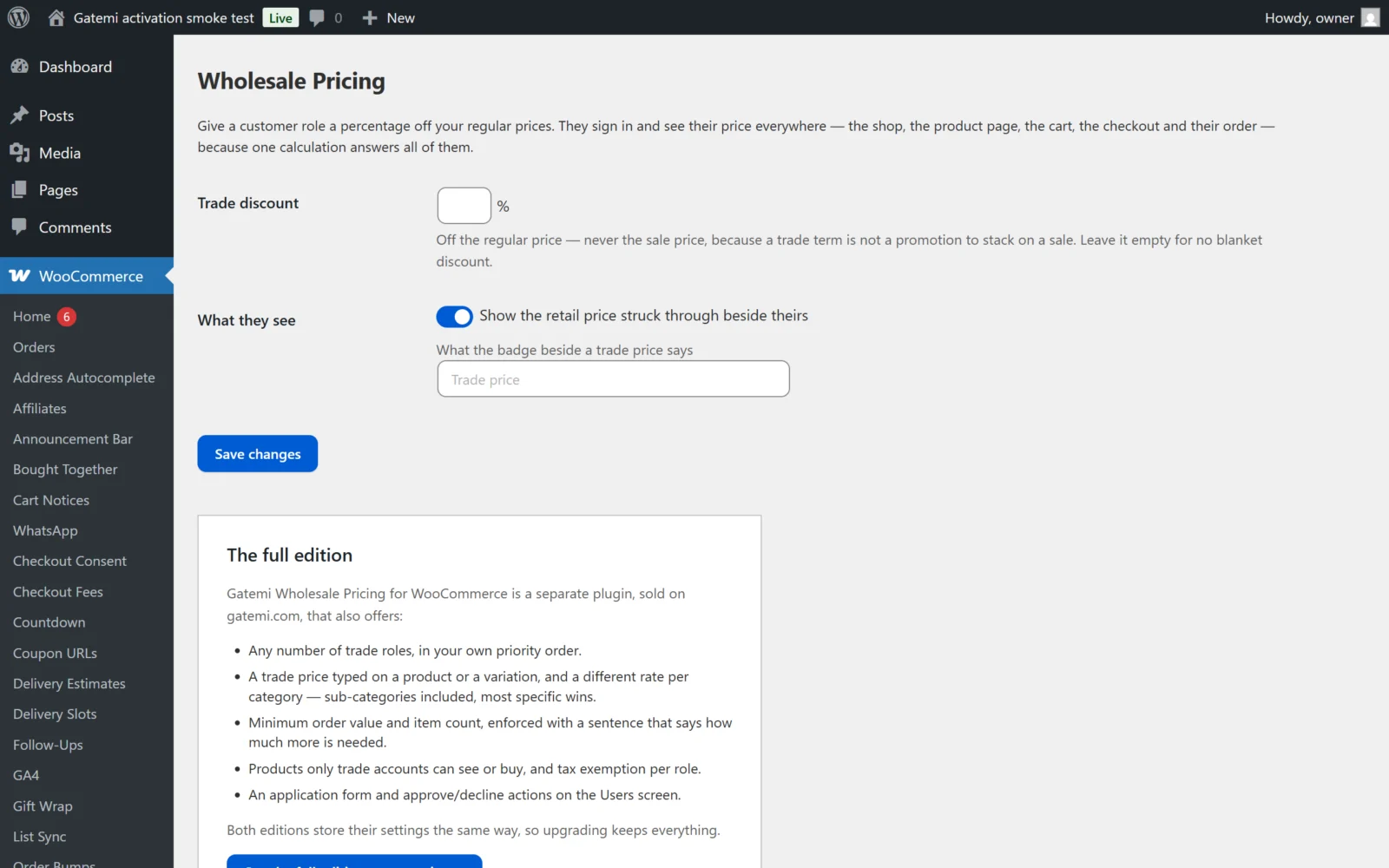
| Label | Stored as | Default | What it does |
|---|---|---|---|
| Trade discount | percentage on the wholesale_customer row of roles |
empty | Percentage off the regular price for the wholesale_customer role. Empty means no trade price at all. |
| Show the retail price struck through beside theirs | show_retail |
on (yes) |
Shows |
| What the badge beside a trade price says | badge |
empty ("Trade price") | The words beside a trade price. |
The free edition prices one role, wholesale_customer. The screen reminds you to give customers that role in WordPress → Users.
Full edition
Who buys at trade prices
A table, one row per role. An empty row is always offered at the bottom; choose a role in it to add one, and set a row's role to — none — to remove it.
| Column | Key | Default | What it does |
|---|---|---|---|
| Role | role |
wholesale_customer on first open |
Any WordPress role. A role named twice counts once. |
| % off regular price | percentage |
empty | The role's blanket discount. Empty: no blanket discount, only prices typed on products and category rates. |
| Minimum order value | min_amount |
0 |
The cart must be worth at least this at trade prices. 0 means none. |
| Minimum items | min_quantity |
0 |
The cart must hold at least this many items (quantities added up). |
| Tax exempt | tax_exempt |
off | Customers buying under this role are treated as VAT/tax exempt by WooCommerce. |
The order of rows matters. A customer who holds two of these roles buys under the first one listed.
If you save the table with no roles at all, wholesale_customer is still treated as the trade role, but with no percentage it has no price.
Different rates by category
Overrides a role's percentage for part of the catalogue.
| Column | Key | What it does |
|---|---|---|
| Role | role |
The role this rate is for |
| Category | category |
A product category; its sub-categories are included |
| % off regular price | percentage |
The rate for products in that category |
When a product is in several matching categories, the most specific (deepest) category's rate wins. A variation takes its parent product's categories.
What a trade customer sees
| Label | Key | Default | What it does |
|---|---|---|---|
| Show the retail price struck through beside theirs | show_retail |
on | As in the free edition |
| Say what they are saving on the product page | show_saving |
on | Adds "Your trade price saves you 10.00 (20%)." below the product title |
| What to call the trade price | badge |
empty ("Trade price") | The badge wording |
How accounts are granted
This section explains the application flow; it has no settings. See How it works.
On the product — Full edition
In Product data → General, each trade role gets a field — on simple and external products, and on variable products too, where the price is the one every variation without its own inherits:
| Field | Stored in | What it does |
|---|---|---|
| Role name price (e.g. "Wholesale customer price") | _gmwh_prices post meta, one entry per role |
A fixed trade price for this product. Beats every percentage. Empty: use the percentages. |
| Trade accounts only | _gmwh_only post meta (yes/no) |
Hides the product from everybody without a trade role and refuses it at the cart. |
Emptying a price box removes the price rather than storing 0, because 0 is a real price and would give the product away.
A variation without its own price uses its parent product's typed price. Version 1.0's product screen shows these fields on the product only, not on each variation.
License & updates — Full edition
The card takes your gatemi.com licence key (GM-XXXXX-XXXXX-XXXXX-XXXXX-XXXXX), shows its status and how many sites use it, and offers Deactivate on this site. An expired licence keeps the plugin working; it only stops updates.
Which price wins — Full edition
For a trade customer's role, the first of these that exists is the price:
- A price typed on the product (or the variation, when one is stored).
- For a variation, a price typed on its parent product.
- The rate for the most specific matching category, off the regular price.
- The role's own percentage, off the regular price.
If none applies, the customer pays the ordinary price. In the free edition only step 4 exists.