
Both editions add a shipping method to WooCommerce's zones, configured per zone under WooCommerce → Settings → Shipping → (zone) → (method) → Edit. WooCommerce stores each instance's settings in an option named woocommerce_<method id>_<instance id>_settings.
Free edition: Table rates (Gatemi)
Method id gmshf_table_rate.
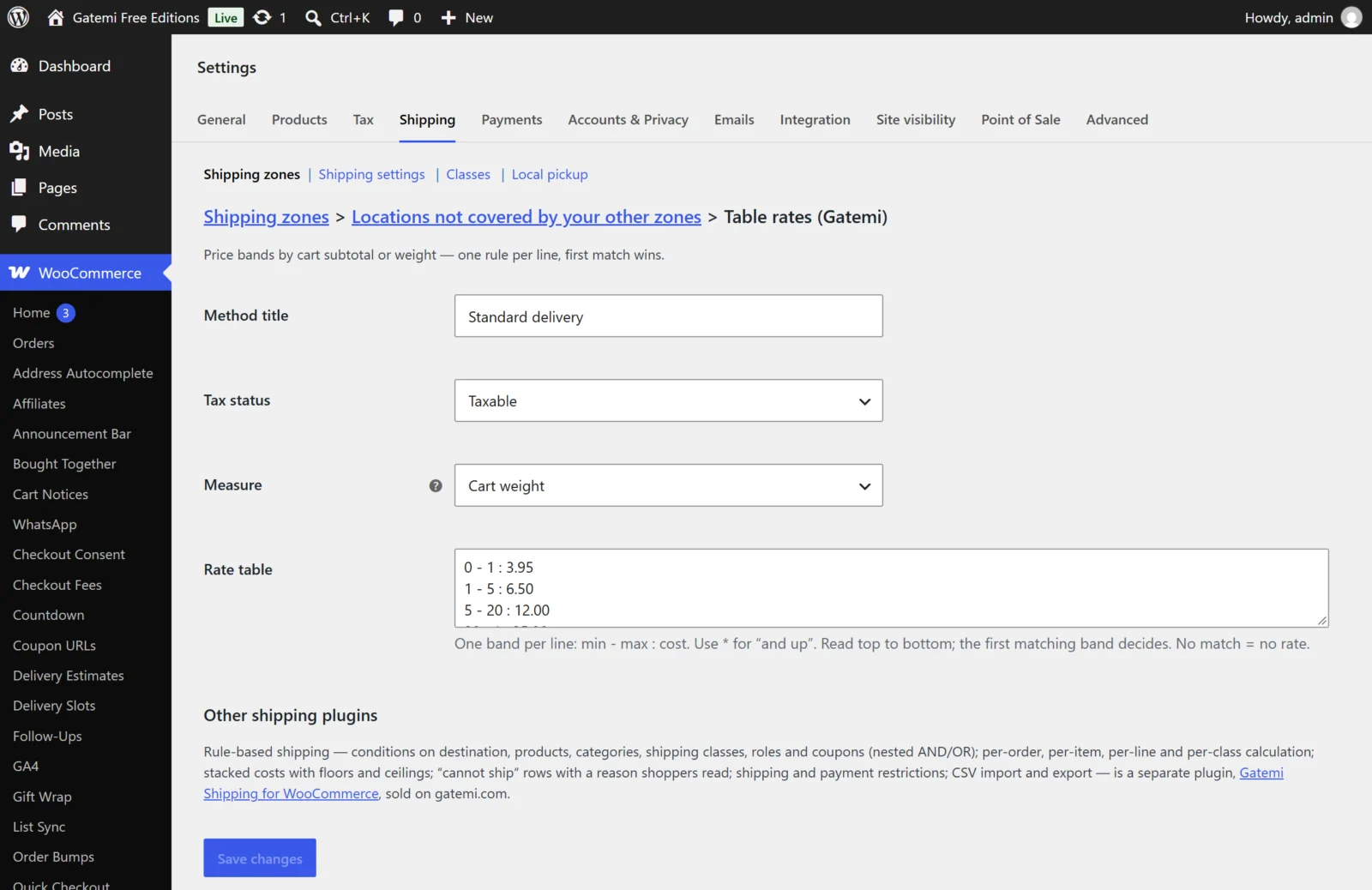
| Label | Key | Default | What it does |
|---|---|---|---|
| Method title | title |
Shipping |
The rate's name at checkout |
| Tax status | tax_status |
taxable |
taxable or none |
| Measure | basis |
subtotal |
Cart subtotal or Cart weight — what the bands are compared with |
| Rate table | table |
0 - 49.99 : 7.95 / 50 - * : 0 |
The bands, one per line |
Writing the rate table
Each line is min - max : cost:
0 - 49.99 : 7.95— from 0 up to and including 49.99, charge 7.95.50 - * : 0— from 50 with no upper limit, charge nothing.- A blank maximum also means no limit:
50 - : 0. - Lines starting with
#are comments. - Both ends are inclusive. Lines are read top to bottom and the first line that matches decides, so
0 - 50 : 7.95above50 - * : 0charges 7.95 at exactly 50. - A comma is read as the decimal point:
7,95is 7.95. Do not type a thousands separator —1,000is read as 1. - A line that does not fit the pattern, or whose maximum is below its minimum, is skipped.
- No line matches, no rate. Add a last catch-all line such as
0 - * : 9.95if you always want a price.
Cart subtotal is WooCommerce's package contents cost: the items that need shipping, after coupons, before tax. Cart weight is each product's weight × quantity, in your shop's weight unit.
Full edition: Shipping rules
Method id gmship_table_rate.
| Label | Key | Default | What it does |
|---|---|---|---|
| Name | title |
Shipping |
Shown at checkout unless a rule names itself |
| Rules | — | — | The rate table (below); stored in {prefix}gmship_rates |
| Calculate rates | calculation_type |
order |
See below |
| Percentages include tax | include_tax |
off | Rule percentages and a percentage handling fee are taken on tax-inclusive amounts |
| Handling fee | handling_fee |
empty | Added to each thing the table prices: an amount (4.95) or a percentage of the goods (5%) |
| Handling fee per order | order_handling_fee |
empty | Added once to the finished rate |
| Minimum cost | min_cost |
empty | A floor for each thing priced, after the handling fee |
| Maximum cost | max_cost |
empty | A ceiling for each thing priced, after the handling fee |
| Maximum for the whole order | max_shipping_cost |
empty | The finished rate is never more than this |
| When no rule matches | no_match_message |
empty | Shown only if the shopper is left with no shipping option at all |
| Tax status | tax_status |
taxable |
taxable or none |
Price conditions (subtotal, total) do not follow Measure prices including tax: they are compared including tax when your shop enters prices including tax (WooCommerce → Settings → Tax → Prices entered with tax), and excluding it otherwise. A developer can change that with the gmship_conditions_include_tax filter.
Calculate rates
| Choice | Key | What happens |
|---|---|---|
| Per order — one charge for the whole delivery | order |
The whole cart is one unit. Every matching rule becomes its own option, until a rule that stops |
| Per item — charge each unit and add them up | item |
Each single item is priced, then multiplied by its quantity and added up |
| Per line — charge each product line and add them up | line |
Each cart line is priced and the lines added up |
| Per shipping class — charge each class and add them up | class |
Items are grouped by shipping class; each group is priced and the groups added up |
A rule (rate row)
Each row in Rules has:
| Field | Column | Default | |
|---|---|---|---|
| Rule name — shown at checkout | label |
empty | The option's name in per-order mode; empty uses the method's Name |
| Active | enabled |
on | Off, the row is skipped |
| Applies when | conditions |
none | Conditions with AND/OR; with none, the row always matches |
| Flat | cost_flat |
0 | Charged once |
| Per item | cost_item |
0 | × the number of items |
| Per weight unit | cost_weight |
0 | × the weight |
| Percent of goods | cost_percent |
0 | % of what the items being shipped cost after coupons |
| Never less than | cost_min |
empty | Floor for this row |
| Never more than | cost_max |
empty | Ceiling for this row |
| Note under the rate name | description |
empty | A line under the option, such as "Arrives in 2–3 working days" |
| Stop here when this rule matches | stops |
on | Off, later matching rows add their cost (or, per order, their own option) |
| We cannot ship this at all | is_abort |
off | No rate is offered and the shopper is told why |
| What to tell the shopper | abort_reason |
empty | The reason for a "cannot ship" row |
Rows have ↑ / ↓, Duplicate and Remove buttons. The editor needs JavaScript; without it the stored rules are shown as data.
Amounts accept a comma as the decimal point. Do not type a thousands separator.
Conditions — Full edition
Rate rows and restrictions share one vocabulary, grouped as on the screen:
| Group | Condition | Type | Operators | Value |
|---|---|---|---|---|
| Destination | Country | country |
is one of, is not one of | Countries |
| State / county | state |
is one of, is not one of | States | |
| Postcode | postcode |
matches any of, matches none of | Patterns: SW1A 1AA, SW1*, ranges 10000...19999 |
|
| City | city |
matches any of, matches none of | Names, * wildcards |
|
| Cart totals | Subtotal before discounts | subtotal |
is, is not, is more than, is at least, is less than, is at most, is between | Amount |
| Total after discounts | total |
same | Amount | |
| Weight | weight |
same | Store weight unit | |
| Volume | volume |
same | ||
| Number of items | item_count |
same | ||
| Number of cart lines | line_count |
same | ||
| Products in the cart | Product | product |
contains any of, contains all of, contains none of, contains only | Products |
| Category | category |
same | Categories | |
| Tag | tag |
same | Tags | |
| Shipping class | shipping_class |
same | Classes (including No shipping class) | |
| SKU | sku |
matches any of, matches none of | Patterns | |
| Customer | Customer role | user_role |
is one of, is not one of | Roles, including guests |
| Customer is signed in | logged_in |
is | yes / no | |
| Order | Coupon | coupon |
matches any of, matches none of | Coupon codes, * wildcards |
| Payment method | payment_method |
is one of, is not one of | Restrictions only | |
| Chosen shipping method | shipping_method |
is one of, is not one of | Restrictions only |
Patterns ignore case, spaces and hyphens. A condition type nothing on the site understands does not match.
CSV import and export
Below the rule table, Export CSV downloads the instance's rules and Import CSV uploads a file. Tick Replace the rules that are here now to replace them; otherwise imported rows are added after the existing ones. The columns are listed in the developer reference.
Full edition: the Rules screen
WooCommerce → Settings → Shipping → Rules holds the restrictions and the plugin settings.
Shipping and payment rules
Press Add rule. Each rule reads as a sentence:
| Field | Column | |
|---|---|---|
| Name this rule — only you see it | title |
|
| Active | enabled |
|
| Then | action |
hide (hide) or allow only (show_only) |
| these | target_type |
shipping methods or payment methods |
| Methods | targets |
Chosen from a list; naming a method covers every zone it is in |
| When | conditions |
The same conditions as rate rows; with none, the rule always applies |
| What to tell the shopper | message |
Shown only if the rule leaves the shopper with nothing to choose from |
Plugin settings
Stored in the option gmship_settings.
| Label | Key | Default | |
|---|---|---|---|
| Explain rate calculations | debug |
no |
Meant to show store managers which rule matched. In version 1.0.0 the trace is recorded during the calculation but not yet displayed anywhere |
| Delete my rules if I delete this plugin | delete_data |
no |
On, uninstalling drops both tables. Deactivating never removes anything |
License & updates
The licence card shows the state, "N of M sites in use", a link to manage the licence on gatemi.com and Deactivate on this site. An expired licence stops updates; the plugin keeps working. It is stored in gmship_license.
A For developers panel at the bottom lists every filter.