
Neither edition has a settings screen. A kit or a bundle is configured on the product it describes, in WooCommerce's own Product data box, because that is where you already edit the product.
Free edition: Kit contents
Where: Products → Edit product → Product data → General, the Kit contents group. A kit is a simple product of simple products, so the group appears only when the product type is Simple product; contents are not saved on, or read off, any other type.
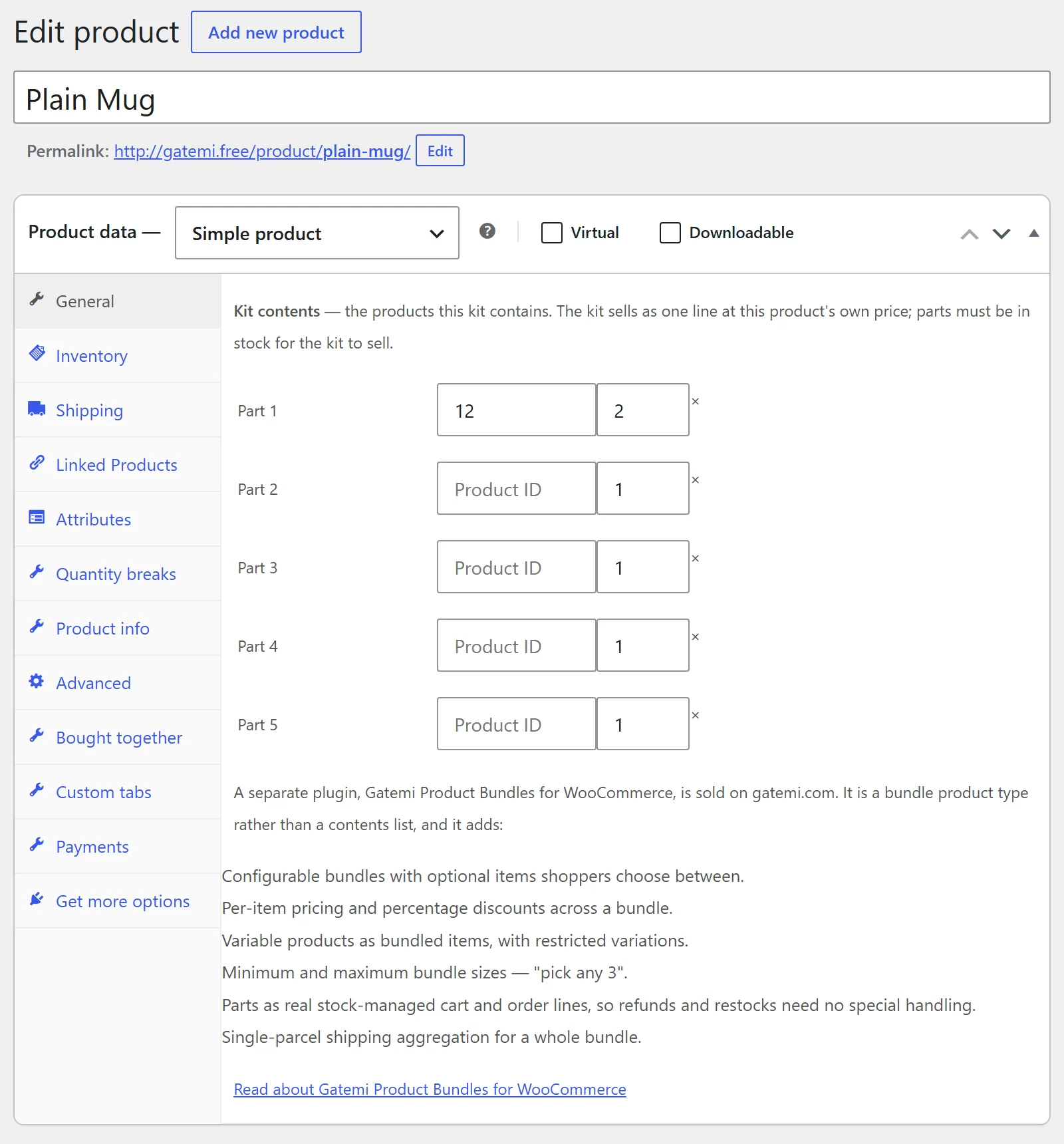
| Field | Stored as | Default | What it does |
|---|---|---|---|
| Part 1 … Part 5 — product ID | id in each row of _gmpbf_items |
empty | The product this kit contains. |
Part 1 … Part 5 — quantity (×) |
qty in each row |
1 | How many of that product one kit contains, 1 to 99. |
How the rows are cleaned when you save:
- An empty ID, a quantity of 0 and the kit's own ID are dropped.
- A quantity above 99 is saved as 99.
- Only the first five valid rows are kept.
- If no valid row is left,
_gmpbf_itemsis deleted and the product is an ordinary product again.
When the contents are read back, a row whose product no longer exists is skipped, and so is a part that is a draft, private, in the bin or not a simple product — none of those is on sale, so none is listed, checked or promised as part of a kit.
The kit's price, stock, weight and shipping class are the product's own ordinary fields. The free edition adds no price of its own.
Full edition: the Bundled products tab
Where: Products → Edit product, choose Product bundle as the product type, then the Bundled products tab. The tab is only shown for that product type.
Bundle options
| Label | Meta key | Default | What it does |
|---|---|---|---|
| Base regular price | _gmpb_base_regular_price |
empty | The price of the bundle itself, before any individually priced contents. |
| Base sale price | _gmpb_base_sale_price |
empty | A sale price for the base. A sale price equal to or above the regular price is discarded as a typo. The base in force is stored as _gmpb_base_price. |
| Layout | _gmpb_layout |
Standard (default) |
How the items are laid out on the product page: Standard, Tabular or Grid. |
| Item grouping | _gmpb_group_mode |
Grouped (parent) |
How the bundle and its items appear in the cart, checkout, order screens and emails. See below. |
| Min bundle size | _gmpb_min_bundle_size |
empty (no rule) | The smallest total number of items a shopper must choose. |
| Max bundle size | _gmpb_max_bundle_size |
empty (no rule) | The largest total. A maximum below the minimum is saved as the minimum. Set both to the same number for "pick exactly 3". |
| Edit in cart | _gmpb_edit_in_cart |
off (no) |
Adds an Edit link under the bundle in the cart, which opens the product page with the shopper's choices filled in. |
| Aggregate weight | _gmpb_aggregate_weight |
off (no) |
Adds the weight of assembled items to the bundle's own weight, for weight-based shipping rates. |
Item grouping options:
- Grouped — the bundle line is shown, its items indent under it, and their prices and subtotals roll up into the bundle line.
- Flat — the bundle line is shown, items are not indented, and each item carries a "part of" row.
- None — no bundle line; each item carries a "part of" row.
Flat and None without a bundle line are only kept for a bundle that is Virtual and has no base price. Otherwise the plugin saves Grouped, because hiding the bundle line would hide money or weight.
Per-item options
Add an item with Add bundled product (a product search; other bundles are excluded). Each item gets its own row. Items are stored together in _gmpb_bundled_items, each with a stable id handed out from _gmpb_next_item_id.
| Label | Key in the item | Default | What it does |
|---|---|---|---|
| Min quantity | quantity_min |
1 | The fewest of this item per bundle. |
| Max quantity | quantity_max |
1 | The most per bundle. Empty means no maximum. |
| Default quantity | quantity_default |
1 | Where the quantity field starts, kept between min and max. |
| Optional | optional |
off | The shopper ticks the item to include it. |
| Priced individually | priced_individually |
off | The item's own price is added to the bundle. Off means it is worth exactly 0 inside the bundle. |
| Discount % | discount |
empty | A percentage off an individually priced item, 0–100. |
| Shipped individually | shipped_individually |
off | The item keeps its own weight and box. Off means it is assembled into the bundle. |
| Hide thumbnail | hide_thumbnail |
off | No image beside the item on the product page. |
| Override title / Title | override_title, title |
off / empty | Show your own title for the item. |
| Override short description / Short description | override_description, description |
off / empty | Show your own short text under the item. |
| Visible on product page | single_product_visibility |
Visible | Show the item on the product page. |
| Visible in cart | cart_visibility |
Visible | Show the item's cart line. |
| Visible in orders | order_visibility |
Visible | Show the item's order line to the customer. |
| Price visible on product page / in cart / in orders | single_product_price_visibility, cart_price_visibility, order_price_visibility |
Visible | Show or hide that item's price on each surface. |
| Allowed variations | allowed_variations |
empty (all) | For a variable product only: comma-separated variation IDs the shopper may choose from. |
An item hidden on all three surfaces is treated as a secret item: its name is never shown in a stock or validation message.
Full edition: licence
WooCommerce → Bundles license holds the licence key card (stored in the gmpb_license option). Without a key the plugin works; it does not check for updates.
On a store with kits made in the free edition, the same screen also shows Kits from the free edition: each kit with what it contains, a box to tick and Convert the selected kits. Nothing is converted until you press it; see the FAQ for what a conversion does. The list is not shown on a store with no kits.
Full edition: delete data on uninstall
Where: WooCommerce → Bundles license, the When the plugin is deleted card.
| Label | Key | Default | What it does |
|---|---|---|---|
| Also delete every bundle's configuration — its contents, prices and layout. | delete_data in gmpb_settings |
off (no) |
Ticked, deleting the plugin also deletes every bundle's configuration. Left off, a store that removes the plugin for a while finds every bundle intact when it comes back. Orders are never touched either way. |
Full edition: filters listed on the screen
Below that card the same screen lists the filters that tune what is deliberately not a setting — gmpb_bundled_items, gmpb_bundled_item_price, gmpb_bundle_price_range, gmpb_settings, gmpb_validation_error_message, gmpb_child_cart_item_visible, gmpb_child_order_item_visible, gmpb_modules, gmpb_license_api_url and gmpb_update_cache_ttl — each with what it changes. See Developer reference.