
All settings are on WooCommerce → India GST. Both editions store them in one option, gmgst_settings, in the same shape. The free edition has eleven settings; the full edition has those and three more, marked Full edition. When the free edition saves, it keeps the full edition's three keys exactly as they were.
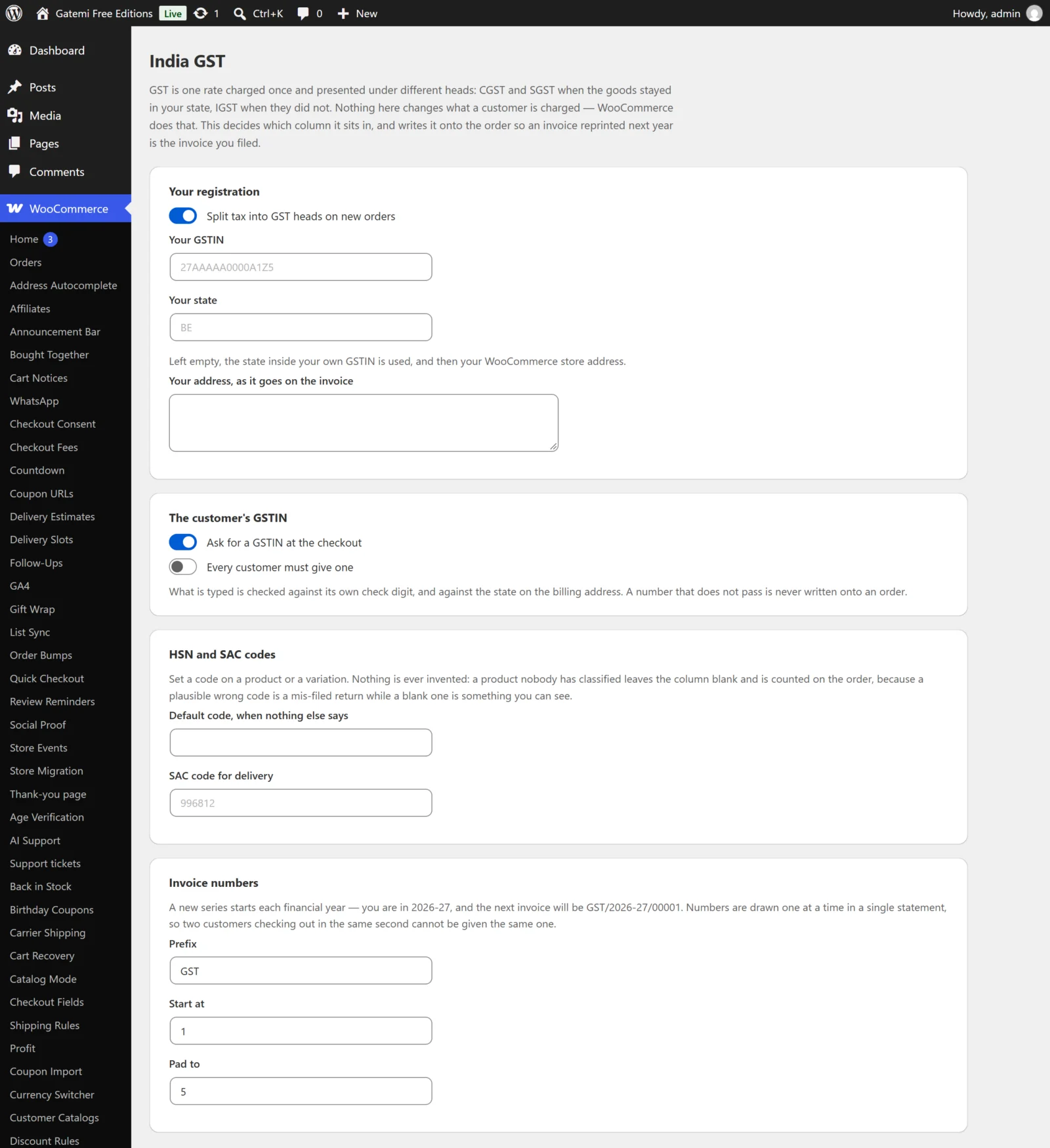
Your registration
Split tax into GST heads on new orders
- Key:
enabled· Default: on (yes) - Turned off, new orders get no GST record, no split rows and no GSTIN field. Orders already recorded keep their record.
Your GSTIN
- Key:
seller_gstin· Default: empty - Your own 15-character GSTIN. Stored upper case with spaces and punctuation removed. If it fails its check digit, the screen warns you; it is still saved, because it is your registration and printed on every invoice.
Your state
- Key:
seller_state· Default: empty - WooCommerce's state code for the state you are registered in, for example
MHorKA. Up to three characters. - Empty is recommended. The plugin then takes the state from the first two digits of your GSTIN, and failing that from your WooCommerce store address. Three boxes would be three chances to disagree.
- Until a state is known, the plugin does nothing: no split, no field, no record. A guessed state would put every local sale under the wrong head.
Your address, as it goes on the invoice
- Key:
seller_address· Default: empty - Multi-line text printed under your name on the invoice.
The customer's GSTIN
Ask for a GSTIN at the checkout
- Key:
field· Default: on (yes) - Adds a GSTIN (for input credit) field to the billing section of the classic checkout and to the address form of the Checkout block.
Every customer must give one
- Key:
required· Default: off (no) - Makes the field required. Leave it off if you sell to consumers.
What the field is called — Full edition
- Key:
label· Default: empty, shown as "GSTIN (for input credit)" - The field's label on both checkouts.
Place of supply — Full edition
A supply happens at
- Key:
place· Default:shipping - the delivery address — goods (
shipping) or the billing address — services (billing). - With
shipping, an order with no delivery address falls back to the billing address, because a missing address is not a decision. - The free edition always uses the delivery address, falling back to billing.
HSN and SAC codes
Default code, when nothing else says
- Key:
default_hsn· Default: empty - Used for any product with no code of its own (and, in the full edition, none from its categories). Digits only, up to 8.
- Leave it empty if you would rather see an unclassified product than file it under a code that may be wrong: a line with no code is left blank on the invoice and counted in the order's GST box.
SAC code for delivery
- Key:
shipping_sac· Default: empty (placeholder996812) - The code printed on the delivery line, when an order has shipping.
On each product
Product data → Inventory → HSN / SAC code, stored as product meta _gmgst_hsn. Digits only, up to 8. Emptying the box removes it.
On each variation
Each variation has its own HSN / SAC code box in its panel under Product data → Variations, stored as _gmgst_hsn on the variation. Left empty, the product's own code is used.
On product categories — Full edition
Products → Categories → (edit a category) → HSN / SAC code, stored as term meta _gmgst_hsn. Used by every product in the category and its sub-categories that has no code of its own.
Invoice numbers
The screen shows the current financial year and what the next invoice will be, for example GST/2026-27/00001.
Prefix
- Key:
series_prefix· Default:GST - Letters, digits and hyphens, up to 12. Empty means no prefix (
2026-27/00001).
Start at
- Key:
series_start· Default:1 - The first number of a series. The series never goes backwards: raising this mid-year jumps the next number up to it; lowering it has no effect on a series already past it.
Pad to
- Key:
series_padding· Default:5 - How many digits the number is padded to, from 1 to 12.
A note at the foot of every invoice — Full edition
- Key:
invoice_note· Default: empty - Plain text printed below the totals, for example your bank details or "Subject to Mumbai jurisdiction".
GSTR-1 export — Full edition
Not a setting: choose From and To dates and click Download CSV. See How it works.
License & updates — Full edition
Your licence key, stored in gmgst_license. Below it, For developers lists the filters described in the Developer reference.