
All settings are on WooCommerce → Delivery Slots. Press Save changes at the bottom. The calendar is stored in one option, gmds_settings, shared by both editions. Full edition: time slots are stored in a second option, gmds_slots.
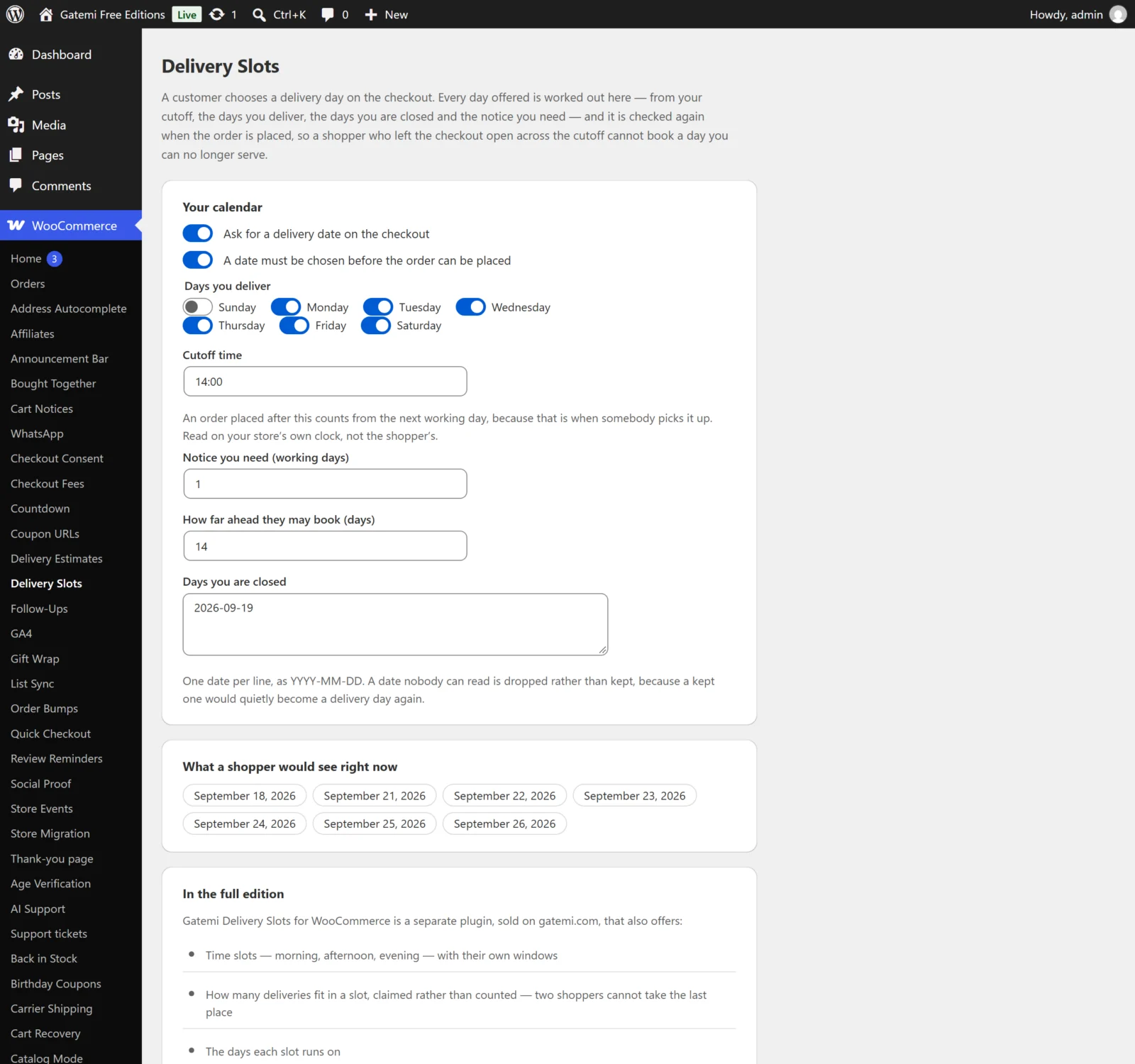
Your calendar
Ask for a delivery date on the checkout
- Key:
enabled· Default: on (yes) - Off: no field, nothing checked, nothing saved. Dates already on orders still show.
A date must be chosen before the order can be placed
- Key:
required· Default: on (yes) - On: an order without a date is refused with "Please choose a delivery date." Off: the date is optional, but a date that is chosen must still be one the calendar offers.
- Full edition: it also makes a time required when the chosen day has times.
Days you deliver
- Key:
working_days· Default: Monday to Friday (1,2,3,4,5) - The days a delivery can happen and the days the notice is counted in. Stored as numbers, Sunday
0to Saturday6.
Cutoff time
- Key:
cutoff· Default: empty (no cutoff) - A 24-hour time such as
14:00. At or after it, on your store's clock, counting starts from the next working day — because that is when somebody picks the order up. Anything that is not a time is saved as empty, and an empty cutoff never moves the start.
Notice you need (working days)
- Key:
notice_days· Default:1 - How many working days after the start day the first date offered is.
0offers the start day itself.
How far ahead they may book (days)
- Key:
window_days· Default:21 - Calendar days after the first date that are still offered. Saved between 1 and 365.
Days you are closed
- Key:
holidays· Default: empty - One date per line, as
2026-12-25. These days are never offered and never counted as notice. - A line that is not a date in exactly that form is dropped rather than kept — a holiday nobody can read would quietly become a delivery day again.
Date format — Full edition
- Key:
date_format· Default: empty (your site's date format) - A PHP date format for the dates in the list and on the order, such as
l j F. Free edition: always your site's date format.
What a shopper would see right now
Not a setting: the days the checkout offers at this moment, worked out from everything above. If it says no day is being offered, check that at least one delivery day is ticked and that your closed days and notice have not closed the whole window.
Delivery times — Full edition
Each time slot is one row. Press Add a time for another and Remove this time to delete one. Removing a slot stops it being offered; deliveries already booked into it keep their day and time.
| Field | Key | Default | |
|---|---|---|---|
| Offered | enabled |
on | Untick to stop offering it without deleting it. |
| What it is called | label |
empty | Shown to the customer, e.g. "Morning". Empty shows the hours, e.g. "08:00 – 12:00". |
| From / To | from, to |
empty | 24-hour times. |
| How many fit | capacity |
0 |
The most deliveries this slot takes on one day. 0 is no limit — not closed. |
| Days it runs (none means every delivery day) | days |
none | Weekdays it is offered. |
A full slot (for one day) stops being offered for that day, rather than being shown and refused. Leave Delivery times empty to ask only for a day.
Wording — Full edition
| Field | Key | Default |
|---|---|---|
| Label above the date | date_label |
"Delivery date" |
| Label above the time | slot_label |
"Delivery time" |
| When no date was chosen | no_date |
"Please choose a delivery date." |
| When the date is no longer offered | bad_date |
"That delivery date is no longer available. Please choose another." |
| When no time was chosen | no_slot |
"Please choose a delivery time." |
| When the time has just been taken | slot_gone |
"That delivery time has just been taken. Please choose another." |
Empty uses the default. Free edition: always uses the first, third and fourth defaults, translated into your site's language.
Booked deliveries — Full edition
A day sheet: every booking on the days currently offered, by Day, Time and Order, for whoever loads the van.
The Delivery box on an order — Full edition
On the order edit screen (both the HPOS orders screen and the classic one), a Delivery box shows the day and time booked, or "No delivery day was chosen for this order."
License & updates — Full edition
Paste your key and press Activate. Stored in gmds_license. A failed connection to gatemi.com never changes the status.
For developers — Full edition
A table of filters. See the Developer reference.
What the free edition keeps
Saving in the free edition rewrites only its own settings — the switch, required, delivery days, cutoff, notice, window and closed days. The full edition's time slots, date format and wording are kept as they are and not used.