
Everything is on one screen: WooCommerce → Customer Catalogs. Press Save changes at the bottom.
Two WordPress options hold it, and both editions use the same two in the same shape:
gmct_catalogs— the catalogs.gmct_settings— how the plugin behaves.
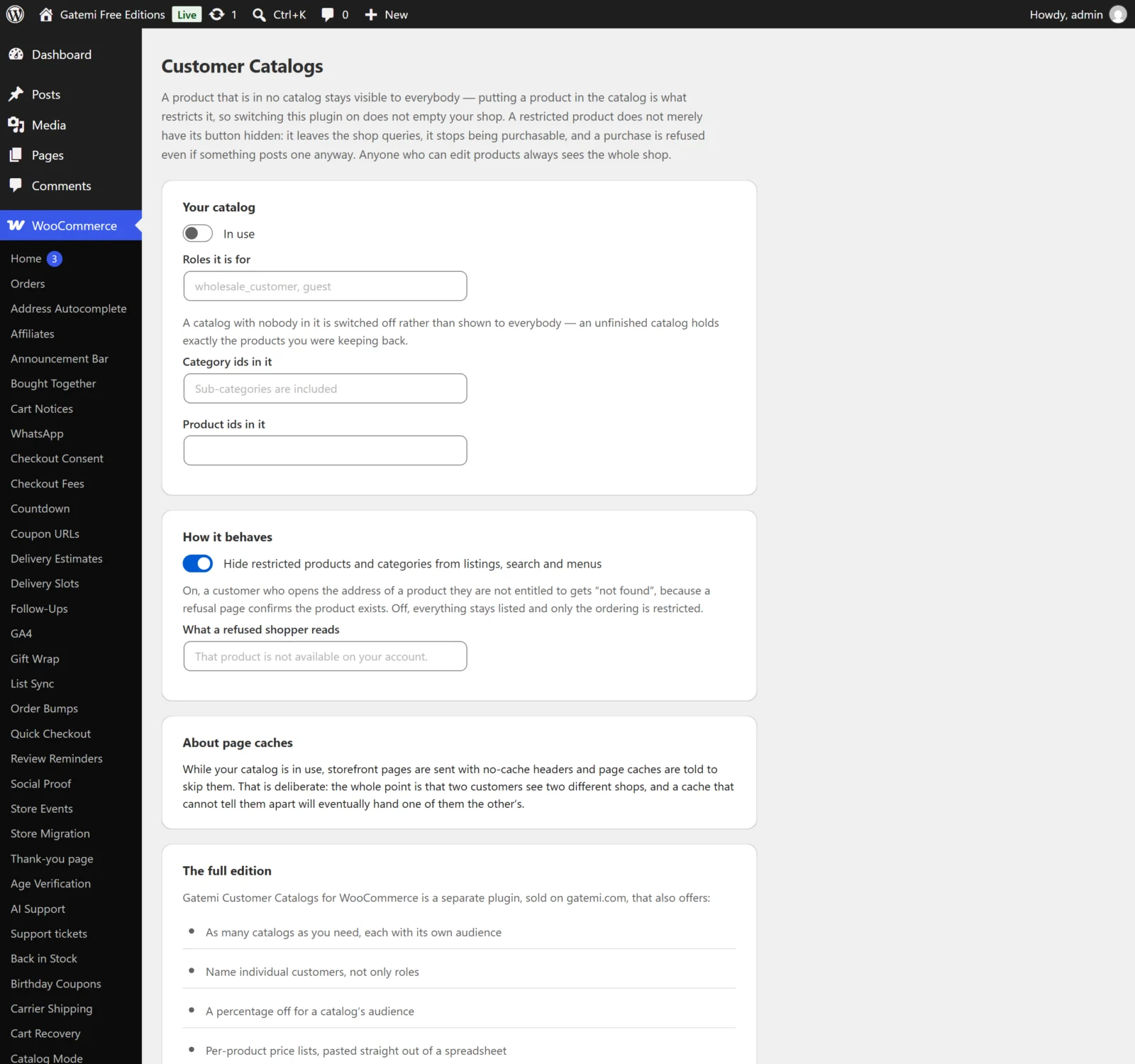
The catalog
The free edition has one catalog, Your catalog, stored under the fixed id catalog. The full edition lists every catalog, each with the same fields plus the ones marked Full edition, an Add a catalog button and a Remove this catalog link.
Lists of roles or ids are typed separated by commas or spaces.
In use
- Key:
enabled· Default: off for a new free-edition catalog - Untick to switch a catalog off without losing what is in it. A switched-off catalog restricts nothing.
Name — Full edition
- Key:
name· Default: empty - For your own reference, for example "Trade accounts".
Roles it is for
- Key:
roles· Default: none - The user roles in this catalog's audience, by their role key:
customer,subscriber,wholesale_customer.guestmeans visitors who are not signed in. - A customer is in the audience if any of their roles is listed — a customer upgraded to
wholesale_customerwho still hascustomeris in.
Customer ids it is for — Full edition
- Key:
users· Default: none - Individual customers by user id, whatever their role. Find an id under Users by hovering over a name (
user_id=in the address).
Category ids in it
- Key:
categories· Default: none - Product category ids. Every product in the category or any of its sub-categories is in the catalog. The categories themselves are hidden from menus and category lists for people outside the audience.
Product ids in it
- Key:
products· Default: none - Single products by id. Use a variable product's own id: a variation belongs to whatever catalog its product is in.
A catalog with neither categories nor products restricts nothing and is ignored. A catalog with products but no audience is not opened up to everybody: its products stay hidden from all customers until you say who it is for.
Percentage off — Full edition
- Key:
discount· Default: empty (prices left alone) - A percentage off the regular price for this catalog's audience, on every product in the catalog. Kept between 0 and 100. Commas work as decimal points:
12,5is 12.5%. - Taken off the regular price, never the sale price, so a catalog term is not stacked on a promotion you are already running.
Prices of its own — Full edition
- Key:
prices(typed in a box, saved as product id ⇒ price) · Default: empty - One line per product: the product id, then the price —
142: 18.50. A space, comma, semicolon or tab works as well as the colon. - A price of its own beats the percentage for that product.
- An empty price is no price (the line is ignored);
0is a real price of nothing. - Prices are read the way people type them:
1.250,00and1,250.00are both 1250. - A line may name a product or a variation by its id. A variation's own line wins; a variation with none takes its product's price.
How it behaves
Hide restricted products and categories from listings, search and menus
- Key:
hide· Default: on (yes) - On: a restricted product leaves the shop, category and search results and the product's own address answers 404 not found — a refusal page would confirm the product exists. Restricted categories leave category menus and lists.
- Off: everything stays listed and viewable; only buying is restricted.
- Either way, a restricted product cannot be bought by anyone outside its audience.
Say beside a catalog price that it is this customer's own — Full edition
- Key:
badge· Default: on (yes) - Adds a small badge after the price of every product this customer has a catalog price for.
What that says — Full edition
- Key:
badge_text· Default: "Your price" - Plain text. Empty falls back to "Your price".
Keep catalog prices out of the structured data search engines read — Full edition
- Key:
structured· Default: on (yes) - Removes the
offers(the price) from a product's structured data when the current customer has a catalog price for it. The price in that markup is an offer to the public.
What a refused shopper reads
- Key:
message· Default: empty, shown as "That product is not available on your account. Please sign in with an account that can order it, or contact us." - Shown when somebody tries to add a product they are not entitled to.
About page caches
Not a setting, but on the screen for a reason: while any catalog is in force, storefront pages are sent with no-cache headers and page caches are told to skip them. Two customers see two different shops, and a cache that cannot tell them apart would eventually show one of them the other's.
License & updates — Full edition
Paste your key and press Activate. The card shows the status, how many sites the key is used on, and Deactivate on this site. The state is stored in gmct_license. A failed connection to gatemi.com never changes the status.
What the free edition keeps for the full edition
When you save in the free edition, it rewrites only Your catalog's In use, roles, categories and products, and the hide and message settings. Everything else — other catalogs, a percentage, a price list, named customers, the badge and structured-data settings — is kept exactly as the full edition left it, and is not used by the free edition. See How it works for how the free edition treats the other catalogs' products.