
Everything is on one screen: WooCommerce → Checkout Fees. It needs the manage_woocommerce capability.
Both editions store their configuration in the same two options, in the same shape:
gmfe_rules— the list of fee rules, in the order you wrote them.gmfe_settings— the shipping-insurance settings.
So moving between editions keeps every rule. The free edition writes back everything it does not show — a percentage, a base, taxability, extra conditions — exactly as it found it.
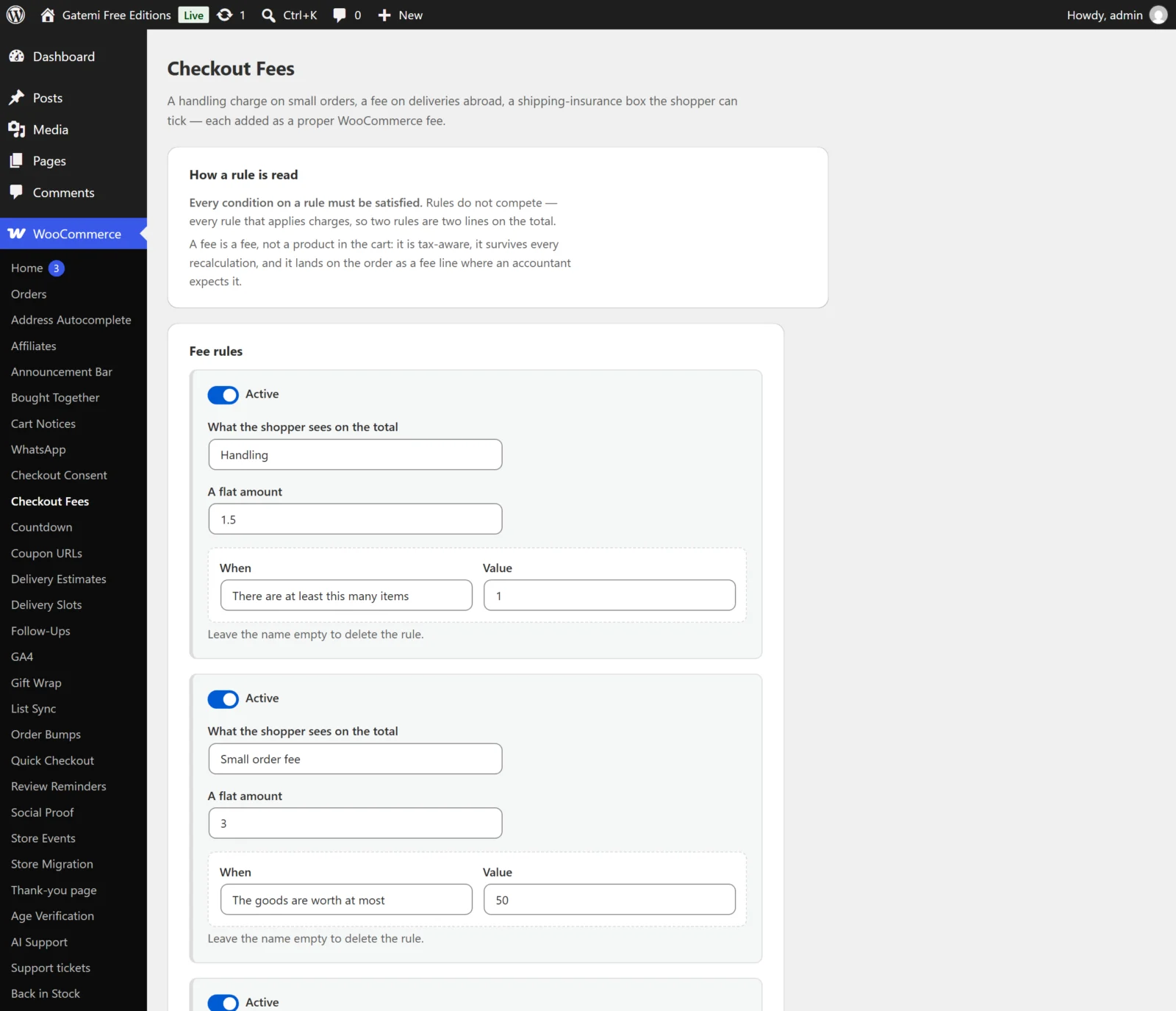
Fee rules
The free edition shows three rule rows. The full edition shows every saved rule, an empty row at the end, and an Add another rule button.
Each rule is stored as an array with these keys.
Active
- Key:
enabled· Default: on for a new rule - Unticked, the rule is kept but never charged.
What the shopper sees on the total
- Key:
label· Default: empty - The name of the fee line on the cart, the checkout, the order and the emails. Leave it empty to delete the rule — a fee with no name is not saved.
- The rule's
idis made from this name the first time it is saved (Small order handling→small-order-handling) and then kept. Two rules never share an id; a duplicate gets-2added.
A flat amount (free edition) / Charge and Of (full edition)
- Keys:
kind(fixedorpercent, defaultfixed) andamount(default empty, read as 0) - Free edition: the field is A flat amount — a fixed sum added to the total.
- Full edition: Charge chooses A flat amount or A percentage, and Of is the number. A negative number is a discount:
-2with a percentage is "2% off". - Amounts are read the way people type them.
2,50is 2.50 and1.250,00is 1250 — when both separators appear, the rightmost one is the decimal point. - A rule that works out at nothing is not added at all, so no order ever reads "Handling: 0.00".
Measured against — Full edition
- Key:
base· Default:goods - Only used by a percentage.
| Choice | Key | Base |
|---|---|---|
| the goods after coupons, before shipping and tax | goods |
The cart lines' totals after coupons |
| the goods after coupons and the shipping, before tax | goods_shipping |
Those goods plus the shipping total |
| everything the customer pays after coupons, tax included | total |
Those goods plus shipping plus the tax on both |
A card surcharge should normally be measured against total, because that is what the gateway takes its cut of. See How it works.
Taxable — Full edition
- Key:
taxable· Default: off - On, WooCommerce charges tax on the fee at the standard rate. A
tax_classkey is stored beside it (default empty, the standard class); the screen does not edit it. - In the free edition every fee is untaxed.
When (conditions)
- Key:
conditions— a list of{ type, value }pairs - Free edition: one condition per rule, chosen in When, with its number or list in Value. Always — no condition charges every cart.
- Full edition: as many as you like. After each save a new empty condition box appears under the rule. Every condition on a rule must be satisfied for it to charge.
| Label | Type | Value | Edition |
|---|---|---|---|
| The goods are worth at least | min_total |
A number | both |
| The goods are worth at most | max_total |
A number | both |
| There are at least this many items | min_items |
A whole number | both |
| The shipping country is one of | country |
Country codes, comma-separated: FR, DE |
both |
| The shipping country is not one of | not_country |
Country codes | both |
| The chosen payment method is one of | payment_method |
Gateway ids: cod, bacs |
Full edition |
| The chosen shipping method is one of | shipping_method |
Method ids: flat_rate or flat_rate:3 |
Full edition |
| The cart holds something from these categories | category |
Category ids: 12, 15 |
Full edition |
| The cart holds something in these shipping classes | shipping_class |
Shipping-class slugs: bulky |
Full edition |
| The customer's role is one of | user_role |
Role slugs: customer, wholesale_customer; guest for a visitor who is not signed in |
Full edition |
"The goods" is the sum of the cart lines' subtotals before coupons, shipping and tax. The country is the shipping country, or the billing country when there is no shipping address.
Rules the free edition does not charge
A rule the full edition wrote with a percentage, a negative amount, more than one condition, or a condition only the full edition offers is shown on the free edition's screen with a note saying it is kept for that plugin. It is never charged by the free edition, and saving the screen does not change it. Rules past the third are left in the option untouched and do not run.
Shipping insurance
Stored in gmfe_settings.
| Label | Key | Default | Edition |
|---|---|---|---|
| Offer shipping insurance | insurance_enabled |
no |
both |
| What the box says | insurance_label |
empty, shown as "Shipping insurance" | both |
| A flat amount | insurance_amount |
0 |
both |
| Plus a percentage of the goods | insurance_percent |
0 |
Full edition |
| But never less than | insurance_minimum |
0 |
Full edition |
| The insurance charge is taxable | insurance_taxable |
no |
Full edition |
| Show the box on | insurance_where |
both (cart, checkout) |
Full edition |
| A note under the box (free) / A note beside the box (full) | insurance_note |
empty | both |
- The box is never ticked for the shopper, and there is no setting to tick it.
- The box does not appear while its price is nothing.
- Negative amounts are stored as 0.
- Free edition: the price is the flat amount, the charge is untaxed, and the box shows on both the cart and the checkout.
- Full edition: the price is the flat amount plus the percentage of the goods, raised to But never less than when it falls below it.
License & updates — Full edition
Paste the licence key from your gatemi.com account and press Activate. It is stored in its own option, gmfe_license. The card shows the state ("Active — updates until …", "Expired — renew for updates", "Revoked") and a Deactivate on this site button. If the last check could not reach gatemi.com, the state is left as it was. The plugin keeps charging fees whatever the licence says; the key switches on updates and support.
Filters — Full edition
The full edition's screen ends with a Filters card listing every filter the plugin applies. They are documented in the developer reference.