
The settings are on WooCommerce → Age Verification (capability manage_woocommerce). Both editions store them in the option gmav_settings. The free edition has three settings; when it saves, it keeps any full-edition settings already in the option untouched.
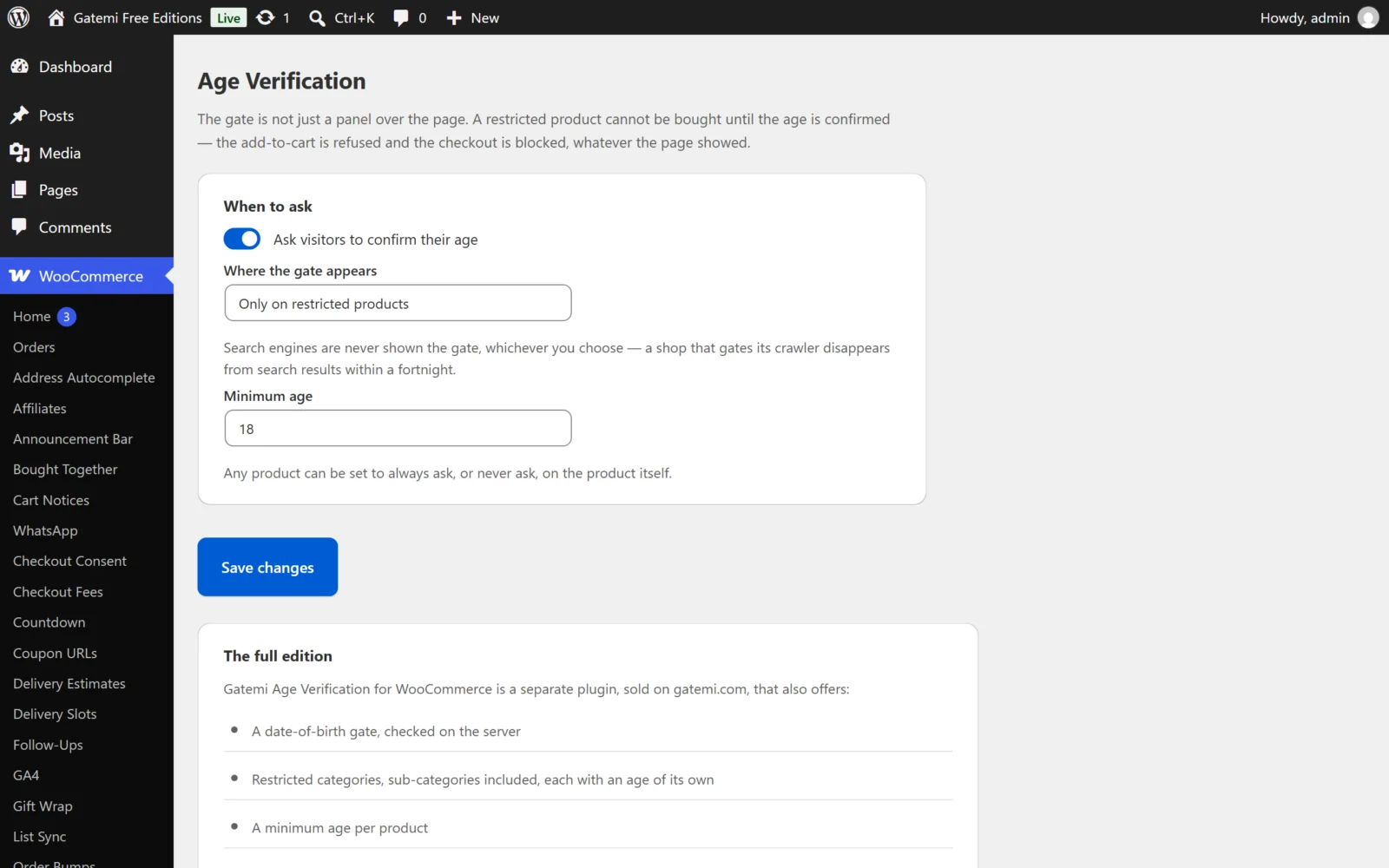
When to ask
Ask visitors to confirm their age
- Key:
enabled· Default: off (no) - The master switch. Off, no gate is shown and no product is restricted.
Where the gate appears
- Key:
scope· Default:products
| Option | Value | Gate shown on | Products restricted |
|---|---|---|---|
| Only on restricted products | products |
Restricted product pages, and the cart and checkout when they hold one | Only products set to Always ask (full edition: and restricted categories, products with their own age) |
| On every shop page | shop |
WooCommerce pages: shop, categories, products, cart, checkout, My Account | Every product unless set to Never ask |
| On the whole site | site |
Every front-end page | Every product unless set to Never ask |
Search engines are never shown the gate, whichever you choose.
Full edition: when Restricted categories is filled in, it decides which products are restricted in every scope; the scope then only decides where the gate is shown.
Minimum age
- Key:
min_age· Default:18· Range: 1–120 - The age the gate asks for. An empty or zero value is saved as 18.
Restricted categories — Full edition
- Key:
categories· Default: none - Product category IDs, comma-separated. A product in one of them, or in a sub-category of one, is restricted.
- Each category can have its own Minimum age on its edit screen (Products → Categories; term meta
_gmav_min_age). Empty uses the store's minimum age. A product in two restricted categories asks for the higher age.
Roles that are never asked — Full edition
- Key:
exempt_roles· Default: none - Role keys, comma-separated, for example
administrator, shop_manager. A signed-in user with one of these roles is never gated and can always buy. - Free edition: nobody is exempt except search engines.
How to ask — Full edition
The gate asks for
- Key:
mode· Default:confirm - A yes or no (
confirm): two buttons. - A date of birth (
dob): day, month and year boxes. The age is worked out on the server, in the store's timezone, and the date is then thrown away — nothing about it is stored, on the visitor or on the order. An impossible date is refused with a message; an age under the minimum is treated as a "no". Only a date clears this gate: a hand-made "yes" posted past it is refused. - Free edition: always yes or no.
Remember for (days)
- Key:
remember_days· Default:30· Range: 0–365 - How long the confirmation cookie lasts.
0makes it a browser-session cookie: the visitor is asked again on their next visit. - Free edition: always 30 days.
Ask again at the checkout, and record the answer on the order
- Key:
checkout_confirm· Default: off (no) - On: when the cart holds a restricted product, a tick box appears above the Place order button on the classic checkout, and in the order section of the Checkout block. It is never pre-ticked. The order is refused until it is ticked, and the wording as shown is recorded on the order. On the Checkout block the sentence names no age, because one sentence serves every cart; your own wording is used there when it contains no
{age}.
The words — Full edition
Write {age} where the minimum age should appear. Empty uses the default.
| Label | Key | Default |
|---|---|---|
| Heading | heading |
Please confirm your age |
| Message | message |
You must be {age} or over to view this shop. |
| Yes button | yes_label |
Yes, I am (date-of-birth gate: Enter) |
| No button | no_label |
No, I am not |
| After a no | declined_text |
You need to be {age} or over to shop here. |
| At the checkout | checkout_label |
I confirm I am {age} or over. |
The free edition uses those default sentences.
On each product
Product data → General:
Age verification
- Meta key:
_gmav_mode· Default: absent (Follow the store setting) - Always ask for this one (
verify) — restricted whatever the store scope. - Never ask for this one (
open) — never restricted, even in the shop or site scope or a restricted category. - A variation follows its parent product.
Minimum age — Full edition
- Meta key:
_gmav_min_age· Default: empty - An age for this product alone. Setting it restricts the product. Empty uses the category's or the store's age.
License & updates — Full edition
Enter the GM-XXXXX-… key from your gatemi.com account and press Activate. A failed check never changes the licence state.