
Configuration lives in two places: the Licensing tab on each product, and WooCommerce → License Manager. Both editions use the same product meta and the same option, gmlk_settings, so changing edition keeps everything.
The Licensing tab on a product
Products → Edit → Product data → Licensing. A variation reads every value from its parent product unless it carries its own.
| Label | Meta key | Default | Edition | What it does |
|---|---|---|---|---|
| Sells license keys | _gmlk_enabled |
off | Both | Issue a key for every unit of this product sold. |
| Keys come from | _gmlk_key_source |
Generated (no value) | Both | Generated mints a random key per unit; A pool (pool) draws one of the keys you uploaded. |
| Add keys to the pool | — | empty | Both | One key per line. Stored encrypted in the pool table; a key already in any pool is skipped. The count above it reads "Key pool: N of M left to sell." |
| Product identifiers | _gmlk_product_slugs |
empty | Full edition | What a key unlocks, as your software names it — a plugin slug, an app id. Several, separated by spaces or commas, make a bundle. Empty means the product's own slug. A product with identifiers set is treated as selling keys even with the box unticked. |
| Activation limit | _gmlk_activation_limit |
empty (= 1) | Full edition | How many sites one key may be active on at once. Empty or 0 means 1. |
| Term (days) | _gmlk_term_days |
empty (= 0) | Full edition | Days of updates and support a key buys, counted from issue. Empty or 0 means it never expires. |
The free edition writes only the first three. It keeps the full edition's values on the product untouched, and issues every key for the product's own slug, one activation, no expiry.
Key pools
- A pool belongs to a product. A product selling from its pool is out of stock when the pool is empty, everywhere WooCommerce asks — the shop, the product page, add-to-cart, the Store API. If the product manages stock, its stock quantity shows the keys left.
- A variation draws from its own pool first and its product's otherwise. The Licensing tab uploads to the product's pool; in the full edition each variation's row in Product data → Variations has its own Add keys to this variation's pool box and shows what is left in it.
- The Key pools card on WooCommerce → License Manager lists each pool with what is left to sell.
WooCommerce → License Manager
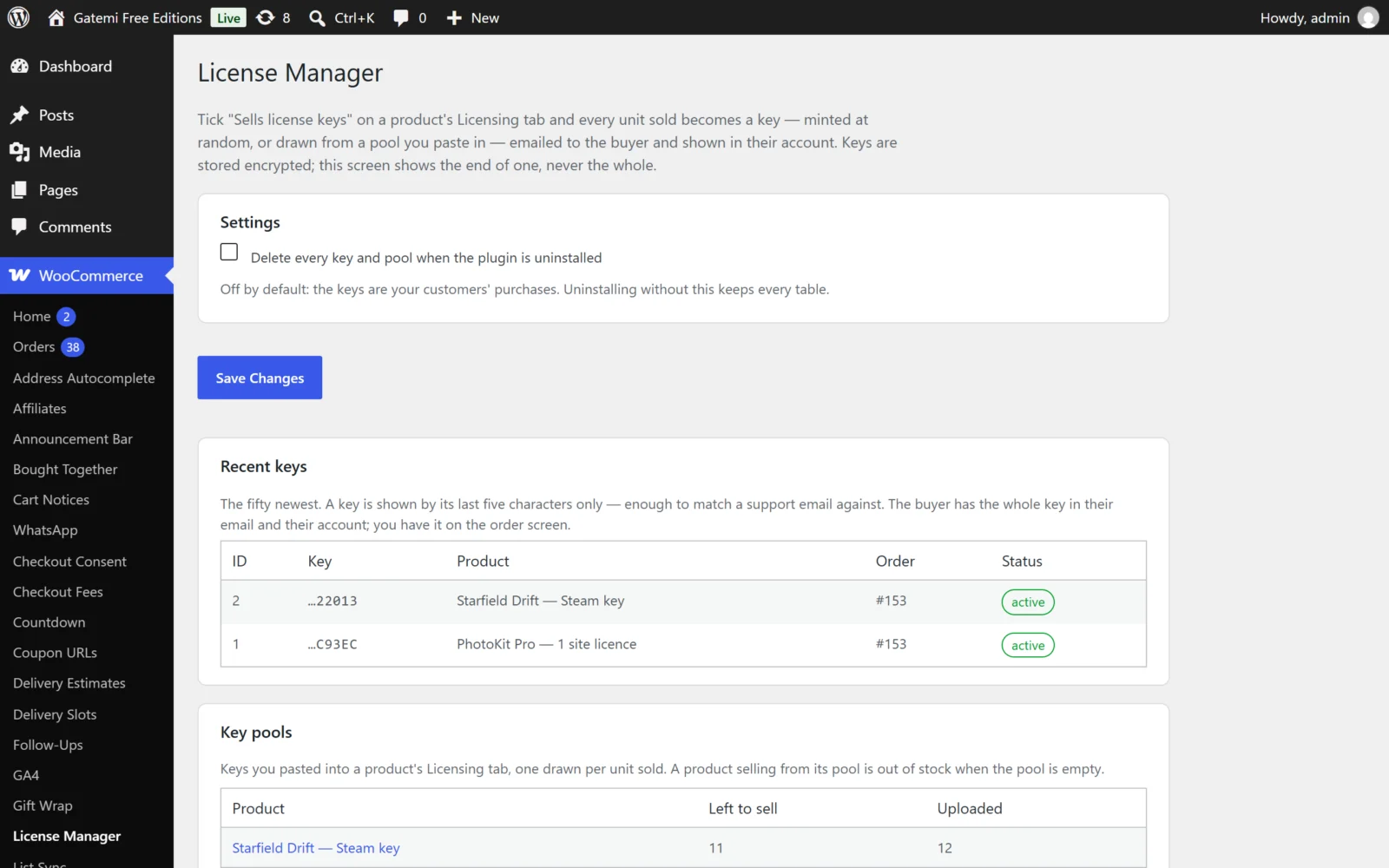
Requires the manage_woocommerce capability.
Settings
| Label | Key | Default | Edition | What it does |
|---|---|---|---|---|
| Where customers manage their licenses | manage_url |
empty | Full edition | Every refusal the API sends carries this address, so a customer's error links to its fix. Empty means this store's My Account → Licenses. |
| Delete every license, activation, pool key, release and audit row when the plugin is uninstalled | delete_data |
off | Both (free: "Delete every key and pool when the plugin is uninstalled") | Off, uninstalling keeps every table. The keys are your customers' purchases. |
gmlk_settings also holds two secrets the plugin generates for itself the first time it needs them and never displays: cipher_secret (encrypts keys at rest — shared by both editions, so a key sealed by one opens in the other) and, full edition, signing_secret (signs download links).
Recent licenses / Recent keys
The fifty newest keys, each shown by its last five characters only — enough to match a support email, never a whole key on a list screen. The full key is in the buyer's email and account, on the single order screen, and (full edition) in the export.
Full edition columns: ID, Key, Products, Customer / order, Sites, Expires, Status and Actions:
- Extend — add a number of days, counted from the key's expiry or from today, whichever is later. An expired key becomes active again. A revoked or refunded key cannot be extended, and a lifetime key (no expiry) shows no Extend at all, so it never gains an expiry date by accident.
- Revoke — stop a key working: it fails activation and gets no updates.
- Export — every license as a CSV, keys included, with every cell protected against spreadsheet formulas. The export is written to the audit log.
Key pools
Each pool and how many keys are left to sell.
Releases — Full edition
Upload the zip of a new version of a WordPress plugin you sell. The plugin reads the slug (the plugin's folder), the Version, the requirements and the newest changelog entry from the zip itself. The rules:
- The zip must hold exactly one plugin folder whose main file has a
Version:header. - A published version is never replaced: to fix a release, bump the version.
- Packages are stored in
wp-content/uploads/gmlk-releases/, outside the public media library, and served only through signed links.
A release is offered to licenses whose Product identifiers include its slug.
Audit log — Full edition
An append-only list of what happened to keys: minted, activated, deactivated, reset, extended, revoked, refunded, exported, an empty pool, the local-site cap being reached.
License & updates — Full edition
The gatemi.com licence for this plugin itself: paste the key and click Activate, or Deactivate on this site.
For developers — Full edition
A table of every filter the plugin applies — see the developer reference.