
Both editions have one screen: WooCommerce → Free Shipping Bar. There is no threshold setting on it, on purpose. The amount the bar counts towards is the minimum order amount of the Free shipping method in your shipping zones (WooCommerce → Settings → Shipping). One number, in one place, so the bar can never promise free shipping at a different amount from the one the checkout actually applies.
The two editions keep their settings in different options: the free edition in gmfb_settings, the full edition in gmfsb_settings. When the full edition first runs on a site where it has never been configured, it copies the free edition's switch and its shop and cart placements across, once; the mini-cart and checkout placements start on, and the wording and colours start at the full edition's defaults. The threshold itself lives in WooCommerce either way.
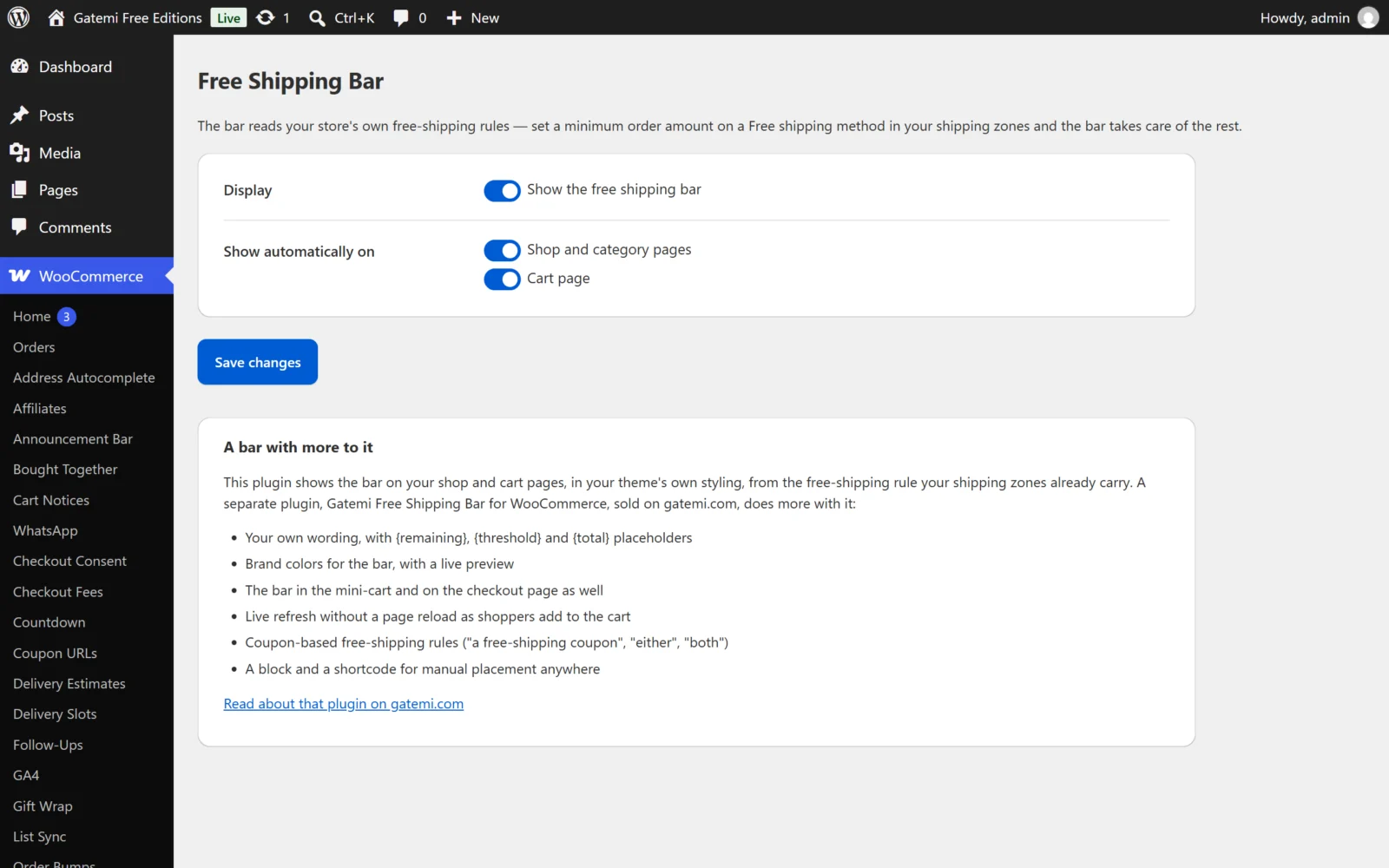
Display
Show the free shipping bar
- Key:
enabled· Default: on (yes) - The master switch. Turned off, the bar renders nowhere — not in the automatic placements and, in the full edition, not from the block or the shortcode either.
Show automatically on
- Key:
locations(a list) · Default: every placement the edition offers - The free edition offers two:
- Shop and category pages (
shop) — above the product list, on WooCommerce'swoocommerce_before_shop_loophook. - Cart page (
cart) — above the cart. On a classic cart page it useswoocommerce_before_cart; on a block-based Cart page it is printed directly above the Cart block.
- Shop and category pages (
- Full edition adds two more:
- Mini-cart widget (
minicart) — inside the mini-cart, before its buttons (woocommerce_widget_shopping_cart_before_buttons). - Checkout page (
checkout) — above the checkout form on a classic checkout (woocommerce_before_checkout_form), or above the Checkout block.
- Mini-cart widget (
- Untick a placement to stop the bar appearing there. Placement names the edition does not offer are dropped when the screen is saved.
Full edition. Below the placements the screen reminds you that the Free Shipping Bar block and the [gatemi_free_shipping_bar] shortcode place the bar by hand. A page that contains either is skipped by the automatic placements, so the bar never appears twice on one page.
Messages — Full edition
The free edition always says "Add amount more to unlock free shipping" and, once the minimum is reached, "Congratulations — you've unlocked free shipping!", translated into the site's language.
While the cart is below the minimum
- Key:
message· Default: "Add {remaining} more to unlock free shipping"
Once free shipping is unlocked
- Key:
message_qualified· Default: "Congratulations — you've unlocked free shipping!"
Both accept three placeholders, each replaced with a price in your store's currency format:
| Placeholder | Becomes |
|---|---|
{remaining} |
The amount still missing |
{threshold} |
The free-shipping minimum |
{total} |
The cart total as the free-shipping rule measures it |
Messages are plain text. An emptied box falls back to its default when you save.
Example: "Only {remaining} to go — orders over {threshold} ship free."
Colors — Full edition
Progress color
- Key:
accent_color· Default:#1d4ed8 - The fill colour while the cart is below the minimum.
Unlocked color
- Key:
success_color· Default:#15803d - The fill colour once free shipping is unlocked.
Both must be hex colours; anything else falls back to the default. They are written as CSS custom properties (--gmfsb-accent, --gmfsb-success) on .gmfsb-bar, so a theme can also override them in CSS.
Live preview — Full edition
The full edition's screen shows a preview of the bar with your messages and colours as you edit. It uses sample figures; shoppers see the bar only once a real free-shipping rule exists.
When the screen shows a notice
- No free-shipping rule found — no shipping zone has an enabled Free shipping method with a minimum order amount. The bar stays hidden until one exists. The notice links to the shipping zones.
- Your free shipping requires a coupon (full edition only) — your Free shipping method needs a coupon and has no amount. The bar has nothing to count towards, so it appears only with its congratulations message once a shopper applies a free-shipping coupon.
License & updates — Full edition
Paste the licence key from your gatemi.com account and click Activate. The key is stored in its own option, gmfsb_license. The card shows whether the licence is active, until when, and how many sites use it. A failed check because gatemi.com could not be reached never changes the licence state.
For developers — Full edition
The screen lists the filters the full edition applies beyond these settings. They are explained in the Developer reference.