
Coupon URLs has two places to configure:
- WooCommerce → Coupon URLs — the decisions that are the same for every link. Stored in one WordPress option,
gmcu_settings. - The URL tab on each coupon (Marketing → Coupons → a coupon → Coupon data → URL) — the link itself. Stored as meta on the coupon.
Both editions use the same option and the same meta keys, so switching edition keeps every setting and every link.
Nothing about the discount is set here. What a coupon is worth, who may use it, when it expires and how often it can be used are WooCommerce's own fields on the coupon. The plugin deliberately has no second place to set any of that.
WooCommerce → Coupon URLs
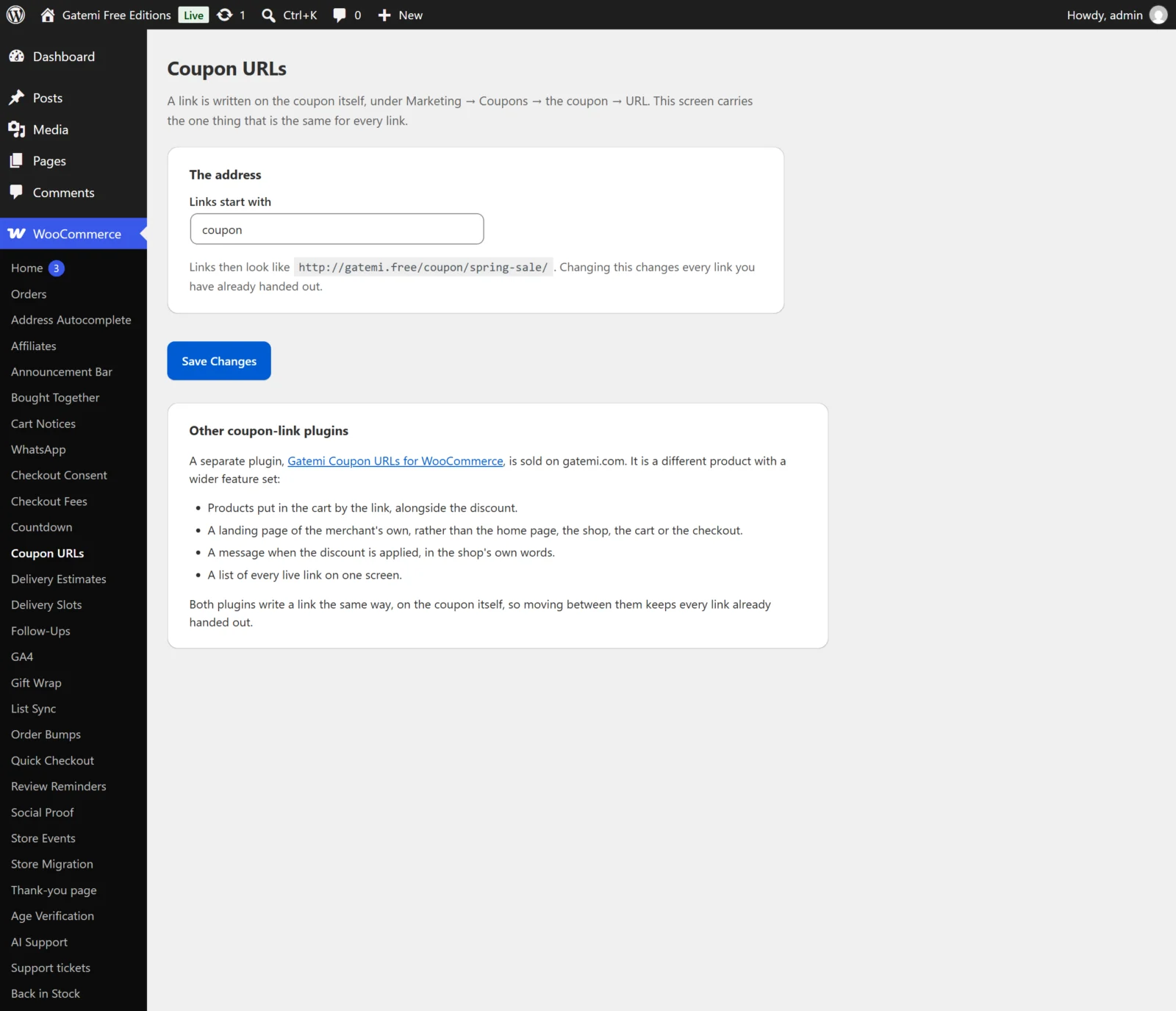
The address
Links start with
- Key:
prefix· Default:coupon - The first part of every link. With
deal, links look likehttps://yourshop.com/deal/spring-sale/. The screen shows an example of the finished address under the field. - Saved through WordPress'
sanitize_title(), so it becomes lower case with hyphens for spaces. - An emptied field is saved as
coupon, not as nothing. A rule with no prefix would match every one-segment address on the site. - Changing it changes every link you have already handed out. The old addresses stop working. That is why it is one store-wide setting rather than a field on each coupon.
- The plugin updates WordPress' rewrite rules once, on the next page load after you change it.
What the shopper is told — Full edition
These two settings are on the full edition's screen only. The free edition shows no message of its own; WooCommerce's own "Coupon code applied successfully." is what the shopper sees.
Say so when a link applies a discount
- Key:
notice· Default: on (yes) - Shows a success notice on the page the shopper lands on when the link's coupon was applied (or was already on the cart).
- A refused coupon is never announced by this setting. WooCommerce already shows why it was refused.
The message
- Key:
notice_text· Default: empty, shown as "Your discount has been applied." - Plain text. Write
{code}anywhere to include the coupon code, for exampleYour {code} discount is on your cart.
Your links — Full edition
A table of every live link: the coupon's name, the finished link and how many products it adds. Only published coupons with a link address appear.
License & updates — Full edition
Enter the licence key from your gatemi.com account and click Activate. The card then shows the status (Active, Expired, Revoked or Not recognised), the key with most of it masked, and a Deactivate on this site button. If gatemi.com could not be reached at the last check, the card says so and the licence is left unchanged. The state is stored in the gmcu_license option.
For developers — Full edition
A table of the filters the plugin applies. They are listed in the Developer reference.
The URL tab on a coupon
Open Marketing → Coupons, edit a coupon, and click URL in the Coupon data box. Save with the coupon's own Update or Publish button.
Link address
- Meta key:
_gmcu_slug· Default: empty - The last part of the link, for example
spring-sale. Empty means the coupon has no link. - Saved through
sanitize_title(). - Refused (saved as empty) when another coupon already uses it, because two coupons on one address would leave no way to tell which one answers.
- Refused when it is only digits, such as
2026, because some permalink structures would read it as a post id. - Clearing the field removes the link. In the full edition it also removes the products and landing settings below; the free edition removes only the address and keeps the rest.
The link
Read-only. Appears once a link address has been saved, showing the finished address ready to copy.
Also add to the cart — Full edition
- Meta key:
_gmcu_products· Default: none - Product ids, separated by commas, spaces or new lines.
- Each one is added through WooCommerce's own add-to-cart, so stock and other plugins' add-to-cart checks apply. One that cannot be added (out of stock, say) is skipped and the rest still go in.
- At most 20 products are kept; duplicates are removed.
- Use simple product ids. The product is added with quantity 1.
Then send them to
- Meta key:
_gmcu_landing· Default: The home page (home) - Where the shopper is sent after the coupon is applied:
- The home page (
home) - The shop (
shop) - The cart (
cart) - The checkout (
checkout) - A page of my own (
custom) — Full edition
- The home page (
- In the free edition, a link the full edition set to A page of my own keeps that value stored but lands on the home page.
That page — Full edition
- Meta key:
_gmcu_landing_url· Default: empty - The address used when Then send them to is A page of my own.
- It has to be on your own site. An empty value lands on the home page.
- Saved through
esc_url_raw(), so ajavascript:address is never stored.