
All rules are on one screen: WooCommerce → Shipping Rules. It needs the manage_woocommerce capability.
The screen has five rule slots, Rule 1 to Rule 5, and one Save rules button. Each rule is one row in the table {prefix}gmship_restrictions — the same table, in the same shape, that Gatemi Shipping uses for its restrictions.
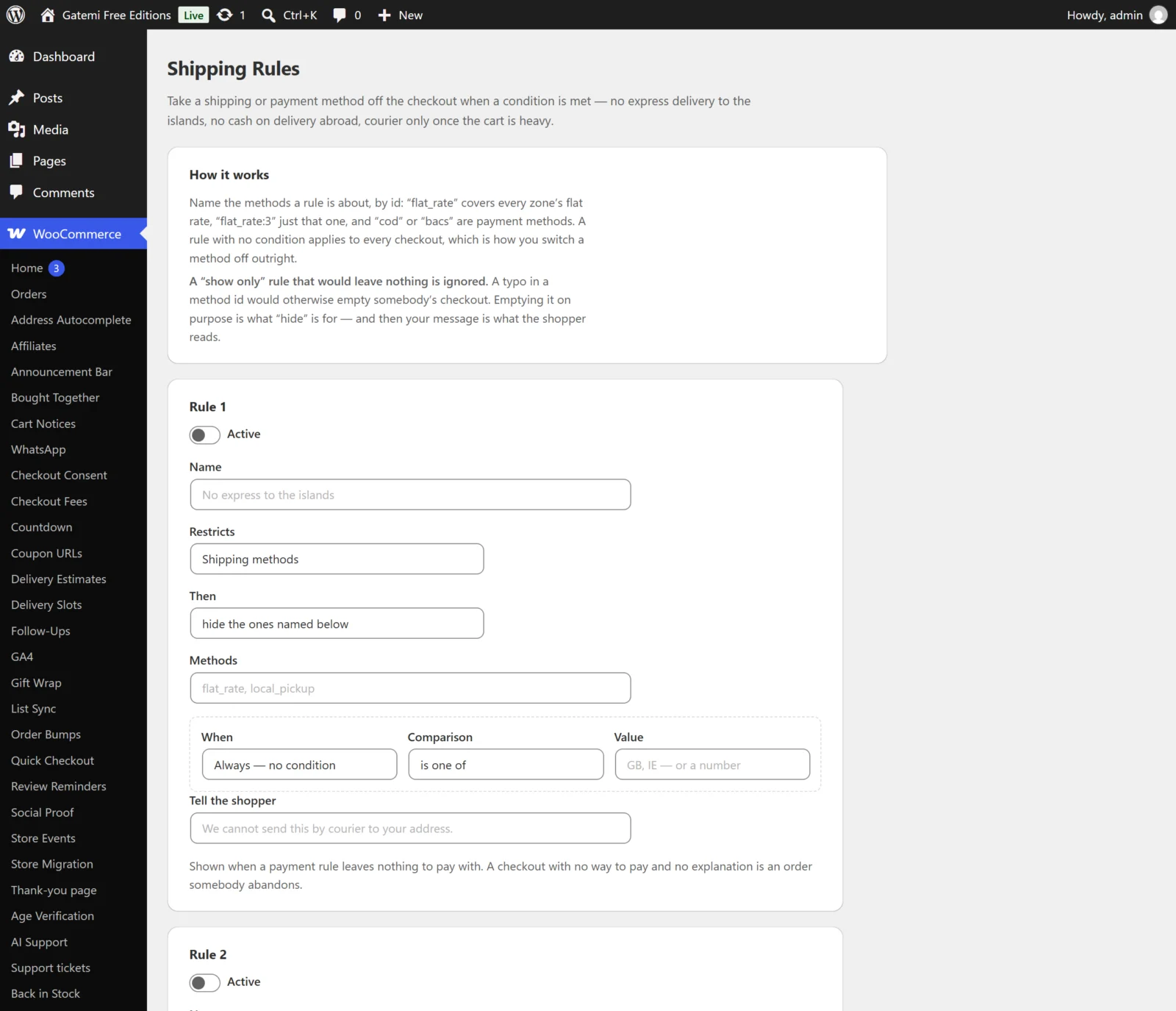
Fields of a rule
Read a rule as one sentence: "When the shipping country is not one of GB, hide the payment methods cod, and tell the shopper why."
Active
- Column:
enabled· Default: off for an empty slot - Unticked, the rule is kept but does nothing.
Name
- Column:
title· Default: empty - For you only; the shopper never sees it.
- To delete a rule, empty both Name and Methods and save. An emptied slot is removed from the table.
Restricts
- Column:
target_type· Default:shipping - Shipping methods (
shipping) — filters the delivery options offered for each package. - Payment methods (
payment) — filters the payment methods offered at the checkout.
Then
- Column:
action· Default:hide - hide the ones named below (
hide) — takes the named methods away and leaves the rest. - show only the ones named below (
show_only) — takes everything away except the named methods. If that would leave nothing at all — usually a typo in a method id — the rule is ignored for that checkout and every method stays.
Methods
- Column:
targets(a JSON list) · Default: empty - Method ids, separated by commas or new lines:
flat_rate:3— exactly that instance in one zone;flat_rate— every flat-rate instance in every zone (matched only up to the colon, soflat_ratedoes not also catchflat_rate_plus);fedex*— a wildcard, case-insensitive, for carrier plugins that make up their own ids;cod,bacs,cheque— payment gateways by their id.
When
- Column: inside
conditions· Default: Always — no condition - One condition per rule on this screen.
| Choice | Type | What is measured |
|---|---|---|
| Always — no condition | — | Nothing: the rule applies to every checkout |
| Shipping country | country |
The package's destination country (the customer's shipping country for payment rules) |
| Subtotal before discounts | subtotal |
The cart lines' subtotal, before coupons, shipping and tax |
| Total weight | weight |
Product weight × quantity, in your shop's weight unit (WooCommerce → Settings → Products) |
| Number of items | item_count |
The total quantity |
| Shipping class | shipping_class |
The shipping classes in the cart (stored by their term id) |
A rule with no condition is how you switch a method off outright — for example a show-only rule for one zone's local pickup.
Comparison
- Key:
operatorinside the condition · Default: is one of
| Label | Key | Use with |
|---|---|---|
| is one of | in |
Shipping country |
| is not one of | not_in |
Shipping country |
| is at least | gte |
Subtotal, weight, number of items |
| is at most | lte |
Subtotal, weight, number of items |
| contains any of | contains_any |
Shipping class |
| contains none of | contains_none |
Shipping class |
For a number, anything other than is at most is saved as is at least. For a country, anything other than is not one of is read as is one of.
Value
- Key:
valueinside the condition - For a country: two-letter codes separated by commas —
GB, IE. - For a shipping class: the class slugs (or names) from WooCommerce → Settings → Shipping → Classes, separated by commas. They are stored as the classes' numeric ids, the way Gatemi Shipping stores them, and shown back as slugs. A product with no class counts as
0. - For a number: one number. A comma is read as the decimal point, so
2,5is 2.5.
Tell the shopper
- Column:
message· Default: empty - Used only by payment rules, and only when the checkout is left with no payment method at all. Your sentence then replaces WooCommerce's own "no available payment methods" message. If several matching rules carry a sentence, they are joined with a space.
- Shipping rules store the field but do not show it.
Order
- Column:
sort_order— the slot number, 0 to 4. - Order does not change the result: every matching rule is applied. See How it works.
Rules written in Gatemi Shipping
The table can also hold rules written by Gatemi Shipping for WooCommerce.
- A rule in the first five that this screen cannot edit — more than one condition, nested AND/OR groups, or a condition this plugin does not know (postcode, category, coupon, role and so on) — is shown as a read-only summary tagged Written in Gatemi Shipping. It is still enforced, and saving the screen leaves it exactly as it is.
- Rules beyond the fifth are not shown. A card at the top says how many there are. They are kept untouched and still apply.
What is stored where
| Item | Where |
|---|---|
| Rules | Table {prefix}gmship_restrictions |
| Schema version | Option gmship_schema_version (shared with Gatemi Shipping) |
The plugin has no options of its own.