
All settings are on WooCommerce → WhatsApp, and need the manage_woocommerce capability.
Both editions store them in the same two WordPress options:
gmwa_settings— the button and, in the full edition, order updates.gmwa_agents— the people who answer.
So switching between editions keeps everything. The free edition saves only the keys it shows and writes every other key back exactly as it found it, including the full edition's WhatsApp Business credentials.
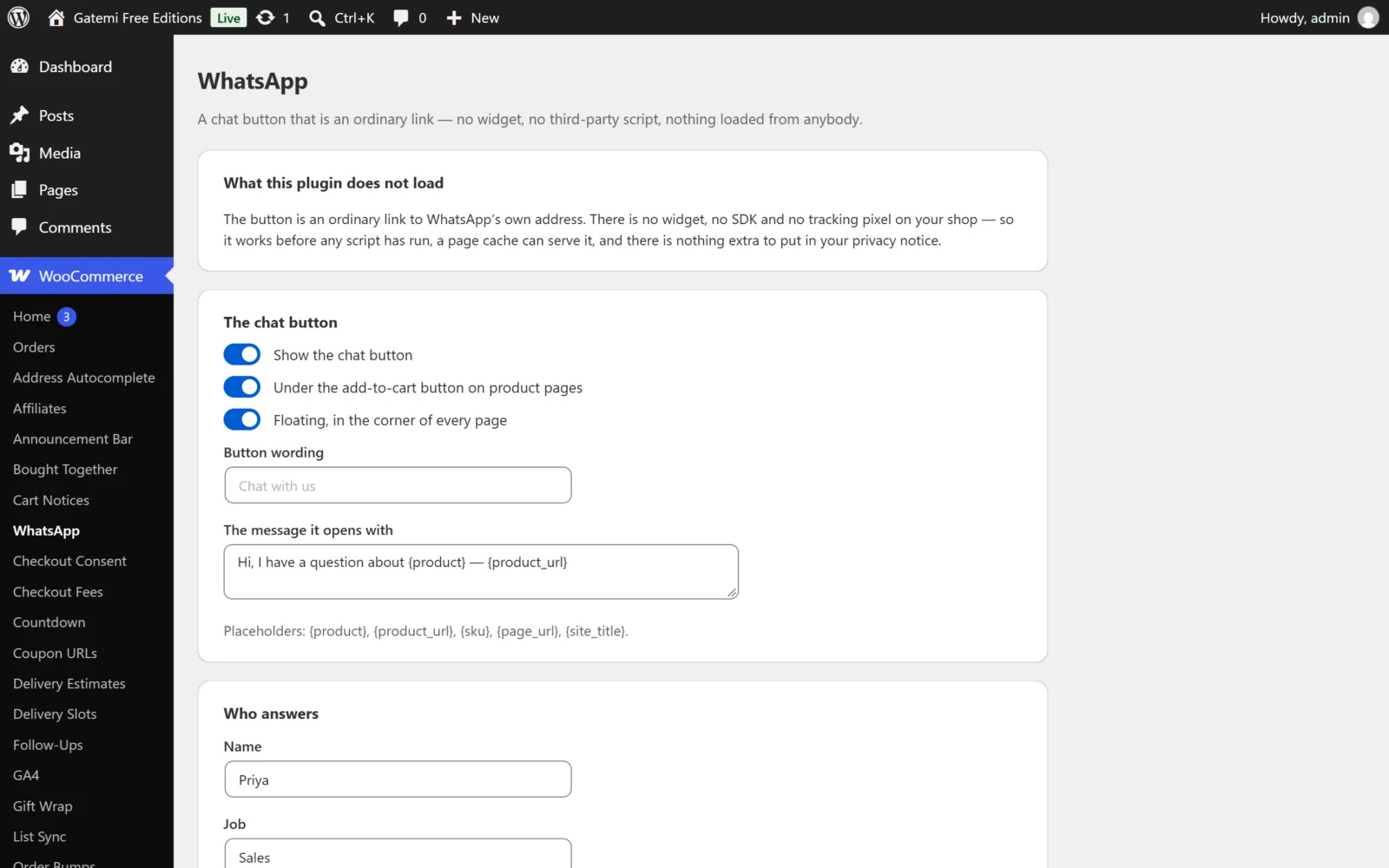
The chat button
Show the chat button
- Key:
chat_enabled· Default: on (yes) - The master switch. Off, no button is shown anywhere — not under products, not floating, not from the shortcode.
Under the add-to-cart button on product pages
- Key:
product_button· Default: on (yes) - Prints the button right after the add-to-cart button on single product pages (WooCommerce's
woocommerce_after_add_to_cart_buttonaction).
Floating, in the corner of every page
- Key:
floating· Default: on (yes) - Prints the button fixed in a corner of every front-end page.
- The free edition places it bottom right, in WhatsApp green (
#25d366).
Corner — Full edition
- Key:
position· Default:bottom-right - Bottom right or Bottom left. Any other value is read as bottom right.
Button wording
- Key:
button_label· Default: empty, shown as "Chat with us" - The button's text when the person who answers has no Name. When a name is set, the button shows the name (and " · Job" if a job is set) instead. In the full edition it is also the text of the floating button that opens the panel when there is more than one person.
Colour — Full edition
- Key:
accent· Default:#25d366 - The floating button's colour, as a hex code. Anything that is not a valid hex colour is replaced with the default, so it can never inject CSS.
The message it opens with
- Key:
greeting· Default:Hi, I have a question about {product} — {product_url} - The message WhatsApp opens with, already typed. Line breaks are kept.
- Placeholders:
{product},{product_url},{sku},{page_url},{site_title}. On a page that is not a product, the product placeholders are empty — see How it works. - Empty after the placeholders are filled, WhatsApp opens with no message.
- Full edition: a person with Their own greeting uses that instead.
Outside working hours — Full edition
The free edition always shows the button outside hours, with its own away line ("We are away right now — send a message and we will reply when we are back.").
When nobody is on duty — Full edition
- Key:
away_behaviour· Default:show - Show the button, with a note (
show) or Hide the button (hide). Withhide, a person outside their hours is not offered at all; if nobody is on duty, there is no button.
The note — Full edition
- Key:
away_message· Default: empty, shown as the sentence above - The away line under the button. Plain text.
Who answers
Stored in gmwa_agents. The free edition edits one person. The full edition edits as many as you add; the free edition keeps any extra people the full edition saved and says how many on the screen.
| Field | Key | Default | Notes |
|---|---|---|---|
| Name | name |
empty | Shown on the button. |
| Job | role |
empty | Shown after the name: "Sarah · Sales". |
| WhatsApp number | typed → number |
empty | What you typed is kept in typed; the digits WhatsApp receives in number. |
| On | enabled |
on | Off, this person is never offered. |
| Days | days |
every day | mon … sun. Untick them all and every day is used. |
| From | from |
09:00 |
HH:MM, 24-hour. An unreadable time becomes the default. |
| To | to |
17:00 |
Same. Earlier than From means the shift runs past midnight. |
| Their own greeting — Full edition | greeting |
empty | Replaces the shop-wide message for this person. |
A row with neither a name nor a number is not saved.
Order updates — Full edition
Every order screen carries a Send on WhatsApp link whatever these say. These settings are for sending updates automatically.
Send order updates automatically
- Key:
notify_enabled· Default: off (no) - Nothing is sent until this is on and all four account fields below are filled in.
Ask at the checkout first, and only message customers who said yes
- Key:
optin_enabled· Default: on (yes) - Shows an unticked permission box above the pay button on the classic checkout, and records the answer on the order. While on, an order without that recorded "yes" is never messaged.
- Off, every order with a usable billing phone is messaged.
What the checkout asks
- Key:
optin_label· Default: empty, shown as "Send me order updates on WhatsApp"
Statuses worth a message
- Key:
notify_statuses· Default:processing,completed - Order status slugs, separated by commas or spaces, without
wc-.
Your WhatsApp Business account — Full edition
| Field | Key | Default |
|---|---|---|
| Phone number ID | api_phone_id |
empty |
| Access token | api_token |
empty — shown as a mask once saved; submitting the mask keeps the saved token |
| Approved template name | api_template |
empty |
| Template language | api_language |
en_US |
Your template is sent three values in order: {{1}} the shop's name, {{2}} the order number, {{3}} the status it reached.
License & updates — Full edition
Enter the licence key from your gatemi.com account and press Activate. It is stored in its own option, gmwa_license. The card shows the state, how many sites are in use, and a Deactivate on this site button. An expired licence stops updates; the plugin keeps working.