
Everything is on WooCommerce → Cart Notices. Both editions store the master switch in the option gmcn_settings and the notices in gmcn_notices, in the same shape, so upgrading keeps every message.
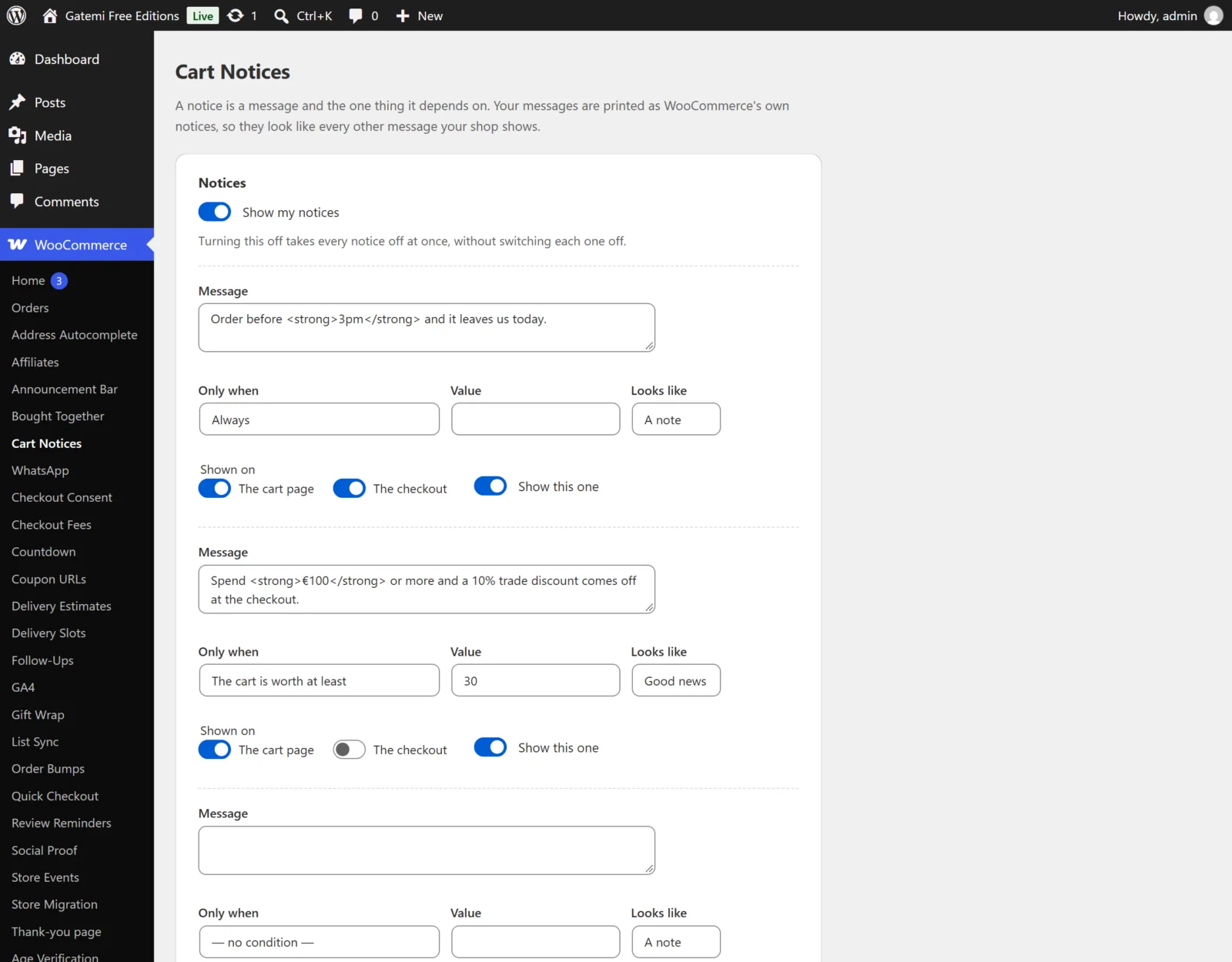
Notices
Show my notices
- Key:
enabledingmcn_settings· Default: on (yes) - Off takes every notice off at once, without switching each one off — so turning it back on does not mean remembering which ones were on.
Each notice
The free edition shows three fixed rows. The full edition shows as many as you add, with Add another notice. A notice with an empty message is not saved.
| Label | Key | Default | What it does |
|---|---|---|---|
| Name (for your own reference) — Full edition | name |
empty | Only shown on this screen. |
| Message | message |
empty | The text. Simple HTML is allowed (links, bold); it is filtered with wp_kses_post() when saved and again when shown. Placeholders below. |
| Looks like | style |
notice |
A note (notice), Good news (success), and in the full edition A warning (error). These are WooCommerce's three notice kinds, so your theme's notice styling applies. |
| Shown on | placements |
the cart page | The cart page (cart), The checkout (checkout), and in the full edition The mini-cart (minicart). Nothing ticked means the cart page. |
| Show this one | enabled |
ticked on a new, empty row | Switches this notice on or off without deleting it. |
| Only when / Value | conditions |
none | The condition and its value. See below. |
Free edition: one condition per notice. Full edition: Add a condition adds more, and every condition must be satisfied.
A notice with no condition shows every time (on its placements), the same as Always.
Conditions
| Condition | Type key | Value | Edition |
|---|---|---|---|
| Always | always |
— | both |
| The cart is worth at least | min_total |
An amount, e.g. 50, 49,99 or 1.250,00 |
both |
| The cart is worth less than | max_total |
An amount | both |
| There are at least this many things in it | min_items |
A number (counts quantities) | both |
| Free shipping is close but not reached | free_shipping_short |
— | both |
| It contains one of these products | has_product |
Product ids, comma separated | full |
| It contains none of these products | lacks_product |
Product ids, comma separated | full |
| It contains something from these categories | has_category |
Category ids, comma separated | full |
| It is before this time today | before_time |
A time like 15:00 |
full |
| The shopper has one of these roles | role |
Role names, comma separated; guest for signed-out visitors |
full |
Amounts are read the way people type them: when both a point and a comma appear, the rightmost one is the decimal separator, so 1.250,00 and 1,250.00 are both 1250.
Notes:
- "What the cart is worth" is WooCommerce's displayed subtotal: the products, before coupons and shipping, with or without tax as your store displays prices.
- A product condition matches a variation and its parent product, so naming the product covers every colour.
- A category condition includes sub-categories.
- The time is your store's time (Settings → General → Timezone). A time the plugin cannot read matches nothing.
- A condition type nothing understands — for example one added by another plugin that has since been removed — is treated as not matching, so the notice stays hidden.
Placeholders
Write these into a message:
| Placeholder | Becomes |
|---|---|
{remaining} |
What is still needed for free shipping, e.g. $12.00. Empty when there is no measurable free-shipping rule or it is already reached. |
{total} |
What the cart is worth |
{items} |
How many things are in it |
{site} |
Your store's name |
Use {remaining} together with the Free shipping is close but not reached condition, so the notice never shows with an empty amount.
Free edition and the full edition's notices
If the full edition wrote more than three notices, the free edition shows and edits the first three and keeps the rest untouched. A notice whose condition, placement or style only the full edition understands is kept as it was:
- a full-edition condition is never evaluated, so that notice does not show;
- a notice placed only in the mini-cart does not show;
- a notice in the full edition's A warning style does not show, and its row on the screen says so.
Editing such a notice in the free edition changes only the condition the form shows; every other condition stored on it is kept, so a save never drops part of what the full edition wrote.
License & updates — Full edition
The License & updates card takes your gatemi.com licence key. Licence state is stored in gmcn_license.